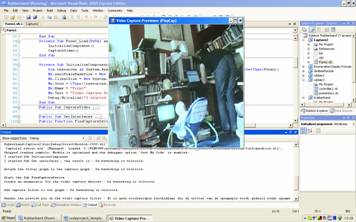
Introduction
This article describes how to use
DirectShow.NET.
DirectShow.NET is a dll to use DirectShow as managed code. I found it hard to find examples for using DirectShow. I still didn't find out how that all works. That is why I translated a C# example of
DirectShow.NET to VB.NET code. Here, I show you what the code finally looks like. You all could still help me (and others) to provide a better understanding of what the code means. In the help below, you will only find stuff that I thought was difficult for me to understand. The rest is explained in the code itself.
Background
DirectShow will be dumped for the Windows Presentation Foundation. In the meanwhile, I recommend the book "Programming Microsoft DirectShow for Digital Video and Television", ISBN: 0-7356-1821-6. I also recommend googling for
DirectShow.NET and reading their website which is really good.
You have to understand the basics of DirectShow.
Using the code
Please do these things first:
- Add a reference to DirectShowLib-2005.dll to the project (sometimes it cannot find it).
- Turn off Enable Application Framework, and choose Directshow.Samples.Form1 as the startup object.
- Be sure to have NET 2.0 installed.
You should download the code before reading this article.
Step 1
Imports System
Imports System.Diagnostics
Imports System.Drawing
Imports System.Runtime.InteropServices
Imports System.Windows.Forms
Imports DirectShowLib
Imports System.Runtime.InteropServices.ComTypes
Nothing special here. "imports" , does what it says , imports "namespaces" , mostly it is used to not have to type so much.
<shape alt="Namespace Hierarchy" type="#_x0000_t75" style="width: 265.5pt; height: 69pt;" id="_x0000_i1025"><imagedata o:href="ms-help://MS.VSExpressCC.v80/MS.NETFramework.v20.en/dv_vbalr/local/Local_1522711919_vanamespacehierarchy.gif" src="codeproject_template_bestanden/image001.gif">
If you import system.diagnostics , you don't have to type system.diagnostics.blabla everytime.
Step 2
Namespace Capture_The_Webcam Public Class Form1
Inherits System.Windows.Forms.Form
               End Class
End Namespace
Now we create our own namespace (maybe we want to import our VB in a different project or something later.
Inside we create our program in public class Form 1. Public means that outside this namespace , this class is still reachable. Inherits means something like in MSDN : causes the current class or interface to inherit the attributes, variables, properties, procedures, and events from another class or set of interfaces. So, go and let this class feel like system.windows.forms.form.
Step 3
Inside the class, there are four parts:
- Setting variables / objects to use in this class
- Our main program loop
- The main functions / routines we use
- Helper functions
Step 4A: Setting variables
Enum PlayState

     Stopped = 0
     Paused = 1
     Running = 2
     Init = 3
End Enum
Dim currentState As PlayState = PlayState.Stopped
So what does this do ? Let's give a example :
If Me.CurrentState = PlayState.Paused
Then Me.CurrentState = PlayState.Running
This looks a lot nicer than:
If Me.CurrentState = 0 Then Me.CurrentState = 3
Dim D As Integer = Convert.ToInt32("0X8000", 16)
Public WM_GRAPHNOTIFY As Integer = D + 1
What I think happens here is that we want to let WM_GRAPHNOTIFY create a ordinary windows message holder in the format of a string. And that it has to start in place 0X8000, because that place is where the filtergraph events start. Filtergraph events are events that DirectShow gives you when you use inputs, filters and outputs.
Dim videoWindow As IVideoWindow = Nothing
What you do here is create an object with the format of a videowindow that starts out empty (with nothing in it). Generally, this is a video renderer that draws the video onto a window on the display.
Dim mediaControl As IMediaControl = Nothing
This creates an empty object/interface that function likes tape-deck buttons. The filter graph exposes the IMediaControl interface to allow applications to control the streaming of media through the filters in the graph. The interface provides methods for running, pausing, and stopping the streaming of data.
Dim mediaEventEx As IMediaEventEx = Nothing
This creates a empty object for event messages.
"This interface derives from IMediaEvent and adds a method that allows registration of a window to receive messages when events occur. This interface is used by applications to receive notification that an event has occurred. Applications can then avoid using a separate thread that waits until an event is set."
This means that you can receive events without the rest of your program stopping to wait for a new message..
Dim graphBuilder As IGraphBuilder = Nothing
This is our main object that will create filters. It will put the input filter (webcam), through a conversion filter, so that it can show it on a Ivideowindow.This interface provides methods that enable an application to build a filter graph. The Filter Graph Manager implements this interface.
Dim captureGraphBuilder As ICaptureGraphBuilder2 = Nothing
This is a object that we create to help us out with building stuff that has to do with capturing of video and/or audio. (That's called a helper object)
Dim rot As DsROTEntry = Nothing
This makes a helper object for the program "graphedit" . When you start up "graphedit" you can make a connection with your program!
What you can do to see this is the following:
- Debug the program.
- Start graphedit.exe and go to File->Connect to remote graph.
What would happen is that graphedit makes a graphical representation of how it creates your filters to show "the webcam capture device" to the "render video window".
Step 4B: Our main program loop
This is a short one:
<STAThread()> Shared Sub <place w:st="on">Main</place>()
   Application.Run(New Form1)
End Sub
What STAThread does is protect our program against using objects at the same time in our program. That's rather handy , because streaming can be rather more complicated if you can't think about this step by step. Think about what could happen between the window and the capture preview if they both live their own life. Then moving the main window could leave your capture preview behind because the capture preview is still busy with its own "message solving".
Sub main is the main/head sub-routine that will start when we write code..
Shared Sub Main means that if our class is used multiple times in a new program/object, we still only use one Sub Main that will be shared by all. There are no extra copies of the sub main in memory for each instance, there is only one.
Application.Run() starts an application , a "New Form1" .. (Form1 is our class code, see paragraph 2)…
Private Sub Form1_Load(ByVal sender As Object, ByVal e As System.EventArgs)
                                Handles Me.Load
   InitializeComponent()
   CaptureVideo()
End Sub
When we do application.run, it automatically tries to find the "load" sub routine , and starts it (handles me.load is pointing in this direction).
Private Sub means that this sub routine is not publicly available outside this class.
InitializeComponent() and CaptureVideo are routines that do what they say..
<metricconverter productid="4C" w:st="on">Step 4C: Functions/Routines we use
Private Sub InitializeComponent()

    Dim resources As System.Resources.ResourceManager =
            New System.Resources.ResourceManager(GetType(Form1))

    Me.AutoScaleBaseSize = New System.Drawing.Size(5, 13)
    Me.ClientSize = New System.Drawing.Size(320, 320)
    Me.Icon = CType((resources.GetObject("$this.Icon")), System.Drawing.Icon)
    Me.Name = "Form1"
    Me.Text = "Video Capture Previewer (PlayCap)"
    Debug.WriteLine("I started Sub InitializeComponent")
End Sub
This Sub Routine is also private to this class (private sub).
First we create an object called resources that will have the feel of a resourceManager. This use of the resourceManager gives access to the resource management of the form.
Next interesting line is the Debug.Writeline. It writes a line of text to your debug output. If you don't know where that is , go to the Visual Basic menu, go to debug, and select output. When you test run your program, you will see these messages appearing in this output window.
Public Sub CaptureVideo()
    Dim sourceFilter As IBaseFilter = Nothing
    Try
      Big chunk of code
    Catch ex As Exception
        MessageBox.Show("An unrecoverable error has occurred.With error : " &
                                ex.ToString)
    End Try
End Sub

Dim hr As Integer = 0
A try / catch thing is really handy.
We will try to implement the code "you write" , but when there is an "exception error", we will show a "messageBox" which will translate the exception code (ex) to normal readable text.
A exception error could be all kinds of errors we create. When an error occurs, either the system or the currently executing application reports it by throwing an exception containing information about the error. "hr" is a placeholder for (mainly error) messages. It will keep them as numbers. So you have to use a error number translator. I have shown how to do this later in the code.
Next we create an object that works like a "DirectShow filter object" . These objects have a input-pin and output-pin, and do filtering in between. DirectShow graphs are (in the most simplest way) a chain of filter-objects , each doing their own type of conversion or filtering. So all in all a "chain of filters" always has a source and a target. Now we use this filter object creation to create the source (our webcam). Filter objects do more, but I won't tell you now to keep it simple. So, what is in the "Big chunk of code" ? Let's check it out.
GetInterfaces()
This means we will start a subroutine to create the building blocks of our interface. Here is what "getinterfaces()" says : "hr" is for keeping the error code. "Me" is used to point out that we are talking about our own created objects , not stuff made by something else.
CTYPE is a function to convert a object type to another object type.
Me.graphBuilder = CType(New FilterGraph, IGraphBuilder)
Lets fill the "graphBuilder"-object with a new FilterGraph object, (a type of "Igraphbuilder").The FilterGraph is our chain of filters that we will build.
Me.captureGraphBuilder = CType(New CaptureGraphBuilder2, ICaptureGraphBuilder2
Let's fill the "CaptureGraphBuilder" object with a CaptureGraphBuilder2 object(a type of "ICaptureGraphBuilder2").We use this to help us build the FilterGraph (helper-object).
Me.mediaControl = CType(Me.graphBuilder, IMediaControl)
Let's fill the "mediaControl" object with a mediaControl object, and we use the just created "graphBuilder" object for this to decide how this mediaControl type looks/feels like.
Me.videoWindow = CType(Me.graphBuilder, IVideoWindow)
Let's fill the "videoWindow" object with a videoWindow object , using our graphBuilder object .
Me.mediaEventEx = CType(Me.graphBuilder, IMediaEventEx)
Let's fill the "mediaEventeX" (message) object with messaging capabilities , using our graphBuilder object .
hr = Me.mediaEventEx.SetNotifyWindow(Me.Handle, WM_GRAPHNOTIFY, IntPtr.Zero)
This method designates a window as the recipient of messages generated by or sent to the current DirectShow object. Variable "hr" gets a number back for this.
DsError.ThrowExceptionForHR(hr)
ThrowExceptionForHR is a wrapper for Marshal.ThrowExceptionForHR, but additionally provides descriptions for any DirectShow specific error messages. If the " hr" value is not a fatal error, no exception will be thrown.
Debug.WriteLine("I started Sub Get interfaces , the result is : " &
                        DsError.GetErrorText(hr))
I already explained what this does before.
Now that getinterfaces() has been completed, let us go back to our try-code. Remember that when there is an error , the "dserror" code will throw an exception that directly starts up the catch code to tell us we had a error.
hr = Me.CaptureGraphBuilder.SetFiltergraph(Me.GraphBuilder)
Debug.WriteLine("Attach the filter graph to the capture graph : " &
                    DsError.GetErrorText(hr))
DsError.ThrowExceptionForHR(hr)
We use the "CaptureGraphBuilder" (helper) object to "set up" the "GraphBuilder" – Filtergraph. When there is an error we throw a exception.
sourceFilter = FindCaptureDevice()
What this code does is to use the system device enumerator and class enumerator to find a video capture/preview device, such as a desktop USB video camera. Let's look at the function "FindCaptureDevice()" code:
Debug.WriteLine("Start   the Sub FindCaptureDevice")
Dim hr As Integer = 0
Easy to understand by now.
Dim classEnum As IEnumMoniker = Nothing
Dim moniker As IMoniker() = New IMoniker(0) {}
This is what I think it means :
- A
moniker creates a object that connects a Global Unique Identifier (GUID) to a name. - A sermonizer creates a "enumeration" object that makes it easy to use objects that have a name and id number.
- Enumerations provide a convenient way to work with sets of related constants and to associate constant values with names. For example, you can declare an enumeration for a set of integer constants associated with the days of the week, and then use the names of the days rather than their integer values in your code. Enumerations most often count objects in the most abstract way possible. An enumerator is an object that iterates through its associated collection. It can be thought of as a movable pointer to any element in the collection.
Dim source As Object = Nothing
Create a empty object called "source".
Dim devEnum As ICreateDevEnum = CType(New CreateDevEnum, ICreateDevEnum)
The ICreateDevEnum interface creates an enumerator for a category of filters, such as video capture devices or audio capture devices. It puts them in devEnum.
hr = devEnum.CreateClassEnumerator(FilterCategory.VideoInputDevice, classEnum,
0) Debug.WriteLine("Create an enumerator for the video capture devices : " &
                            DsError.GetErrorText(hr))
DsError.ThrowExceptionForHR(hr)
Create an enumeration for the video capture devices .The CreateClassEnumerator method creates an enumerator for a specified device category meaning that we are going to fill classEnum with VideoInputDevices. The zero at the end means that we will check up every sort of filter (to find VideoInputDevices).
Marshal.ReleaseComObject(devEnum)
The device enumerator is no more needed so we dump it. Marshal provides a collection of methods for allocating unmanaged memory, copying unmanaged memory blocks, and converting managed to unmanaged types, as well as other miscellaneous methods used when interacting with unmanaged code.
If classEnum Is Nothing Then
   Throw New ApplicationException("No video capture device =
                    was detected.\r\n\r\n" &
   "This sample requires a video capture device, such as a USB WebCam,\r\n" & _
   "to be installed and working properly. The sample will now close.")
End If
I think it is clear to understand that when a enumeration goes well , it doesn't mean we have a device in the enumeration list. So, let's check if we have one, otherwise we don't have a webcam.
If classEnum.Next(moniker.Length, moniker, IntPtr.Zero) = 0 Then
   Dim iid As Guid = GetType(IBaseFilter).GUID
   moniker(0).BindToObject(Nothing, Nothing, iid, source)
Else
   Throw New ApplicationException("Unable to access video capture device!")
End If
Let's go to the first line. An "if then else" function is easy to understand. Imonkier.next(a,b,c) retrieves a specified number of items in the enumeration sequence.
- a = number of elements requested
- b = the array of elements requested will be given back to b
- c = if c is
null, we want only one element back , if c is some other integer we want that total amount back in b.
So Classenum.next let moniker fill with only one element of classenum (that will be the first videoinputdevice). And if this classenum gives back a value 0 , then…
By the way if it returns 0 (S_OK) it means that there is a moniker. If it returns 1 (S_False) it means that there is no moniker.
So if there is a videocapturedevice then :
Dim iid As Guid = GetType(IBaseFilter).GUID
Let "iid" be a global unique identifier , based on IbaseFilter.
moniker(0).BindToObject(Nothing, Nothing, iid, source)
Use the reference to the capturedevice as the source, and give it a global unique identifier.
Marshal.ReleaseComObject(moniker(0))
Marshal.ReleaseComObject(classEnum)
Dump the objects…
Return CType(source, IBaseFilter)
Return "Source" to the asker who started this "FindCaptureDevice" function, but let it feel like a IbaseFilter.
Ok, so everything went fine in finding a capture device, and now that we have a source-filter inside "Sourcefilter", we go back to the CaptureVideo() code.
hr = Me.GraphBuilder.AddFilter(sourceFilter, "Video Capture")
Debug.WriteLine("Add   capture filter to our graph : " &
    DsError.GetErrorText(hr))
DsError.ThrowExceptionForHR(hr)
This means that we add the sourcefilter (the videocapturedevice) to our filtergraph by letting the filtergraph know it's a "Video Capture" filter
hr = Me.CaptureGraphBuilder.RenderStream(PinCategory.Preview, MediaType.Video,
sourceFilter, Nothing, Nothing)
Debug.WriteLine("Render the preview pin on the video capture filter : " &
DsError.GetErrorText(hr))
DsError.ThrowExceptionForHR(hr)
This means that we use the helper object "CaptureGraphBuilder" to finish the rest of our filtergraph. We let it build the rest of our filtergraph for us.
There are five variables as you see.
- var 1 = here we choose in what mode the graph will be, now we let it render in preview mode (instead of a capture-mode)
- var 2 = we choose what kind of media type the result will be in
- var 3 = the starting filter we will use
- var 4 = points to a compression filter to use , we don't use none, so we give nothing
- var 5 = points to a target to use, we don't give one, so it will revert to default render target (a window)
Marshal.ReleaseComObject(sourceFilter)
The "sourceFilter" has been added to the filtergraph and has been used to build the rest of the filtergraph automatically , so we release the reference to the "sourcefilter".
SetupVideoWindow()
Let's check that sub routine out….
Public Sub SetupVideoWindow()
Dim hr As Integer = 0
hr = Me.VideoWindow.put_Owner(Me.Handle)
DsError.ThrowExceptionForHR(hr)
hr = Me.VideoWindow.put_WindowStyle(
WindowStyle.Child Or WindowStyle.ClipChildren)
DsError.ThrowExceptionForHR(hr)
ResizeVideoWindow()
hr = Me.VideoWindow.put_Visible(OABool.True)
DsError.ThrowExceptionForHR(hr)
End Sub
Put_Owner : Sets the owning parent window for the video playback window. Meaning : set the video window to be a child of the main window. Put_WindowStyle : Set the style of the window to be a child of the form , and clip over any children of the form. ResizeVideoWindow : we check that out later. Put_Visible : make the directShow window visible or not (using a Boolean true or not).
Lets go back to the "CaptureVideo()" code..
rot = New DsROTEntry(Me.GraphBuilder)
This will add our graph to the running object table, which will allow the GraphEdit application to "spy" on our graph.
Or said differently , we fill our helper object Rot with the our filtergraph, so the external GraphEdit application can read it.
hr = Me.MediaControl.Run()
Debug.WriteLine("Start previewing video data : " & DsError.GetErrorText(hr))
DsError.ThrowExceptionForHR(hr)
Start previewing video data! We use the "mediacontrol" helper object to start our filtergraph.
Me.CurrentState = PlayState.Running
Debug.WriteLine("The   currentstate : " & Me.CurrentState.ToString)
Now we tell our program that because we are previewing video data , the "
currentstate" is "
playstaterunning.
Step 4D: Helper Functions
Lets start out with:
Public Sub ResizeVideoWindow()
If Not (Me.VideoWindow Is Nothing) Then
Me.VideoWindow.SetWindowPosition(0, 0, Me.Width, Me.ClientSize.Height)
End If
End Sub
If the videowindow is not nothing, then resize the videopreviewwindow to match owner window size: left, top, width, height.
But what to do when the form resizes ?
Private Sub Form1_Resize1(ByVal sender As Object, ByVal e As System.EventArgs)
                            Handles Me.Resize
    If Me.WindowState = FormWindowState.Minimized Then
        ChangePreviewState(False)
    End If

    If Me.WindowState = FormWindowState.Normal Then
        ChangePreviewState(True)
    End If
   ResizeVideoWindow()
End Sub
If the form resizes, there will be different situations. For us, it is interesting what to do when the form is minimized or normal. Because the state of the directshow preview could better change in those situations. That's why we start out a function called ChangePreviewState(). The code of ResizeVideoWindow is already explained above.
I will not explain ChangePreviewState() because it is really simple.
Protected Overloads Sub WndProc(ByRef m As Message)
    Select Case m.Msg
        Case WM_GRAPHNOTIFY
            HandleGraphEvent()
    End Select
    If Not (Me.VideoWindow Is Nothing) Then
        Me.VideoWindow.NotifyOwnerMessage(m.HWnd, m.Msg,
                    m.WParam.ToInt32, m.LParam.ToInt32)
    End If
    MyBase.WndProc(m)
End Sub
The "protected overloads sub" means that we also want to have control over something. That something is WndProc, the message interface so that we can see messages that we need to know for our program.
It is used byRef because we make a reference to that message.
In case the message is a WM_Graphnotify one, we will handle this.
WM_Graphnotify was the holder of directshow messages. But if it is not the case, we want to restore the message and sent it back to where it belongs. That's what the rest means.
Public Sub HandleGraphEvent()
Dim hr As Integer = 0
Dim evCode As EventCode
Dim evParam1 As Integer
Dim evParam2 As Integer
If Me.MediaEventEx Is Nothing Then
Return
End If
While Me.MediaEventEx.GetEvent(evCode, evParam1, evParam2, 0) = 0
hr = Me.MediaEventEx.FreeEventParams(evCode, evParam1, evParam2)
DsError.ThrowExceptionForHR(hr)
End While
End Sub
If Me.MediaEventEx Is Nothing Then
Return
End If
First we check if MediaEventEx message queue has something to say, otherwise it is no use to start the rest:
While Me.MediaEventEx.GetEvent(evCode, evParam1, evParam2, 0) = 0
End While
Otherwise we use a while loop. As long as the while loop condition is still true we do another loop. The .GetEvent method retrieves the next event notification from the event queue from MediaEventEx. It fills efCode, EvParam2 and evParam2 with info about that. The 0 means that we wait infinitely for that message.
As said before , if the result is 0 (meaning S_OK), there is a message. So as long there are messages in the queue, execute this while loop.
hr = Me.MediaEventEx.FreeEventParams(evCode, evParam1, evParam2)
DsError.ThrowExceptionForHR(hr)
We fill "hr" with this message and directly clean this message in the queue.
If Hr gives a bad value, we will give a exception.
Protected Overloads Overrides Sub Dispose(ByVal disposing As Boolean)
If disposing Then
closeinterfaces()
End If
MyBase.Dispose(disposing)
End Sub
Like the routine above , we also want to have some control in ending our program, because we use references in memory that cannot be killed automatically by itself. You could keep crap in memory. Like for me, if I don't stop the program correctly (pressing stop using the debugger stop button), I cannot use the webcam the second time.
So if disposing is true, then start the subroutine closeinterfaces(), after this , do closing stuff that is normally done by the program itself.
Public Sub closeinterfaces()
Also closeinterfaces() is now is easy to understand.
So that's it. Hope you liked this stuff. If you see errors or have any questions/hints/corrections, please post them here.
Points of Interest
If I stop the program using the debugger instead of closing the form itself, the filtergraph doesn't close properly and the webcam does not become useable anymore.
History
- This code is in version 1.0.



 General
  News
News  Suggestion
  Question
  Bug
Bug  Answer
  Joke
Joke  Praise
  Rant
Rant  Admin
Admin 


 Submit an article or tip


 this program works in my pc i changed from vbnet to c# but i want use that in Android, It's possible? i'm a junior, where can I find information? thanks

