Click here to Skip to main content

Creating a Tasktray Application

By , 23 Sep 2007
 
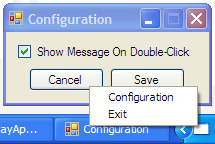
Screenshot - TaskTrayApp.png

Introduction

Quite often, people find themselves writing small applications that live mainly in the TaskTray as a TaskTray icon. Something that monitors something, updates something, little applications that run in the background but that they want to let the user know it's running.

To date, the method I've seen all around the Internet to achieve this is to create the configuration form (which in turn contains the NotifyIcon) and then hide the configuration form.

This, however, has several drawbacks, the main one being that the configuration form will flicker whenever you start the application. Getting it to start hidden can be a bit of a chore.

Fortunately, there is a better way to start an application as a NotifyIcon: using ApplicationContext.

Using the Code

Start by creating a WinForms project and editing the configuration form to suit your needs. Once you have done this, open up Program.cs. You should find that the last line looks like this:

Application.Run(new Form1());

This tells the Application to load and show Form1, and to keep the Application alive as long as Form1 is alive. But take a look at the overloads for Run. Not only does it accept Forms, but also ApplicationContexts.

Create a new class that inherits from ApplicationContext (we will refer to it as MyApplicationContext). Then replace the above line with:

Application.Run(new MyApplicationContext());

Inside the constructor for MyApplicationContex, you can insert the code to initialize the NotifyIcon. Mine looks something like this:

MenuItem configMenuItem = new MenuItem("Configuration", new EventHandler(ShowConfig));
MenuItem exitMenuItem = new MenuItem("Exit", new EventHandler(Exit));

NotifyIcon notifyIcon = new NotifyIcon();
notifyIcon.Icon = TaskTrayApplication.Properties.Resources.AppIcon;
notifyIcon.ContextMenu = new ContextMenu(new MenuItem[] 
    { configMenuItem, exitMenuItem });
notifyIcon.Visible = true;

You can then create a ShowConfig method to display the configuration window. Mine looks something like this:

Configuration configWindow = new Configuration();
void ShowConfig(object sender, EventArgs e)
{
    // If we are already showing the window, merely focus it.
    if (configWindow.Visible)
    {
        configWindow.Activate();
    }
    else
    {
        configWindow.ShowDialog();
    }
}

And for completeness, my Exit method looks like this:

void Exit(object sender, EventArgs e)
{
    // We must manually tidy up and remove the icon before we exit.
    // Otherwise it will be left behind until the user mouses over.
    notifyIcon.Visible = false;
    Application.Exit();
}

So you should now be able to create applications that start, live and die in the TaskTray without having to hack together a form to host the NotifyIcon.

History

  • 07/05/2007
    • Submitted article
  • 09/23/2007
    • Fixed formatting
    • Changed configWindow.Focus(); to configWindow.Activate();

License

This article, along with any associated source code and files, is licensed under The Code Project Open License (CPOL)

About the Author

[ICR]
United Kingdom United Kingdom
Member
No Biography provided

Sign Up to vote   Poor Excellent
Add a reason or comment to your vote: x
Votes of 3 or less require a comment

Comments and Discussions

 
You must Sign In to use this message board.
Search this forum  
    Spacing  Noise  Layout  Per page   
GeneralThanks! [modified]memberDonMattéo29 Sep '07 - 13:47 
So it shows in ALT+TAB, but to get rid of the flicker att startup makes my app so much more prefessional looking. Thanks a lot! Smile | :)
 

-- modified at 8:07 Wednesday 3rd October, 2007
It doesn´t show in ALT+TAB - even better. I think i´ll get a raise for this one Wink | ;)
QuestionLeft Click Context MenumemberSkylinc27 Sep '07 - 9:32 
Nice article. Thank you. I know this is gonna sound corny, but I have been looking for something like this for a while now...
 
OK, now the question: How do I get the Context Menu to popup when the user clicks with the Left Mouse Button.
I have tried the .Show() method, but I cannot seem to get the positioning correctly, and it also seems to disappear behind my TaskBar...
 
Any help would be appreciated.

AnswerRe: Left Click Context MenumemberSkylinc27 Sep '07 - 10:29 
Nevermind...
 
Found it at: http://www.codeproject.com/useritems/notifyicondualmenus.asp?target=context%7Cmenu%7Cleft
 
Thanks
QuestionCool, only a gripe leftmemberCarlosMPerez25 Sep '07 - 22:27 
I've also searched a lot for a good solution for this problem. Yours is quite good, and original, but still not perfect.
 
You see, if I run a .EXE made as per your instructions I get the TaskBar icon, the menu, and the form; BUT if I do an ALT+TAB I can see it in the list of applications that can get focus. Windows does not ignore it as the minimized-to-TaskBar Outlook, for example.
 
Do you haver any idea on how to achieve this? How can I make my app not showing on an ALT+TAB?


Keep on codin' in a free world!

AnswerRe: Cool, only a gripe leftmember[ICR]26 Sep '07 - 21:50 
Perhaps the easiest way is to set the FormBorderStyle to FixedToolWindow after you hide it and then back to normal before you show it. You can continue to look for a better solution (any solution will be a general solution to hide an application from the Alt+Tab menu) but this was all I could come up with after a few minutes of searching.
I won't add it to the article, because I think that, whilst related, it it a slightly separate topic. Anyone interested can read this thread.
GeneralCoolmemberAndreo25 Sep '07 - 3:20 
Congratulations! Nice Article!
GeneralClean.Simple.Straightforwardmemberdedgod9 Jul '07 - 4:58 
Good Work!

GeneralAwesome.memberMarc Leger27 Jun '07 - 8:43 
Thank you very much.
QuestionVery nice, but can I start a message-loop without any forms?memberdavid zha020 May '07 - 19:46 
A nice example. But can I start a message loop without any forms? Sometimes I want my application to recive some Windows Messages.
 
Thank you.
AnswerRe: Very nice, but can I start a message-loop without any forms?member[ICR]20 May '07 - 22:52 
What sort of messages were you wishing to receive?

General General    News News    Suggestion Suggestion    Question Question    Bug Bug    Answer Answer    Joke Joke    Rant Rant    Admin Admin   

Permalink | Advertise | Privacy | Mobile
Web04 | 2.6.130523.1 | Last Updated 23 Sep 2007
Article Copyright 2007 by [ICR]
Everything else Copyright © CodeProject, 1999-2013
Terms of Use
Layout: fixed | fluid
