Click here to Skip to main content

Sound visualizer in C#

By , 15 Aug 2007
 
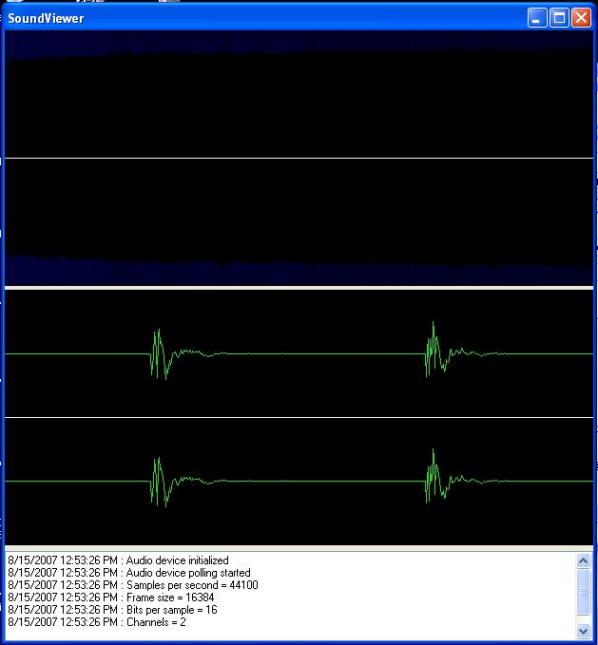
Screenshot - SoundViewer.jpg

Introduction

This project demonstrates the use of the Fast Fourier Transform and Windows GDI to produce near real-time visualizations of the time and frequency domains of sound.

Background

While looking for information on signal processing for a robotics project, it became apparent that examples written in C# were hard to find. This led me to create some of my own classes, which I have provided here for this demonstration.

Using the Code

Audio input for this demonstration is provided by the Wave classes developed by Ianier Munoz. Wave samples are further processed using the AudioFrame class.

class AudioFrame
{
    private Bitmap _canvasTimeDomain;
    private Bitmap _canvasFrequencyDomain;
    private double[] _waveLeft;
    private double[] _waveRight;
    private double[] _fftLeft;
    private double[] _fftRight;
    private SignalGenerator _signalGenerator;
    private bool _isTest = false;
    public AudioFrame(bool isTest)
    {
        _isTest = isTest;
    }

    /// <summary>
    /// Process 16 bit sample
    /// </summary>
    /// <param name="wave"></param>
    public void Process(ref byte[] wave)
    {
        _waveLeft = new double[wave.Length / 4];
        _waveRight = new double[wave.Length / 4];
        if (_isTest == false)
        {
            // Split out channels from sample
            int h = 0;
            for (int i = 0; i < wave.Length; i += 4)
            {
                _waveLeft[h] = (double)BitConverter.ToInt16(wave, i);
                _waveRight[h] = (double)BitConverter.ToInt16(wave, i + 2);
                h++;
            }
        }
        else
        {
            // Generate artificial sample for testing
            _signalGenerator = new SignalGenerator();
            _signalGenerator.SetWaveform("Sine");
            _signalGenerator.SetSamplingRate(44100);
            _signalGenerator.SetSamples(16384);
            _signalGenerator.SetFrequency(5000);
            _signalGenerator.SetAmplitude(32768);
            _waveLeft = _signalGenerator.GenerateSignal();
            _waveRight = _signalGenerator.GenerateSignal();
        }
        // Generate frequency domain data in decibels
        _fftLeft = FourierTransform.FFTDb(ref _waveLeft);
        _fftRight = FourierTransform.FFTDb(ref _waveRight);
    }

    /// <summary>
    /// Render time domain to PictureBox
    /// </summary>
    /// <param name="pictureBox"></param>
    public void RenderTimeDomain(ref PictureBox pictureBox)
    {
        // Set up for drawing
        _canvasTimeDomain = new Bitmap(pictureBox.Width, pictureBox.Height);
        Graphics offScreenDC = Graphics.FromImage(_canvasTimeDomain);
        SolidBrush brush = new System.Drawing.SolidBrush
                    (Color.FromArgb(0, 0, 0));
        Pen pen = new System.Drawing.Pen(Color.WhiteSmoke);
        // Determine channel boundaries
        int width = _canvasTimeDomain.Width;
        int center = _canvasTimeDomain.Height / 2;
        int height = _canvasTimeDomain.Height;
        offScreenDC.DrawLine(pen, 0, center, width, center);
        int leftLeft = 0;
        int leftTop = 0;
        int leftRight = width;
        int leftBottom = center - 1;
        int rightLeft = 0;
        int rightTop = center + 1;
        int rightRight = width;
        int rightBottom = height;
        // Draw left channel
        double yCenterLeft = (leftBottom - leftTop) / 2;
        double yScaleLeft = 0.5 * (leftBottom - leftTop) / 32768;  
            // a 16 bit sample has values from -32768 to 32767
        int xPrevLeft = 0, yPrevLeft = 0;
        for (int xAxis = leftLeft; xAxis < leftRight; xAxis++)
        {
            int yAxis = (int)(yCenterLeft + (_waveLeft[_waveLeft.Length / 
                (leftRight - leftLeft) * xAxis] * yScaleLeft));
            if (xAxis == 0)
            {
                xPrevLeft = 0;
                yPrevLeft = yAxis;
            }
            else
            {
                pen.Color = Color.LimeGreen;
                offScreenDC.DrawLine(pen, xPrevLeft, yPrevLeft, xAxis,yAxis);
                xPrevLeft = xAxis;
                yPrevLeft = yAxis;
            }
        }
        // Draw right channel
        int xCenterRight = rightTop + ((rightBottom - rightTop) / 2);
        double yScaleRight = 0.5 * (rightBottom - rightTop) / 32768;  
            // a 16 bit sample has values from -32768 to 32767
        int xPrevRight = 0, yPrevRight = 0;
        for (int xAxis = rightLeft; xAxis < rightRight; xAxis++)
        {
            int yAxis = (int)(xCenterRight + (_waveRight[_waveRight.Length / 
            (rightRight - rightLeft) * xAxis] * yScaleRight));
            if (xAxis == 0)
            {
                xPrevRight = 0;
                yPrevRight = yAxis;
            }
            else
            {
                pen.Color = Color.LimeGreen;
                offScreenDC.DrawLine
                (pen, xPrevRight, yPrevRight, xAxis, yAxis);
                xPrevRight = xAxis;
                yPrevRight = yAxis;
            }
        }
        // Clean up
        pictureBox.Image = _canvasTimeDomain;
        offScreenDC.Dispose();
    }

    /// <summary>
    /// Render frequency domain to PictureBox
    /// </summary>
    /// <param name="pictureBox"></param>
    public void RenderFrequencyDomain(ref PictureBox pictureBox)
    {
        // Set up for drawing
        _canvasFrequencyDomain = new Bitmap
                (pictureBox.Width, pictureBox.Height);
        Graphics offScreenDC = Graphics.FromImage(_canvasFrequencyDomain);
        SolidBrush brush = new System.Drawing.SolidBrush
                    (Color.FromArgb(0, 0, 0));
        Pen pen = new System.Drawing.Pen(Color.WhiteSmoke);
        // Determine channel boundaries
        int width = _canvasFrequencyDomain.Width;
        int center = _canvasFrequencyDomain.Height / 2;
        int height = _canvasFrequencyDomain.Height;
        offScreenDC.DrawLine(pen, 0, center, width, center);
        int leftLeft = 0;
        int leftTop = 0;
        int leftRight = width;
        int leftBottom = center - 1;
        int rightLeft = 0;
        int rightTop = center + 1;
        int rightRight = width;
        int rightBottom = height;
        // Draw left channel
        for (int xAxis = leftLeft; xAxis < leftRight; xAxis++)
        {
            double amplitude = (int)_fftLeft[(int)(((double)(_fftLeft.Length)
                         / (double)(width)) * xAxis)];
            if (amplitude < 0) // Drop negative values
            amplitude = 0;
            int yAxis = (int)(leftTop + 
                ((leftBottom - leftTop) * amplitude) / 100);  
                        // Arbitrary factor
            pen.Color = Color.FromArgb(0, 0, (int)amplitude % 255);
            offScreenDC.DrawLine(pen, xAxis, leftTop, xAxis, yAxis);
        }
        // Draw right channel
        for (int xAxis = rightLeft; xAxis < rightRight; xAxis++)
        {
            double amplitude = (int)_fftRight[(int)(((double)
            (_fftRight.Length) / (double)(width)) * xAxis)];
            if (amplitude < 0)
            amplitude = 0;
            int yAxis = (int)(rightBottom - 
            ((rightBottom - rightTop) * amplitude) / 100);
            pen.Color = Color.FromArgb(0, 0, (int)amplitude % 255);
            offScreenDC.DrawLine(pen, xAxis, rightBottom, xAxis, yAxis);
        }
        // Clean up
        pictureBox.Image = _canvasFrequencyDomain;
        offScreenDC.Dispose();
    }
}

License

This article, along with any associated source code and files, is licensed under The GNU General Public License (GPLv3)

About the Author

Jeff Morton
Systems / Hardware Administrator
United States United States
Member
No Biography provided

Sign Up to vote   Poor Excellent
Add a reason or comment to your vote: x
Votes of 3 or less require a comment

Comments and Discussions

 
You must Sign In to use this message board.
Search this forum  
    Spacing  Noise  Layout  Per page   
QuestionNullReferenceException occuredmemberMA_hosseini28 Feb '13 - 0:53 
hello
when I try to run, this exception was shown
please help me thank.
 
28,02,2013 03:16:59 ب.ظ : Audio exception
System.NullReferenceException: Object reference not set to an instance of an object.
at SoundViewer.WaveNative.waveInOpen(IntPtr& phwi, Int32 uDeviceID, WaveFormat lpFormat, WaveDelegate dwCallback, Int32 dwInstance, Int32 dwFlags)
at SoundViewer.WaveInRecorder..ctor(Int32 device, WaveFormat format, Int32 bufferSize, Int32 bufferCount, BufferDoneEventHandler doneProc) in C:\Users\Amin\Downloads\C# Project\SoundViewerSource\SoundViewer\SoundViewer\WaveIn.cs:line 145
at SoundViewer.Form1.Start() in C:\Users\Amin\Downloads\C# Project\SoundViewerSource\SoundViewer\SoundViewer\Form1.cs:line 69
AnswerRe: NullReferenceException occuredmemberk0ennn28 Feb '13 - 22:51 
I have exactly the same error. I realy hope some1 can help us, cause i have no clue how to fix this ^^
AnswerRe: NullReferenceException occuredmemberJames Melkon Smith2 Mar '13 - 7:34 
I run into this issue as well. I am using Windows 8 (x64). This exception happens when there is a call to waveInOpen() in winmm.dll. I have also been looking into winmm.net and found that the call to waveInOpen() in that project does not throw an exception. So at least I know that it isn't an issue with the dll itself. I have a feeling that the issue is with the WaveFormat class.
 
First off, looking at Form1.Start() an instance of WaveFormat is instantiated with the following line
_waveFormat = new WaveFormat(_audioFrameSize, _audioBitsPerSample, _audioChannels);
but I believe that it should be
_waveFormat = new WaveFormat(_audioSamplesPerSecond ,_audioBitsPerSample,_audioChannels);
since the first attribute should be the rate. However, this does not fix the issue, and I get an audio exception instead. In the winmm.net project, I had used the settings below. I set these for the format object before the call to waveInOpen with no luck.
wFormatTag = 1
nChannels = 2
nSamplesPerSec = 44100
nAvgBytesPerSec = 176400
nBlockAlign = 4
wBitsPerSample = 16
cbSize= 0
 
I'm giving up for now, but I may come back to it later.
GeneralRe: NullReferenceException occured [modified]memberGettor900011 Apr '13 - 23:42 
This problem occurs when you are trying to run the application from 64 bit version of Windows. In that case (provided you're using Visual Studio) you must go into Build -> Configuration Manager... -> Active Solution Platform -> New...
Now choose x86 and leave other fields as they are (they should be "Any CPU" and a checked box). Now confirm that configuration and choose Rebuild Solution. From now on you should be fine (alternatively, there should be a "x86" inside of "bin" folder in your project with .exe file of that project).
 
Or you can just look at eweewf's post just a few positions below...

modified 14 Apr '13 - 17:20.

GeneralMy vote of 5membersanosay9 Aug '12 - 3:09 
Thank you very mutch!
QuestionProblems with Windows 7membervaleriopini13 Mar '12 - 0:51 
Hi Jeff,
it is a very interisting work!
However I have found a problem with Windows 7 for the acquisition of the signal coming from the mic.
Do you know how can I fix this bug?
Best wishes
Valerio Pini
GeneralMy vote of 1memberrrossenbg12 Jan '12 - 5:33 
ref PictureBox pictureBox ??
GeneralRe: My vote of 1membersanosay9 Aug '12 - 3:08 
Learn C#
Questionwhat are the values representing in arrays? [modified]memberD__I___O31 Aug '11 - 0:11 
Hi Jeff!
 
1.)
 
In AudioFrame.cs u got 2 arrays per channel:
 
private double[] _waveLeft;
private double[] _waveRight;
private double[] _fftLeft;
private double[] _fftRight;
 

What are the double-values u are extracting out of the stream represent?
 
I monitored the vals from _waveLeft and if its quiet in the room, its between -250 and 250.
If I clap my hands it raises up to 2000 or down to -2000.
 
I search for the loudest sound in lets say 10 seconds.
 
Are these vals the loudness of a signal?
 
what is the difference to the Fouriertransformed Vals in _fftLeft/_fftRight?
 
2.)
True or False?
 
The samplingrate of 44100 means that the electric signal from the microphone
is caught 44100 times per second. Or in another way : 44100 int-values in array represent a second
of sound.
 
If I set the samplingrate to 1000, every millisecond a currencyvalue is writen into an arrayelement.


thxALot in advance
 
Dirk


PS: Just found you SoundActivated... this answers the question about the loudness!
But still asking for the samplerate.

modified on Wednesday, August 31, 2011 6:35 AM

Questionis this code possible to save as Wav or MP3 File after recording processmembermyatthu198617 Aug '11 - 23:37 
Please , Let me know how to save wav or mp3 file after recording.

General General    News News    Suggestion Suggestion    Question Question    Bug Bug    Answer Answer    Joke Joke    Rant Rant    Admin Admin   

Permalink | Advertise | Privacy | Mobile
Web01 | 2.6.130523.1 | Last Updated 15 Aug 2007
Article Copyright 2007 by Jeff Morton
Everything else Copyright © CodeProject, 1999-2013
Terms of Use
Layout: fixed | fluid
