Foreword
Thanks to those of you who take the time to read through this article. If you feel like dropping off a vote (and particularly if it's a low one), please include a comment that mentions what the problem was. Feedback is what drives improvement.
Introduction
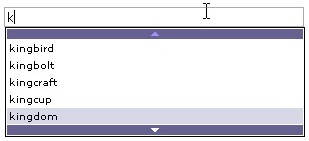
The Auto-complete control article by zichun has gained much publicity in the last several years. The "Auto-complete" feature (also known as "auto-suggest," named after Google Suggest) greatly increases site usability and enriches user experience. Unfortunately, the original author has given up code support and didn't answer my e-mails. Furthermore, requirements for auto-complete controls have risen in the last few years.
In order to address all script issues and to provide ongoing user support, the auto-suggest control was born. What was changed and fixed:
- Script now supports both offline (via client-side array) and online (via AJAX) way of populating the suggestion list
- Script is now 100% compatible with all major browsers (Mozilla/Firefox, Opera, Safari, Chrome, Microsoft Internet Explorer)
- Script was moved to a single file
- All styling info was moved to CSS
- Memory leaks were found and fixed
- Many useful options added
Setup
At first, you should upload autosuggest.js, autosuggest.css, arrow-down.gif, arrow-down-d.gif, arrow-up.gif and arrow-up-d.gif to your server. Next, assume that we have a simple page with a single input field:
<html>
    <body>
        <input type="text"
            id="tb" value=""
            style="font-family:verdana;width:300px;font-size:12px" />

    </body>
</html>
- The first thing you should do is add references to autocomplete.js and autocomplete.css files:
<html>
    <head>

        <link rel="stylesheet" type="text/css" href="autosuggest.css"></link>
        <script type="text/javascript" src="autosuggest.js"></script>

    </head>

 ...
- Next, initialize the auto-suggest control with the
id of the bound INPUT element:
<input type="text" id="tb" value=""

    style="font-family:verdana;width:300px;font-size:12px" />

   <script> new autosuggest("tb"); </script>
If you wish to use a static client-side array:
- Create it in the
head of the page:
<head>
    <script type="text/javascript" src="autosuggest.js"></script>

    <script>
        var customarray =
                     ["apple", "alligator", "banana", "elephant",
                      "pear", "kingbird", "kingbolt", "kingcraft",
                      "kingcup', "kingdom", "kingfisher"];
    </script>

</head>
- Pass it as a second parameter to the
autosuggest object:
<script>
    var obj = new autosuggest("tb", customarray);

</script>
- Make sure that the
autosuggest_url variable at the very beginning of autosuggest.js is empty (""). You can change the bound static array at any time with the help of bindArray method:
var customarray2 = [ ... ];

...

obj.bindArray(customarray2);
This is particularly helpful if you want to create linked autosuggest controls.
Note: To use all advantages of caching, consider moving custom_array to either autosuggest.js or any other external JavaScript file.
If you wish to retrieve suggestions through AJAX:
- Pass the URL of the server-side script (that will be used to retrieve the suggestion list) as a third parameter to the
autosuggest object:
<script>
    var obj = new autosuggest("tb", "", "http://mysite.org/suggest.asp?");
</script>
Note: Be sure to append the ? symbol at the end of webservice's URL.
Optionally, you can set the global autosuggest_url variable (inside autocomplete.js) to the path of the server-side script; then you can avoid the third parameter of autosuggest (this may be useful when you use several autosuggest controls on a page). However, if you do specify that third parameter, it overrides the global autosuggest_url.
Note: Script awaits the returned data to be the following XML:
="1.0"="UTF-8"="yes"
<listdata>item1|item2|...</listdata>
(i.e. a set of strings, delimited by a vertical bar character, inside a single listdata tag.)
Note: The delimiting | (vertical bar) is the default one; ajax_delimiter variable controls this.
- Similarly to static array, you can re-bind the webservice URL at any time with the help of
bindURL method:
obj.bindURL("http://mysite.com/suggest?");
Options
When testing the script locally, the Mozilla/Firefox browser will not allow you to make AJAX queries due to security limitations. Circumvent this by uncommenting the following inside autosuggest.js:
If you wish to use up/down arrows instead of a scrollbar in this control, you can change the use_scroll variable to false.
By default, the script populates the suggestion list with all items that start with a string that the user typed. If you wish to change it, thus having all variants that contain the typed string, set the limit_start variable to false. Otherwise, it is recommended to keep it true.
If you choose limit_start variable to be false, you have one more option to look at: match_first. It controls the order of the suggestions' appearance. Set to true, it first shows all the items that start with a string that the user typed, then all other items that contain the typed string; set to false it shows all items in the order that they appear in an internal array, regardless of part matching.
If you have several input/combo boxes on a page, and encounter a situation when a suggestion list is rendered behind one of the other controls, you should change the use_IFrame variable to true. Otherwise, it is recommended to keep it false.
By default, the suggestion list is not displayed until a special timeout - response_time - elapses; this is done to improve usability (and save a bit of traffic for AJAX users). You can change it to fit your needs.
By default, no item is selected when the suggestion list first opens. This can be controlled by changing the no_default variable of autosuggest object to false.
Currently, the script loads suggestion variants only once - when the user enters the first character; then the actual filtering occurs. If you wish to set up a more sophisticated filtering technique, consider changing the full_refresh option that instructs the script to make an AJAX call on every key pressed.
If you wish to use the autosuggest object as an ordinary select element, you can look at the selectedIndex property that contains the index (zero-based) of the selected suggestion.
You may want to restrict the typing and selection to the predefined set of values. In this case, use the restrict_typing option (works with client-side array only); it won't allow a user to type the value that isn't in the key array. Please take a note that this option doesn't safeguard the text field from accepting the "wrong" value (by pasting it from the clipboard, for example) - so server-side checks are always a good thing.
One more thing you can do is to turn this auto-suggest control into an AJAX-powered select is to use the key/value pairs instead of an ordinary strings; together with a selectedIndex, this can be used to retrieve item's value. The case for a client-side array is:
<head>
    <script type="text/javascript" src="autosuggest.js"></script>

    <script>
        var customarray =
           [['apple', 1], ['alligator', 2], ['banana', 3],
            ['elephant', 4], ['pear', 5], ['kingbird', 6],
            ['kingbolt', 7], ['kingcraft', 8],
            ['kingcup', 9], ['kingdom', 10], ['kingfisher', 11]];
    </script>

</head>
And the AJAX string must be:
<listdata>key1,value1|key2,value2|...</listdata>
Note: Delimiting character (comma by default), that separates the key and the value, can be controlled with item_delimiter property.
autosuggest constructor function can also accept the 4th parameter - reference to a function, that is called when user selects a suggestion:
new autosuggest("tb", customarray, null, function(index, control)
{
    alert("You've selected the key: " + control.keywords[index]);
});
Function is given two parameters: the index of a selected item (in the keywords array) and the reference to a control object that called this callback function.
The End?
No, of course. Feel free to post your questions in the forum below, e-mail me if you have questions, and please vote for this article. :) I'll try to answer all requests and provide user support.
Enjoy!
History
Dmitry Khudorozhkov began programming (and gaming) with his ZX Spectrum in 1989. Having seen and used all IBM PCs from early XT to the latest x64 machines, now Dmitry is a freelance programmer, living in Moscow, Russia. He is a graduate of the Moscow State Institute of Electronics and Mathematics (Applied Mathematics).
He is proficient in:
- C/C++ - more that 9 years of experience. Pure Win32 API/MFC desktop programming, networking (BSD/Win sockets), databases (primarily
SQLite), OpenGL;
- JavaScript - more that 6 years of experience. Client-side components, AJAX, jQuery installation and customization;
- Firefox extensions (immediatelly ready for addons.mozilla.org reviewing) and Greasemonkey scripts. As an example of extensions Dmitry made you can search for FoxyPrices or WhatBird Winged Toolbar;
- XML and it's applications (last 2 years): XSLT (+ XPath), XSD, SVG, VML;
- ASP.NET/C# (webservices mostly);
Also familiar with (= entry level):
- PHP;
- HTML/CSS slicing.
Trying to learn:
- Ruby/Ruby-on-Rails;
- Czech language.
If you wish to express your opinion, ask a question or report a bug, feel free to e-mail:
dmitrykhudorozhkov@yahoo.com. Job offers are warmly welcome.
If you wish to donate - and, by doing so, support further development - you can
send Dmitry a bonus through the Rentacoder.com service (registration is free, Paypal is supported). Russian users can donate to the Yandex.Money account 41001132298694.
-



 General
  News
News  Suggestion
  Question
  Bug
Bug  Answer
  Joke
Joke  Praise
  Rant
Rant  Admin
Admin 


 Submit an article or tip


 Modified the function curPos, included object's scrollTop.
 Do you know about that?