
Introduction
As we all knows, there is a MaskedTextBox control for Windows Application, where as in web, there is no masking for TextBox is available, this is the solution of the maskof the text box.
It will allow user to insert the text in predefined mask only.
Background
Some companies like telerik are providing this control for $299 or above, eventhough we are having knowledge, why should I pay? This was the question which inspired me to create this control.
Using the code
A brief description of how to use the article or code. The class names, the methods and properties, any tricks or tips.
Blocks of code should be set as style "Formatted" like this:
<%@ Register Assembly="MaskingText" Namespace="MaskingText" TagPrefix="cc1" %>
<cc1:MaskedText ID="MaskedText1" runat="server" DefaultMask="Phone" Mask="(###) ###-####">(___) ___-____</cc1:MaskedText>
Below is the code syntax for web control library:
Imports System

Imports System.Collections.Generic

Imports System.ComponentModel

Imports System.Text

Imports System.Web

Imports System.Web.UI

Imports System.Web.UI.WebControls


<DefaultProperty("Text"), ToolboxData("<{0}:MaskedText runat="server"></{0}:MaskedText>")> _

Public Class MaskedText

Inherits System.Web.UI.WebControls.TextBox

'# - Numeric

'@ - Alphas

'? - Any Character

Private MaskingChars As New List(Of String)(New String() {"#", "?", "@"})

Private DefaultMasks As New ArrayList(New Object() {"", "###.###.#.###", "(###) ###-####", "###-##-###"})

Private _DefMask As CommonMasks

Public Enum CommonMasks

None = 0

IPAddress = 1 '

Phone = 2 '

SSN = 3 '

End Enum

<Bindable(True), Category("Appearance"), DefaultValue(""), Localizable(True)> Public Overrides Property Text() As String

Get

Dim s As String = CStr(ViewState("Text"))

If s Is Nothing Then

Return String.Empty

Else

Return s

End If

End Get

Set(ByVal Value As String)

ViewState("Text") = Value

End Set

End Property

<Bindable(True), Category("Mask"), DefaultValue(""), Localizable(True)> _

Public Property DefaultMask() As CommonMasks

Get

Return _DefMask

End Get

Set(ByVal Value As CommonMasks)

_DefMask = Value

Me.Mask = CStr(DefaultMasks(DirectCast(_DefMask, Integer)))

End Set

End Property

<Bindable(True), Category("Mask"), DefaultValue(""), Localizable(True)> _

Public Property Mask() As String

Get

Dim s As String = CStr(ViewState("Mask"))

If s Is Nothing Then

Return String.Empty

Else

Return s

End If

End Get

Set(ByVal Value As String)

If Value <> "" Then

Dim tempString As String = System.Text.RegularExpressions.Regex.Replace(Value, "\#|\?|\@", "_")

Me.Text = tempString

Me.MaxLength = Value.Length + 1

ViewState("Mask") = Value

End If

End Set

End Property

Protected Overrides Sub RenderContents(ByVal output As HtmlTextWriter)

output.Write(Text)

End Sub

Private Sub MaskedText_PreRender(ByVal sender As Object, ByVal e As System.EventArgs) Handles Me.PreRender

Me.Attributes.Add("onkeyup", "processText('" & Me.ClientID & "','" & Me.Mask & "')")

Me.Attributes.Add("onkeydown", "return checkKey('" & Me.ClientID & "','" & Me.Mask & "')")

Me.Page.ClientScript.RegisterClientScriptResource(GetType(MaskingText.MaskedText), "MaskingText.Mask.js")

End Sub

End Class
Description:
By just setting the mask property, user can easily use this control.
Things to be note:
1. # sign indicate the Numeric Character.
2. @ sign indicate the Alpha Character, where as
3. ? sign indicates any character.
For example, if user want to mask this textbox for the format "(123)-(ABC)-(1DE)"
the format string will be "(###)-(@@@)-(#@@)"
Very easy to use....!!
Isn't it???
Points of Interest
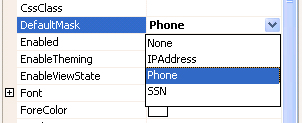
There are predefined mask also like IPAddress, Phone and SSN, which automatically format the text box.
Hope this will help we (Web Developer) to provide a goof UI.
Have a Happy Programming....!! :)
My self Paresh Rathod, working as a web developer in Rajkot, Guajrat, India.
I am having total experience of 10 yrs in this field.
I beleive in...
TOGETHER WE CAN AND WE WILL MAKE A DIFFERENCE.



 General
  News
News  Suggestion
  Question
  Bug
Bug  Answer
  Joke
Joke  Praise
  Rant
Rant  Admin
Admin 


 Submit an article or tip


