|
GanttChart.cs Line 56, it does not seem to work because I can't see the ToolTip.
So I modify,
this.GanttChart1.ToolTip.Draw += new DrawToolTipEventHandler(this.GanttChart1.ToolTipText_Draw);
this.GanttChart1.ToolTip.Popup += new PopupEventHandler(this.GanttChart1.ToolTipText_Popup);
on Form1_Load.
|
|
|
|
|
in My project, I have list item. for each item have gantt chart.
when user click on item, system will load grantt chart'item.
I meet problem when user click other item the your lib need to deplay time for refesh and draw chart again.
How to add waitting cursors when your lib draw chart ( I had add cursors in my code but it not effect).
|
|
|
|
|
Here is a very simple example how to add text to the center of each bar. You can adjust to fit your application, create a new sub to populate from your data source or add a new property 'bar.text' etc.
After the code in GanttChart.vb
grfx.DrawRectangle(Pens.Black, obRect)
grfx.FillRectangle(obBrush, obRect)
Add this:
Dim txt As String = "raz" & ControlChars.CrLf & "dwa" & ControlChars.CrLf & "trzy"
Dim txtFont As New Font("Arial", 10)
Dim txtWidth As Integer = grfx.MeasureString(txt, txtFont).Width
Dim txtHeight As Integer = grfx.MeasureString(txt, txtFont).Height
Dim barWidth As Integer = bar.TopLocation.Right.X - bar.TopLocation.Left.X
If txtWidth < barWidth And txtHeight < barHeight Then
grfx.DrawString(txt, txtFont, Brushes.Black, (barWidth / 2 - txtWidth / 2) + bar.TopLocation.Left.X, (barHeight / 2 - txtHeight / 2) + bar.TopLocation.Left.Y)
End If
This will only work if the text will fit inside the bar. My bars are 108 pixels tall so i can fit several lines but if yours are small or the default size, try one line
|
|
|
|
|
In the example chart 1 contians days while the upper only month, how to control it???
|
|
|
|
|
Currently it is only controlled automatically based on the time between first date and last date. You might want to look at the function
GetFullHeaderList
|
|
|
|
|
Kanon Adrian
Fandt din kode ved et tilf�lde - lige hvad jeg manglede
/Morten
|
|
|
|
|
Er glad for at du kan bruge det 
|
|
|
|
|
Why two almost identical for loops ?
The bar is not yet needed!!!
The foreach Loop is needless
The Speed will increase dramatically 
Optimised version:
Private Sub DrawNetHorizontal(ByVal grfx As Graphics)
Dim FUN As String = "DrawNetHorizontal"
Dim index As Integer = 0
Dim width As Integer = 0
Try
If shownHeaderList Is Nothing Then Exit Sub
If shownHeaderList.Count = 0 Then Exit Sub
index = 0
width = (widthPerItem * shownHeaderList.Count) + barStartLeft
For index = 0 To GetIndexChartBar("QQQQQQ")
Try
grfx.DrawLine(lineColor, 0, barStartTop + (barHeight * index) + (barSpace * index), width, barStartTop + (barHeight * index) + (barSpace * index))
Catch EXC As Exception
End Try
Next
lastLineBottomStop = barStartTop + (barHeight * (index - 1)) + (barSpace * (index - 1))
Catch EXC As Exception
End Try
End Sub
Greetings
vmeyer
|
|
|
|
|
Hi, is there a way to show text on bars permanently?
|
|
|
|
|
yes, on draw bar area find
Grfx.DrawRectangle(Pens.Black, obRect)
and add this below it
Grfx.DrawString("YourText", rowtextfont, Brushes.LimeGreen, obRect)
|
|
|
|
|
Hello,
got it running now, found the dll.
how can i achieve a larger vertical spacing for the bars or even broaden them ?
Greetings
mjfuchs
|
|
|
|
|
Hi,
try to change the code line:
Private barHeight As Integer = 9
in GanttChart Class. If you increase the value the bars get heigher.
If you need more space between the bars lines change the code line:
Private barSpace As Integer = 5

Have a nice day.
modified 4-Nov-12 8:46am.
|
|
|
|
|
Hello,
i found this an liked it very much. I am using VB 2010 Express and whenn starting the sample it works. but i do get the following message:
Warnung 1 Der Typ "TestApplication.GanttChart" wurde nicht gefunden. Stellen Sie sicher, dass auf die Assembly, die diesen Typ enthält, verwiesen wird. Wenn dieser Typ Teil Ihres Entwicklungsprojekts ist, stellen Sie sicher, dass das Projekt mithilfe der Einstellungen für die aktuelle Plattform oder eine beliebige CPU erstellt wurde. 0 0
My Questions:
How do i get rid off that message because i want to write a deliverable application ?
Where do i find the control object to integrate it in my own applications/forms ?
Are there any references /DLL or anything to load to get the control ?
Greetings Matthias
|
|
|
|
|
Hello,
how to make signatures on blocks?
Sorry, My English is bad!
|
|
|
|
|
Hi there,
Firstly big thanks to Adagio.81 for your contribution and time in making this control!
I've converted the GanttChart to C#, but I'm having difficulty with it if anyone can help on these 2 issues (class added below)?
1) Initially it was causing VS to crash so I've temporarily excluded the paint method from firing when in design mode
2) It's loading all bars with 1 pixel width irrespective of the values you put in?
Sample Bars:
ganttChart1.FromDate = new System.DateTime(2009, 1, 1, 0, 0, 0);
ganttChart1.ToDate = new System.DateTime(2009, 12, 31, 0, 0, 0);

List lst = new List();

lst.Add(new BarInformation("Row 1", new System.DateTime(2009, 1, 1), new System.DateTime(2009, 5, 1), Color.Gray, Color.LightGray, 0));
lst.Add(new BarInformation("Row 2", new System.DateTime(2009, 1, 1), new System.DateTime(2009, 7, 1), Color.Gray, Color.LightGray, 1));
lst.Add(new BarInformation("Row 3", new System.DateTime(2009, 5, 1), new System.DateTime(2009, 8, 1), Color.Gray, Color.LightGray, 2));
lst.Add(new BarInformation("Row 2", new System.DateTime(2009, 10, 1), new System.DateTime(2009, 12, 1), Color.Gray, Color.LightGray, 3));
lst.Add(new BarInformation("Row 1", new System.DateTime(2009, 8, 1), new System.DateTime(2009, 11, 1), Color.Gray, Color.LightGray, 4));

foreach (BarInformation bar in lst)
{
	ganttChart1.AddChartBar(bar.RowText, bar, bar.FromTime, bar.ToTime, bar.Color, bar.HoverColor, bar.Index);
}
Class:
http://pastebin.com/RdttF899
Kind Regards
Chris
___________________________
"There are 10 types of people in the world.
Those that understand binary... and those that don't!"
|
|
|
|
|
Hi again,
I've posted new changes to the C# version of the Gantt Chart - http://pastebin.com/b6HsgvXN[^]
It's now displaying the bars and layout correctly. I'm currently working on (adding) a "BarChanging" event for the control.
Will keep you posted.
Kind Regards
Chris
___________________________
"There are 10 types of people in the world.
Those that understand binary... and those that don't!"
|
|
|
|
|
Hallo 
great Project - very nice
How can i add more Rows?
I trying this for testing.....
Dim lst As New List(Of BarInformation)
lst.Add(New BarInformation("Row 1", New Date(2011, 7, 3), New Date(2011, 7, 5), Color.Aqua, Color.Khaki, 0))
lst.Add(New BarInformation("Row 2", New Date(2011, 7, 1), New Date(2011, 7, 2), Color.AliceBlue, Color.Khaki, 1))
lst.Add(New BarInformation("Row 3", New Date(2011, 7, 5), New Date(2011, 7, 7), Color.Violet, Color.Khaki, 2))
lst.Add(New BarInformation("Row 4", New Date(2011, 7, 3), New Date(2011, 7, 5), Color.Aqua, Color.Khaki, 3))
lst.Add(New BarInformation("Row 5", New Date(2011, 7, 6), New Date(2011, 7, 5), Color.Aqua, Color.Khaki, 3))
but the row 5 overwrite row 4.
Can you help me?
|
|
|
|
|
Try to change the row index number for the last row. Both row 4 and 5 is set to use row index 3
Color.Aqua, Color.Khaki, 3))
The bolded part is the row index. Change that number to 4 and it will add a new row. The first row has index 0, second row has index 1, etc
Hope that helped
|
|
|
|
|
 ohhh sh*t ohhh sh*t
i see a lot of tree .... but can't see the forest 
Thanks it works
|
|
|
|
|
|
How Can add another text column HELP
|
|
|
|
|
|
I found the code that caused the ghost bars and I fixed it for you:
If bar.StartValue < FromDate Then
   lengthTimeSpan = endValue - FromDate
Else
   lengthTimeSpan = endValue - bar.StartValue
End If
Now bars won't draw when they don't need to be drawn.
|
|
|
|
|
Hello,
First of all I wanted to thank you for your amazing control, it has been a real life-saver for me!
I have been trying to make the chart bar a bit "dynamic", I can increase / decrease the days, go to month view, etc...
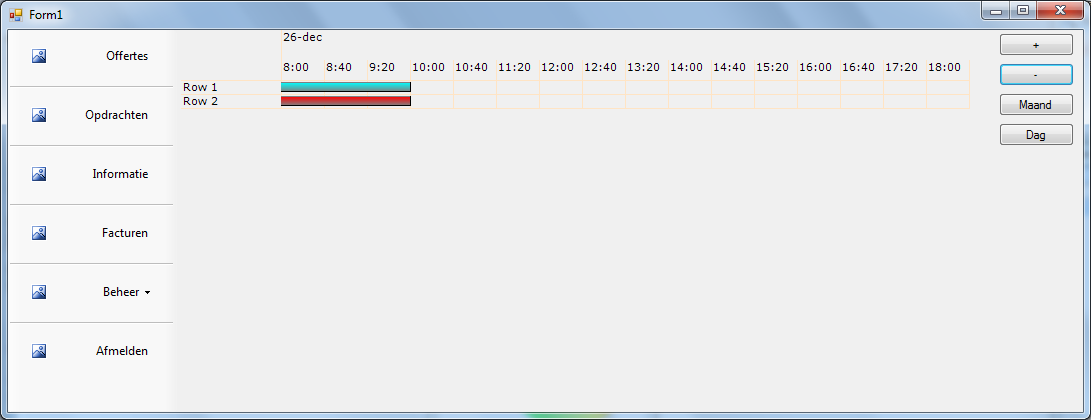
But I have encountered a small glitch, when I navigate to the next day there is a bar that shouldn't be there (also nothing happens when I hover over it)
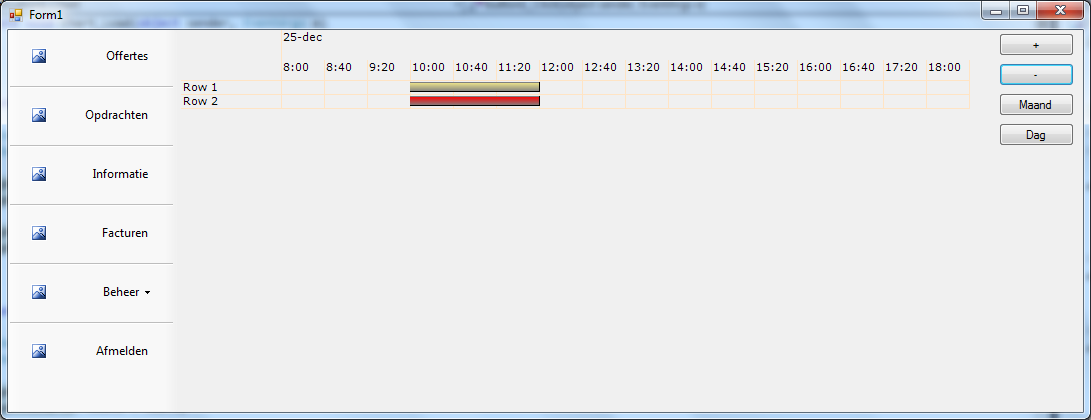
This my example: I added an event on the 25th of december, from 10 to 12.
public Chart()
        {
            InitializeComponent();

            ganttChart1.FromDate = new DateTime(2012, 12, 24, 08, 0, 0);
            ganttChart1.ToDate = new DateTime(2012, 12, 24, 18, 0, 0);

            DateTime test = new DateTime(2012, 12, 25, 10, 00, 00);
            DateTime test2 = new DateTime(2012, 12, 25, 12, 00, 00);

            ganttChart1.AddChartBar("Row 1", null, test, test2, Color.Aqua, Color.Khaki, 0);}
            ganttChart1.AddChartBar("Row 2", null, test, test2, Color.Red, Color.DarkRed, 1);
This appears correctly like this: [^]
Now I used this code to navigate to the next day:
private void button1_Click(object sender, EventArgs e)
{
    DateTime newFrom = ganttChart1.FromDate.AddDays(1);
    DateTime newTo = ganttChart1.ToDate.AddDays(1);

    ganttChart1.FromDate = newFrom;
    ganttChart1.ToDate = newTo;

    ganttChart1.PaintChart();
    ganttChart1.Refresh();

}
But when I click that button, a strange chart bar appears from the beginning of the Gantt Chart (no matter what the start hour is), it's also the exact same length as the normal event on the previous day. http://localhostr.com/file/f2HdDA2/gantt_2.png[^]
I have no idea what's causing this. This "Ghost" chart bar doesn't appear when I go back in the days or when I go to month view.
private void button2_Click(object sender, EventArgs e)
{
    DateTime newFrom = ganttChart1.FromDate.AddDays(-1);
    DateTime newTo = ganttChart1.ToDate.AddDays(-1);

    ganttChart1.FromDate = newFrom;
    ganttChart1.ToDate = newTo;

    ganttChart1.PaintChart();
    ganttChart1.Refresh();
}

private void btnMaand_Click(object sender, EventArgs e)
{
    DateTime newFrom = new DateTime(ganttChart1.FromDate.Year, ganttChart1.FromDate.Month,1);
    DateTime newTo = new DateTime(ganttChart1.ToDate.Year, ganttChart1.ToDate.Month, 31);

    ganttChart1.FromDate = newFrom;
    ganttChart1.ToDate = newTo;

    ganttChart1.PaintChart();
    ganttChart1.Refresh();
}
I'm sorry to bother you with this problem, but I can't figure it out.
Thanks,
Thomas
|
|
|
|
|
Do you have c# version??I want to study it.Thanks!
|
|
|
|
|



 General
  News
News  Suggestion
  Question
  Bug
Bug  Answer
  Joke
Joke  Praise
  Rant
Rant  Admin
Admin 


 Submit an article or tip