Introduction
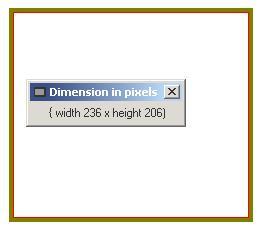
This is an utility with which you can measure an area on the desktop. It can be useful if you, for example, want to know the size of a picture.
Using the Code
The application consists of two windows: the "measurer" and then another that displays the current size of the measuring area.
The measuring window can be resized by dragging the borders and corners.
It can be moved by gripping the tiny red line with the mouse and dragging it around. Since it is only 1 pixel wide, a steady hand is needed.
The code for this is:
If e.Button = MouseButtons.Left Then
   ReleaseCapture()
   SendMessage(CType(Me.Handle.ToInt32, IntPtr), _
               WM_NCLBUTTONDOWN, HTCAPTION, 0&)
End If
It can also be moved by the arrow keys. The window gets into "keyboard move mode" by right clicking the brown border. The code for this is adapted from a VB6 version I did years ago: http://www.vb-helper.com/howto_move_form_with_arrows.html.
Protected Overrides Sub WndProc(ByRef m As System.Windows.Forms.Message)
Dim skip_it As Boolean
If m.Msg = WM_NCRBUTTONDOWN Then
Select Case m.WParam.ToInt32
Case HTBORDER, HTBOTTOM, _
HTBOTTOMLEFT, HTBOTTOMRIGHT, _
HTLEFT, HTRIGHT, HTTOP, _
HTTOPLEFT, HTTOPRIGHT, HTGROWBOX
SendMessage(Me.Handle, WM_SYSCOMMAND, SC_MOVE, 0&)
skip_it = True
End Select
End If
If Not skip_it Then
MyBase.WndProc(m)
End If
End Sub
Points of Interest
The viewport creation is done like this:
Dim hRgn As IntPtr
Dim hRgnClient As IntPtr
lFormWidthPixels = Me.Width
lFormHeightPixels = Me.Height
mlBorderThickness = CInt((lFormWidthPixels - Me.ClientSize.Width) / 2)
mlTitleThickness = CInt((Me.lFormHeightPixels - _
Me.ClientSize.Height)) - (2 * mlBorderThickness)
lViewportWidthPixels = lFormWidthPixels - (2 * mlBorderThickness)
lViewportHeightPixels = lFormHeightPixels - _
mlTitleThickness - (2 * mlBorderThickness)
hRgn = CreateRectRgn(0, 0, lFormWidthPixels, lFormHeightPixels)
hRgnClient = _
CreateRectRgn(mlBorderThickness + 1, mlBorderThickness + 1, _
Me.ClientSize.Width + mlBorderThickness - 1, _
Me.ClientSize.Height + mlBorderThickness - 1)
CombineRgn(hRgn, hRgn, hRgnClient, RGN_DIFF)
DeleteObject(hRgnClient)
SetWindowRgn(Me.Handle, hRgn, -1)
DeleteObject(hRgn)
This member has not yet provided a Biography. Assume it's interesting and varied, and probably something to do with programming.



 General
  News
News  Suggestion
  Question
  Bug
Bug  Answer
  Joke
Joke  Praise
  Rant
Rant  Admin
Admin 


 Submit an article or tip


