Click here to Skip to main content

Adding tray icons and context menus

By , 10 Apr 2002
 

Introduction

As MFC/SDK programmers move into .NET, what surprises them most is the fact that everything is now so much more easier then ever before. Christian Graus was complaining that it was too easy and that the abominable allowance of gotos annoyed him. He might have a point there, but making coding easy is not such a bad thing after all. It's funny when you think of all the effort Chris Maunder and others put into those MFC & SDK tray icon classes that are ever so popular with copy/paste programmers. I dedicate this article to Chris M and others involved in the brilliant tray icon class project over the last few years.

Adding  the icon to your project

Ctrl-Shift-A will bring up the Add-New-Item dialog box. Select Icon File from the list of available templates. If the list is too populated to your liking select Resources from the tree control on the left. This will bring up a smaller list on the right and it will be easier for you to select Icon File. Now click open. You'll end up with the VS.NET icon editor. You may now create your icon here or copy/paste an icon from elsewhere.
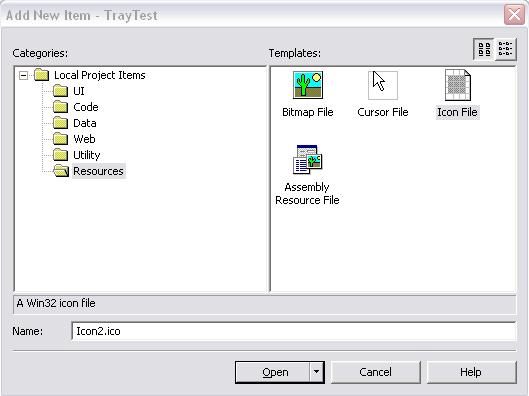
Now right click on this icon from Solution Explorer. Take properties. And change the Build Action property to Embedded Resource. This will instruct the compiler to embed this icon along with your EXE file, thus saving you the annoyance of having to distribute the icon with your EXE.

Adding the NotifyIcon member to your form

Okay. Now that we have our icon ready we need to add it to our form class.

private NotifyIcon m_notifyicon;

Alright, so we have added a NotifyIcon member. Now let's initialize it and set some default properties. This should be done from the form object's constructor.

m_notifyicon = new NotifyIcon();
m_notifyicon.Text = "Hello, what's cooking?"; 
m_notifyicon.Visible = true; 
m_notifyicon.Icon = new Icon(GetType(),"Icon1.ico"); //Thanks to Hasaki for this.

Alright, now compile and run your program. You'll see the icon in your tray. That was rather simple, huh? But usually people like to add a context menu to their tray icons. A tray icon simply sitting there is not very useful.

Adding a context menu to the tray icon

The first thing we need to do is to add a ContextMenu member to our form.

private ContextMenu m_menu;  

Now we need to initialize it and add some menu items.

m_menu = new ContextMenu(); 
m_menu.MenuItems.Add(0, 
    new MenuItem("Show",new System.EventHandler(Show_Click))); 
m_menu.MenuItems.Add(1, 
    new MenuItem("Hide",new System.EventHandler(Hide_Click))); 
m_menu.MenuItems.Add(2, 
    new MenuItem("Exit",new System.EventHandler(Exit_Click)));

We have added three menu items and have also associated click event handlers for each of those menu items. I could have created an array of MenuItem objects but that's not really needed here.

Now we need to associate this ContextMenu with our tray icon. So we do this.

m_notifyicon.ContextMenu = m_menu;

Now let's fill up those event handlers.

protected void Exit_Click(Object sender, System.EventArgs e) 
{
    Close();
}
protected void Hide_Click(Object sender, System.EventArgs e) 
{
    Hide();
}
protected void Show_Click(Object sender, System.EventArgs e) 
{
    Show();
}

Okay. Compile and run it. Now right clicking on the tray icon brings up the context menu. You can hide and show the form window using the two menu options. And the "Exit" option will exit the application.

A small problem

Now you'll notice a slight annoyance. The tray icon does not vanish when you exit the program. But when you move the mouse over the tray the icon vanishes. So, what do we do to avoid that? Again as with everything else with this whole .NET thing, it's as easy as 1,2,3. Override your form object's Dispose function and put the following lines of code into it.

protected override void Dispose( bool disposing ) 
{ 
    if( disposing ) 
    { 
        this.m_notifyicon.Dispose(); //we dispose our tray icon here
    }
    base.Dispose( disposing );
}

Full Source Listing

using System;
using System.Drawing;
using System.Windows.Forms;
using System.Data;

namespace TrayTest
{
    public class Form1 : System.Windows.Forms.Form
    {
        private NotifyIcon m_notifyicon;    
        private ContextMenu m_menu;        

        public Form1()
        {
            Text = "TrayIcon test program";    
        
            m_menu = new ContextMenu();                                    
            m_menu.MenuItems.Add(0,
                new MenuItem("Show",new System.EventHandler(Show_Click)));
            m_menu.MenuItems.Add(1,
                new MenuItem("Hide",new System.EventHandler(Hide_Click)));
            m_menu.MenuItems.Add(2,
                new MenuItem("Exit",new System.EventHandler(Exit_Click)));

            m_notifyicon = new NotifyIcon();
            m_notifyicon.Text = "Right click for context menu";
            m_notifyicon.Visible = true;
            m_notifyicon.Icon = new Icon(GetType(),"Icon1.ico");
            m_notifyicon.ContextMenu = m_menu;            
            
        }
        
        protected void Exit_Click(Object sender, System.EventArgs e) 
        {
            Close();
        }
        protected void Hide_Click(Object sender, System.EventArgs e) 
        {
            Hide();
        }
        protected void Show_Click(Object sender, System.EventArgs e) 
        {
            Show();
        }
        
        protected override void Dispose( bool disposing )
        {
            if( disposing )
            {
                this.m_notifyicon.Dispose();
            }
            base.Dispose( disposing );
        }
        
        [STAThread]
        static void Main() 
        {
            Application.Run(new Form1());
        }
        
    }
}


Conclusion

I would like to thank James Johnson for his valuable tips while I was struggling with embedding icons into my exe. Also a special thanks to Colin for keeping me cheered up with Bobs while I was burying myself in despair after my bad experiences with the new CD writer.

License

This article has no explicit license attached to it but may contain usage terms in the article text or the download files themselves. If in doubt please contact the author via the discussion board below.

A list of licenses authors might use can be found here

About the Author

Nish Sivakumar
United States United States
Member
Nish is a real nice guy who has been writing code since 1990 when he first got his hands on an 8088 with 640 KB RAM. Originally from sunny Trivandrum in India, he has been living in various places over the past few years and often thinks it’s time he settled down somewhere.
 
Nish has been a Microsoft Visual C++ MVP since October, 2002 - awfully nice of Microsoft, he thinks. He maintains an MVP tips and tricks web site - www.voidnish.com where you can find a consolidated list of his articles, writings and ideas on VC++, MFC, .NET and C++/CLI. Oh, and you might want to check out his blog on C++/CLI, MFC, .NET and a lot of other stuff - blog.voidnish.com.
 
Nish loves reading Science Fiction, P G Wodehouse and Agatha Christie, and also fancies himself to be a decent writer of sorts. He has authored a romantic comedy Summer Love and Some more Cricket as well as a programming book – Extending MFC applications with the .NET Framework.
 
Nish's latest book C++/CLI in Action published by Manning Publications is now available for purchase. You can read more about the book on his blog.
 
Despite his wife's attempts to get him into cooking, his best effort so far has been a badly done omelette. Some day, he hopes to be a good cook, and to cook a tasty dinner for his wife.

Sign Up to vote   Poor Excellent
Add a reason or comment to your vote: x
Votes of 3 or less require a comment

Comments and Discussions

 
You must Sign In to use this message board.
Search this forum  
    Spacing  Noise  Layout  Per page   
GeneralMy vote of 5memberleenert3 Jan '11 - 0:32 
It s so helpfull in creating icons
GeneralMy vote of 5memberCibergod2 Aug '10 - 1:28 
how to get this icon for all users to let a program run when you start under admin and managing it could and normal user?
GeneralNotify Icon's and timers in an applicationmemberabhey Handa7 Dec '09 - 10:18 
i am working on a application which has timers set up in it as
System.Threading.Timer timer = new System.Threading.Timer(timerDelegate, autoEvent, new TimeSpan(0, 0, 0), new TimeSpan(0, 0, 0, 0, -1));
 

now when i am trying to support this application in task bar, using notifyIcons --- whenever i try to close the app, the icon doesn't go away and the application keeps on running in task manager, untill i again click on icon (just clicking on icon serves, no need to select any option)
 

Actually the timers are running as below, cause i want them to run continuosly with doing some calculation every 12 hours
 
private void Form1_Load(object sender, EventArgs e)
            {
                  while (true)
                  {
                        if (x == 0)
                        {
                              System.Threading.Timer timer = new System.Threading.Timer(timerDelegate, autoEvent, new TimeSpan(0, 0, 0), new TimeSpan(0, 0, 0, 0, -1));
                              autoEvent.WaitOne();
                              x++;
                        }
                        else if (x == 1)
                        {
                              System.Threading.Timer timer = new System.Threading.Timer(timerDelegate, autoEvent, new TimeSpan(12, 0, 0), new TimeSpan(0, 0, 0, 0, -1));
                              autoEvent.WaitOne();
                        }
                  }
}
Questionthis solution does not workmemberhoney.hv31 Jul '09 - 21:04 
Hi , thanks for nice article
I have a problem, when i follow step by step that article in vs2008 and build my project and finally i run Bin\Release\MyProect.exe i've recieved a windows problem "MyProect has encountered a problem and needs to close. We are sorry for the inconvenience."
Here is My Code :
namespace PostIt
{
    public partial class frmPostIT : System.Windows.Forms.Form
    {
        private  System.Windows.Forms.NotifyIcon m_notifyicon;
        private System.Windows.Forms.ContextMenu m_menu;  
 
        public frmPostIT()
        {
 
            InitializeComponent();
 
            m_notifyicon = new System.Windows.Forms.NotifyIcon();
            m_notifyicon.Text = "Post IT";
            m_notifyicon.Visible = true;
            m_notifyicon.Icon = new System.Drawing.Icon(GetType(), "NotifyPostIT");
 
            m_menu.MenuItems.Add(0, new System.Windows.Forms.MenuItem("Add New PostIt", new System.EventHandler(Add_Click)));
            m_menu.MenuItems.Add(0, new System.Windows.Forms.MenuItem("Save Current PostIt", new System.EventHandler(Save_Click)));
            m_menu.MenuItems.Add(0, new System.Windows.Forms.MenuItem("Load Last PostIt", new System.EventHandler(load_Click)));
            m_menu.MenuItems.Add(0, new System.Windows.Forms.MenuItem("Exit PostIt", new System.EventHandler(Exit_Click)));
 
        }
 
        protected void Add_Click(System.Object sender, System.EventArgs e)
        {
            
        }
 
        protected void Save_Click(System.Object sender, System.EventArgs e)
        {
           
        }
        protected void Load_Click(System.Object sender, System.EventArgs e)
        {
            
        }
        protected void Exit_Click(System.Object sender, System.EventArgs e)
        {
            Close();
        }
 
    }
}

QuestionThis Solution does not workmemberhoney.hv31 Jul '09 - 20:56 
Hi, thanks for your article
 
i have a problem , when i follow your solution step by step in VS2008 and build my project ,finally I run bin\Release\Myproject.exe and recieve a windows message "Myproject.ex has encountered a problem and needs to close. We are sorry for the inconvenience."
this is my code
 
namespace PostIt
{
    public partial class frmPostIT : System.Windows.Forms.Form
    {
        private  System.Windows.Forms.NotifyIcon m_notifyicon;
        private System.Windows.Forms.ContextMenu m_menu;  
 
        public frmPostIT()
        {
 
            InitializeComponent();
 
            m_notifyicon = new System.Windows.Forms.NotifyIcon();
            m_notifyicon.Text = "Post IT";
            m_notifyicon.Visible = true;
            m_notifyicon.Icon = new System.Drawing.Icon(GetType(), "NotifyPostIT");
 
            m_menu.MenuItems.Add(0, new System.Windows.Forms.MenuItem("Add New PostIt", new System.EventHandler(Add_Click)));
            m_menu.MenuItems.Add(0, new System.Windows.Forms.MenuItem("Save Current PostIt", new System.EventHandler(Save_Click)));
            m_menu.MenuItems.Add(0, new System.Windows.Forms.MenuItem("Load Last PostIt", new System.EventHandler(load_Click)));
            m_menu.MenuItems.Add(0, new System.Windows.Forms.MenuItem("Exit PostIt", new System.EventHandler(Exit_Click)));
 
        }
 
        protected void Add_Click(System.Object sender, System.EventArgs e)
        {
            
        }
 
        protected void Save_Click(System.Object sender, System.EventArgs e)
        {
           
        }
        protected void Load_Click(System.Object sender, System.EventArgs e)
        {
            
        }
        protected void Exit_Click(System.Object sender, System.EventArgs e)
        {
            Close();
        }
 
    }
}

 
---------------
Honey Variani
---------------
Generalcodememberyingxuzhong20 Feb '09 - 2:12 
where is the code that i can download
Questionwhat about limits in the tooltipmemberabc@tempinbox.com7 Feb '08 - 8:56 
why is there a limitation of 64 characters?
 
m_notifyicon.Text = "Right click for context menu .................. more than 64 characters. breaks everything off..... breaksss ......................";
 
in an old project of mine in C++ the tooltips have a limitation of 128 characters.
GeneralthanksmemberEvilInide9 Jul '07 - 23:48 
It helps me in my job but i wanna idea is there any way how to display context menu on mouse over like as tooltip
 
finally thanks for the article
 
evil
QuestionHow To Add Icon To FormmemberAnkush Komarwar21 Feb '07 - 19:29 
The ressource 'Icon1.ico' could not be found in class 'TrayTest.Form1'
error on Line m_notifyicon.Icon = new Icon(GetType(),"Icon1.ico")
 
s

QuestionRe: How To Add Icon To FormmemberSkippums25 Apr '07 - 13:58 
Did you make sure to change it to embedded? Is that the proper name of the object?
 
Jeff
AnswerRe: How To Add Icon To Formmemberpeterchen8 Aug '07 - 10:47 
The GetType() (or typeof(somethinginthisassembly)) doesn't seme to work for class libraries.
The flollowing works, though:
 
m_icon = new Icon(
System.Reflection.Assembly
.GetExecutingAssembly()
.GetManifestResourceStream("project.iconname.ico"));

 
Where project is usually the class library project name, and iconname.ico is the embedded resource name. You can also see the "full" resource name using Reflector.


We are a big screwed up dysfunctional psychotic happy family - some more screwed up, others more happy, but everybody's psychotic joint venture definition of CP
My first real C# project | Linkify!|FoldWithUs! | sighist

QuestionRe: How To Add Icon To FormmemberPoggel, Steven Buraje2 Oct '07 - 21:56 
Even that doesn't really work for me.
I'm just trying this out to learn how to do it,
but despite it's beauty and simplicity - it just doesn't run.
 
I added the resource myIcon.ico (in Visual C# Express, newest version)
and I am getting a folder "Resources" where the icon seems to live in.
After that I edit the icon's properties.
Build Action: Embedded Resource
 
m_notifyicon.Icon = new Icon(System.Reflection.Assembly
.GetExecutingAssembly()
.GetManifestResourceStream("TrayTest.Form1.myIcon.ico"));

 
Yields: "Value of 'null' is not valid for 'stream'." on runtime.
 
This:
m_notifyicon.Icon = new Icon(System.Reflection.Assembly
.GetExecutingAssembly()
.GetManifestResourceStream("TrayTest.Resources.myIcon.ico"));

Yields: Oooops, it doesn't yield any error, but an icon in the tray!
Don't seem to have tried that before... Laugh | :laugh:
Well then, no problem left, just solved it.
May this post help other people as dumb as me who can't get their paths right.


Btw, the world is a great place, actually. Must see it!

AnswerRe: How To Add Icon To Formmemberpeterchen3 Oct '07 - 2:07 
I guess that's what I meant - If you open the binary with the embedded icon in Lutz Röders Reflector[^], you will see the correct path.


We are a big screwed up dysfunctional psychotic happy family - some more screwed up, others more happy, but everybody's psychotic joint venture definition of CP
My first real C# project | Linkify!|FoldWithUs! | sighist

QuestionHelpmemberashokkumar7679 Jan '07 - 22:45 
Actually i have created one context menu and assigned it for the system tray icon's context menu. I wanted to change the particular context menu's text dynamically. Using the property contextmenuname.text i have changed the context menu's text. But it didn't get refreshed in the tray icon.
How can we do this?
 

QuestionWindows Service Tray Icons?membertheCodeDevil25 Sep '06 - 17:01 
Can this work for a windows service? From my recent trials, it doesn't seem to.
 
Got a coding problem? Hand it to the CodeDevil!

GeneralNice codememberTejpal Garhwal11 Sep '06 - 9:22 
Very easy and clear !! As someone also posted a question. How can we minimize windows to system tray when we click on minimize button?
 
Let me know if you have solution for this.
 
Thanks,
 
Tejpal
GeneralError - Form1 already has a disposememberRheal_Notes27 Jul '06 - 11:33 
Hello… Thanks for the article! Straight forward except for one thing…
 
When I tried it in VS 2005 Team Developer, it complained that Form1 already had a dispose. After scratching my head for a while, I realized - There is a dispose in the "other part" of the partial class (Form1.Designer.cs) - in which it went:
 
if (disposing && (components != null))
{
   components.Dispose();
}
Which I changed to:
if (disposing)
{
   if (components != null)
   {
      components.Dispose();
   }
   this.m_notifyicon.Dispose(); //we dispose our tray icon here
}
Then it worked… Thanks! Smile | :)
GeneralCancel context menumemberFylom13 Apr '06 - 5:53 
Hi,
 
What about canceling the context menu ? Today, we are used to click anywhere else than on context menu to cancel it (or to hide it). How can I detect a click outside the context menu region ?!?
 
Thanks.
 
_____________________________
 
Fylom

GeneralMinimize to System Traymembertom183322 Mar '06 - 5:37 
Many programs minimize to the system tray when you minimize them and rise up out of the system tray as you open the form again.
Is this possible in vb.net?

 
Mike
GeneralVery GoodmemberOwen Hines19 Feb '06 - 10:56 
Very Nice article. To the point, clear and Concise.


<html>

Without education, you're not going anywhere in this world.
Malcolm X, speech at Militant Labor Forum, NY, 29 May 1964

</html>
GeneralNice ArticlememberAngel_Komarov17 Feb '06 - 16:33 
Simple and easy to follow. I like that!Big Grin | :-D
 
ak
QuestionWindows Mobile Tray IconmemberRedaemon29 Dec '05 - 7:28 
I've know that Windows Mobile 5.0 supporting tray icon on today screen, I've have the Windows Mobile 5.0 SDK and there is a sample creating tray icon application but the code in C/C++. Now i want to change the code into C#, but i have problem create NotifyIconData object on cbSize variable, how to use "sizeof" function in C#, because creating tray icon in Windows Mobile and Windows 32 is same nothing difference. Ok my problem is when i want to take size of NotifyIconData object it always make exception of NotSupportedException, i have use "sizeof" and "Marshal.SizeOf" but still have same problems. My code is :
 
* The NOTIFYICONDATA Structure
[StructLayout(LayoutKind.Sequential)]
public struct NOTIFYICONDATA
{
public int cbSize;
public int hWnd;
public int uID;
public int uFlags;
public int uCallbackMessage;
public int hIcon;
public char[] szTip;
}
 
* Get the structure size on cbSize
...
this.tryData.cbSize = Marshal.SizeOf(tryData);
...
 
I have use alternate for char[] into string but still same exception.
 
Sorry long message, i hope you can help. Thanks a lot.
AnswerRe: Windows Mobile Tray IconmemberAjatashatru4 Aug '06 - 1:44 
NOTIFYICONDATA notdata = new NOTIFYICONDATA();
 
notdata.cbSize = System.Runtime.InteropServices.Marshal.SizeOf(notdata);
notdata.hIcon = hIcon;
notdata.hWnd = hwnd;
notdata.uCallbackMessage = WM_NOTIFY_TRAY;
notdata.uFlags = NIF_MESSAGE | NIF_ICON;
notdata.uID = uID;
 
I think u can use like this, it gives no exception.
 
yuvraj

QuestionWhat about the Compact Frameworkmemberddas7710 Nov '05 - 2:11 
Thanks for the article.. Its very well written.
 
Can you help out on how to attach a Context Menu to the NotifyIcon in the .Net Compact Framework.
 
I have succesfully created a NotifyIcon to the application using the article at http://msdn.microsoft.com/library/default.asp?url=/library/en-us/dnnetcomp/html/messagewindow.asp[^]. But I need help on attaching a Context Menu to the NotifyIcon..
 
Please help... really in need.
 
Thanks in advance.
 
We are alone, absolutely alone on this chance planet: and, amid all the forms of life that surround us, not one, excepting the dog, has made an alliance with us. - Maurice Maeterlinck
AnswerRe: What about the Compact Frameworkmemberlisagitel2 Aug '07 - 10:08 
Since you're using the NotifyIcon class from http://msdn.microsoft.com/library/default.asp?url=/library/en-us/dnnetcomp/html/messagewindow.asp, just add the following to your application (to your Form class).
 
Create a context menu, add some menu items to it, add some click event handlers for the menu items.
 
Add these declarations:
 
[DllImport("coredll.dll")]
internal static extern IntPtr LoadIcon(IntPtr hInst, string IconName);
 
[DllImport("coredll.dll")]
internal static extern IntPtr GetModuleHandle(String lpModuleName);
 
private NotifyIcon notifyIcon;

Set up your notifyicon (probably in the constructor for your Form class):
 
notifyIcon = new NotifyIcon();
notifyIcon.Click += new EventHandler(notifyIcon_Click);
AddIcon();
 
Add these methods:
 
private void AddIcon()
{
IntPtr hIcon = LoadIcon(GetModuleHandle(null), "#32512");
notifyIcon.Add(hIcon);
}
 
private void RemoveIcon()
{
notifyIcon.Remove();
}
 
private void notifyIcon_Click(object sender, EventArgs e)
{
contextMenu1.Show(this, new System.Drawing.Point(20, 20));
}
 
private void Form1_Closing(object sender, CancelEventArgs e)
{
RemoveIcon();
}

General General    News News    Suggestion Suggestion    Question Question    Bug Bug    Answer Answer    Joke Joke    Rant Rant    Admin Admin   

Permalink | Advertise | Privacy | Mobile
Web02 | 2.6.130516.1 | Last Updated 11 Apr 2002
Article Copyright 2002 by Nish Sivakumar
Everything else Copyright © CodeProject, 1999-2013
Terms of Use
Layout: fixed | fluid
