Click here to Skip to main content

A Gradient Static Control

By , 26 Apr 2004
 

Introduction

I was looking through this site (and a few others) in order to find a simple, easy to use control that looks better than the ordinary CStatic. Unfortunately, I was not successful - there are a lot of cool controls around but I needed something different. One of the articles I read entitled CTitleMenu contains a class that creates a menu with a nice gradient title - that was it!. I decided to incorporate some of the code to create a nice static control.... and here it is.

How to add this control to your project:

  1. Copy files GradientStatic.h and GradientStatic.cpp to your project directory, and add those files to your project.
  2. Put #include "GradientStatic.h" in files where you plan to use this class.
  3. Change CStatic definitions to CGradientStatic.
  4. Use the API described below.

CGradientStatic API

This control is derived from CStatic and adds only a few new functions. Please note that this class is not perfect. If you need some other features - just modify it!

By default CGradientStatic uses the following colors:

  • The left side is the color of the active application's caption (COLOR_ACTIVECAPTION)
  • The right side is the color of the button face (COLOR_BTNFACE)
  • The text is painted used the color of the text on the caption of the application.
void SetColor(COLORREF cl);
    // Use this function to change left color of gradient.

    //For example this will set a RED color.
    SetColor(RGB(255,0,0)); 
    //this will use one of system defined colors
    SetColor(GetSysColor(COLOR_ACTIVECAPTION)); 

void SetGradientColor(COLORREF cl);
    //Use this function to changes right color of gradient.

void SetTextColor(COLORREF cl);
    //Use this function to changes color of text.

void SetLeftSpacing(int iNoOfPixels);
    //If text isn't centered you can use this function to set a point where 
    //CGradientStatic should start painting text.
    //On default control leaves 10 pixels from the right side.

void SetTextAlign(int iAlign ) 
    //Use this function to change text aligment.
    //Acceptable values:  0 - left, 1 - center, 2 -right

void void SetVerticalGradient(BOOL a_bVertical = TRUE)
    //Use this function to set vertical gradient

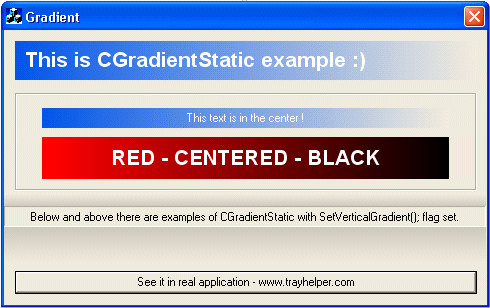
Example of Use

    m_pBoldFont = new CFont; //delete it in destructor
    m_pBoldFont->CreateFont(25,0,0,0,900,0,0,0,0,0,0,
        ANTIALIASED_QUALITY,0,"Arial");

    //Use big font and standard colors
    m_cExample.SetFont(m_pBoldFont);
    m_cExample.SetWindowText("This is CGradientStatic example :)");

    //Use standard font & centered text
    m_cExample2.SetWindowText("This text is in the center !");

    m_cExample2.SetColor(RGB(255,0,0));
    m_cExample2.SetGradientColor(RGB(0,0,0));

Notes

This control loads the GradientFill function dynamically from msimg32.dll. If this load fails, for whatever reason, no gradient fill will be performed, but no crash should occur either. This control is free to use :)

Updates

26th April 2004

Added support of vertical gradients, new improved demo application.

6th May 2003

Removed few limitations of previous version. Now code is smaller, simpler and works a bit better.

6th Octber 2002

Paolo Adami suggested a small addition to this control. Thanks to function DrawGradRect(CDC *pDC, CRect r, COLORREF cLeft, COLORREF cRight) - control will draw gradient background also on systems that don't have msimg32.dll library installed. This code is not such a fancy algorithm as msimg32.dll library and produces worse effect - but it works fine.


License

This article has no explicit license attached to it but may contain usage terms in the article text or the download files themselves. If in doubt please contact the author via the discussion board below.

A list of licenses authors might use can be found here

About the Author

Irek Zielinski
Web Developer
United Kingdom United Kingdom
Member
Irek works as a C++ senior software developer.
He runs also his own small shareware bussines (He is author of few quite popular applications like: Tray Helper or Time Adjuster).
 
Occasionaly he posts articles to Codeguru or Codeproject. Besides C++ he likes motorcycles and paragliding.
Check out his software at: http://www.ireksoftware.com

Sign Up to vote   Poor Excellent
Add a reason or comment to your vote: x
Votes of 3 or less require a comment

Comments and Discussions

 
You must Sign In to use this message board.
Search this forum  
    Spacing  Noise  Layout  Per page   
Generalunresolved externalsmembercjpm1007 Apr '05 - 9:23 
XXXX.obj : error LNK2001: unresolved external symbol "public: virtual __thiscall CGradientStatic::~CGradientStatic(void)" (??1CGradientStatic@@UAE@XZ)
XXXX.obj : error LNK2001: unresolved external symbol "public: __thiscall CGradientStatic::CGradientStatic(void)" (??0CGradientStatic@@QAE@XZ)
Release/XXXX.exe : fatal error LNK1120: 2 unresolved externals
 
I appear to have done everything according to your example, but am getting these errors. No-one else has posted such a thread, so I assume its something Im doing. So heres what I did.
 
1. Created a static control on dialog
2. Assigned a CONTROL variable to it (m_cHeader)
3. Changed the CStatic in my dialog's header file to CGradientStatic
4. Called ONLY the following from my .cpp function:
m_cHeader.SetColor(RGB(255,0,0));
m_cHeader.SetGradientColor(RGB(0,0,0));
 
All help appreciated.
 

GeneralRe: unresolved externalsmembercjpm1007 Apr '05 - 12:15 
Answered my own question: isnt that always *much* more satisfying!!
 
HINT - Its not enough to just add "#insert "GradientStatic.h" (/.cpp) whereever you need to use it, you have to:
 
Right click "Source Files" in the workspace toolbar on the left of VC++ 6.0 by default. Click "Add files to folder". Select the .cpp file.
 
Then right click "Header Files" as above, and select the .h file.
 
For some reason I added this to the code, and I forget what it fixed:
 
m_cHeader.SubclassDlgItem(IDC_SHEADER,this);
 
m_cHeader is my CStatic control variable, and the IDC_SHEADER is the resource ID of the CStatic control.
 
Big Grin | :-D
GeneralI'm wondering.memberKimjuhoon25 Feb '04 - 15:20 
First, I'm a code novice. So I'm wondering how to put this control on the CView control in SDI based project.
 
I did :
int CSp3View::OnCreate(LPCREATESTRUCT lpCreateStruct)
{
CFont* m_pBoldFont;
m_pBoldFont = new CFont;
m_pBoldFont->CreateFont(25,0,0,0,900,0,0,0,0,0,0,ANTIALIASED_QUALITY,0,"Arial");
 
CGradientStatic NewStatic;
NewStatic.Create(NULL, WS_CHILD | WS_VISIBLE, CRect(0, 0, 250, 30), GetParent(), 2000);
NewStatic.SetFont(m_pBoldFont);
NewStatic.SetWindowText("Wow! So great class.");
NewStatic.ShowWindow(SW_SHOW);
}
 
It didn't occur any error but also didn't show any static control.
 
<(-.-)(-.-)(-.-)
    | > s|┘ s|z
   / \ / \ / \
GeneralRe: I'm wondering.memberIrek Zielinski26 Feb '04 - 6:51 
Hi Smile | :)
The biggest bug I see there it's that you create a instance of class inside of function.
 
int CSp3View::OnCreate(LPCREATESTRUCT lpCreateStruct)
{
.....
CGradientStatic NewStatic;
.....
} <- NewStatic will be destroyed at this point of code!
 
In your code gradient window could be created but few miliseconds after window will be destroyed since funtion will finish and all obects declared inside will be deleted.
 
My recommendation: Make this CGradientStatic variable a member of CSp3View class.
 
Best regards and good luck!
Irek
 
Check out my software at: http://www.ireksoftware.com
Questionhow to implement this with text scrollmemberCodeFlatter10 Dec '03 - 6:41 
thanx 4 this very nice tool! Big Grin | :-D
 
my idea is a flicker free text scoller with this tool. text scrolls from left to right,
right to left, top to bottom or bottom to top. u plane a new version? Roll eyes | :rolleyes:
 
greets
GeneralA few notesmemberChopper21 May '03 - 2:29 
1. You're calling FreeLibrary on a system DLL. You really shouldn't... Wink | ;)
2. It is worth mentioning that your code will work differently on Windows 95/NT4 where FreeLibrary is not supported;)
3. How come you didn't implement vertical gradient Confused | :confused:

 
Regards,
Vitaly Tomilov
 

Professional tooltips for all development platforms on www.Tooltips.NET


GeneralRe: A few notesmemberIrek Zielinski8 Oct '03 - 12:05 
1. You're calling FreeLibrary on a system DLL. You really shouldn't...
Well...you should always call FreeLibrary after LoadLibrary - nothing wrng will happen + it's a good programming practice. Such rules like not freeing system object had a point in Win3.x programming - as far I know it's no longer true/recommended.
 
2. It is worth mentioning that your code will work differently on Windows 95/NT4 where FreeLibrary is not supported
Code will work differently only on systems that don't have the library - if Win95 or NT is updated it's rather big chance it will have th library. By the way FreeLibrary IS supported in all versions of Windows.
 
3. How come you didn't implement vertical gradient
Yeahh...you got me... I will do it in next version Blush | :O
 
Best regards and thanks for feedback!
Irek
 
Check out my software at: http://www.ireksoftware.com
GeneralAlternativesussDave_16 May '03 - 8:04 
It looks great - if you are looking for something similar (maybe different features,...) check out CLabel. It does the gradient thing and quite a bit more (I think the author was Norm Almond?). It's on codeproject's site.

QuestionIs something missing?memberWREY27 Sep '02 - 11:28 
The button at the bottom of the dialog that has the caption, "See it in action ..." sort of gave the impression that you'd see the gradient feature moving (as from left to right).
 
Because there was no such activity, why give it such a caption as, "See it in action ..."?
 
Unsure | :~
 
William
GeneralReplacement for the DLL callmemberGregor S.27 Sep '02 - 3:04 
Hi, it is a very useful CStatic control. However, the imported DLL library is not necessary if you do the gradient drawing yourself.
 
I don't know if I'm allowed to use the drawing code used by Matt Weagle in his terrific gradient progress control. I simply replaced the DLL call with his gradient drawing code and now the DLL is not necessary anymore.
 
I would like to post the code you need to replace, but need to ask Matt for permission first Blush | :O
 
regards
Greg
GeneralRe: Replacement for the DLL callmemberEd Gadziemski27 Sep '02 - 3:11 
Does it use the same trivertex algorithm as the DLL GradientFill? If so, then the quality should be excellent unlike algorithms that just step through color bands and (perhaps) do a little dithering, thus leaving a visible banding effect.
GeneralRe: Replacement for the DLL callmemberGregor S.27 Sep '02 - 3:11 
no, it does not use the trivertex algorithm, but quality is very good anyway Smile | :) Just take a look at the "DrawGradient" function in the gradient progress bar code.
GeneralRe: Replacement for the DLL callsussAnonymous3 Oct '02 - 21:34 
I have just posted an update to CGradientStatic article and code. Thise new code will try to load dll library and use GradientFill function. If it fails it will use simple gradient fill algorithm - and produce a bit worse effect that this one form dll but it works fine :;P
GeneralOpening statementsussAmita Buch27 Sep '02 - 0:09 
I was looking through this site (and a few others) in order to find a simple, easy to use control that looks better than the ordinary CStatic.
 
It seems you did not look hard enough, there are plenty of articles with code that do this plus lots of extra
 
see http://www.codeproject.com/staticctrl/clabel.asp[^]
GeneralRe: Opening statementmemberirekz@yahoo.com31 Jan '03 - 4:46 
You're ABSOLUTELY right - there ARE a lot of cool controls around - but this one seems to be perfect if you just want to have gradient bacground - it's effective and quite compact.
 
The old truth: not everything is for everyone Smile | :)

GeneralI am curiousmemberJörgen Sigvardsson26 Sep '02 - 23:40 
What is "msimg32.dll"? Does it ship with all versions of windows?
 
--
Iron Maiden (Harris/Gers) wrote:
The rebel of yesterday, tomorrow's fool
Who are you kidding being that cool?

GeneralRe: I am curiousmemberEd Gadziemski27 Sep '02 - 3:07 
No, it ships with Win 2K and above and Windows ME (98?) and above. I have copied it from those systems to NT 4 and it worked fine, but that is probably not supported by Microsoft.

General General    News News    Suggestion Suggestion    Question Question    Bug Bug    Answer Answer    Joke Joke    Rant Rant    Admin Admin   

Permalink | Advertise | Privacy | Mobile
Web04 | 2.6.130516.1 | Last Updated 27 Apr 2004
Article Copyright 2002 by Irek Zielinski
Everything else Copyright © CodeProject, 1999-2013
Terms of Use
Layout: fixed | fluid