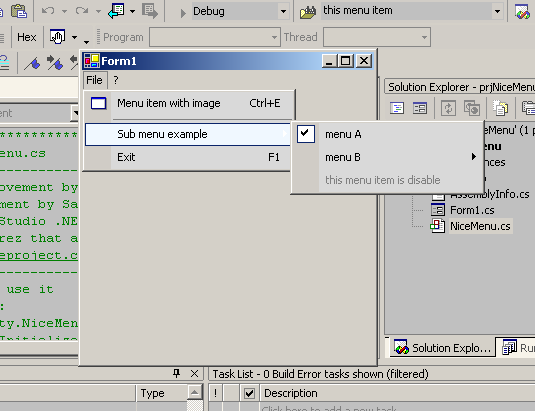
Introduction
With this new ".NET Menu Style" class, you can get a great menu with only few lines of code. You don't have to write a line of code for each menu item because your menu now will be AUTOMATICALLY updated! This is very useful, 'cause now you can still build and update your menu with the VS.NET tool, but at runtime you'll always have a new fresh .NET style menu. Another improvement is about the menu images, now you can use a simple imagelist to store your icon, and with a line of code and a simple trick (to add the index of the image near the text of the menu item), you'll get your image near your menu item.
I've updated this class, now you can use icons with context menu and search for a MenuItem at runtime with an easy function. Now you can also download a nice RTF file editor that uses the .NET style menu. This RTF file editor is still under development, however it's already a good example of C# programming.
Using the Code
You have to add:
using Utility.NiceMenu;
and after the "InitializeComponent()" code:
NiceMenu myNiceMenu = new NiceMenu();
myNiceMenu.UpdateMenu(this.nameofyourmainmenu,
    new NiceMenuClickEvent(nameofyourclickfunction));
If you want to add some incons in your menu, you have to:
- add an
imagelist control in your form - add your icons in your
imagelist control - add in your menu items the index of the icon in the first two characters. For example:
- After the
NiceMenu myNiceMenu = new NiceMenu(); code, you have to add this simple line of code:
myNiceMenu.imgMenu = nameofyourimagelist;
Points of Interest
There are a lot of comments with the code, so... enjoy!
History
This is an improvement by Francesco Natali over an improvement by Sajith M of the "Visual Studio .NET Menu Style" by Carlos H. Perez
License
This article has no explicit license attached to it but may contain usage terms in the article text or the download files themselves. If in doubt, please contact the author via the discussion board below.
A list of licenses authors might use can be found here.
This member has not yet provided a Biography. Assume it's interesting and varied, and probably something to do with programming.



 General
  News
News  Suggestion
  Question
  Bug
Bug  Answer
  Joke
Joke  Praise
  Rant
Rant  Admin
Admin 


 Submit an article or tip


![Rose | [Rose]](https://www.codeproject.com/script/Forums/Images/rose.gif)


