Contents
Introduction
COM/ActiveX control has been around for more than a decade. In spite of all, it is very difficult to get a complete Windowless container. MFC dialog has its own Windowless container that is truly windowless compared to ATL but if your project can't afford to depend on MFC, you are on your own. The container I am presenting in this article offers complete support to Windowless controls. It is developed especially for ATL/WTL projects and can be used to create composite controls. That means, you can combine multiple Windowless Controls to create your own component.
Imagine being able to encapsulate Adobe Flash, Windows Media Player and Silverlight into your own component. Another advantage you will find with these classes is that the learning curve is quasi zero if you have any previous experiences with ATL. You simply derive your dialog from the new dialog class to get the full power of this container.
Description
Having a full-blown windowless container can be very useful. I hope that you will find some great uses for it. I will describe the process necessary to integrate the container in your own project. Later, in other articles, we'll explore how we can take some of this to a new level.
Think about this, wouldn't it be great if you could integrate Silverlight and Flash contents seamlessly and interact with them within your C++ application?
The more you think about it, this is quite possible after all that's what a web browser does in a large part. But before we go too deep, let's do a quick refresh about ActiveX control container and see how powerful the whole concept was and is, even today. If you are already comfortable with ActiveX and Windowless or don't need a memory refresh, you can jump directly to Using ActiveXContainerImpl Class.
ActiveX Control Container
If you want to be proficient at developing Windowless controls and their container, you have to rely on the OC96 Specification. Basically, you need to know and understand several things.
Apartment-Model Awareness
ActiveX Controls should be developed to conform to apartment-model rules to ensure they behave correctly. That is, you have to think in term of UI thread and make sure that your object is thread safe. If your object uses global variables, it should synchronize access to them.
Windowless
By supporting the windowless control specification, a control can make efficient use of its container's window rather than having a window of its own. This results in using fewer system resources and improves performance through faster activation/deactivation. Providing windowless support not only provides transparency for interesting visual effects, but also further improves the performance of the control.
Hit Detection
Hit detection is provided so that a windowless control can have an irregular shape and to complete the visual benefits of transparency. The container calls IViewObjectEx::QueryHitPoint of the control. In return, the control determines if it has been hit and returns an indication to the container.
Control Persistent Data
A control can use any of IPersistStreamInit, IPersistStorage, IPersistMemory, and IPersistPropertyBag as a Persistent Embedding mechanism. A control may implement more than one of these interfaces if it wants to. The container being presented with this article supports only IPersistStreamInit but IPersistPropertyBag may be added in the future in order to support a wider range of controls.
Interacting with Container
Because the container interface is passed to the control, the entire object model of the container is available and can be manipulated by the control. Consider for example this same scenario with Internet Explorer, a control access the entire DOM tree (IHTMLDocument) and change background color of the document.
CComPtr<IOleContainer> spContainer;
m_spClientSite->GetContainer(&spContainer);
CComQIPtr<IHTMLDocument2, &IID_IHTMLDocument2> spDoc(spContainer);
if (spDoc)
    spDoc->put_bgColor(CComBSTR(_T("blue")));
What this means is if you develop a custom container or composite control, any control that is hosted into your dialog surface can get access to the methods and properties that your object model supports.
The following diagram shows the main interfaces that come into play.

Basically, to host an ActiveX component, the container must:
- Call the object
SetClientSite to inform the object of its display location, called a "Client Site". - Initialize the object properties; It uses
IPersistStreamInit, IPersistPropertyBag for this purpose. - Call the object
SetAdvise method in order to be notified of compound document events. - Then, call the object
DoVerb method with OLEIVERB_INPLACEACTIVATE to activate the object.
The object then proceeds by:
- Negotiating its activation by calling
CanWindowlessActivate to find out if it can be activated "windowlessly"; if not possible, the control creates its own window. - Then, it calls
OnInPlaceActivateEx but uses the activate flag to indicate whether it wants windowless activation. - Windowless object also calls
GetWindowContext to find its position within the container. - Finally, the control calls the container
ShowObject; This indicates to the container that the control is ready to be shown.
The container is also responsible for managing input focus, mouse capture and associating moniker for the object. The container dispatches mouse and keyboard messages to the windowless control by calling the OnWindowMessage method of the IOleInPlaceObjectWindowless interface. That way, the control may respond to regular inputs when it has focus. This is about all there is to it but the ActiveXContainerImpl class makes this process really transparent. Now, let's see some of it in action.
Using ActiveXContainerImpl Class
ActiveXContainerImpl class supports the following features:
- Hosting both Windowless and window controls
- Hosting multiple ActiveX controls in one container
- Restrict mouse or keyboard input for individual controls (window or windowless)
- Change control Z-Order (controls can be sent to: back, top, top-most)
- Supports data moniker (controls are allowed to load data via the http://, file:///, res://)
- Transparency Support (governed by Z-order position)
- Rendering Windowless controls to memory DC or printer (not screen)
Hosting ActiveX controls inside of a dialog is basically the same as you did with ATL. You can safely rename your base class from CAxDialogImpl to CAxWindowlessHost. This class inherits from CDialogImplBaseT, thus, will have the same capabilities as any Windows dialog.
class CMainDlg : public CAxWindowlessHost<CMainDlg>
{
public:
enum { IDD = IDD_MAINDLG };
BEGIN_MSG_MAP(CMainDlg)
CHAIN_MSG_MAP(CAxWindowlessHost<CMainDlg>)
MESSAGE_HANDLER(WM_INITDIALOG, OnInitDialog)
COMMAND_ID_HANDLER(ID_APP_ABOUT, OnAppAbout)
COMMAND_ID_HANDLER(IDOK, OnOK)
COMMAND_ID_HANDLER(IDCANCEL, OnCancel)
END_MSG_MAP()
LRESULT OnInitDialog(UINT , WPARAM ,
LPARAM , BOOL& );
LRESULT OnAppAbout(WORD , WORD ,
HWND , BOOL& );
LRESULT OnOK(WORD , WORD wID,
HWND , BOOL& );
LRESULT OnCancel(WORD , WORD wID,
HWND , BOOL& );
};
Let's get this started with some examples. The examples below assume that the controls are inserted using 'Insert ActiveX Control' from the dialog editor. You still have the flexibility to create everything manually at runtime.
Hosting Microsoft Windows Media Player
Windows Media Player supports windowless activation. Assuming you inserted a media player onto your dialog, the example below shows how you can turn it to windowless mode. Note that in the case of Windows Media Player, a custom property dialog is also available so you can configure your control at design time.
HRESULT hr;
ActiveXSite* pSite;
pSite = CAxWindowlessHost<CMainDlg>::GetControlSite(IDC_WMP11);
if ( pSite != NULL )
{
pSite->SetAllowResize(false); CComQIPtr<IWMPCore> wmp = pSite->ActiveXControl();
CComQIPtr<IWMPPlayer4> wmp4 = pSite->ActiveXControl();
if ( wmp4 ) {
hr = wmp4->put_windowlessVideo( VARIANT_TRUE );
hr = wmp4->put_uiMode( CComBSTR("Full") );
}
hr = wmp->put_URL( CComBSTR("enter resource URL") );
}
Hosting Adobe Flash Player
You can also host Flash content. Flash animations can be loaded for external file resources or retrieved from the internet. For example, you can add support for YouTube video provided that you correctly specify the URL of the resources. The example below shows how to initialize Adobe Flash player to host an animation or video.
HRESULT hr;
ActiveXSite* pSite;
pSite = CAxWindowlessHost<CMainDlg>::GetControlSite(IDC_SHOCKWAVEFLASH);
if ( pSite != NULL )
{
    CComQIPtr<IShockwaveFlash> spFlash = pSite->ActiveXControl();
    hr = spFlash->put_WMode( CComBSTR("Transparent") );
    hr = spFlash->put_Movie( CComBSTR("enter resource URL") );
}
Setting Transparent mode is necessary to turn Adobe Flash to Windowless mode.
Hosting Microsoft Silverlight
XAML and Silverlight application package (*.xap) can be hosted using Microsoft Silverlight ActiveX control. For security reasons, you can only load data from file:/// or http:// moniker. It would have been nice to support the resource protocol (res://). The example below shows how to configure Silverlight to load external resources.
HRESULT hr;
ActiveXSite* pSite;
pSite = CAxWindowlessHost<CMainDlg>::GetControlSite(IDC_AGCONTROL1);
if ( pSite != NULL )
{
    pSite->SetAllowRClick(false);
    CComBSTR bstrUrl("enter resource URL");
    pSite->SetUrl(bstrUrl);
    CComQIPtr<IXcpControl2> slight = pSite->ActiveXControl();
    hr = slight->put_Source(bstrUrl);
}
In this example, the control is prevented from receiving right clicks so the context menu is never shown.
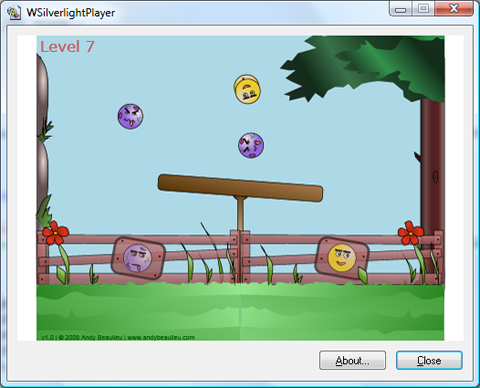
The demo shows how to use Silverlight in Windowless mode.
A huge number of demos would have to be presented if I had to consider all the ActiveX controls that we have at our disposal. Windows Form ActiveX controls can be hosted by your application as well. A demo is provided here as well.
Conclusion
This article presents a complete and real solution for the ATL windowless ActiveX container issue. I've described the steps necessary to integrate three popular controls in your own dialog. It is quite easy to use other ActiveX controls as well. The container may be used to develop custom composite control. Probably the most interesting part was to show how you can integrate Silverlight Application package (*.xap,*.xaml) within your solution with little effort. I hope you will consider the features that it offers and put them to use in your own program.
References
History
- 02/19/2009: Initial Release + Windows CE port
- 03/05/2009: Updated for Silverlight in Windowless and Viewer mode
Ernest is a multi-discipline software engineer.
Skilled at software design and development for all Windows platforms.
-
MCSD (C#, .NET)
Interests: User Interface, GDI/GDI+, Scripting, Android, iOS, Windows Mobile.
Programming Skills: C/C++, C#, Java (Android), VB and ASP.NET.
I hope you will enjoy my contributions.



 General
  News
News  Suggestion
  Question
  Bug
Bug  Answer
  Joke
Joke  Praise
  Rant
Rant  Admin
Admin 


 Submit an article or tip


 Yes, most documentation talk about these two interfaces. It's easier using ATL.
 ... the joys of legacy code!