Click here to Skip to main content

Generate Excel files without using Microsoft Excel

By , 22 Jun 2011
 

Introduction

Generating Excel files from web pages or other applications is a major subject in many articles. I'd like to present here a solution that does not require MS Excel to be installed on the target computer. This article shows how to create Microsoft Excel Binary Interchange File Format (BIFF) without using Microsoft Excel. BIFF is the native file format for Excel data, and can be viewed and modified in Microsoft Excel 97 or later.

Approaches and problems

The technique that is most frequently used to transfer data to an Excel workbooks is Automation. With Automation, you can call methods and properties that are specific to Excel tasks, but this solution has many drawbacks. Some of them are described in the Microsoft Knowledge Base. Additionally, you have to manage the lifetime of the temporary XLS files created on the server. Also, it is slow, because Excel runs in a separate process.

ExcelWriter class

The solution presented here is to write directly to a stream in Excel binary file format. For this purpose, I created very small C# class called ExcelWriter.
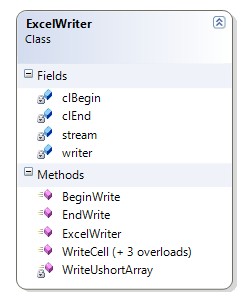
ExcelWriter class diagram
/// <summary>
/// Produces Excel file without using Excel
/// </summary>
public class ExcelWriter
{
    private Stream stream;
    private BinaryWriter writer;

    private ushort[] clBegin = { 0x0809, 8, 0, 0x10, 0, 0 };
    private ushort[] clEnd = { 0x0A, 00 };


    private void WriteUshortArray(ushort[] value)
    {
        for (int i = 0; i < value.Length; i++)
            writer.Write(value[i]);
    }

    /// <summary>
    /// Initializes a new instance of the <see cref="ExcelWriter"/> class.
    /// </summary>
    /// <param name="stream">The stream.</param>
    public ExcelWriter(Stream stream)
    {
        this.stream = stream;
        writer = new BinaryWriter(stream);
    }

    /// <summary>
    /// Writes the text cell value.
    /// </summary>
    /// <param name="row">The row.</param>
    /// <param name="col">The col.</param>
    /// <param name="value">The string value.</param>
    public void WriteCell(int row, int col, string value)
    {
        ushort[] clData = { 0x0204, 0, 0, 0, 0, 0 };
        int iLen = value.Length;
        byte[] plainText = Encoding.ASCII.GetBytes(value);
        clData[1] = (ushort)(8 + iLen);
        clData[2] = (ushort)row;
        clData[3] = (ushort)col;
        clData[5] = (ushort)iLen;
        WriteUshortArray(clData);
        writer.Write(plainText);
    }

    /// <summary>
    /// Writes the integer cell value.
    /// </summary>
    /// <param name="row">The row number.</param>
    /// <param name="col">The column number.</param>
    /// <param name="value">The value.</param>
    public void WriteCell(int row, int col, int value)
    {
        ushort[] clData = { 0x027E, 10, 0, 0, 0 };
        clData[2] = (ushort)row;
        clData[3] = (ushort)col;
        WriteUshortArray(clData);
        int iValue = (value << 2) | 2;
        writer.Write(iValue);
    }

    /// <summary>
    /// Writes the double cell value.
    /// </summary>
    /// <param name="row">The row number.</param>
    /// <param name="col">The column number.</param>
    /// <param name="value">The value.</param>
    public void WriteCell(int row, int col, double value)
    {
        ushort[] clData = { 0x0203, 14, 0, 0, 0 };
        clData[2] = (ushort)row;
        clData[3] = (ushort)col;
        WriteUshortArray(clData);
        writer.Write(value);
    }

    /// <summary>
    /// Writes the empty cell.
    /// </summary>
    /// <param name="row">The row number.</param>
    /// <param name="col">The column number.</param>
    public void WriteCell(int row, int col)
    {
        ushort[] clData = { 0x0201, 6, 0, 0, 0x17 };
        clData[2] = (ushort)row;
        clData[3] = (ushort)col;
        WriteUshortArray(clData);
    }

    /// <summary>
    /// Must be called once for creating XLS file header
    /// </summary>
    public void BeginWrite()
    {
        WriteUshortArray(clBegin);
    }

    /// <summary>
    /// Ends the writing operation, but do not close the stream
    /// </summary>
    public void EndWrite()
    {
        WriteUshortArray(clEnd);
        writer.Flush();
    }
}

Using the code

The ExcelWriter sample is a console application that writes an XLS file to the name and location specified. The XLS file that is created is simply an empty spreadsheet. Then, you can start to write cell values by calling the WriteCell method with the row number, column number, and a cell value as parameters:

namespace XLSExportDemo
{
    class Program
    {
        static void Main(string[] args)
        {
            FileStream stream = new FileStream("demo.xls", FileMode.OpenOrCreate);
            ExcelWriter writer = new ExcelWriter(stream);
            writer.BeginWrite();
            writer.WriteCell(0, 0, "ExcelWriter Demo");
            writer.WriteCell(1, 0, "int");
            writer.WriteCell(1, 1, 10);
            writer.WriteCell(2, 0, "double");
            writer.WriteCell(2, 1, 1.5);
            writer.WriteCell(3, 0, "empty");
            writer.WriteCell(3, 1);
            writer.EndWrite();
            stream.Close();
        }
    }
}

The picture below shows the final result of this sample:
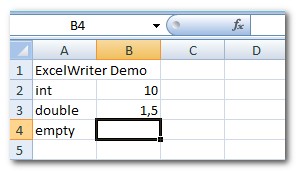
The ExcelWriter class supports numeric and text values for the cells, and can be used for exporting data from the database to an XLS file, or for producing an XLS stream from a website on the fly.

I hope this article gives you a head start in working with Excel files from .NET and C#.

History

  • 03 March 2009 - Initial submission.

License

This article, along with any associated source code and files, is licensed under The Code Project Open License (CPOL)

About the Author

Serhiy Perevoznyk
Architect
Belgium Belgium
Member
No Biography provided

Sign Up to vote   Poor Excellent
Add a reason or comment to your vote: x
Votes of 3 or less require a comment

Comments and Discussions

 
You must Sign In to use this message board.
Search this forum  
    Spacing  Noise  Layout  Per page   
Generalvery cool stuffmemberJerry139 May '13 - 2:31 
Smile | :)
So much time, but so little things I have to do.

QuestionI can't open the generated XLS file through Excel 2010memberJosen.L.Zhang9 Apr '13 - 0:03 
When i double click the XLS file, it told me : The file corrupt and cannot be opened.
AnswerRe: I can't open the generated XLS file through Excel 2010membersangheraajit14 Apr '13 - 22:04 
Do you got any fix for this.
Ajit Sanghera

Software Engineer
e-Soft Technologies
449 Oshiwara Industrial Estate,
Opp. Oshiwara Bus Depo,
Goregaon (w),
Mumbai 400104
ajit@esoftech.com

GeneralMy vote of 5memberDineshMaind5 Mar '13 - 6:01 
Awesome API...
QuestionPlease add Border Style at next upgradememberphong104057224 Jan '13 - 16:29 
This is great tool to export excel from Database or DataTable but please add Border Style of cell at next upgrade!
Thanks
SuggestionColumn Width AutoFit?mvpadriancs9 Jan '13 - 14:46 
Is it possible to make a Column Width AutoFit? Smile | :)
Something like:
public void ColumnWidthAutoFit(int column)
{
    ...
}

SuggestionCode Patch, Write DataTable [modified]mvpadriancs9 Jan '13 - 14:01 
code patch:
void WriteCell(System.Data.DataTable dt)
{
    WriteCell(0, 0, dt, true);
}
void WriteCell(int x, int y, System.Data.DataTable dt, bool writeTableHeader)
{
    if (writeTableHeader)
    {
        for (int i = 0; i < dt.Columns.Count; i++)
        {
            WriteCell(y, x + i, dt.Columns[i].ColumnName);
        }
        y = y + 1;
    }
 
    for (int i = 0; i < dt.Rows.Count; i++)
    {
        for (int j = 0; j < dt.Columns.Count; j++)
        {
            WriteCell(x + i, y + j, dt.Rows[i][j]);
        }
    }
}


modified 9 Jan '13 - 20:38.

QuestionIs it possible to Write stream to respose headers instead of a demo.xls file?membershabari713 Dec '12 - 0:25 
Is it possible to Write stream to respose headers instead of a demo.xls file?So, that an Open/save dialog would pop up
QuestionMore feature rich alternativememberAndrew Kirillov11 Nov '12 - 22:30 
NPOI[^] does the same, but provides much more features. Just in case of an interest ...
With best regards,
Andrew Kirillov
AForge.NET

AnswerRe: More feature rich alternativememberMember 940799029 Mar '13 - 16:58 
Upvoting this one for sure.   I don't know why, but the majority of solutions being presented on the net (even the prestigious StackOverflow) seem entirely worthless.
 
Apache's POI is reputable.   Use that.   Ignore everything else aside from Automation.

General General    News News    Suggestion Suggestion    Question Question    Bug Bug    Answer Answer    Joke Joke    Rant Rant    Admin Admin   

Permalink | Advertise | Privacy | Mobile
Web03 | 2.6.130523.1 | Last Updated 22 Jun 2011
Article Copyright 2009 by Serhiy Perevoznyk
Everything else Copyright © CodeProject, 1999-2013
Terms of Use
Layout: fixed | fluid
