Click here to Skip to main content

Binding a ListView to a Data Matrix

By , 15 May 2009
 

DynamicListView

Introduction

This article mainly shows how to bind a WPF ListView to a DataMatrix (an undefined data source with dynamic columns) where the ListView columns cannot be determined until runtime.

This article assumes that the reader has prior knowledge of WPF Data Binding and Dependency Properties. For more information on these topics, check out the following articles here on the CodeProject.

Background

Most of the work I do consists of churning undefined (but structured) datasets and generating meaningful information and trends - i.e., Data Analysis, Knowledge Discovery, and Trend Analysis. And as such, most of the data I get are never really similar. In situations like these, you need to come up with a generic way of doing basic stuff like data presentations (reporting) for any kind of dataset. This led me to create a DataMatrix a long time ago. But as we all know, it is not very obvious how to handle anonymous data in WPF.

I know I could have just used a regular DataTable and bound it to the WPF DataGrid, but I can assure you, when you deal with millions of records that cannot be virutalized, a DataTable becomes very heavy, hogs memory, and results in too much messy code [behind] with "Magic" strings all over the place. Besides, we have to keep things as M-V-VM as possible.

Using the Code

Basically, what we are going to do is bind a ListView to a DataMatrix class as shown below:

public class DataMatrix : IEnumerable
{
    public List<MatrixColumn> Columns { get; set; }
    public List<object[]> Rows { get; set; } 

    IEnumerator IEnumerable.GetEnumerator()
    {
        return new GenericEnumerator(Rows.ToArray());
    }
}

public class MatrixColumn
{
    public string Name { get; set; }
    public string StringFormat { get; set; }
}

Note that the MatrixColumn can always be extended with all the properties you need to format the GridViewColumns.

To achieve this, we need to create a DependencyProperty which will be added to the ListView so that when the DataMatrixSource is set, we can then bind the undefined columns to the ListView at runtime. Below is the class that contains the DependencyProperty.

public class ListViewExtension
{
    public static readonly DependencyProperty MatrixSourceProperty =
        DependencyProperty.RegisterAttached("MatrixSource",
        typeof(DataMatrix), typeof(ListViewExtension),
            new  FrameworkPropertyMetadata(null,
                new  PropertyChangedCallback(OnMatrixSourceChanged)));

    public static DataMatrix GetMatrixSource(DependencyObject d)
    {
        return (DataMatrix)d.GetValue(MatrixSourceProperty);
    }

    public static void SetMatrixSource(DependencyObject d, DataMatrix value)
    {
        d.SetValue(MatrixSourceProperty, value);
    }

    private static void OnMatrixSourceChanged(DependencyObject d,
        DependencyPropertyChangedEventArgs e)
    {
        ListView listView = d as ListView;
        DataMatrix dataMatrix = e.NewValue as DataMatrix;

        listView.ItemsSource = dataMatrix; 
        GridView gridView = listView.View as GridView; 
        int count = 0; 
        gridView.Columns.Clear();
        foreach (var col in dataMatrix.Columns)
        {
            gridView.Columns.Add(
                new  GridViewColumn
                    {
                        Header = col.Name,
                        DisplayMemberBinding = new Binding(stringM.Format("[{0}]", count))
                    }); 
            count++;
        }
    }
}

This will then be attached to the ListView as shown below:

<ListView cc:ListViewExtension.MatrixSource="{Binding MyDataMatrix}"/>

And that's all. At runtime, your columns will be added dynamically to the ListView's GridView. Note that the ListView's ItemsSource property expects an IEnumerable as the binding element; that is why the matrix implements this interface. This is provided by the GenericEnumerator shown below:

class GenericEnumerator : IEnumerator
{
    private readonly object[] _list;
    // Enumerators are positioned before the first element
    // until the first MoveNext() call. 

    private int _position = -1;

    public GenericEnumerator(object[] list)
    {
        _list = list;
    }

    public bool MoveNext()
    {
        _position++;
        return (_position < _list.Length);
    }

    public void Reset()
    {
        _position = -1;
    }

    public object Current
    {
        get
        {
            try { return _list[_position]; }
            catch (IndexOutOfRangeException) { throw new InvalidOperationException(); }
        }
    }
}

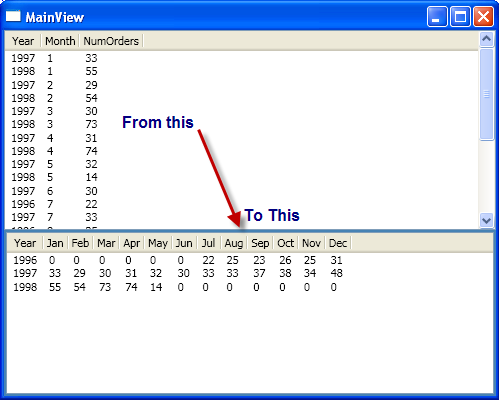
For this example, I used the generic Northwind database and bound to the Orders table (orders count per month/year); then I built a simple DataMatrix from the cross tabulation of the Year (row source) vs. Months (columns source) against the sum for the number of orders.

Given the Orders table, you can generate and bind to a well-known dataset to get the "Number of Orders per Month" as follows:

var orders = from o in db.Orders
 group o by new { o.OrderDate.Value.Year, o.OrderDate.Value.Month }
     into g
     select new MonthlyOrderCount() { Year = g.Key.Year, 
            Month = g.Key.Month, NumberOfOrders = g.Count() };

Which will result as shown below:

To get a more meaningful dataset from the above query, we need to cross-tabulate the year vs. month to get the total number of orders. So, we can run the dataset through a reporting algorithm and generate a DataMatrix as follows:

Note: This is a fake DataMatrixGenerator. A real one will determine the columns (at runtime) based on the parameters specified.

private static DataMatrix CreateMatrix(IEnumerable<monthlyordercount> orders)
{
    DataMatrix result = new DataMatrix {Columns = new List<matrixcolumn>(), 
                                        Rows = new List<object[]>()};
    result.Columns.Add(new MatrixColumn() { Name = "Year" });
    for (int i = 0; i < 12; i++)
        result.Columns.Add(new MatrixColumn()
        {
            Name = string.Format("{0:MMM}", new DateTime(2009, i + 1, 1))
        });
    for (int i = 1996; i < 1999; i++)
    {
        object[] row = new object[13];
        row[0] = i;
        for (int j = 1; j <= 12; j++)
        {
            int count = (from o in orders
                         where o.Year == i && o.Month == j
                         select o.NumberOfOrders).Sum();
            row[j] = count;
        }
        result.Rows.Add(row);
    }
    return result;
}

which will result as shown below:

We can then use this result set at runtime to bind dynamically to the list view using the DataMatrix.

Points of Interest

This approach can also be used for generating flow documents.

History

  • May 15 2009: Initial release.

License

This article, along with any associated source code and files, is licensed under The MIT License

About the Author

Tawani Anyangwe
Architect
United States United States
Member
No Biography provided

Sign Up to vote   Poor Excellent
Add a reason or comment to your vote: x
Votes of 3 or less require a comment

Comments and Discussions

 
You must Sign In to use this message board.
Search this forum  
    Spacing  Noise  Layout  Per page   
GeneralMy vote of 5memberOtto77713 May '12 - 21:46 
Short, clear and juicy. Taught the me how to extend controls in the general case.
QuestionHow can I add textbox to each of the columns?memberReddyKM7 Nov '11 - 15:11 
How can I add textbox to each of the columns?
GeneralMy vote of 5membergjvdkamp28 Feb '11 - 8:38 
Awesome article. Josh's matrix just went a little over my head, this one nailed it for me, very informative! Thanks!
QuestionHow did I miss this article for a long time?? question about GenericEnumerator()memberNamgeun Jeong19 Nov '10 - 8:43 
I can't describe how much I love your article. U da man! (What an Asian who moved into Harlem, New York city 3 months ago can say...)
 
In DataMatrix.cs
I simply replaced
 
return new GenericEnumerator(Rows.ToArray());
 
with
 
return Rows.AsEnumerable().GetEnumerator();
 
It worked just fine.
 
Is there any reason for creating GenericEnumerator class?
AnswerRe: How did I miss this article for a long time?? question about GenericEnumerator()memberTawani Anyangwe19 Nov '10 - 9:17 
Not really. I was thinking more in extending the DataMatrix. But your suggestion is excellent.
 
Thanks!
GeneralExcellent.memberozczecho26 Aug '10 - 21:21 
Worked a treat.
GeneralMy vote of 5memberMSdispenser29 Jun '10 - 2:25 
clean implementation.Thanks
GeneralAdd checkboxmemberlizamathew5 May '10 - 8:36 
How can I add a checkbox as the first row, so that I can either select/deselect the column?
GeneralGreat article.Can you please give me some helpmemberdefanana25 Apr '10 - 22:37 
hi,
It was great example.
I wanted to do that with reflection and you solved my problem.
I need something else maybe you can help me.
I need a list view with custom views like have in windows explorer (thumbnail,details,tile,icons).
I have a treeview which get it's data from WCF (and database) at every click it gets it's level and also a methos to get his childs for the list view but I was very complicated with le custom view of the listView.
As I mentioned, I need this to be in wpf and also it will be great having MVVM.
I get the data by WCF from the database means I have in the WPF browser application, services reference to my WCF.
I you need what I have done till now,I can upload it to a url you'll give me.
If you can help me'I'll be more that thankful.
QuestionAlso for DataGrid?memberChrDressler19 Nov '09 - 8:45 
Hi,
 
thanx for this fine article!
Is this also possible for the WPF DataGrid (from WPF Toolkit)?
 
-christoph
AnswerRe: Also for DataGrid?memberTawani Anyangwe19 Nov '09 - 9:50 
I'm sure the DataGrid can bind directly to a DataTable so you might not need this. However, I think the same technique will work for the WPF Toolkit DataGrid.
QuestionHow can changes to the Data Matrix appear in the ListView [modified]memberKortermand29 Jun '09 - 4:03 
Great post!!
Please help : How do I change the content of the ListView (for example based on user input or other event) ?
Regards Kim Kortermand
 
modified on Monday, June 29, 2009 10:21 AM

AnswerRe: How can changes to the Data Matrix appear in the ListViewmemberTawani Anyangwe1 Jul '09 - 9:23 
This is just a rough suggestion.
 
Given the helper method below:
 
<font color="blue">public static class</font> <font color="teal">Helpers</font>
{
    <font color="blue">public static</font> <font color="teal">IDataMatrix</font> ToDataMatrix(<font color="blue">this</font> <font color="teal">IDataReader</font> dr)
    {
        <font color="blue">int</font> fieldCount = dr.FieldCount;
        <font color="teal">IDataMatrix</font> result = <font color="blue">new</font> <font color="teal">DataMatrix</font>();
        <font color="blue">for</font> (<font color="blue">int</font> i = 0; i < fieldCount; i++)
        {
            result.AddColumn(dr.GetName(i), dr.GetFieldType(i));
        }
        <font color="blue">while</font> (dr.Read())
        {
            <font color="blue">object</font>[] row = <font color="blue">new</font> <font color="blue">object</font>[fieldCount];
 
            for (<font color="blue">int</font> i = 0; i < dr.FieldCount; i++)
            {
                row[i] = dr.GetValue(i);
            }
            result.AddRow(row);
        }
        <font color="blue">return</font> result;
    }    
}
 
You can dynamically create your matrices and bind them [to the ViewModel property] as follows:
 
<font color="blue">void</font> OnSelectionChange(<font color="blue">string</font> table)
{
    <font color="blue">string</font> sql = <font color="blue">null</font>;
    <font color="blue">if</font> (table == <font color="firebrick">"orders"</font>)
        sql = <font color="blue">"select * from orders"</font>;
    <font color="blue">else if</font> (table == <font color="firebrick">"customers"</font>)
        sql = <font color="firebrick">"select CustomerID as ID, companyName as Company from customers"</font>;
    <font color="blue">else
        throw new</font> ArgumentOutOfRangeException</font>(table);
    <font color="teal">IDataReader</font> dr = db.ExecuteReader(sql);
    <font color="blue">this</font>.MatrixSource = dr.ToDataMatrix();        
}
 
Then the INotifyPropertyChange should handle the currently displayed data in the listview.
GeneralNice one!memberPhilipp Sumi26 May '09 - 7:25 
I'll have to keep that one in mind - I'm pretty sure it'll come handy sooner or later.
Thanks for sharing Smile | :)
 
NetDrives - Open Source Network Share Management Awesomeness

GeneralExcellent articlemvpPete O'Hanlon25 May '09 - 23:42 
Have yourself a 5 sir.
 

"WPF has many lovers. It's a veritable porn star!" - Josh Smith

As Braveheart once said, "You can take our freedom but you'll never take our Hobnobs!" - Martin Hughes.

My blog | My articles | MoXAML PowerToys | Onyx


GeneralRe: Excellent articlememberTawani Anyangwe26 May '09 - 5:20 
Cool! Thanks for your support.
Generalapply cell template to the list view cellmembercaveman_197823 May '09 - 10:30 
Hi Tawani,
 
Thank you very much for the great article it was really clear and elegantly written. I have a question regrading the list view cell style.
 
I have a list view that I am creating dynamically. I would like to apply a different style to each cell according to cell value. If the cell is text the Foreground color should be blue, if the cell is a positive number I would like the color to be green and if the value is negative I would like the color to be red.
 
I tried to apply cell template (loading it from the control resource assigning it to the GridViewColumn cell template property) but it didn't work for me. Can you please advise me on this issue? I am new to WPF and I cannot find a solution to my problem.
 
I appreciate your help.
 
Kind Regards,
Haim
Thumbs Up | :thumbsup:
GeneralRe: apply cell template to the list view cell [modified]memberTawani Anyangwe26 May '09 - 3:43 
Off the top of my head, I think you modify the DataMatrixColumn to hold tags of items which you may need for the column styling such as CellTemplate and assign them to the GridViewColumn at runtime as shown below:
 
<font color="blue">public class</font> <font color="teal">DataMatrixColumn</font>
{
    <font color="blue">public string</font> Name { <font color="blue">get</font>; <font color="blue">set</font>; }
    <font color="blue">public string</font> Label { <font color="blue">get</font>; <font color="blue">set</font>; }
    <font color="blue">public string</font> StringFormat { <font color="blue">get</font>; <font color="blue">set</font>; }
    <font color="blue">public string</font> CellTemplate { <font color="blue">get</font>; <font color="blue">set</font>; }
 
    <font color="blue">public override string</font> ToString()
    {
        <font color="blue">return</font> this.Name;
    }
}
Then update the OnMatrixSourceChanged method in ListViewExtension to something like this:
<font color="blue">foreach</font> (<font color="blue">var</font> col in dataMatrix.Columns)
{
    <font color="teal">Binding</font> binding = <font color="blue">new</font> <font color="teal">Binding</font>(<font color="blue">string</font>.Format(<font color="firebrick">"[{0}]"</font>, count));
    if (!string.IsNullOrEmpty(col.StringFormat))
        binding.StringFormat = col.StringFormat;
 
    <font color="teal">GridViewColumn</font> gvc = <font color="blue">new</font> <font color="teal">GridViewColumn</font>
            {
                Header = col.Label ?? col.Name,
                DisplayMemberBinding = binding                        
            };
 
    <font color="teal">DataTemplate</font> cellTemplate = FindDataTemplate(listView, col.CellTemplate);
    <font color="blue">if</font> (cellTemplate != null)
        gvc.CellTemplate = cellTemplate;
    gridView.Columns.Add(gvc);
    count++;
}
I will try an update the article later this weekend.
 
<font color="blue">private static</font> <font color="teal">DataTemplate</font> FindDataTemplate(<font color="teal">ListView</font> listView, <font color="blue">string</font> templateKey)
{
    <font color="blue">if</font> (<font color="blue">string</font>.IsNullOrEmpty(templateKey))
        <font color="blue">return null</font>;
    <font color="blue">return</font> listView.FindResource(templateKey) <font color="blue">as</font> <font color="teal">DataTemplate</font>;
}

 
modified on Tuesday, May 26, 2009 11:14 AM

GeneralRe: apply cell template to the list view cellmembercaveman_197826 May '09 - 7:40 
That will be great. Thank you very much for the prompt response.
GeneralRe: apply cell template to the list view cellmembercaveman_19782 Jun '09 - 11:01 
Hi Tawani,
 
I tried to add data template to the listview cell template like you did in your example. I was able to load the data template from the listview resources but it didn't do anything to my cell. I checked it and it's not null but its visualTree property is null. What can I do?
 
Thanks
 
Haim :(
GeneralRe: apply cell template to the list view cellmemberTawani Anyangwe6 Jun '09 - 7:20 
Apparently, when you set the DisplayMemberBinding, the CellTemplate is ignored. So when using CellTemplate, do not set DisplayMemberBinding.
GeneralRe: apply cell template to the list view cellmemberIzhar Lotem14 Jun '10 - 3:02 
I encountered the same problem. I wanted to present boolean values in a checkbox. I couldn't use predefined Datatemplate due to the fact that its bounded to the object[] in Row. I solved it by creating my own datatemplate:
 
if (col.CellTemplate != null)
{
DataTemplate dt = new DataTemplate();
FrameworkElementFactory checkBoxFactory = new FrameworkElementFactory(typeof(CheckBox));
checkBoxFactory.SetBinding(CheckBox.IsCheckedProperty, binding);
checkBoxFactory.SetValue(CheckBox.IsEnabledProperty, false);
dt.VisualTree = checkBoxFactory;

gvc.CellTemplate = dt;
}
 
Hope this helps,
 
Izhar Lotem
GeneralRe: apply cell template to the list view cellmemberkrishnan.s25 Aug '10 - 16:17 
Hi,
I tried applying the data template for the cells. Can u pls tell how to do the binding in the xaml for the datatemplate as the columns are created dynamically
 
Thanks
Krish
GeneralVery nice sirmvpSacha Barber17 May '09 - 6:45 
I salute you.
 
Thanks for that. Have a 5
 
Sacha Barber
  • Microsoft Visual C# MVP 2008/2009
  • Codeproject MVP 2008/2009
Your best friend is you.
I'm my best friend too. We share the same views, and hardly ever argue
 
My Blog : sachabarber.net

GeneralRe: Very nice sirmemberTawani Anyangwe17 May '09 - 7:55 
Thanks .. especially coming from u!

General General    News News    Suggestion Suggestion    Question Question    Bug Bug    Answer Answer    Joke Joke    Rant Rant    Admin Admin   

Permalink | Advertise | Privacy | Mobile
Web01 | 2.6.130516.1 | Last Updated 15 May 2009
Article Copyright 2009 by Tawani Anyangwe
Everything else Copyright © CodeProject, 1999-2013
Terms of Use
Layout: fixed | fluid
