Click here to Skip to main content

PolyBtn, a polygon button class

By , 23 Feb 2003
 

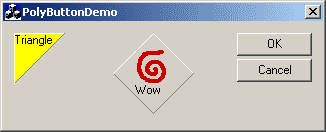
Sample Image - polybtn.gif

Introduction

CPolyBtn is a simple CButton derivative that allows you to create buttons that aren't rectangles or circles or any other typical geometric shape; with CPolyBtn, you specify the button shape by providing a series of points that define a polygon.

What can it do?

CPolyBtn does all of the normal button stuff: rollovers, bitmaps, tooltips, focus colors, fill colors, disabled colors, etc..

How can I use it?

You create a button on your dialog, then create a member variable of type CPolyBtn. You know, the standard stuff. Then, in your CDialog's InitInstance, before calling CDialog::InitInstance you create a std::vector of CPoint objects, one for each polygon point, where the points are arranged in clockwise order, then assign the vector to the CPolyBtn. CPolyBtn will determine highlight and shadow colors for each edge, set up the regions and handle everything else.
   // make a triangle button
   std::vector<CPoint> pts;

   const int triEdgeSize = 16;

   pts.push_back(CPoint(0,0));
   pts.push_back(CPoint(triEdgeSize,0));
   pts.push_back(CPoint(0,triEdgeSize));

   m_zoomInBtn.SetPoints(pts);
   m_zoomInBtn.SetBMPOffset(2,2);
   m_zoomInBtn.SetBMPID(IDB_ZOOM_IN, RGB(255,255,255), IDB_ZOOM_IN_DISABLED, <BR>                        RGB(255,255,255));

At this point, you can also add bitmaps, set text positions, etc..

For those of you who demand control, CPolyBtn also provides a way for you to specify the colors for each edge manually (normal, highlight, focused, disabled, etc..). This method takes more work, of course. But if you need that much control, the option is there.

Other options

// optionally set the colors used.
void SetColors(COLORREF highlight, COLORREF down, COLORREF focus, <BR>               COLORREF disabled, COLORREF rollover);
 
// set the color to fill with. default ::GetSysColor(COLOR_BTNFACE);
void SetFillColor(COLORREF fillClr);
  
// draw bitmap at this offset
void SetBMPOffset(int x, int y);
  
// draw window text at this offset
void SetTextOffset(int x, int y);
 
// optional tooltip
void SetTooltipText(LPCTSTR lpszText, BOOL bActivate = TRUE);
void ActivateTooltip(BOOL bEnable = TRUE);
 
// when using the SetPoints method, you can decide to highlight lines 
// that are more than -45 degrees below horizontal (default false)
void AllowHighlightOnGtrNeg45(bool b);
 
// should the button change color when the mouse moves over ? (default false)
void AllowRollover(bool b);

Issues

In general, I'm not crazy about the way the edges are drawn. Because there's no good way to shrink a polygon, it's hard to draw the button edge like a normal button where the edges are actually two parallel lines, with different colors. So, the edges here are always a single pixel wide. Another example of where this is an issue is in the "focus" rendering: normally, button focus is indicated by drawing a dashed rectangle inside the border. But, since there's no simple way to determine what 'inside' means for all arbitrary polygons, CPolyBtn doesn't bother; it handles focus by drawing the edges with the PS_DOT pen style. (sure, there are complex ways to find the inside of a polygon, but that's more work than i wanted to put into this, and i didn't need it anyway).

Anyway...

If you come up with any improvements on this, feel free to share!

And remember, be excellent to each other.

License

This article has no explicit license attached to it but may contain usage terms in the article text or the download files themselves. If in doubt please contact the author via the discussion board below.

A list of licenses authors might use can be found here

About the Author

Chris Losinger
Software Developer
United States United States
Member
Chris Losinger is the president of Smaller Animals Software, Inc..

Sign Up to vote   Poor Excellent
Add a reason or comment to your vote: x
Votes of 3 or less require a comment

Comments and Discussions

 
You must Sign In to use this message board.
Search this forum  
    Spacing  Noise  Layout  Per page   
GeneralHelpmemberBoscoW23 Mar '03 - 5:42 
Hi i have found another use for these buttons Smile | :)
But i need help because wenn i add member variables in
my header file : MyapplicationDLG.h
like this:
CPolyBtn m_ButtonBack;
and i compile the app and run it dosent start in debug mode i
get a dlgbox:
Unhandled exception in ......exe: 0x0000005: Access Violation.
 
?????????????? Please help me Confused | :confused:
 
thx Bosco
GeneralRe: HelpmemberChris Losinger23 Mar '03 - 5:45 
where does the access violation happen?
 
-c


Image tools: ThumbNailer, Bobber, TIFFAssembler

GeneralRe: HelpmemberBoscoW23 Mar '03 - 6:38 
-> 00000000 ???
00000001 ???
00000002 ???
00000003 ???
00000004 ???
00000005 ???
00000006 ???
00000007 ???
00000008 ???
00000009 ???
0000000A ???
0000000B ???
0000000C ???
0000000D ???
0000000E ???
 
And wenn i clicked on step into (very long time and at one time i must clickt step out our over because i didn't come on):
 
int AFXAPI AfxWinMain(HINSTANCE hInstance, HINSTANCE hPrevInstance,
LPTSTR lpCmdLine, int nCmdShow)
{
ASSERT(hPrevInstance == NULL);
 
int nReturnCode = -1;
CWinThread* pThread = AfxGetThread();
CWinApp* pApp = AfxGetApp();
 
// AFX internal initialization
if (!AfxWinInit(hInstance, hPrevInstance, lpCmdLine, nCmdShow))
goto InitFailure;
 
// App global initializations (rare)
if (pApp != NULL && !pApp->InitApplication())
goto InitFailure;
 
// Perform specific initializations
-> if (!pThread->InitInstance())
{
if (pThread->m_pMainWnd != NULL)
{
TRACE0("Warning: Destroying non-NULL m_pMainWnd\n");
pThread->m_pMainWnd->DestroyWindow();
}
nReturnCode = pThread->ExitInstance();
goto InitFailure;
}
nReturnCode = pThread->Run();
 
InitFailure:
#ifdef _DEBUG
// Check for missing AfxLockTempMap calls
if (AfxGetModuleThreadState()->m_nTempMapLock != 0)
{
TRACE1("Warning: Temp map lock count non-zero (%ld).\n",
AfxGetModuleThreadState()->m_nTempMapLock);
}
AfxLockTempMaps();
AfxUnlockTempMaps(-1);
#endif
 
AfxWinTerm();
return nReturnCode;
}
GeneralRe: HelpmemberChris Losinger23 Mar '03 - 6:39 
this doesn't look like a problem that CPolyBtn would cause. Unsure | :~
 
does the problem happen if you remove the CPolyBtn variables ?


Image tools: ThumbNailer, Bobber, TIFFAssembler

GeneralRe: HelpmemberBoscoW23 Mar '03 - 9:29 
Yes do it ;-( i have chek that i can include the h file of CPolyBTn but wenn ich add a member variable of Cp.. than d the prog dosent start up.
and i not working offten whith the debger so i only give wat came sorry Wink | ;-)
I thin it is a problem whith something of Poly class i dont no but maybe it
is something what is included like this:
#include
 
#pragma comment(lib, "msimg32.lib") // for TransparentBlt
 
i have nerver seen without .h and i have never seen #pragma comment(lib, "msimg32.lib")
but i think i know wath it do.
 
or class CPolyBtn : public CButton maybe public CButton made the problem because i use member variables of CButton but i have thest it and all buttons made to CPolyBtn ssoooo Its very confising but i know the problems wenn the prog not start up and often you must only change one thing and it works.
GeneralRe: HelpmemberChris Losinger23 Mar '03 - 15:19 
if you don't need to use bitmaps, you can comment out that #pragam line, and also comment out the call to TransparentBlt in the _TransparentBlt function.
 
-c


Image tools: ThumbNailer, Bobber, TIFFAssembler

General General    News News    Suggestion Suggestion    Question Question    Bug Bug    Answer Answer    Joke Joke    Rant Rant    Admin Admin   

Permalink | Advertise | Privacy | Mobile
Web04 | 2.6.130523.1 | Last Updated 24 Feb 2003
Article Copyright 2003 by Chris Losinger
Everything else Copyright © CodeProject, 1999-2013
Terms of Use
Layout: fixed | fluid
