Click here to Skip to main content

Windows Authentication Using Form Authentication

By , 1 Jul 2009
 
Windows Authentication using Form Authentication

Background

Last month I worked on a small assignment to authenticate windows account (Domain or Local) using form authentication. The purpose of this task was to facilitate our application users to login with any valid windows account (instead of automatic authentication of windows logged in user).

As it was an interesting task, I decided to share my experience with you.

Requirement

The application should authenticate windows user using form authentication so that the currently logged in user shouldn't be bound to logged-in in the application only with his windows account. He should be able to log-in with any valid windows account.

Solution

We need to do the following steps to get the desired functionality:

  1. Configure Authorization and Authentication settings in web.config
  2. A login page and execute logic to authenticate provided credential of windows user
  3. If provided credentials are authenticated in step 2, then generate an authentication token so that user should be able to navigate into the authorized pages of your application.

1. Configure Authorization and Authentication Settings in web.config

We need to use Form authentication. The user will enter his windows credential in the form and we will validate provided windows credential using custom logic in step 2.

<authentication mode="Forms">
	<forms loginUrl="login.aspx" name=".ASPXFORMSAUTH"></forms>
</authentication>

To restrict anonymous access, you need to make the following authorization settings in web.config:

<authorization>
	<deny users="?"/>
</authorization>

2. Create a Login Page and Execute Logic to Authenticate Provided Credential of Windows User

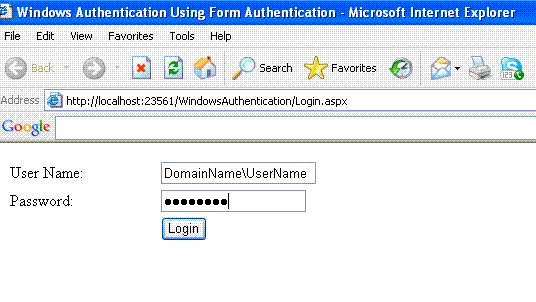
We need to create a login page (e.g. login.aspx) to get username and password information from user and then validate them. We can have different options to validate windows credentials, the way I chose is LogonUser() method of a win32 API called Advapi32.dll.

The LogonUser function attempts to log a user on to the local computer. This method takes username, password and other information as input and returns a Boolean value to indicate that either user is logged or not. If it returns true, it means the provided username and password are correct. To use this method in our class, we need to include the following namespace:

using System.Runtime.InteropServices;

And the add method declaration with DLLImport attribute (as this is a method of Win32 DLL which is an unmanaged DLL).

[DllImport("ADVAPI32.dll", EntryPoint = 
	"LogonUserW", SetLastError = true, CharSet = CharSet.Auto)]
public static extern bool LogonUser(string lpszUsername, string lpszDomain, 
	string lpszPassword, int dwLogonType, int dwLogonProvider, ref IntPtr phToken);

According to the MSDN documentation:

lpszUsername [in]

A pointer to a null-terminated string that specifies the name of the user. This is the name of the user account to log on to. If you use the user principal name (UPN) format, User@DNSDomainName, the lpszDomain parameter must be NULL.

lpszDomain [in, optional] 

A pointer to a null-terminated string that specifies the name of the domain or server whose account database contains the lpszUsername account. If this parameter is NULL, the user name must be specified in UPN format. If this parameter is ".", the function validates the account by using only the local account database.

lpszPassword [in] 

A pointer to a null-terminated string that specifies the plaintext password for the user account specified by lpszUsername. When you have finished using the password, clear the password from memory by calling the SecureZeroMemory function. For more information about protecting passwords, see Handling Passwords.

dwLogonType [in] 

The type of logon operation to perform.

dwLogonProvider [in] 

Specifies the logon provider.

phToken [out] 

A pointer to a handle variable that receives a handle to a token that represents the specified user.

3. Generate an Authentication Token, If Provided Credentials are Authenticated in step 2

If provided credentials are authenticated by LogonUser() method, then we need to generate an authentication token so that users should be able to navigate into the authorized pages of the application.

FormsAuthentication.RedirectFromLoginPage()

Or:

FormsAuthentication.SetAuthCookie()

can be used for this purpose.

Here is login button’s Click handler code for authentication and generating authentication token. The comments will help you to understand the code.

protected void btnLogin_Click(object sender, EventArgs e)
    {
        string domainName = GetDomainName(txtUserName.Text); // Extract domain name 
			// form provided DomainUsername e.g Domainname\Username
        string userName = GetUsername(txtUserName.Text);  // Extract user name 
			// from provided DomainUsername e.g Domainname\Username
        IntPtr token = IntPtr.Zero;

        //userName, domainName and Password parameters are very obvious.
        //dwLogonType (3rd parameter): 
        //    I used LOGON32_LOGON_INTERACTIVE, This logon type 
        //    is intended for users who will be interactively using the computer, 
        //    such as a user being logged on by a terminal server, remote shell, 
        //    or similar process. 
        //    This logon type has the additional expense of caching 
        //    logon information for disconnected operations.
        //    For more details about this parameter please 
        //    see http://msdn.microsoft.com/en-us/library/aa378184(VS.85).aspx
        //dwLogonProvider (4th parameter) :
        //    I used LOGON32_PROVIDER_DEFAUL, This provider use the standard 
        //    logon provider for the system. 
        //    The default security provider is negotiate, unless you pass 
        //    NULL for the domain name and the user name is not in UPN format. 
        //    In this case, the default provider is NTLM. For more details 
        //    about this parameter please see 
        //    http://msdn.microsoft.com/en-us/library/aa378184(VS.85).aspx
        //phToken (5th parameter):
        //    A pointer to a handle variable that receives a handle to 
        //    a token that represents the specified user. 
        //    We can use this handler for impersonation purpose. 
        bool result = LogonUser(userName, domainName, 
				txtPassword.Text, 2, 0, ref token);
        if (result)
        {
            //If Successfully authenticated

            //When an unauthenticated user try to visit any page of your 
            //application that is only allowed to view by authenticated users 
            //then ASP.NET automatically redirect that user to login form 
            //and add ReturnUrl query string parameter that contain the URL of 
            //a page that user want to visit, So that we can redirect the 
            //user to that page after authenticated. 
            //FormsAuthentication.RedirectFromLoginPage() method not only 
            //redirect the user to that page but also generate an authentication 
            //token for that user.
            if (string.IsNullOrEmpty(Request.QueryString["ReturnUrl"]))
            {
                FormsAuthentication.RedirectFromLoginPage(txtUserName.Text, false);
            }
            //If ReturnUrl query string parameter is not present, 
            //then we need to generate authentication token and redirect the user 
            //to any page ( according to your application need). 
            //FormsAuthentication.SetAuthCookie() method will 
            //generate Authentication token 
            else
            {
                FormsAuthentication.SetAuthCookie(txtUserName.Text, false);
                Response.Redirect("default.aspx");
            }
        }
        else
        {
            //If not authenticated then display an error message
            Response.Write("Invalid username or password.");
        }
    }

Let's Put It All Together

Login.aspx

<%@ Page Language="C#" AutoEventWireup="true" CodeFile="Login.aspx.cs" 
	Inherits="Login" %>

<!DOCTYPE html PUBLIC "-//W3C//DTD XHTML 1.0 Transitional//EN" 
	"http://www.w3.org/TR/xhtml1/DTD/xhtml1-transitional.dtd">

<html xmlns="http://www.w3.org/1999/xhtml">
<head runat="server">
    <title>Windows Authentication Using Form Authentication</title>
    <style type="text/css">
        .style1
        {
            width: 100%;
        }
    </style>
</head>
<body>
    <form id="form1" runat="server">
    <div>
    
        <table class="style1">
            <tr>
                <td>
                    <asp:Label ID="lblUserName" runat="server" Text="User Name:">
		 </asp:Label>
                </td>
                <td>
                    <asp:TextBox ID="txtUserName" runat="server"></asp:TextBox>
                </td>
            </tr>
            <tr>
                <td>
                    <asp:Label ID="lblPassword" runat="server" Text="Password:">
		  </asp:Label>
                </td>
                <td>
                    <asp:TextBox ID="txtPassword" runat="server" TextMode="Password" >
		  </asp:TextBox>
                </td>
            </tr>
            <tr>
                <td>
                     </td>
                <td>
                    <asp:Button ID="btnLogin" runat="server" onclick="btnLogin_Click" 
                        Text="Login" />
                </td>
            </tr>
        </table>
    
    </div>
    <p>
         </p>
    </form>
</body>
</html>

Login.aspx.cs

using System;
using System.Collections;
using System.Configuration;
using System.Data;
using System.Linq;
using System.Web;
using System.Web.Security;
using System.Web.UI;
using System.Web.UI.HtmlControls;
using System.Web.UI.WebControls;
using System.Web.UI.WebControls.WebParts;
using System.Runtime.InteropServices;

public partial class Login : System.Web.UI.Page
{
    [DllImport("ADVAPI32.dll", EntryPoint = 
	"LogonUserW", SetLastError = true, CharSet = CharSet.Auto)]
    public static extern bool LogonUser(string lpszUsername, 
	string lpszDomain, string lpszPassword, int dwLogonType, 
	int dwLogonProvider, ref IntPtr phToken);

    /// <summary>
    /// Parses the string to pull the domain name out.
    /// </summary>
    /// <param name="usernameDomain">The string to parse that must 
    /// contain the domain in either the domain\username or UPN format 
    /// username@domain</param>
    /// <returns>The domain name or "" if not domain is found.</returns>
    public static string GetDomainName(string usernameDomain)
    {
        if (string.IsNullOrEmpty(usernameDomain))
        {
            throw (new ArgumentException("Argument can't be null.", "usernameDomain"));
        }
        if (usernameDomain.Contains("\\"))
        {
            int index = usernameDomain.IndexOf("\\");
            return usernameDomain.Substring(0, index);
        }
        else if (usernameDomain.Contains("@"))
        {
            int index = usernameDomain.IndexOf("@");
            return usernameDomain.Substring(index + 1);
        }
        else
        {
            return "";
        }
    }

    /// <summary>
    /// Parses the string to pull the user name out.
    /// </summary>
    /// <param name="usernameDomain">The string to parse that must 
    /// contain the username in either the domain\username or UPN format 
    /// username@domain</param>
    /// <returns>The username or the string if no domain is found.</returns>
    public static string GetUsername(string usernameDomain)
    {
        if (string.IsNullOrEmpty(usernameDomain))
        {
            throw (new ArgumentException("Argument can't be null.", "usernameDomain"));
        }
        if (usernameDomain.Contains("\\"))
        {
            int index = usernameDomain.IndexOf("\\");
            return usernameDomain.Substring(index + 1);
        }
        else if (usernameDomain.Contains("@"))
        {
            int index = usernameDomain.IndexOf("@");
            return usernameDomain.Substring(0, index);
        }
        else
        {
            return usernameDomain;
        }
    }  

    protected void btnLogin_Click(object sender, EventArgs e)
    {
        string domainName = GetDomainName(txtUserName.Text); // Extract domain name 
			//form provide DomainUsername e.g Domainname\Username
        string userName = GetUsername(txtUserName.Text);  // Extract user name 
			//from provided DomainUsername e.g Domainname\Username
        IntPtr token = IntPtr.Zero;

        //userName, domainName and Password parameters are very obvious.
        //dwLogonType (3rd parameter): 
        //    I used LOGON32_LOGON_INTERACTIVE, This logon type is 
        //    intended for users who will be interactively using the computer, 
        //    such as a user being logged on by a terminal server, remote shell, 
        //    or similar process. 
        //    This logon type has the additional expense of caching 
        //    logon information for disconnected operations.
        //    For more details about this parameter please see 
        //    http://msdn.microsoft.com/en-us/library/aa378184(VS.85).aspx
        //dwLogonProvider (4th parameter) :
        //    I used LOGON32_PROVIDER_DEFAUL, This provider use the standard 
        //    logon provider for the system. 
        //    The default security provider is negotiate, unless you pass 
        //    NULL for the domain name and the user name is not in UPN format. 
        //    In this case, the default provider is NTLM. For more details 
        //    about this parameter please see 
        //    http://msdn.microsoft.com/en-us/library/aa378184(VS.85).aspx
        //phToken (5th parameter):
        //    A pointer to a handle variable that receives a handle to a 
        //    token that represents the specified user. We can use this handler 
        //    for impersonation purpose. 
        bool result = LogonUser(userName, domainName, txtPassword.Text, 2, 0, ref token);
        if (result)
        {
            //If Successfully authenticated

            //When an unauthenticated user try to visit any page of your 
            //application that is only allowed to view by authenticated users then,
            //ASP.NET automatically redirect the user to login form and add 
            //ReturnUrl query string parameter that contain the URL of a page that 
            //user want to visit, So that we can redirect the user to that page after 
            //authenticated. FormsAuthentication.RedirectFromLoginPage() method 
            //not only redirect the user to that page but also generate an 
            //authentication token for that user.
            if (string.IsNullOrEmpty(Request.QueryString["ReturnUrl"]))
            {
                FormsAuthentication.RedirectFromLoginPage(txtUserName.Text, false);
            }
            //If ReturnUrl query string parameter is not present, 
            //then we need to generate authentication token and redirect 
            //the user to any page ( according to your application need). 
            //FormsAuthentication.SetAuthCookie() 
            //method will generate Authentication token 
            else
            {
                FormsAuthentication.SetAuthCookie(txtUserName.Text, false);
                Response.Redirect("default.aspx");
            }
        }
        else
        {
            //If not authenticated then display an error message
            Response.Write("Invalid username or password.");
        }
    }
}

And We Are DONE!!!

We are done with authentication of windows account using form authentication.

Feedback

You feedback will be very helpful for me. You can send me an email at akhhttar@gmail.com. Thanks!

License

This article, along with any associated source code and files, is licensed under The Common Public License Version 1.0 (CPL)

About the Author

Muhammad Akhtar Shiekh
Software Developer Imanami Corporation
Pakistan Pakistan
I am Microsoft Certified Technology Specialist for Web Application Development. I have 4 year experience of Web and Distributed application development.I have considerable experience developing client / server software for major corporate clients using the Windows operating systems and .NET platform ( ASP.NET, C# , VB.NET).I have single and multi-threaded code development experience, as well as experience developing database and enterprise level distributed applications.


Sign Up to vote   Poor Excellent
Add a reason or comment to your vote: x
Votes of 3 or less require a comment

Comments and Discussions

 
You must Sign In to use this message board.
Search this forum  
    Spacing  Noise  Layout  Per page   
QuestionRe: getting an error system.argumentexception herememberMember 94688541-Oct-12 6:23 
Were you able to resolve this? I'm running into the same problem.
AnswerRe: getting an error system.argumentexception herememberMuhammad Akhtar Shiekh4-Jan-13 22:19 
Log shows that your website is running under Minimal trust level, I think that might be be causing the issue.
QuestionAuthentication fail for non-domain usermemberankyshah11-Nov-11 20:12 
Hi Akhtar,
 
I tried your code for non-domain user but it not succeed. I pass
result = LogonUser(Environment.UserName, "", "pwd", 2, 0, token)
 
What is wrong?
AnswerRe: Authentication fail for non-domain usermemberMuhammad Akhtar Shiekh4-Jan-13 22:13 
I think you are not passing the correct username and password to LogonUser method. You have to pass the username and password that user has entered on login screen.
 
I have just tested the code with local user and its working fine.
GeneralAuto AuthenticationmemberWolfram Steinke6-Feb-11 17:30 
A quick question that will probably require a long answer.
I would like to have a client app automatically add an encrypted username/password for authentication to the requested URL. The login page is to then process this automatically and once authenticated send a response which is effectively a download of a small ecrypted file by the client. Once the download is complete (no lager than 1k so it should be quick) the session is done.
 
How is the best most efficient way to achieve this?
Happy programming!!

GeneralRe: Auto AuthenticationmemberIrwan Hassan20-Feb-11 18:00 
Hi, I guess you are running the application on the client PC which is Join to the domain controller. If yes, then you can use the Win32 API directly in your application. Just use the LogonUser API in your application. No need a webserver for this.
 
If your client is not connected to the domain controller, then you can use the above source code. Just modify the webform to get the binary which is the one user send to the web server and process the LogonUser. Once success, response the user app the Logon Successfull and end the session else inform the user the Logon is not successfull and you can terminate the session if you want.
 
I guess you understand what I explain above.
 
Thanks.
QuestionHow to log offmemberMember 445189418-Jan-11 1:52 
Very nice article and I have added to my app.
 
Now how do I logOff the application and exit the browser.
 
Thanks in advance.
AnswerRe: How to log offmemberMuhammad Akhtar Shiekh4-Jan-13 22:01 
User FormsAuthentication.SignOut() method.
GeneralGreat example! Questions: how to add aditional pagesmemberttre4r43r5-May-10 11:37 
Hello
I am new to coding. How could I go about adding more pages and prevent users from viewing those pages without authentication. Could you post header sample?
Thank you very much
AnswerRe: Great example! Questions: how to add aditional pagesmemberMuhammad Akhtar Shiekh17-May-10 2:59 
Hi,
 
As far as you have configured web.config according to the guidance in article, all of your pages will automatically be secured and only authenticated users can view the pages. Whenever unauthenticated user will try to access any of the page, he will be redirected to the login.aspx. ASP.NET Form authentication do all these things for us.
 
Thanks
Akhtar
GeneralWindows Authentication in stand-alone appmembernewspicy25-Aug-09 23:50 
Hi
 
This is a good tutorial thanks.
 
But i have a problem
How could i use Windows authentication and authorization for access my application?
I dont wanna use this for IIS or ASP, im try to write an stand-alone application
but need this kind of authenticaton and authorization principal to work with it,
so different users can access it but some not.
 
Thanks
Betize
AnswerRe: Windows Authentication in stand-alone appmemberakhhttar26-Aug-09 5:25 
Hi,
 
You can use the same technique to authenticate windows user in desktop application. You can authenticate the user using LogonUser() method, and instead of creating authentication token using FormAuthentication class, you can use you own boolean flag to store the information that either user was authenticated or not. If you are facing any problem while implementing the same technique in desktop application please let me know.
 
Thanks
-Akhtar
GeneralNice Article.Good going AkhtarmemberKamran Shahid8-Jul-09 1:47 
Nice Article.Good going Akhtar
GeneralUsing this for sharepointmemberbereddin7-Jul-09 21:30 
dear .. how can i use it for sharepoint..
all what i need is to remove defult windows authentication pop up and make new loging page using windows authentication ... as in your post ..
but when i redirect to sharepoint portal after authentication successfully passed i got sharepoint access denied page ..
do you have any idea why is that happen ..
thanks alot ..
GeneralRe: Using this for sharepointmemberakhhttar10-Jul-09 2:23 
Hi,
 
I would definatly like to help you but you erros seeems a sharepoint error and I have no expierence to work with Sharepoint Frown | :(
 
Because as you are saying that LogonUser is sucessfully authenticating the credentials and error comes when you redirect, it seems that this error is particullary related to sharepoint.
 
Thank You
Akhtar
GeneralCannot login with non-administrators privilegememberSavun2-Jul-09 16:04 
It works fine when i log in as administrators privilege. But with a normal domain user, it doesn't succeed. Please advise.
GeneralRe: Cannot login with non-administrators privilegememberakhhttar2-Jul-09 23:55 
Hi,
 
I tested this application with notmail domain user and it works for me. Which exception you are getting?
 
Thanks
-Akhtar
GeneralRe: Cannot login with non-administrators privilege [modified]memberSavun5-Jul-09 18:19 
Hi Akhtar,
 
Thanks for your reply but let me write more about my story. I am writing code in my laptop (which is being joined into a domain controller). When debugging in my laptop, the function works fine (with all users in domain controller). When distributing to web server (which is also domain controller), the function always returns false (with no error message) with non-administrator privilege. My web server runs on Windows Server 2003.
 
Thanks,
 
modified on Monday, July 6, 2009 12:25 AM

GeneralRe: Cannot login with non-administrators privilegememberSavun6-Jul-09 18:20 
Hi Akhtar,
 
FYI, the issue has been solved by using dwLogonType 3: LOGON32_LOGON_NETWORK
 
Anyway, thanks for your reply.
 
Cheers
Savun
GeneralRe: Cannot login with non-administrators privilegememberakhhttar7-Jul-09 6:41 
Hi Savun,
 
Its good to hear that your problem is resolved Smile | :) .
 
Thanks
Akhtar
GeneralRe: Cannot login with non-administrators privilegememberIrwan Hassan20-Feb-11 18:07 
Hi, Just want to add my comment.
 
I guess the answer for your question is because normal your don't have access to your domain controller to login as Interactive. They should Login using network access, not interactive. Interactive means that the user able to login to the domain controller to use the server, network access means that a user once use the network services provided by the domain controller.
 
I hope I answer your question.
 
Thanks.
GeneralNicememberMd. Marufuzzaman1-Jul-09 23:06 
Good work...I think some more description required, I vote 3 for this article.
 
Md. Marufuzzaman

GeneralInformationmemberkamarchand1-Jul-09 2:00 
Hi,
 
I always see Form Authentification used with an asp.net solution.
Can we use the same Authentification method in a winform solution or WPF solution.
 

Thanks
GeneralRe: InformationmemberStephen Inglish1-Jul-09 2:34 
Yes, you just have to include the System.Web.Security dll into your Windows Forms, or WPF solution.
 
Stephen Inglish
Consultant
Sogeti USA
MCPD: Windows Developer
MCPD: Web Developer
MCPD: Enterprise Developer

Generalgood onemembersarfraz_ch1-Jul-09 0:27 
nice article. Akhtar keep going

General General    News News    Suggestion Suggestion    Question Question    Bug Bug    Answer Answer    Joke Joke    Rant Rant    Admin Admin   

Permalink | Advertise | Privacy | Mobile
Web02 | 2.6.130617.1 | Last Updated 1 Jul 2009
Article Copyright 2009 by Muhammad Akhtar Shiekh
Everything else Copyright © CodeProject, 1999-2013
Terms of Use
Layout: fixed | fluid