Overview
Sometimes, we need to display the XML data in our web application in a specific format. XSLT provides the ability to display the XML document in some specific format like HTML, PDF, etc. We can select an XML file or a portion of XML File and using XSL Transformation, we can display in some specific format.
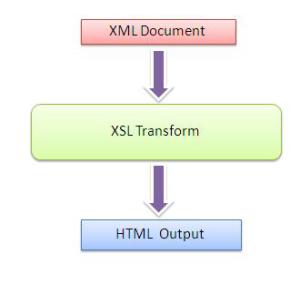
An XSL transformation needs an XML document to transform and an XSL style sheet describing how the transformation will take place. An XSLT engine then transforms the XML document via the XSL style sheet and will produce the output in the format specified by the style sheet.
Here, I am just going to show you how we can display an XML data using XSL in our web page and which will help beginners to start with. This is a sample application. The XSL, which I have used over here is very simple. If you want to learn details on XSL, please read tutorials from W3School.
How to Implement ?
In this section, I have described the steps which we need to follow to render an XML data using XSL. The source of the data can be anything, we can load data from text file, database or can be an XML file itself. But at the time of XSLTranformation, we need to provide the XML data format and the XSL file path.
The steps are listed below.
1. Create Database
Rather than reading the data from XML, I have read the data from database. First of all, I have created a DB, called Student with table name “StudentDetails”. The table contains some dummy data like:
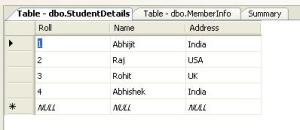
Figure: Sample Data
2. Add XSL File
Before, reading the data from database, we have to create the XSL file. We can add XSL file by just right clicking on the project > Add New Item >Select XSLT File.
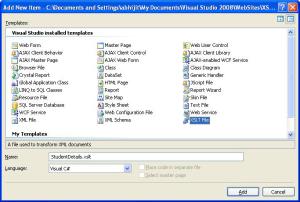
Figure: Add New XSL File
I have put the xsl file in a specific folder called XSL. This is not mandatory to put the xsl file inside the XSL folder. we have to keep it in mind while providing the filepath for XSL rendering.
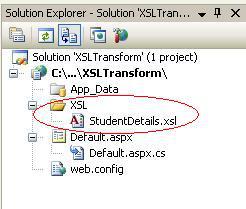
Figure: File Structure
3. Designing XSL
Now, designing XSL is one of the important tasks, and there are many things that are related to an XSL file design. In my case, XSL file is very simple and there is no complexity to design the page, but if you need to learn in details, I will suggest you read from W3School. First of all, have a look into the XML data which I got from the dataset.
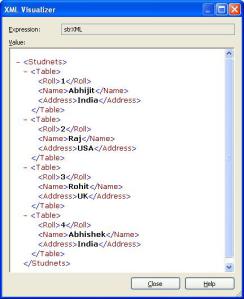
And based on that, we need to design the XSL File. Below is the StudentDetails XSL.
<xsl:stylesheet version="1.0" xmlns:xsl="http://www.w3.org/1999/XSL/Transform">
 <xsl:template match="/">
<table width="100%" align="center" cellpadding="0" cellspacing="0" border="1"
 style="background-color:#123456;font-family:verdana;font-size:10pt;border:1">
<tr>
<td  width="10%"  align="left" >
 Roll</td>
<td width="70%" align="left">
 Name</td>
<td width="20%" align="left">
 Address</td>
</tr>
</table>
<xsl:for-each select="Students/Table">
<table width="100%" align="center" cellpadding="0" cellspacing="0" border="1"
 style="font-family:verdana;font-size:10pt;border:1">
<tr >
<td  width="10%"  align="left"   >
 <xsl:value-of select="Roll"/></td>
<td width="70%" align="left" >
 <xsl:value-of select="Name"/></td>
<td  width="20%" align="left" >
 <xsl:value-of select="Address"/></td>
</tr>
</table>
</xsl:for-each>
 </xsl:template>
</xsl:stylesheet>
The XML root node is started with "Students/Table", and the XSL will read the content for each and every child. Following section of the XSL will do the job for that.
<xsl:for-each select="Students/Table">
Now, have a look into the code.
What did I do? I have just read the data from database and stored the data in a dataset, then just read the XML content from dataset using:
string XMLString=ds.GetXml();
Below is the complete code for reading the data from database and reading the XML string from dataset.
public string strstudentDetails = string.Empty;
protected void Page_Load(object sender, EventArgs e)
{
string _strConnectionString = "Data Source=.\\sqlexpress;Initial Catalog=Student;
Integrated Security=True";
string _strquery = "select * from studentDetails";
SqlConnection con = new SqlConnection(_strConnectionString);
DataSet ds = new DataSet("Students");
SqlDataAdapter da = new SqlDataAdapter(_strquery, con);
da.Fill(ds);
string strXML = ds.GetXml();
strstudentDetails=GetHtml(Server.MapPath("~/xsl/studentDetails.xsl"), strXML);
}
Now, I have wrote a function GetHTML. GetHtml function is actually doing the job. It is taking XSL Stylesheet and XML data as parameter peforming the XSL transformation and returning the HTML output.
public static string GetHtml(string xsltPath, string xml)
{
MemoryStream stream = new MemoryStream(ASCIIEncoding.Default.GetBytes(xml));
XPathDocument document = new XPathDocument(stream);
StringWriter writer = new StringWriter();
XslCompiledTransform transform = new XslCompiledTransform();
transform.Load(xsltPath);
transform.Transform(document, null, writer);
return writer.ToString();
}
}
Now we have got the HTML data and we have to display the data to the page. The below code is used to display the actual content into the page.
<html xmlns="http://www.w3.org/1999/xhtml">
<head runat="server">
 <title>Student Page</title>
</head>
<body>
 <form id="form1" runat="server">
<div>
<table >
<tr>
<td>
 <b>Student Info : Displaying using XSL Rendering</b></td>
</tr>
<tr>
<td>
 <%= strstudentDetails %></td>
</tr>
</table>
</div>
</form>
</body>
</html>
Now, run the web site, you will get the following output:
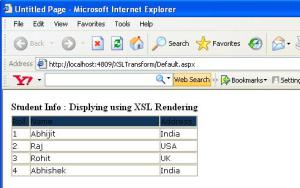
Hope this will help you to move ahead with XSL Transformation.
Thank you for reading!
CodeProject




 General
  News
News  Suggestion
  Question
  Bug
Bug  Answer
  Joke
Joke  Praise
  Rant
Rant  Admin
Admin 


 Submit an article or tip


 . What is the target audience for this piece of text?
![Rose | [Rose]](https://codeproject.global.ssl.fastly.net/script/Forums/Images/rose.gif)