|
|
Comments and Discussions
|
|
 |

|
File EFProfileProvider.cs
You write propertiesNamesBuilder.Append(stringValue != null ? "S" : "B" + ":");
but need propertiesNamesBuilder.Append(stringValue != null ? "S"+":" : "B" + ":");
|
|
|
|

|
I caught the same error and can verify it.
|
|
|
|

|
Hi,
I built a EF Provider based on youre bu done with a POCO Database repository and a standard Role and membership database structure.
It compiles BUT I have a configuration error in ma web.config file.
<connectionStrings>
<add name="MyAppEntities" connectionString="metadata=res://*/MyAppEntities.csdl|res://*/MyAppEntities.ssdl|res://*/MyAppEntities.msl;provider=System.Data.SqlClient;provider connection string="Data Source=MyMachine\MyInstance;Initial Catalog=MyAppDB;Integrated Security=True;MultipleActiveResultSets=True"" providerName="System.Data.EntityClient" />
</connectionStrings>
<system.web>
<authentication mode="Forms">
<forms loginUrl="~/Account/LogOn" timeout="2880" />
</authentication>
<membership defaultProvider="EFMembershipProvider" userIsOnlineTimeWindow="15">
<providers>
<add name="EFMembershipProvider" type="MyApp.Layers.SecurityLayer.RoleAndMembershipProvider.Security.EFMembershipProvider, MyApp.Layers.SecurityLayer, Version=4.0.0.0, Culture=neutral"
connectionStringName="MyAppEntities"
enablePasswordRetrieval="true"
enablePasswordReset="true"
requiresQuestionAndAnswer="true"
writeExceptionsToEventLog="true" />
</providers>
</membership>
<!---->
<profile enabled="true"
defaultProvider="EFProfileProvider"
inherits="MyApp.Layers.SecurityLayer.RoleAndMembershipProvider.Profile.EFProfileProvider"
automaticSaveEnabled="true">
<providers>
<add name="EFProfileProvider"
type="MyApp.Layers.SecurityLayer.RoleAndMembershipProvider.Profile.EFProfileProvider,
MyApp.Layers.SecurityLayer, Version=4.0.0.0, Culture=neutral"
connectionStringName="MyAppEntities"/>
</providers>
</profile>
<!---->
<roleManager enabled="true" defaultProvider="EFRoleProvider">
<providers>
<add name="EFRoleProvider"
type="MyApp.Layers.SecurityLayer.RoleAndMembershipProvider.Security.EFRoleProvider, MyApp.Layers.SecurityLayer, Version=4.0.0.0, Culture=neutral"
connectionStringName="MyAppEntities" />
</providers>
</roleManager>
My problem is, when I launch application I obtain the folowing error :
CS0030: Impossible de convertir le type 'System.Web.Profile.ProfileBase' en 'ProfileCommon'
<!--It's not possible to convert type 'System.Web.Profile.ProfileBase' to 'ProfileCommon'-->
Can you help me to solve this problem ?
Thanks a lot,
Best regards,
Laurent
|
|
|
|
|

|
Not quite useful your feedback!
Michael
modified on Saturday, February 12, 2011 6:21 PM
|
|
|
|

|
The code you have written works great for registered user
But how can we track anonymous user.
|
|
|
|

|
Hi,
Found this is a very usful article to learn EF. I would like to know what are the changes I need to make to use Stored Procedures, instead of LINQ generated SQL Statements. I have all SPs but how to call them from EF?
Thank you.
Regards,
Pradeep.
|
|
|
|

|
i used this solution in my project.
but , i having error.
my project attached here: http://www.4shared.com/file/nNSW1LLy/My_Project.html
please see my project and send me ok version.
my mail is ir_programmer@yahoo.com
modified on Friday, June 25, 2010 10:04 AM
|
|
|
|

|
Same again...
Original Method:
public override int GetNumberOfInactiveProfiles(ProfileAuthenticationOption authenticationOption, DateTime userInactiveSinceDate)
{
using (ProviderEntities context = new ProviderEntities(connectionString))
{
IQueryable<Profile> profiles = context.User.Where(MatchUserApplication())
.Where(ApplyAuthenticationOption(authenticationOption))
.Where(u => u.LastActivityDate <= userInactiveSinceDate.ToUniversalTime())
.Select(u => u.Profile);
return profiles.Count();
}
}
New Method:
public override int GetNumberOfInactiveProfiles(ProfileAuthenticationOption authenticationOption, DateTime userInactiveSinceDate)
{
using (ProviderEntities context = new ProviderEntities(connectionString))
{
IQueryable<Profile> profiles = context.User.Where(MatchUserApplication())
.Where(ApplyAuthenticationOption(authenticationOption))
.Where(u => u.LastActivityDate <= userInactiveSinceDate)
.Where(u => u.Profile != null) // .GetNumberOfProfiles() fix
.Select(u => u.Profile);
return profiles.Count();
}
}
Anthony
modified on Tuesday, April 6, 2010 1:29 PM
|
|
|
|

|
Thanks very much Anthony. I will have a look at your changes and upload a new version once I've tested everything.
Michael
|
|
|
|

|
Same again...
Original Method:
public override ProfileInfoCollection GetAllProfiles(ProfileAuthenticationOption authenticationOption, int pageIndex, int pageSize, out int totalRecords)
{
ProfileInfoCollection profileCollection = new ProfileInfoCollection();
using (ProviderEntities context = new ProviderEntities(connectionString))
{
IQueryable<ProfileInfo> profiles = context.User.Where(MatchUserApplication())
.Where(ApplyAuthenticationOption(authenticationOption))
.Skip(pageIndex * pageSize)
.Take(pageSize)
.Select(u => new ProfileInfo(u.Username, u.IsAnonymous, u.LastActivityDate, u.Profile.LastUpdatedDate, GetSize(u)));
foreach (ProfileInfo profileInfo in profiles)
{
profileCollection.Add(profileInfo);
}
totalRecords = context.User.Where(MatchUserApplication()).Where(ApplyAuthenticationOption(authenticationOption)).Count();
return profileCollection;
}
}
New Method:
public override ProfileInfoCollection GetAllProfiles(ProfileAuthenticationOption authenticationOption, int pageIndex, int pageSize, out int totalRecords)
{
ProfileInfoCollection profileCollection = new ProfileInfoCollection();
using (ProviderEntities context = new ProviderEntities(connectionString))
{
IQueryable<User> users = context.User.Include("Profile").Where(MatchUserApplication())
.Where(ApplyAuthenticationOption(authenticationOption))
.OrderBy(u => u.CreationDate)
.Skip(pageIndex * pageSize)
.Take(pageSize);
foreach (User u in users)
{
if (u.Profile != null)
{
ProfileInfo profileInfo = new ProfileInfo(u.Username, u.IsAnonymous, u.LastActivityDate, u.Profile.LastUpdatedDate, GetSize(u));
profileCollection.Add(profileInfo);
}
}
totalRecords = context.User.Where(MatchUserApplication()).Where(ApplyAuthenticationOption(authenticationOption)).Count();
return profileCollection;
}
}
Anthony
|
|
|
|

|
Same again...
Original Method:
public override ProfileInfoCollection GetAllInactiveProfiles(ProfileAuthenticationOption authenticationOption, DateTime userInactiveSinceDate, int pageIndex, int pageSize, out int totalRecords)
{
ProfileInfoCollection profileCollection = new ProfileInfoCollection();
using (EFDataModelEntities context = new EFDataModelEntities(connectionString))
{
IQueryable<ProfileInfo> profiles = context.User.Where(MatchUserApplication())
.Where(ApplyAuthenticationOption(authenticationOption))
.Where(u => u.LastActivityDate <= userInactiveSinceDate.ToUniversalTime())
.Skip(pageIndex * pageSize)
.Take(pageSize)
.Select(u => new ProfileInfo(u.Username, u.IsAnonymous, u.LastActivityDate, u.Profile.LastUpdatedDate, GetSize(u)));
foreach (ProfileInfo profileInfo in profiles)
{
profileCollection.Add(profileInfo);
}
totalRecords = context.User.Where(MatchUserApplication()).Where(u => u.LastActivityDate > userInactiveSinceDate.ToUniversalTime()).Count();
return profileCollection;
}
}
New Method:
public override ProfileInfoCollection GetAllInactiveProfiles(ProfileAuthenticationOption authenticationOption, DateTime userInactiveSinceDate, int pageIndex, int pageSize, out int totalRecords)
{
ProfileInfoCollection profileCollection = new ProfileInfoCollection();
using (ProviderEntities context = new ProviderEntities(connectionString))
{
IQueryable<User> users = context.User.Include("Profile").Where(MatchUserApplication())
.Where(ApplyAuthenticationOption(authenticationOption))
.Where(u => u.LastActivityDate <= userInactiveSinceDate)
.OrderBy(u => u.CreationDate)
.Skip(pageIndex * pageSize)
.Take(pageSize);
foreach (User u in users)
{
if (u.Profile != null)
{
ProfileInfo profileInfo = new ProfileInfo(u.Username, u.IsAnonymous, u.LastActivityDate, u.Profile.LastUpdatedDate, GetSize(u));
profileCollection.Add(profileInfo);
}
}
totalRecords = context.User.Where(MatchUserApplication()).Where(u => u.LastActivityDate > userInactiveSinceDate).Count();
return profileCollection;
}
}
Anthony
|
|
|
|

|
A couple of similar errors here too...
Original Method:
public override ProfileInfoCollection FindProfilesByUserName(ProfileAuthenticationOption authenticationOption, string usernameToMatch, int pageIndex, int pageSize, out int totalRecords)
{
ProfileInfoCollection profileCollection = new ProfileInfoCollection();
using (EFDataModelEntities context = new EFDataModelEntities(connectionString))
{
IQueryable<ProfileInfo> profiles = context.User.Where(MatchUserApplication())
.Where(ApplyAuthenticationOption(authenticationOption))
.Where(u => u.Username.Contains(usernameToMatch))
.Skip(pageIndex * pageSize)
.Take(pageSize)
.Select(u => new ProfileInfo(u.Username, u.IsAnonymous, u.LastActivityDate, u.Profile.LastUpdatedDate, GetSize(u)));
foreach (ProfileInfo profileInfo in profiles)
{
profileCollection.Add(profileInfo);
}
totalRecords = context.User.Where(MatchUserApplication()).Where(ApplyAuthenticationOption(authenticationOption)).Where(u => u.Username.Contains(usernameToMatch)).Count();
return profileCollection;
}
}
New Method:
public override ProfileInfoCollection FindProfilesByUserName(ProfileAuthenticationOption authenticationOption, string usernameToMatch, int pageIndex, int pageSize, out int totalRecords)
{
ProfileInfoCollection profileCollection = new ProfileInfoCollection();
using (ProviderEntities context = new ProviderEntities(connectionString))
{
IQueryable<User> users = context.User.Include("Profile").Where(MatchUserApplication())
.Where(ApplyAuthenticationOption(authenticationOption))
.Where(u => u.Username.Contains(usernameToMatch))
.OrderBy(u => u.CreationDate)
.Skip(pageIndex * pageSize)
.Take(pageSize);
foreach (User u in users)
{
if (u.Profile != null)
{
ProfileInfo profileInfo = new ProfileInfo(u.Username, u.IsAnonymous, u.LastActivityDate, u.Profile.LastUpdatedDate, GetSize(u));
profileCollection.Add(profileInfo);
}
}
totalRecords = context.User.Where(MatchUserApplication()).Where(ApplyAuthenticationOption(authenticationOption)).Where(u => u.Username.Contains(usernameToMatch)).Count();
return profileCollection;
}
}
Anthony
|
|
|
|

|
The EFProfileProvider appears to have errors in FindInactiveProfilesByUserName(...), due to EF limitations.
Original version of method:
public override ProfileInfoCollection FindInactiveProfilesByUserName(ProfileAuthenticationOption authenticationOption, string usernameToMatch, DateTime userInactiveSinceDate, int pageIndex, int pageSize, out int totalRecords)
{
ProfileInfoCollection profileCollection = new ProfileInfoCollection();
using (ProviderEntities context = new ProviderEntities(connectionString))
{
IQueryable<ProfileInfo> profiles = context.User.Where(MatchUserApplication())
.Where(ApplyAuthenticationOption(authenticationOption))
.Where(u => u.Username.Contains(usernameToMatch) && u.LastActivityDate <= userInactiveSinceDate.ToUniversalTime())
.Skip(pageIndex * pageSize)
.Take(pageSize)
.Select(u => new ProfileInfo(u.Username, u.IsAnonymous, u.LastActivityDate, u.Profile.LastUpdatedDate, GetSize(u)));
foreach (ProfileInfo profileInfo in profiles)
{
profileCollection.Add(profileInfo);
}
totalRecords = context.User.Where(MatchUserApplication())
.Where(ApplyAuthenticationOption(authenticationOption))
.Where(u => u.Username.Contains(usernameToMatch) && u.LastActivityDate <= userInactiveSinceDate.ToUniversalTime())
.Count();
return profileCollection;
}
}
New Version of method:
public override ProfileInfoCollection FindInactiveProfilesByUserName(ProfileAuthenticationOption authenticationOption, string usernameToMatch, DateTime userInactiveSinceDate, int pageIndex, int pageSize, out int totalRecords)
{
ProfileInfoCollection profileCollection = new ProfileInfoCollection();
using (ProviderEntities context = new ProviderEntities(connectionString))
{
IQueryable<User> users = context.User.Include("Profile").Where(MatchUserApplication())
.Where(ApplyAuthenticationOption(authenticationOption))
.Where(u => u.Username.Contains(usernameToMatch) && u.LastActivityDate <= userInactiveSinceDate)
.OrderBy(u => u.Profile.LastUpdatedDate)
.Skip(pageIndex * pageSize)
.Take(pageSize);
foreach (User u in users)
{
if (u.Profile != null)
{
ProfileInfo profileInfo = new ProfileInfo(u.Username, u.IsAnonymous, u.LastActivityDate, u.Profile.LastUpdatedDate, GetSize(u));
profileCollection.Add(profileInfo);
}
}
totalRecords = context.User.Include("Profile").Where(MatchUserApplication())
.Where(ApplyAuthenticationOption(authenticationOption))
.Where(u => u.Username.Contains(usernameToMatch) && u.LastActivityDate <= userInactiveSinceDate)
.Count();
return profileCollection;
}
}
Anthony
modified on Tuesday, April 6, 2010 12:44 PM
|
|
|
|

|
Hi,
Firstly many thanks for posting this, I going to do exactly the same, so it saved me some time.
I found what I believe to be an error in the EFProfileProvider.DeleteProfiles(string[] usernames) method.
This line:
IQueryable<User> users = context.User.Include("Profile").Where(u => usernames.Contains(u.Username) && u.Profile != null);
does not work because EF does not support collection-valued parameters, like LINQ to SQL does, so the above cannot generate the SQL IN clause.
The workaround is to modify the DeleteProfiles(...) method and to add a new helper method (for which I don't take credit), as follows:
public override int DeleteProfiles(string[] usernames)
{
int num = 0;
using (ProviderEntities context = new ProviderEntities(connectionString))
{
//IQueryable<User> users = context.User.Include("Profile").Where(u => usernames.Contains(u.Username) && u.Profile != null);
IQueryable<User> users = context.User.Include("Profile").Where(u => u.Profile != null);
Expression<Func<User, bool>> exp = BuildContainsExpression<User, string>(u => u.Username, usernames);
users = users.Where(exp);
foreach (User user in users)
{
context.DeleteObject(user.Profile);
num++;
}
context.SaveChanges();
}
return num;
}
static Expression<Func<TElement, bool>> BuildContainsExpression<TElement, TValue>(
Expression<Func<TElement, TValue>> valueSelector, IEnumerable<TValue> values)
{
if (null == valueSelector) { throw new ArgumentNullException("valueSelector"); }
if (null == values) { throw new ArgumentNullException("values"); }
ParameterExpression p = valueSelector.Parameters.Single();
if (!values.Any()) return e => false;
var equals = values.Select(value => (Expression)Expression.Equal(valueSelector.Body, Expression.Constant(value, typeof(TValue))));
var body = equals.Aggregate<Expression>((accumulate, equal) => Expression.Or(accumulate, equal));
Expression<Func<TElement,bool>> exp = Expression.Lambda<Func<TElement, bool>>(body, p);
return exp;
}
Anthony
|
|
|
|

|
Hello Michael,
Thanks for your interesting article. I noticed that you added some fields to the User entity (FirstName and LastName) that are not in the ASP.NET Membership tables. Your custom membership provider inherits from MembershipProviderBase, which has methods such as CreateUser(...) that we can override, but there is no way we can get the FirstName and LastName values in, because they are not in the method's arguments. So my question is: did you perhaps add these fields by mistake, and if not, can you tell us how are we supposed to set their values using the Membership API?
Thanks,
Peter
|
|
|
|

|
Hi,
Your observation is correct. I've extended the standard Membership properties by FirstName and LastName because I usually find it useful to have them. In real world project I even extend the user table with many other properties that I require.
As you said since the Membership API is defined by the framework, there is no way to access this extra properties using the framework API. However, there is nothing stopping you from directly querying your user table using EF.
You may wonder what's the benefit of that? The reason why I store this extra information in the same table is that in my opinion this information belongs together and I can safe a join as I would have to do if it was stored in its seperate table.
The way I normally deal with Membership information is that I implement my custom Identity which implements the IIdentity interface and have a property of type User (not MembershiUser) as part of this identity. A web module creates the custom Identity in the 'OnPreRequestHandlerExecute' event handler and assigns it to the 'HttpContext.Current.User' principal and the current thread.
So in the base page or could be the page too you can access the user property like this:
(User)HttpContext.Current.User.Identity
When you create a user using the Membership API you will have to add extra properties in after in an extra step. Like the following:
1. Membership.CreateUser
2. Load user querying EF model using the MembershipUser.ProviderUserKey which is your user id
3. Update the extended properties
I hope this gave you some clarification how it's intended to be used?
Don't hesitate to contact me for further questions.
Cheers,
Michael
|
|
|
|

|
Hi Michael,
Thanks for your explanation. I agree that it makes sense to have properties like FirstName and LastName in the User table. On the other hand, I also like to keep things as simple as possible. I am making a Silverlight application and use the WCF Ria Services framework. The way they solved this issue is by subclassing from System.Web.Ria.ApplicationServices.UserBase and add the extra properties to the derived class. The UserRegistrationService class then stores them into the Profile. It's an easy solution, but from a database point of view, not as clean as yours... well, as always, there are different ways to solve a problem
Cheers,
Peter
|
|
|
|

|
Hi Michael
I believe I have found a bug (but am not sure)in GetRolesForUser method.. You use following: if (!EFMembershipProvider.CheckUser(username, ApplicationName, context)) but the ApplicationName is always = "/" ...and I have applicationName = "/MyApplication" in my web.config (same in the DB). I have imp Membership providers before (this is my firs one for EF) and never had that problem... Do you have any idea what might be causing the problem?
I am imp the provider in .NET 4,0 with SelfTrackingEntities so I do not have your ObjectQuery<Role> properties in DataModel designer like:
<pre> public global::System.Data.Objects.ObjectQuery<Role> Role
{
get
{
if ((this._Role == null))
{
this._Role = base.CreateQuery<Role>("[Role]");
}
return this._Role;
}
}</pre>
in stead I have Model.Context.cs file that uses ObjectSet in stead of ObjectQuery like:
<pre> public ObjectSet<Role> Roles
{
get { return _roles ?? (_roles = CreateObjectSet<Role>("Roles")); }
}
private ObjectSet<Role> _roles;</pre>
I don't know if that is the problem......Do you have any idea? Everything else (that I have tested so far) works perfectly.
|
|
|
|

|
Hi
I checked the source, if you want to use an application name other than '/', you have to add the applicationName attribute to your role provider configuration too. Generally, each provider configuration needs that information seperately.
I hope that solves your issue.
Cheers
|
|
|
|

|
Hi
Yes, this did the trick Tank you again for your help.
|
|
|
|

|
Ive tried to convert this great article to VB, but in the ProviderUtils no converter can get past this:
public static Expression<Func<TElement, bool>> BuildContainsExpression<TElement, TValue>(Expression<Func<TElement, TValue>> valueSelector, IEnumerable<TValue> values)
{
if (null == valueSelector)
{
throw new ArgumentNullException("valueSelector");
}
if (null == values)
{
throw new ArgumentNullException("values");
}
ParameterExpression p = valueSelector.Parameters.Single();
if (!values.Any())
{
return e => false;
}
IEnumerable<Expression> equals = values.Select(value => (Expression)Expression.Equal(valueSelector.Body, Expression.Constant(value, typeof(TValue))));
Expression body = equals.Aggregate(Expression.Or);
return Expression.Lambda<Func<TElement, bool>>(body, p);
}
Could you please convert this bit of code to VB, or better yet full project.
Thank you!
|
|
|
|

|
What about this one?
Public Shared Function BuildContainsExpression(Of TElement, TValue)(ByVal valueSelector As Expression(Of Func(Of TElement, TValue)), ByVal values As IEnumerable(Of TValue)) As Expression(Of Func(Of TElement, Boolean))
If (valueSelector Is Nothing) Then
Throw New ArgumentNullException("valueSelector")
End If
If (values Is Nothing) Then
Throw New ArgumentNullException("values")
End If
Dim p As ParameterExpression = valueSelector.Parameters.Single(Of ParameterExpression)()
If Not values.Any(Of TValue)() Then
Dim expr As ParameterExpression
Return Expression.Lambda(Of Func(Of TElement, Boolean))(Expression.Constant(False, GetType(Boolean)), New ParameterExpression() { expr = Expression.Parameter(GetType(TElement), "e") })
End If
Return Expression.Lambda(Of Func(Of TElement, Boolean))(values.Select(Of TValue, Expression)(Function (ByVal value As TValue)
Return Expression.Equal(MyBase.valueSelector.Body, Expression.Constant(value, GetType(TValue)))
End Function).Aggregate(Of Expression)(New Func(Of Expression, Expression, Expression)(AddressOf Expression.Or)), New ParameterExpression() { p })
End Function
Thought I have to admit that the C# version seems much easier to read and understand.
Cheers,
Michael
modified on Wednesday, December 2, 2009 5:53 PM
|
|
|
|

|
Hi Michael,
I believe you did a mistake in the ProfileProvider.
In the method PrepareDataForSaving, I replaced the four lines concerning the propertiesNamesBuilder:
propertiesNamesBuilder.Append(value.Name + ":");
propertiesNamesBuilder.Append((stringValue != null ? "S" : "B") + ":"); // <-- here
propertiesNamesBuilder.Append(startPosition.ToString(CultureInfo.InvariantCulture) + ":");
propertiesNamesBuilder.Append(length.ToString(CultureInfo.InvariantCulture) + ":");
With your code, I received an error when reading the data in the ParseDataFromDatabase method.
Cheers,
Nicolas
modified on Tuesday, November 10, 2009 6:23 AM
|
|
|
|

|
there are another problem by this method to (PrepareDataForSaving)
as you see below line
List<SettingsPropertyValue> relevantValues = properties.Cast<SettingsPropertyValue>()
.Where(v => v.IsDirty && (userIsAuthenticated || (bool)v.Property.Attributes["AllowAnonymous"]))
.ToList();
it just attached Dirty properties
after you read a property for one time for the second time it will remove from data base
ICT professionalists shape the future.
|
|
|
|

|
Hi,
Thanks for the article and the source code - it saved me heaps of time on one of my projects.
I think I have found a bug in the GetUsersInRole(string roleName) method on the role provider - it returns the string[] of Names not the Usernames.
Thanks,
Nick
|
|
|
|

|
Hi Nick,
Thanks very much for that! You are right I've changed the source. I will upload a new version shortly.
Cheers,
Michael
|
|
|
|

|
Hi Michael,
Good Job! 5* and best of luck!
Rgds,
Alex
|
|
|
|

|
I really like this and have been playing around with it, however I'm having trouble using the profile stuff.
It never finds user in 'SetPropertyValues'.
Has anyone had the same problem? Or has anyone used the profileProvider without an issue therefore confirming it'#s something I've got wrong?
Thanks in advance,
Ray.
|
|
|
|

|
Hi Ray,
When I tested the providers I've noticed that the profile declaration varies depending on the type of web project that you use. If you use a web site project you can specify the properties directly in the web.config markup. However, in case of the web application project you will have to declare your own profile class (derived from ProfileBase) and inherit from it in the profile declaration within the web.config.
Have a look at the example above it uses MyProfile as profile class containing all the profile properties that you wish to use.
Later on in the code you can use the profile information in the following way:
MyProfile profile = (MyProfile) ProfileBase.Create(user.Identity.Name);
Cheers,
Michael
|
|
|
|

|
Hi Michael
I am testing your EF Providers and I think you did a GREAT job but I have a small problem with the Profiles..in the example cod there is no example of actually using the providers an I am new to the EF Framework usage. I have imp custom membership before but never worked with Profile provider before. Can you please explain a bit more how to imp custom profile properties in this scenario?
|
|
|
|
|

|
Hi Michael
I have not gotten to imp the Profile provider yet..still working on the Roles (see new message) I will NOT forget to vote on your article.
I have one question, Do I need to imp the profile values (the usual way) in web.config as well as in my class?
|
|
|
|

|
Hi,
As mentioned earlier in this thread, depending on your project type you can do it decleratively or by inheriting the profile class. If you choose your custom profile class no declerative property configuration is required.
Cheers,
M
|
|
|
|

|
Hi Michael
Thank you, I will try this during the weekend and get back to you
|
|
|
|

|
I opened it as a website in my VS.
it opens and show all the files in the site.
can you explain how to change the webconfige? didn't work for me
thanks
|
|
|
|

|
Hi. Thanks for creating this, Michael. I'm trying to get it to work. I'm calling Membership.ValidateUser() and got a Configuration Error:
Could not load file or assembly 'SmartSoft.EFProviders.Web, Version=1.0.0.0, Culture=neutral, PublicKeyToken=53fb08796b3f3bb2'
I took the EFProviders solution and created a new website project within it, called TestEFP. I set the web.config within that project for the EFMembershipProvider and referenced the SmartSoft.EFProviders.Web project from the website project.
I also tried rebuilding and got a dialog, "Import Key File," saying:
This project includes a password-encrypted key used for signing. Enter the password for the key file to import the key file into the local crypto-store database for use" ... "Key file: SmartSoft.pfx"
Can you help me get this working?
|
|
|
|

|
Hi Kevin,
You can ignore the error regarding the password protected key file. I suggest once you opened the solution, delete the key file and create your own key file (can be done in the project properties window).
Dont forget to update your public key after that in the web.config file since this will change with a new key file.
Cheers,
Michael
|
|
|
|

|
OK, thanks Michael!
Another question: If I'm implementing my own admin functionality (to edit users, etc), I don't need to use the methods in the Providers, do I? Is it okay to use the entities from EF directly? For example, get a User entity, update some fields, and call context.SaveChanges() .. without having to deal with a MembershipUser at all?
I'm using ASP.NET MVC. So the default login functionality works great. I'm also implementing functionality for admins to create/edit/delete other users. Based on the Apress ASP.NET MVC book (Steven Sanderson), I'm creating a repository as an interface to the entities - e.g. an AccountRepository, for Users, Roles, Profiles.
|
|
|
|

|
I noticed one thing. In EFMembershipProvider.UnlockUser(), it was setting LastLockOutDate to Now, but wasn't setting IsLockedOut to false. (so it wasn't unlocking the user)
|
|
|
|

|
Thanks for your efforts. Exactly what i needed.
http://deltabis.com/steven
|
|
|
|

|
Hi Michael,
On more question:
Did you ever implemented a profile provider that works with a Profile table with the traditional columns instead of the Property Names / Property Values?
My Entity Framework model contains a normal Profile SQL table and that is related with other tables and I would like to make the Profile Provider to access my Profile Repository and return a MyProfile object based on those tables.
Thanks,
Miguel
|
|
|
|

|
Hi Michael,
I am posting the SQL script, tested, where I added a few columns.
The Length of the columns are a little bit different than from the original.
Instead of using those 256, 128 lengths I tend to use 200, 100, ...
One thing I am not sure even from your code are the "On Delete No Action" on Users and Profiles table.
Probably it is correct ... Just wanting to confirm.
Here is my SQL Script:
<pre>
use Membership;
go
/* ------ { Tables } ------ */
-- Applications
create table dbo.Applications
(
Id uniqueidentifier rowguidcol not null constraint DF_Applications_Id default (newid()),
Description nvarchar(200) null,
[Name] nvarchar(100) not null,
constraint PK_Applications primary key clustered (id)
)
-- Profiles
create table dbo.Profiles
(
UserId uniqueidentifier rowguidcol not null constraint DF_Profiles_UserId default (newid()),
LastUpdatedDate datetime not null,
PropertyNames ntext null,
PropertyValuesBinary image null,
PropertyValuesString ntext null,
constraint PK_Profiles primary key clustered (UserId)
)
-- Roles
create table dbo.Roles
(
Id uniqueidentifier rowguidcol not null constraint DF_Roles_Id default (newid()),
ApplicationId uniqueidentifier not null,
Description nvarchar(200) not null,
[Name] nvarchar(100) not null,
constraint PK_Roles primary key clustered (id)
)
-- Users
create table dbo.Users
(
Id uniqueidentifier rowguidcol not null constraint DF_Users_Id default (newid()),
ApplicationId uniqueidentifier not null,
Comment nvarchar(200) null,
CreationDate datetime null,
Email nvarchar(200) not null,
FailedPasswordAnswerAttemptCount int null,
FailedPasswordAnswerAttemptWindowStart datetime null,
FailedPasswordAttemptCount int null,
FailedPasswordAttemptWindowStart datetime null,
IsAnonymous bit not null constraint DF_Users_IsAnonymous default (0),
IsApproved bit not null constraint DF_Users_IsApproved default (1),
IsLockedOut bit not null,
IsOnline bit null,
LastActivityDate datetime not null,
LastLockedOutDate datetime null,
LastLoginDate datetime null,
LastModified datetime null,
LastPasswordChangedDate datetime null,
[Name] nvarchar(100) null,
Password nvarchar(100) null,
PasswordAnswer nvarchar(200) null,
PasswordFormat int not null,
PasswordQuestion nvarchar(200) null,
PasswordSalt nvarchar(100) not null,
Username nvarchar(200) not null,
constraint PK_Users primary key clustered (id)
)
-- UsersRoles
create table dbo.UsersRoles
(
UserId uniqueidentifier not null,
RoleId uniqueidentifier not null,
constraint PK_UsersRoles primary key clustered (UserId, RoleId)
)
/* ------ { Constraints } ------ */
-- Roles
alter table dbo.Roles
add constraint FK_Roles_Applications foreign key (ApplicationId) references dbo.Applications(Id) on delete cascade on update cascade;
-- Users (NO CASCADE ON DELETE??)
alter table dbo.Users
add constraint FK_Users_Applications foreign key (ApplicationId) references dbo.Applications(Id) on delete no action on update no action;
-- UsersRoles
alter table dbo.UsersRoles
add constraint FK_UsersRoles_Roles foreign key(RoleId) references dbo.Roles(Id) on delete cascade on update cascade,
constraint FK_UsersRoles_Users foreign key(UserId) references dbo.Users(Id) on delete cascade on update cascade;
-- Profiles (NO CASCADE ON DELETE??)
alter table dbo.Profiles
add constraint FK_Profiles_Users foreign key(UserId) references dbo.Users(Id) on delete no action on update no action;
</pre>
Thanks,
Miguel
|
|
|
|

|
Hi,
Thank you for the posting. I didn't test it yet.
I will post here any problem I might find.
At the moment I could mention that the tables could be named: Users, Profiles, Roles, ... instead of User, Profile, Roles ...
Then you could add a note saying to rename the name of the Entities on the EF as usual.
And is there a FirstName and LastName on original ASP.NET Membership Users table?
Just wondering if you added any columns to the tables.
Thank You,
Miguel
|
|
|
|

|
Hi Miguel,
I guess the correct table names would be: Users, Roles, Profile if you directly want to relate to the SQL providers. However, the SQL providers split the user information into membership and users.
You are right, I've added the FirstName and LastName.
Cheers,
|
|
|
|

|
Hi Michael,
I have been going around your SQL code. I made a few changes (I didn't test it yet).
What is strange is that you don't have delete cascade on Users/Profiles and on Applications/Users.
If a User is deleted shouldn't its Profiles being deleted.
I am posting my SQL (It is cleaner. I recoded not using SQL Man. Studio)
Note that I didn't test it yet. I wanted to know your opinion about the cascade delete before.
create table dbo.Applications
(
Id uniqueidentifier rowguidcol not null constraint DF_Applications_Id default (newid()),
Description nvarchar(200) null,
[Name] nvarchar(100) not null,
constraint PK_Applications primary key clustered (id)
)
create table dbo.Profiles
(
UserId uniqueidentifier rowguidcol not null constraint DF_Profiles_UserId default (newid()),
LastUpdatedDate datetime not null,
PropertyNames ntext null,
PropertyValuesBinary image null,
PropertyValuesString ntext null,
constraint PK_Profiles primary key clustered (id)
)
create table dbo.Roles
(
Id uniqueidentifier rowguidcol not null constraint DF_Roles_Id default (newid()),
ApplicationId uniqueidentifier not null,
Description nvarchar(200) not null,
[Name] nvarchar(100) not null,
constraint PK_Roles primary key clustered (id)
)
create table dbo.Users
(
Id uniqueidentifier rowguidcol not null constraint DF_Users_Id default (newid()),
ApplicationId uniqueidentifier not null,
Comment nvarchar(200) null,
CreationDate datetime null,
Email nvarchar(100) not null,
FailedPasswordAnswerAttemptCount int null,
FailedPasswordAnswerAttemptWindowStart datetime null,
FailedPasswordAttemptCount int null,
FailedPasswordAttemptWindowStart datetime null,
IsAnonymous bit not null constraint DF_Users_IsAnonymous default (0),
IsApproved bit not null constraint DF_Users_IsApproved default (1),
IsLockedOut bit not null,
IsOnline bit null,
LastActivityDate datetime not null,
LastLockedOutDate datetime null,
LastLoginDate datetime null,
LastModified datetime null,
LastPasswordChangedDate datetime null,
[Name] nvarchar(100) null,
Password nvarchar(100) null,
PasswordAnswer nvarchar(200) null,
PasswordQuestion nvarchar(200) null,
Username nvarchar(50) not null,
constraint PK_Users primary key clustered (id)
)
create table dbo.UsersRoles
(
UserId uniqueidentifier not null,
RoleId uniqueidentifier not null,
constraint PK_UsersRoles primary key clustered (id)
)
And the restrictions:
alter table dbo.Roles
add constraint FK_Roles_Applications foreign key (ApplicationId) references dbo.Applications(Id) on delete cascade on update cascade;
alter table dbo.Users
add constraint FK_Users_Applications foreign key (ApplicationId) references dbo.Applications(Id) on delete no action on update no action;
alter table dbo.UsersRoles
add constraint FK_UsersRoles_Roles foreign key(RoleId) references dbo.Roles(Id) on update cascade on delete cascade;
constraint FK_UsersRoles_Users foreign key(UserId) references dbo.Users(Id) on update cascade on delete cascade;
alter table dbo.Profiles
add constraint FK_Profiles_Users foreign key(UserId) references dbo.Users(Id) on delete no action on update no action;
Thanks,
Miguel
|
|
|
|

|
And one more question:
Is there any reason why your removed the columns
PasswordSalt
PasswordFormat
MobileAlias
From the tables?
Thanks,
Miguel
|
|
|
|

|
Hi Miguel,
I removed the MobileAlias because as far as I could see it is nowhere used. In what table did you find the PasswordSalt and PasswordFormat columns?
Cheers
Michael
|
|
|
|

|
Hi Michael,
I found out that Mobile Alias is an Orphan in ASP.NET 2.0. It was originally placed in the table on early development of ASP.NET 2.0 where mobile clients were to be considered.
PasswordSalt and PasswordFormat are in Membership table just after Password column.
Check the table on the bottom:
http://msdn.microsoft.com/en-us/library/aa478949.aspx
It contains the columns of Membership table.
I am confirming the other tables to.
In Roles you are missing one: Description.
I am not saying this is necessary, but it would be a good idea to keep the same columns when possible just in case.
I have my SQL code working. I will post it here.
Thanks,
Miguel
|
|
|
|

|
Hi Michael,
I am posting the SQL code, tested, where I added a few columns.
The Length of the columns are a little bit different than from the original.
Instead of using those 256, 128 lengths I tend to use 200, 100, ...
One thing I am not sure even from your code are the "On Delete No Action" on Users and Profiles table.
Probably it is correct ... Just wanting to confirm.
Here is my SQL Script:
use Membership;
go
-- Applications
create table dbo.Applications
(
Id uniqueidentifier rowguidcol not null constraint DF_Applications_Id default (newid()),
Description nvarchar(200) null,
[Name] nvarchar(100) not null,
constraint PK_Applications primary key clustered (id)
)
-- Profiles
create table dbo.Profiles
(
UserId uniqueidentifier rowguidcol not null constraint DF_Profiles_UserId default (newid()),
LastUpdatedDate datetime not null,
PropertyNames ntext null,
PropertyValuesBinary image null,
PropertyValuesString ntext null,
constraint PK_Profiles primary key clustered (UserId)
)
-- Roles
create table dbo.Roles
(
Id uniqueidentifier rowguidcol not null constraint DF_Roles_Id default (newid()),
ApplicationId uniqueidentifier not null,
Description nvarchar(200) not null,
[Name] nvarchar(100) not null,
constraint PK_Roles primary key clustered (id)
)
-- Users
create table dbo.Users
(
Id uniqueidentifier rowguidcol not null constraint DF_Users_Id default (newid()),
ApplicationId uniqueidentifier not null,
Comment nvarchar(200) null,
CreationDate datetime null,
Email nvarchar(200) not null,
FailedPasswordAnswerAttemptCount int null,
FailedPasswordAnswerAttemptWindowStart datetime null,
FailedPasswordAttemptCount int null,
FailedPasswordAttemptWindowStart datetime null,
IsAnonymous bit not null constraint DF_Users_IsAnonymous default (0),
IsApproved bit not null constraint DF_Users_IsApproved default (1),
IsLockedOut bit not null,
IsOnline bit null,
LastActivityDate datetime not null,
LastLockedOutDate datetime null,
LastLoginDate datetime null,
LastModified datetime null,
LastPasswordChangedDate datetime null,
[Name] nvarchar(100) null,
Password nvarchar(100) null,
PasswordAnswer nvarchar(200) null,
PasswordFormat int not null,
PasswordQuestion nvarchar(200) null,
PasswordSalt nvarchar(100) not null,
Username nvarchar(200) not null,
constraint PK_Users primary key clustered (id)
)
-- UsersRoles
create table dbo.UsersRoles
(
UserId uniqueidentifier not null,
RoleId uniqueidentifier not null,
constraint PK_UsersRoles primary key clustered (UserId, RoleId)
)
-- Roles
alter table dbo.Roles
add constraint FK_Roles_Applications foreign key (ApplicationId) references dbo.Applications(Id) on delete cascade on update cascade;
-- Users (NO CASCADE ON DELETE??)
alter table dbo.Users
add constraint FK_Users_Applications foreign key (ApplicationId) references dbo.Applications(Id) on delete no action on update no action;
-- UsersRoles
alter table dbo.UsersRoles
add constraint FK_UsersRoles_Roles foreign key(RoleId) references dbo.Roles(Id) on delete cascade on update cascade,
constraint FK_UsersRoles_Users foreign key(UserId) references dbo.Users(Id) on delete cascade on update cascade;
-- Profiles (NO CASCADE ON DELETE??)
alter table dbo.Profiles
add constraint FK_Profiles_Users foreign key(UserId) references dbo.Users(Id) on delete no action on update no action;
Thanks,
Miguel
|
|
|
|
 |
|
|
General News Suggestion Question Bug Answer Joke Rant Admin
Use Ctrl+Left/Right to switch messages, Ctrl+Up/Down to switch threads, Ctrl+Shift+Left/Right to switch pages.
|
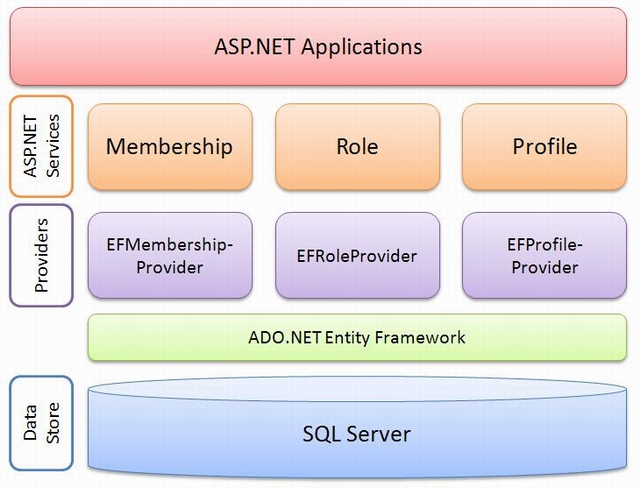
The introduction of the ADO.NET Entity Framework implicitly created the need for ASP.NET providers such as membership, role and profile that leverage this new technology.
| Type | Article |
| Licence | CPOL |
| First Posted | 31 Jul 2009 |
| Views | 75,628 |
| Downloads | 1,564 |
| Bookmarked | 74 times |
|
|