Click here to Skip to main content

Using MatLab Add-in for MS Visual Studio 6

By , 4 Jul 2003
 
<!-- Article image -->

Sample Image - MATLAB_ADD_IN.jpg

<!-- Add the rest of your HTML here -->

Introduction

Following the line of the article posted by A.Riazi, Solving engineering problem using MATLAB C API, I will show in this small example how to use M Functions inside our VC++ 6 project.

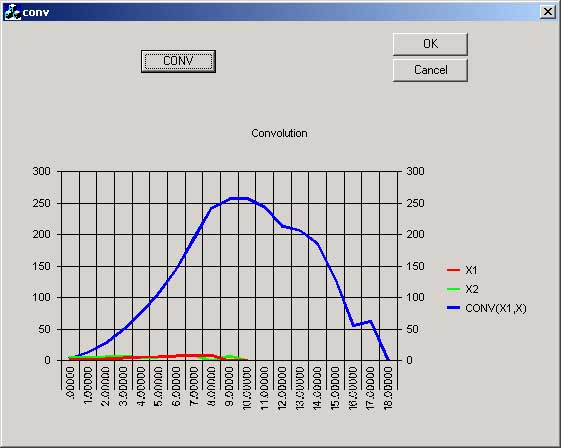
The project calculates the convolution of two vectors, and shows the resulting vector in the MsChart control. The function that performs the convolution is written in MatLab and then through the MatLab Add-in converted to C code ready to be used inside our app.

Requirements

You need Visual Studio 6 and MatLab Release 12 installed with the MatLab C Library and Matlab Compiler.

Installing the MatLab Add-in

The add-in automates the integration of M-files into Visual C++ projects. The add-in for Visual Studio is automatically installed on your system when you run either mbuild -setup or mex -setup and select Microsoft Visual C/C++ version 6. In order to use the add-in you must follow these steps:

  • Start MatLab, in the prompt type mbuild -setup
  • Follow the menus and choose MS Visual C++6.0.
  • Type the following commands in the matlab prompt :

    cd (prefdir)
    mccsavepath

These commands save the MatLab path to a file called mccpath in your user preferences directory (prefdir), ussually inside your documents and settings file. The path is used by the add-in because it runs outside Matlab and there is no other way for it to determine your Matlab path. If you add new directories to your Matlab path you will have to rerun this command if you want the add-in to see them.

  • Configure the Matlab Add-in for Visual Studio 6 to work within MSVisual C++.
    • Open MSVisualC++.
    • Select Tools -> Customize from the MSVC menu.
    • Click on the Add-ins and Macro Files tab.
    • Check MATLAB for Visual Studio on the Add-ins and Macro Files list and click Close.

The floating MATLAB add-in for Visual Studio toolbar appears. The checkmark directs MSVC to automatically load the add-in when you start MSVC again.

Calculating the convolution in Matlab

We will write a simple function in MatLab that will perform the convolution of two vectors:

In1 and In2 and store the result in out.

We actually can use any matlab built-in function or toolbox function inside our function here we use only the function conv for simplicity.

function out=MyFunc(In1,In2)
%Returns the convolution of vector IN1 and IN2
out=conv(In1,In2);

Save the function with the name MyFunc.m

Writing the Application

Use the MFC AppWizard (exe) option to generate a Dialog Based Application and call it conv. Create a Button which will calculate the convolution of two given vectors.

Add the code below to the button's Message Handler.

//x1 and x2 are the input array to do the computation
//res will have the result, we already know that the length 
//of the convolution of 2 vectors is (length(x1)+length(x2)-1)=19
double x1[]={1,2,3,4,5,6,7,8,9,0};
double x2[]={4,5,6,7,4,5,8,9,0,7};
double res[19];

//create the arrays that will be passed to MyFunc
mxArray* In1;
mxArray* In2;
mxArray* Out;

//we make them Real and have 10 values
In1=mxCreateDoubleMatrix(1,10,mxREAL);
In2=mxCreateDoubleMatrix(1,10,mxREAL);

//this make In1=x1;In2=x2
memcpy(mxGetPr(In1),x1,10*sizeof(double));
memcpy(mxGetPr(In2),x2,10*sizeof(double));

//Call to MyFunc.m that return the convolution of In1 and In2
Out=mlfMyFunc(In1,In2);

//now we have the result(Out) in a double array 'res'
memcpy(res,mxGetPr(Out),19*sizeof(double));

//Destroy matrices
mxDestroyArray(Out);
mxDestroyArray(In1);
mxDestroyArray(In2);

Copy MyFunc.m into your VC++ project directory. Now go to the MatLab Add-in and click the .m++ (Add m-files to current project) button:

Sample screenshot

Select Windows Console Exe from the Combo Box and check Generate main file and debug mode. Press OK.

Then select the MyFunc.m file and click Open. After a while you will see new files added to your project.

Sample screenshot

Under MATLAB M-files you will see our MyFunc.m, you can even edit it from inside Visual C++. Under MATLAB C/C++ are MyFunc.c and MyFunc_main.c, generated by the MatLab Compiler. And all the headers needed by the compiler.

We can't build the app yet, we must add the following lines to convDlg.cpp:

#include "matlab.h"
#include "MyFunc.h"

Now the project should be built without any problem.   

Points of Interest

The steps described here don't include the MSChart part, you can see it from the source code, but you can see that the calculation is done by placing a  breakpoint inside the button message handler and checking the value of the res vector after the line:

memcpy(res,mxGetPr(Out),19*sizeof(double));
<!------------------------------- That's it! --------------------------->

Well I hope this simple article be interesting for MatLab lovers, this is the first article I wrote, so I apologize if it is not clear enough. I will be glad to explain anything if you ask me. Greetings.

License

This article, along with any associated source code and files, is licensed under The Code Project Open License (CPOL)

About the Author

Cambalindo
Software Developer Motorola
United States United States
Daniel Cespedes is now working on his final project to get the Electrical Engineering degree at the National University of Technology in Cordoba Argentina. He is developing a Computerized system for the study of Human Echolocation, the ability to detect obstacles with the echoes of self generated sounds.(yes like bats!!) at the CINTRA (Centro de Investigación y Transferencia Acústica).He uses MsVisual C++ 6 as a developing tool. He also work at the Software Research Lab at the University.
He comes from Sta.Cruz de la Sierra-Bolivia a paradise in SouthAmerica´s heart, where you can find pure air, nature contact, happy people, beautiful women etc.


Sign Up to vote   Poor Excellent
Add a reason or comment to your vote: x
Votes of 3 or less require a comment

Comments and Discussions

 
You must Sign In to use this message board.
Search this forum  
    Spacing  Noise  Layout  Per page   
Generalmatlab and microsoft visual C++membersou.bhowmick29-Jun-10 3:29 
please tell me how can i use matlab functions in msvc while i am using matlab 7(r14) and msvc 6.0............
GeneralRe: matlab and microsoft visual C++memberCambalindo1-Jul-10 16:41 
HI,
Please check here http://www.codeproject.com/Messages/2551239/ANSWER-TO-SOME-OF-YOUR-PROBLEMS.aspx[^] you may find the answer you are looking for.
let me know if it helps.
thanks.
Daniel Cespedes
 

daniel.cespedes@ieee.org

QuestionPassing a 28x5700 double matrix from a C program to Matlab engine.memberStefano7121-Sep-08 1:16 
Hi,
I have written a traffic simulator based on C language, and I launch it using the Matlab engine functionality after compiling it with LCC.
Everything works well as long as I only pass single double variable from the simulator to the Matlab workspace. But I can't find a way to pass the whole Matrix, which is 28x5700.
I could not adapt the examples I have read here (using memcpy), probably I miss some background on this topic.
I have been striving against this for some weeks and any help will be very appreciated.
Thank you
Stefano.
QuestionInvalid property valuemembervitamine198323-May-08 20:28 
Hello Cambalindo Smile | :)
Thank you for the perfect project and beautipfu explanation. Smile | :) Iwell compiled your project, but when I start it and when I press "CONV" button the Error box appears which is saying about "Invalid property value".
How do I can reapare that ?Confused | :confused:
 
That message appears in WINCORE.CPP file in such place
 
CATCH_ALL(e)
{
CWinThread* pWinThread = AfxGetThread();
if ( pWinThread != NULL )
{
lResult = pWinThread->ProcessWndProcException(e, &pThreadState->m_lastSentMsg);
TRACE1("Warning: Uncaught exception in WindowProc (returning %ld).\n",
lResult);
}
else
{
TRACE0("Warning: Uncaught exception in WindowProc.\n");
lResult = 0;
}
DELETE_EXCEPTION(e);
}
 
when is executing this code part in CONV button function
if(n<11)
{
m_Chart.SetColumn(1);
m_Chart.SetRow(n+1);
value=do2CStr(x1[n]);
m_Chart.SetData(value);
 
m_Chart.SetColumn(2);
m_Chart.SetRow(n+1);
value=do2CStr(x2[n]);
m_Chart.SetData(value);
 
}
AnswerRe: Invalid property valuememberCambalindo24-May-08 13:13 
Hi,vitamine, thanks for your words regarding the article.
It's really annoying that it's not working for you, and unfortunately I don't have an answer for your error, could you tell me what Matlab and VS versions are you using?
regards.
 
Daniel Cespedes
 
"There are 10 types of people, those who understand binary and those who do not"
"Santa Cruz de la Sierra Paraiso Terrenal!"
 
daniel.cespedes@ieee.org

GeneralRe: Invalid property valuemembervitamine198325-May-08 10:52 
MATLAB version is 6.5 or VS according to the article - 6.0. I gess that problem is with visualisation, because in initialisation of graph window defined 10 points (input data), after convolition we get 16 points. In my opinion is something wrong with reinitialisation.
GeneralRe: Invalid property valuememberCambalindo26-May-08 2:59 
perhaps, you could try without the mschart, comment all the lines corresponding to the chart, and see if your function is working. If it works, the problem es in the chart part, I'll review it to see if I can find the error.
cheers
 
Daniel Cespedes
 
"There are 10 types of people, those who understand binary and those who do not"
"Santa Cruz de la Sierra Paraiso Terrenal!"
 
daniel.cespedes@ieee.org

GeneralError on the fatal errormemberhappy0121-May-08 17:46 
Hi,
 
Could you give me idea on this errors? I am currently using Matlab 7.5.0(2007b) and Microsoft Visual c++ 6.
 
Please. thank alot.
 
c:\documents and settings\administrator\desktop\matlab_add_in\myfunc.h(21) : fatal error C1083: Cannot open include file: 'libmatlb.h': No such file or directory
MyFunc_main.c
c:\documents and settings\administrator\desktop\matlab_add_in\myfunc_main.c(14) : fatal error C1083: Cannot open include file: 'libmatlb.h': No such file or directory
Error executing cl.exe.
Build : warning : failed to (or don't know how to) build 'E:\trabajos\daniel\practicasC++\conv\MyFunc.m'
GeneralRe: Error on the fatal errormemberCambalindo24-May-08 13:09 
Hi, pls. see the thread right below this one, I think your errors are addressed there.
another thing:
the last warning, is addressing my HardDisk:
Error executing cl.exe.
Build : warning : failed to (or don't know how to) build 'E:\trabajos\daniel\practicasC++\conv\MyFunc.m' 
check that should be your path to your function.
regards
 
Daniel Cespedes
 
"There are 10 types of people, those who understand binary and those who do not"
"Santa Cruz de la Sierra Paraiso Terrenal!"
 
daniel.cespedes@ieee.org

AnswerANSWER TO SOME OF YOUR PROBLEMSmemberleevonk13-May-08 9:46 
I had matlab 7.0 and the mccsavepath command doesn't work anymore, this is because this version of matlab supposedly 'automatically' adds its path to the windows path. this is not necessarily done right and can be corrected manually. See instructions here and add you matlab bin directory to the path, for example on my computer I copied this to my path:
C:\Program Files\MATLAB\R2007a\bin
C:\Program Files\MATLAB\R2007a\bin\win32
 
also, make sure your visual c++ bin directory is in the same path, on my computer:
C:\Program Files\Microsoft Visual Studio\Common\MSDev98\Bin
 
Before I discovered this I reinstalled an older version of matlab that did have a working mccsavepath command, matlab 6.5 (release 13). in matlab 6.5 I typed in the commands as this article shows and they worked ok, but then I still had to go into the windows path and manually make sure that the matlab and vc++ bin directories were in the windows path:
c:\matlab6p5\bin\win32
C:\Program Files\Microsoft Visual Studio\Common\MSDev98\Bin
GeneralRe: ANSWER TO SOME OF YOUR PROBLEMSmemberleevonk13-May-08 10:08 
IN ADDITION:
 
some of you asked about mlfMyFunc undeclared identifier errors. The way to fix this is to open the myfunc.h file, and look to see what the corrrect capitalization is of the function, it should be around line 26 of the .h file. the capitalization seems to be arbitrary so make sure you check, for me it was mlfMyfunc() even though the .h file was myfunc.h and my m-file function was MyFunc()
AnswerRe: ANSWER TO SOME OF YOUR PROBLEMSmemberleevonk13-May-08 11:01 
here's how I finally got everything to work. read my advice in the two comments above (check capitalization of myfunc, include bin directories in the widnows PATH, etc.
 

%+++++++++++++++++++++++++++++++++++
%+++++++++--MATLAB M FILE--+++++++++
%+++++++++++++++++++++++++++++++++++
function out=MyFunc(a,b)
if ( a >= b)
out = a;
else
out = b;
end
%+++++++++++++++++++++++++++++++++++


//###################################
//#########--VC++ Code Below--#######
//###################################
 
//#######library modules linked to project:#########
// libmwlapack.lib libmex.lib libmx.lib
 
//include section
#include "stdafx.h"
#include "MatlabIntegrationTest.h"
#include "MatlabIntegrationTestDlg.h"
#include "matlab.h"
#include "myfunc.h"
#include "mat.h"
#include "conio.h"
#include
 

/*
this part below is in the OK buttons function
I modified the code posted in the instructions to be simpler
my code sends two numbers, x1 and x2 to the m-file, the m-file
decides which number is larger and sends it back to the c++ code
---
you can see the unmodified original code in the comments above each
line of my modified code
---
In order to see that the code was working correctly, I made an 'edit box'
in my GUI dialog, the variable associated with the edit box is m_Output
So at the end of my code I write the value returned to the c++ code from the
m-file to the edit box so you can see it. In the case of the two numbers I'm
sending the m-file in my code (4 and 6), it should show a 6 when you click the
GUI's ok button to run the program.
*/
 
void CMatlabIntegrationTestDlg::OnOK()
{
//double x1[]={1,2,3,4,5,6,7,8,9,0};
//double x2[]={4,5,6,7,4,5,8,9,0,7};
double x1[]={6};
double x2[]={4};
//double res[19];
double res[1];
 
//create the arrays that will be passed to MyFunc
 
mxArray* In1;
mxArray* In2;
mxArray* Out;
 
//we make them Real and have 10 values
//In1=mxCreateDoubleMatrix(1,10,mxREAL);
//In2=mxCreateDoubleMatrix(1,10,mxREAL);
In1=mxCreateDoubleMatrix(1,1,mxREAL);
In2=mxCreateDoubleMatrix(1,1,mxREAL);
 
//this make In1=x1;In2=x2
//memcpy(mxGetPr(In1),x1,10*sizeof(double));
//memcpy(mxGetPr(In2),x2,10*sizeof(double));
memcpy(mxGetPr(In1),x1,1*sizeof(double));
memcpy(mxGetPr(In2),x2,1*sizeof(double));
 
//Call to MyFunc.m that return the convolution of In1 and In2
 
Out=mlfMyfunc(In1,In2);
 
//now we have the result(Out) in a double array 'res'
//memcpy(res,mxGetPr(Out),19*sizeof(double));
memcpy(res,mxGetPr(Out),1*sizeof(double));
 
//send the returned value to an edit box of the GUI
double LeeOut;
LeeOut = res[0];
m_Output = LeeOut;
UpdateData(FALSE);
 
//extra debug message
MessageBox("hi");
 
//Destroy matrices
mxDestroyArray(Out);
mxDestroyArray(In1);
mxDestroyArray(In2);
 
}

GeneralRe: ANSWER TO SOME OF YOUR PROBLEMSmemberCambalindo14-May-08 3:14 
Thanks leevonk!!
for clarifying some of the doubts posted, and making the sample easier to implement!!
I haven't looked this article for a while...
cheers!
 
Daniel Cespedes
 
"There are 10 types of people, those who understand binary and those who do not"
"Santa Cruz de la Sierra Paraiso Terrenal!"
 
daniel.cespedes@ieee.org

GeneralproblemmemberahmedY17-Feb-08 13:29 
I have the same exact proplem as the following and i have matlab R2007b :
 
I follow the instruction to
Configure the Matlab Add-in for Visual Studio 6 to work within MSVisual C++:
by Open MSVisualC++, Select Tools -> Customize from the MSVC menu.
Clicking on the Add-ins and Macro Files tab.
but i dont see any MATLAB for Visual Studio on the Add-ins or Macro Files list ,
i also type the command in MAATLAB:
cd(prefdir) ;
save mccpath;
QuestionHow can Imemberflomerie20-Jul-07 4:16 
sir,
I used the example to build an Vc++6.0 application which use matlab function and yhe application run well. my problem is when i execute my application to the another computer i have some errors. how can i generate the executable file of my application?Confused | :confused:
AnswerRe: How can ImemberCambalindo2-Aug-07 7:18 
Can you send me the error messages in the other computer you try to run..
does the other computer has VC++ insalled, if not you may be need some dlls to copy.

 
Daniel Cespedes
 
"There are 10 types of people, those who understand binary and those who do not"
"Santa Cruz de la Sierra Paraiso Terrenal!"
 
daniel.cespedes@ieee.org

Generalconfusemembercocojin26-Oct-06 20:33 
this is my first time to come here.I also have the problem that is same as Joel Karbassi .My matlab release is 7.1. I also cannot see the button in MSVC. I'm glad to hear from you and thank you!
Questionconfigure the MATLAB add-in for VISUAL STUDIOmemberJoel Karbassi17-Sep-06 6:20 
i follow the instruction to
Configure the Matlab Add-in for Visual Studio 6 to work within MSVisual C++:
by Open MSVisualC++, Select Tools -> Customize from the MSVC menu.
Clicking on the Add-ins and Macro Files tab.
but i dont see any MATLAB for Visual Studio on the Add-ins or Macro Files list ,
i also type the command in MAATLAB:
cd(prefdir) ;
save mccpath;
 
sincerely Joel
AnswerRe: configure the MATLAB add-in for VISUAL STUDIOmemberCambalindo29-Sep-06 10:05 
what matlab version do you have?

 
Daniel Cespedes
 
"There are 10 types of people, those who understand binary and those who do not"
"Santa Cruz de la Sierra Paraiso Terrenal!"
 
daniel.cespedes@ieee.org

QuestionUndefined Function ErrorsmemberUJ_Student16-May-06 1:49 
I'm new to MATLAB programming. I currently use MATLAB v6.1(R12) on
MS WINXP SP2 with MS Visual C++ (6.0). I created a section of a
program within the Visual C++ environment and inserted a function
M-file into this program using the MATLAB Visual Studio Add-in. The
function M-file is to produce graphical output based on the values of
arrays which are to be initialized in the C++ environment. The
resulting program shows no compile errors.

The problem begins when the program is executed. It seems unable to
use the arrays intialized within the Visual C++ environment and
returns the error: "variable x is undefined". I don't understand why
this is so as the arrays have been initialized and passed
(mwArray(n_,_n,_name). I would appreciate it if someone could
provide assistance urgently.

Thank you
 
ATBU
GeneralHELP: Errors Using MSVC and the MATLAB add-inmemberUJ_Student16-May-06 0:51 
I'm new to MATLAB programming. I currently use MATLAB v6.1(R12) on
MS WINXP SP2 with MS Visual C++ (6.0). I created a section of a
program within the Visual C++ environment and inserted a function
M-file into this program using the MATLAB Visual Studio Add-in. The
function M-file is to produce graphical output based on the values of
arrays which are to be initialized in the C++ environment. The
resulting program shows no compile errors.

The problem begins when the program is executed. It seems unable to
use the arrays intialized within the Visual C++ environment and
returns the error: "variable x is undefined". I don't understand why
this is so as the arrays have been initialized and passed
(mwArray(n_,_n,_name). I would appreciate it if someone could
provide assistance urgently.

Thank you
 
ATBU
QuestionUsing VS .net with MatLab Add-inmembersillE maiL9-Mar-06 10:57 

On VS2003 I get mbuild -setup and mex- setup to work and can build mex files (from .c/.cpp code and .m code). I did this (in case anyone wants to know) by making a copy of the VC folder in the visual studio .net folder and naming it Vc7 (as this is where matlabs mbuild -setup script looks for the cl.exe compiler).
I could also get the Visulal Studio. However the add-in, that should be made availeble after running the mbuild -setup, is not availeble because the tools-customize dialogue is not the same as in VC++ 6. Also the (copied) Vc7 folder is not accessed by VS2003 .net so, if this is where the add-in is placed it will not be found.
To overcome this I used the MatLab VS.Net Custom App Wizard (see matlab exchange) to allow me to start a mex project using the VS IDE new project wizard. This was fine.
 
Now I have upgraded to VS2005 and things are not so good.
 
On VS2005 I can get the mex -setup and mbuild -setup scripts to run successfully (by doing the same copying and calling it trick) but this time the .dlls dont work. Also I have tried the MatLab VS.Net Custom App Wizard and although I can get the wizard to create the project, the project no longer compiles.
 
If anyone has sorted this out yet please let me know. Also, if your using VS2003 then try my trick of creating the Vc7 folder in the VS.NET2003 folder.
 
cheers,

 
lIAmO,
 
lets help each other make coding easier.
GeneralpiecewisesussAnonymous18-Oct-05 11:44 
Hi, my name is Ray, can I help you?
 
I have a function (piecewise) in matlab's editor
 
function y = fdp1(x)
 
if (x < 0)
y=0;
elseif (x >= 0 & x < 1)
y=(1/2)*x.^2;
elseif (x >= 1 & x < 2)
y=1/2;
elseif (x >= 2 & x < 4)
y=(1/4)*x;
else x >= 4
y=1;
end;
 
______________
When I want to plot,
It's don't plot
Why?
Generalpuedo usar archivos .mat usando add insussHector Villacorta17-Aug-05 7:18 
Hola,en primer lugar te expreso mis saludos y agradecerte pues este tutorial e ha servido mucho.Ahora te quiero hacer una pregunta: lo que yo deseo es leer una funcion en visual c++ usando el add in pero en esta función yo guardo variables como archivos .mat para luego cargarlos con load en otra función y poder trabajar en esa. ¿Cómo puedo trabajar con estos archivos?.Te agradeceré mucho tu ayuda.
Hector Villacorta
GeneralUsing GAMS in a C++ programsussAnonymous8-Aug-05 23:42 
I want to write a Visual C++ program which gets data from the user and gives this data to GAMS (on a simple button click and GAMS should not run visibly). GAMS is then supposed to make a calculation and give the obtained data back to my Visual C++ program so that I can use this new data. Does anybody know if this is possible???? And if so, then how should I do this? THANKSA in advance.
GeneralRe: Using GAMS in a C++ programmemberCambalindo9-Aug-05 3:03 
Sorry but I don't know what GAMS is..
could you explain pls.
tks.
 
Daniel Cespedes
 
"There are 10 types of people, those who understand binary and those who do not"
"Santa Cruz de la Sierra Paraiso Terrenal!"
 
daniel.cespedes@ieee.org
GeneralRe: Using GAMS in a C++ programsussAnonymous11-Aug-05 20:40 
GAMS (General Algebraic Modeling System ) is (I think) similar to matlab though the source code is only written in a text file and not in a .m file.
QuestionHelp! Wrong Input Parameter ?!?memberwsquare8-May-05 4:45 
hi, desparately in need of advise why it doesnt seem to work for me..
 
I did all the steps as advised and what i did was change the function and import to my vc++ program. I tried a simple .m file ie.
 
ie. function d=magic(imagefn)
ie. p = imread(imagefn);
ie. imshow(p);
----
where imagefn is a filename string

However, when i tried calling the function mlfMagic(filename) in
VC++, it keeps giving me error ' function does not take 1 parameters'
when indeed my .m requires only an input parameter 'imagefn'.

Can advise me immediately on this issue if u know the answer? Tks in advance!
AnswerRe: Help! Wrong Input Parameter ?!?memberwsquare8-May-05 5:38 
hi i discovered that my function prototype contains more than a parameter.. but i have absolutely no idea why is it so. Do you have any idea?
 
mxArray * mlfMagic(mxArray * * V, mxArray * * thm, mxArray * * r2e,
mxArray * z, mxArray * nn, mxArray * r2, mxArray * q, mxArray * r1,
mxArray * M, mxArray * th0, mxArray * p0, mxArray * lifelength,
mxArray * mu)
 
do not understand why are there so many input paramters required now... when i only need one..
GeneralProblem with ur code...Plz HLP!!!memberviveksundaram6-Apr-05 2:22 
Sir,
 
These are the errors i receive when i build ur project... Pls help!!!
 
ibmatpm.lib(dblmtrx.o) : warning LNK4044: unrecognized option "alternatename:__imp_??$?6U?$char_traits@D@std@@@std@@YAAAV?$basic_ostream@DU?$char_traits@D@std@@@0@AAV10@PBD@Z=__imp_??6std@@YAAAV?$basic_ostream@DU?$char_traits@D@std@@@0@AAV10@PBD@Z"
; ignored
libmatpm.lib(varargin.o) : warning LNK4044: unrecognized option "alternatename:__imp_??$?6U?$char_traits@D@std@@@std@@YAAAV?$basic_ostream@DU?$char_traits@D@std@@@0@AAV10@PBD@Z=__imp_??6std@@YAAAV?$basic_ostream@DU?$char_traits@D@std@@@0@AAV10@PBD@Z
"; ignored
libmatpm.lib(mcccpp.o) : warning LNK4044: unrecognized option "alternatename:__imp_??$?6U?$char_traits@D@std@@@std@@YAAAV?$basic_ostream@DU?$char_traits@D@std@@@0@AAV10@PBD@Z=__imp_??6std@@YAAAV?$basic_ostream@DU?$char_traits@D@std@@@0@AAV10@PBD@Z";
ignored
libmatpm.lib(init.o) : warning LNK4044: unrecognized option "alternatename:__imp_??$?6U?$char_traits@D@std@@@std@@YAAAV?$basic_ostream@DU?$char_traits@D@std@@@0@AAV10@PBD@Z=__imp_??6std@@YAAAV?$basic_ostream@DU?$char_traits@D@std@@@0@AAV10@PBD@Z"; i
gnored
libmatpm.lib(stdexcpt.o) : warning LNK4044: unrecognized option "alternatename:__imp_??$?6U?$char_traits@D@std@@@std@@YAAAV?$basic_ostream@DU?$char_traits@D@std@@@0@AAV10@PBD@Z=__imp_??6std@@YAAAV?$basic_ostream@DU?$char_traits@D@std@@@0@AAV10@PBD@Z
"; ignored
libmatpm.lib(nsubarry.o) : warning LNK4044: unrecognized option "alternatename:__imp_??$?6U?$char_traits@D@std@@@std@@YAAAV?$basic_ostream@DU?$char_traits@D@std@@@0@AAV10@PBD@Z=__imp_??6std@@YAAAV?$basic_ostream@DU?$char_traits@D@std@@@0@AAV10@PBD@Z
"; ignored
libmatpm.lib(arrayidx.o) : warning LNK4044: unrecognized option "alternatename:__imp_??$?6U?$char_traits@D@std@@@std@@YAAAV?$basic_ostream@DU?$char_traits@D@std@@@0@AAV10@PBD@Z=__imp_??6std@@YAAAV?$basic_ostream@DU?$char_traits@D@std@@@0@AAV10@PBD@Z
"; ignored
libmatpm.lib(matmtxif.o) : warning LNK4044: unrecognized option "alternatename:__imp_??$?6U?$char_traits@D@std@@@std@@YAAAV?$basic_ostream@DU?$char_traits@D@std@@@0@AAV10@PBD@Z=__imp_??6std@@YAAAV?$basic_ostream@DU?$char_traits@D@std@@@0@AAV10@PBD@Z
"; ignored
libmatpm.lib(handler.o) : warning LNK4044: unrecognized option "alternatename:__imp_??$?6U?$char_traits@D@std@@@std@@YAAAV?$basic_ostream@DU?$char_traits@D@std@@@0@AAV10@PBD@Z=__imp_??6std@@YAAAV?$basic_ostream@DU?$char_traits@D@std@@@0@AAV10@PBD@Z"
; ignored
libmatpm.lib(feval.o) : warning LNK4044: unrecognized option "alternatename:__imp_??$?6U?$char_traits@D@std@@@std@@YAAAV?$basic_ostream@DU?$char_traits@D@std@@@0@AAV10@PBD@Z=__imp_??6std@@YAAAV?$basic_ostream@DU?$char_traits@D@std@@@0@AAV10@PBD@Z";
ignored
libmatpm.lib(varargout.o) : warning LNK4044: unrecognized option "alternatename:__imp_??$?6U?$char_traits@D@std@@@std@@YAAAV?$basic_ostream@DU?$char_traits@D@std@@@0@AAV10@PBD@Z=__imp_??6std@@YAAAV?$basic_ostream@DU?$char_traits@D@std@@@0@AAV10@PBD@
Z"; ignored
libmatpm.lib(dblmtrx.o) : error LNK2001: unresolved external symbol __ftol2
libmatpm.lib(init.o) : error LNK2001: unresolved external symbol __ftol2
libmatpm.lib(init.o) : error LNK2001: unresolved external symbol "__declspec(dllimport) ??$?6U?$char_traits@D@std@@@std@@YAAAV?$basic_ostream@DU?$char_traits@D@std@@@0@AAV10@PBD@Z" (__imp_??$?6U?$char_traits@D@std@@@std@@YAAAV?$basic_ostream@DU?$cha
r_traits@D@std@@@0@AAV10@PBD@Z)
libmatpm.lib(handler.o) : error LNK2001: unresolved external symbol "__declspec(dllimport) ??$?6U?$char_traits@D@std@@@std@@YAAAV?$basic_ostream@DU?$char_traits@D@std@@@0@AAV10@PBD@Z" (__imp_??$?6U?$char_traits@D@std@@@std@@YAAAV?$basic_ostream@DU?$
char_traits@D@std@@@0@AAV10@PBD@Z)
libmatpm.lib(nsubarry.o) : error LNK2001: unresolved external symbol "void * __cdecl operator new[](unsigned int)" (??_U@YAPAXI@Z)
libmatpm.lib(matmtxif.o) : error LNK2001: unresolved external symbol "void * __cdecl operator new[](unsigned int)" (??_U@YAPAXI@Z)
libmatpm.lib(feval.o) : error LNK2001: unresolved external symbol "void * __cdecl operator new[](unsigned int)" (??_U@YAPAXI@Z)
libmatpm.lib(handler.o) : error LNK2001: unresolved external symbol "protected: virtual class std::fpos __thiscall std::strstreambuf::seekoff(long,int,int)" (?seekoff@strstreambuf@std@@MAE?AV?$fpos@H@2@JHH@Z)
libmatpm.lib(handler.o) : error LNK2001: unresolved external symbol "void __cdecl operator delete[](void *)" (??_V@YAXPAX@Z)
libmatpm.lib(feval.o) : error LNK2001: unresolved external symbol "void __cdecl operator delete[](void *)" (??_V@YAXPAX@Z)
conv.exe : fatal error LNK1120: 5 unresolved externals
Error executing link.exe.
Build : warning : failed to (or don't know how to) build 'E:\trabajos\daniel\practicasC++\conv\MyFunc.m'
 
conv.exe - 11 error(s), 12 warning(s)
 
Thanks,
Vivek

GeneralRe: Problem with ur code...Plz HLP!!!memberCambalindo6-Apr-05 3:35 
Hi,
Did you installed the Matlab add-in successfully?
it seems that you don't have matlab installed.
because Visual Stoudio can not locate the matlab libraries.

 
Daniel Cespedes
 
"There are 10 types of people, those who understand binary and those who do not"
"Santa Cruz de la Sierra Paraiso Terrenal!"
 
daniel.cespedes@ieee.org
GeneralMatlab 7.0memberDima889-Dec-04 3:56 
Has the Matlab 7.0 function "mccsavepath"? If no, what similar function exists in Matlab 7.0?
GeneralRe: Matlab 7.0memberCambalindo9-Dec-04 4:07 
Sorry I do not know, I have version 6.1 and it has that function.
I suppose Matlab 7 should have that function.

 
Daniel Cespedes
 
"There are 10 types of people, those who understand binary and those who do not"
"Santa Cruz de la Sierra Paraiso Terrenal!"
 
daniel.cespedes@ieee.org
GeneralRe: Matlab 7.0susspetitbitume16-Jan-05 6:05 
I work with matlba 7.0 and I have the same problem.
Is there any equivalent to the Visual Studio add-in (included in matlab 6.1) in the 7.0 version ?
If not, how can I compile m code from my visual C++ compiler ?
Questionhow to set the compiler path?memberMuhammad Naveed8-Dec-04 5:49 
hi,
i am working in matlab 7. whenever i build the component an error comes. error description is: An error ocurred while shelling out to mbuild (error code = 1).
Unable to build executable.
can somebody tell me how to remove the error.

 
This will appear at the
end of messages you post
to the Code Project
AnswerRe: how to set the compiler path?memberMadhukarGM23-Mar-05 9:58 
Hi,
 
I saw this FAQ and was very Happy. I am facing exactly the same problem mentioned here. I am using Matlab 6.5 and when I type mbuild -setup on my command prompt I see the same message.
 
If somebody knows the solution for this. Kindly email me.
Thanks and regards,
Madhukar.G.M
GeneralPlzz help in my code for plotmemberhssuma16-Nov-04 19:42 
Hello,
I have a m-file which plots a graph taking inputs from a dat file. So, i have called the m file just as mlfbaffle in the button message handler. The code is
 
double res[19];
mxArray* out;
out = mlfbaffle();
memcpy(res,mxGetPr(out),19*sizeof(double));
mxDestroyArray(out);
 
But i get error as
 
:\work\convu\convudlg.cpp(178) : error C2065: 'mlfbaffle' : undeclared identifier
c:\work\convu\convudlg.cpp(178) : error C2440: '=' : cannot convert from 'int' to 'struct mxArray_tag *'
Conversion from integral type to pointer type requires reinterpret_cast, C-style cast or function-style cast
baffle.c
 
I have followed the instructions as given in this link but the error persists.. Plz help...
 
I can run this code in matlab but not using MFC...
 
function out = baffle()
x1 = load('d:\su_mat\t0');
x2 = load('d:\su_mat\t01');
x3 = load('d:\su_mat\t012');
x4 = load('d:\su_mat\t0123');
x5 = load('d:\su_mat\t01234');
y1 = load('d:\su_mat\f0');
y2 = load('d:\su_mat\f01');
y3 = load('d:\su_mat\f012');
y4 = load('d:\su_mat\f0123');
y5 = load('d:\su_mat\f01234');
r1 = load('d:\su_mat\reflectivity.dat');
%plot(y1,x1,y2,x2)
plot(y1,x1,y2,x2,y3,x3,y4,x4,y5,x5) %CHANGE
grid on;
xlabel(' T/(2*H) ');
ylabel( ' F(r) / F(i) ');
out = sprintf('1')
 

PLzz help
Regards,
 

Generalusing plotmemberArkadeep Sett1-Sep-04 1:00 
Dear sir,
I've just started learning how to call a MATLAB funtion from MSVC++.I've tried with a lots of funtions that doesn't require graphics.It goes fine,but I got stuck with the 'plot' function.The program I've written is as follows:
 

#include "matlab.hpp"
#include "stdafx.h"
#include "libmwsglm.h"
 
//Add C++ Math Library to project
#pragma comment(lib, "libmatpm.lib")
#pragma comment(lib, "libmx.lib")
#pragma comment(lib, "libmatlb.lib")
#pragma comment(lib, "libmat.lib")
#pragma comment(lib, "libmmfile.lib")
#pragma comment(lib, "libmatpm.lib")
#pragma comment(lib, "sgl.lib")
 
int main()
{
const double pi = 3.1415926;
const double Fc = 1;
const double T = 1/Fc;
mwArray t(0.0,T/16,T);
mwArray x = cos(2*pi*Fc*t);
x.Print("x");
plot(t,x);
return 0;
}
 
It gives neither compilation error nor linker error.The vector x is printed ,but after that the program ends with a messege "abnormal program termination" without any figure.
Can you please help me to fix the probelem
Waiting for ur kind reply.
 
Thanks and regards
Arkadeep Sett
GeneralGUIsussAnonymous21-Aug-04 20:21 
1) Can i hav a complete code for Matlab 6.5 GUI open file dialog box that is functional.i can't open the selected file from the dialog box?
 
2) How can i pass the selected file from the dialog box as an argument to a function?thanks.
GeneralRe: GUImemberCambalindo23-Aug-04 9:14 
1)What kind of file are you trying to open?
2)You pass the name and path of the selected file with de uigetfile function:
[FileName,Path]=uigetfile('*.m','title');
 
Daniel Cespedes
 
"There are 10 types of people, those who understand binary and those who do not"
"Santa Cruz de la Sierra Paraiso Terrenal!"
 
daniel.cespedes@ieee.org
QuestionHow Can I?....memberTheBobik11-Jul-04 6:30 
Loved the example thanx.
I need an implementation of a matlab function called "decimate", I guess its from the signal processing toolbox , I tried to add
Mydecimate.m to the project like in the example. Lots of files where added to the project by the matlab Add-in, the compilation went very well but during the linking process I got exactly 2450 unresolved externals (and 17 warnings -that made me very happy)
any way...
Am I doing something terribly wrong , I'm newbie in MATLAB and is there a way to know what lib's to link to resolve these errors (or perhaps link them all)
Enlighted people of the world please advise a lost soul Cry | :(( .
Thanks a lot!
Generalmatlab =&gt; C++ =&gt; GAMSmemberZenón10-Jun-04 6:28 
I want to do an optimization in GAMS ( a program of optimization). But I want to use an m-file. To do this I consider the use of Visual C++ 6.0. For use a C program from GAMS I have to compile this program with a .bat file (I can't use visual C++ directly). I want to know if posible compile the m-file in such way that I can use that program in other program without use the matlab library. I consider use COM, but I don't know how to use this in a C++ program. In the other hand, I want to know if it's possible to call a .exe program for a c/c++ program.

Questionhow can i compile this functionmemberdnqhung20-May-04 18:15 
this is my function
funtion a=FT1(b)
a=b*2;
funtion c=FT2(d)
e=FT1(d);
c=e*3;
 
i'm new to VC++,so can you show me clearly,or give me some code.
thank you

 
dnqhung
GeneralPressing the CONV buttonmemberBeth Armstrong20-May-04 10:49 
I downloaded the files, and followed steps to install the add-in and build the project and it runs just fine. However, when I press the CONV button the application exits with a code of 1. When I debug the OnConv() this occurs at the mxCreateDoubleMatrix() call ... any ideas what is going on? Thanks!
 
peter
GeneralMatlabsussmustafa samady23-Apr-04 8:58 
Dear Sir,
 
I'm control engineer student(M.S.).T work with MATLAB alot.
I have good skill in matlab.I live in Iran.I wanna know that can I
use my information to have a acception form othe university.
 

Best Regards
mustafa samadi

GeneralRe: MatlabmemberCambalindo23-Apr-04 9:21 
I don´t understand very well what do you want to do.
you want to change the university you go now?? is that so?
which University do you want to go? Please give me more details so I can help you..
cheers!!
 
Daniel Cespedes
 
"There are 10 types of people, those who understand binary and those who do not"
"Santa Cruz de la Sierra Paraiso Terrenal!"
 
daniel.cespedes@ieee.org
GeneralPlease ReplysussAnonymous18-Apr-04 18:41 
I have followed each and every step , when I open Myfunc.m file from MSVC after selecting Windows Console Exe .
ERROR Comes: MCC returned error code 1.
I have installed Matlab 6.5 , I don’t know whether Matlab C library is included with it or it is to be installed separately. I am doubtful that it may be the cause for this error.
When I build this application then following error comes:

Generalmex problemmemberawhan16-Apr-04 5:28 
i wrote a similar program :
 
m file : MyFunc.m
===========================
function out=MyFunc(a,b)
if ( a >= b)
out = a;
else
out = b;
end
========
 
in visual studio :
====================
#include
#include "matlab.h"
#include "MyFunc.h"
 

int main(void)
{
double aa = 2;
double bb = 5;
double outout;
 
mxArray *a;
mxArray *b;
mxArray *out;
 
a = mxCreateDoubleMatrix(1,1,mxREAL);
b = mxCreateDoubleMatrix(1,1,mxREAL);
 
memcpy(mxGetPr(a),aa,1*sizeof(double));
memcpy(mxGetPr(b),bb,1*sizeof(double));
 
out = mlfMyFunc(a,b);
 
memcpy(outout,mxGetPr(out),1*sizeof(double));
 
mxDestroyArray(out);
mxDestroyArray(a);
mxDestroyArray(b);
 
printf("The bigger of 2 and 5 is %f",outout);
 
return 0;

}
 
=====================
 
but i got the following error:
=====================
-------------------Configuration: humm - Win32 Debug--------------------
Compiling...
main.cpp
C:\FIRSTAPP\humm\main.cpp(19) : error C2664: 'memcpy' : cannot convert parameter 2 from 'double' to 'const void *'
There is no context in which this conversion is possible
C:\FIRSTAPP\humm\main.cpp(20) : error C2664: 'memcpy' : cannot convert parameter 2 from 'double' to 'const void *'
There is no context in which this conversion is possible
C:\FIRSTAPP\humm\main.cpp(22) : error C2065: 'mlfMyFunc' : undeclared identifier
C:\FIRSTAPP\humm\main.cpp(22) : error C2440: '=' : cannot convert from 'int' to 'struct mxArray_tag *'
Conversion from integral type to pointer type requires reinterpret_cast, C-style cast or function-style cast
C:\FIRSTAPP\humm\main.cpp(24) : error C2664: 'memcpy' : cannot convert parameter 1 from 'double' to 'void *'
There is no context in which this conversion is possible
Error executing cl.exe.
 
main.obj - 5 error(s), 0 warning(s)
========================
 
please help....
 
awhanpatnaik@rediffmail.com
GeneralRe: mex problemmemberCambalindo16-Apr-04 7:06 
Hi awhan:
try this...
Check the case of mlfMyFunc,, probably it is mlfMyfunc or mlfmyFunc()..
 
cheers..
 
Daniel Cespedes
 
"There are 10 types of people, those who understand binary and those who do not"
"Santa Cruz de la Sierra Paraiso Terrenal!"
 
daniel.cespedes@ieee.org
GeneralRe: mex problemmemberawhan16-Apr-04 7:29 
thanks daniel for the quick response
 
there are a couple of things i would point out:
 
1> the code in the earlier faulty the correct code is:
 
==================
 
#include
#include "matlab.h"
#include "func.h"
 
int main(void)
{
double *aa ; // had messed up here
double *bb ; // --do--
double *outout; //--do--
 
*aa = 2;
*bb = 5;
 
mxArray *a;
mxArray *b;
mxArray *out;
 
a = mxCreateDoubleMatrix(1,1,mxREAL);
b = mxCreateDoubleMatrix(1,1,mxREAL);
 
memcpy(mxGetPr(a),aa,1*sizeof(double));
memcpy(mxGetPr(b),bb,1*sizeof(double));
 
out = mlfFunc(a,b);
memcpy(outout,mxGetPr(out),1*sizeof(double));
 
mxDestroyArray(out);
mxDestroyArray(a);
mxDestroyArray(b);
 
printf("The bigger of 2 and 5 is %f",outout);
 
return 0;

}
 

======================
 

the m file is:
===================
function out=func(a,b)
if ( a >= b)
out = a;
else
out = b;
end
===================
 

now it all compiles fine but there is a linker error:
 
--------------------Configuration: a - Win32 Debug--------------------
Linking...
func_main.obj : error LNK2005: _main already defined in main.obj
a.exe : fatal error LNK1169: one or more multiply defined symbols found
Error executing link.exe.
 
a.exe - 2 error(s), 0 warning(s)
========================================
 

ne way out of this?????


awhanpatnaik@rediffmail.com

General General    News News    Suggestion Suggestion    Question Question    Bug Bug    Answer Answer    Joke Joke    Rant Rant    Admin Admin   

Permalink | Advertise | Privacy | Mobile
Web02 | 2.6.130617.1 | Last Updated 5 Jul 2003
Article Copyright 2003 by Cambalindo
Everything else Copyright © CodeProject, 1999-2013
Terms of Use
Layout: fixed | fluid