Note: Requires SQL Server Express 2008 and .NET 3.5 to run.
Introduction
This is the final part of a three-part series on using LINQ to SQL:
These tutorials describe how to map your classes to your tables manually (rather than with an automated tool like SqlMetal) so that you can have support for M:M relationships and data binding against your entity classes. Even if you do choose to auto-generate your classes, understanding how these techniques work will allow you to expand the code to better fit your application's needs and to better troubleshoot issues when they arise.
The purpose of this final article is to complete the introduction to LINQ to SQL by showing how to make your LINQ to SQL classes work with WPF data bindings.
Getting Started
This article builds on top of: A LINQ Tutorial: Adding/Updating/Deleting Data, to add INotifyPropertyChanged events to your entity classes so they'll work with WPF's data binding. Please refer to the latest version of that article to see how the application has been setup.
Simple Data Binding
WPF data binding allows you to bind to any CLR object, including the classes you've mapped to your tables with LINQ to SQL. Let's start with a quick look at how it's used in the attached Book Catalog application.
The main window, BookCatalogBrowser.xaml, displays a list of book catalog items in a ListView named Listing (see the bottom of the file):
<ListView Name="Listing"
   ItemsSource="{Binding}"
   HorizontalContentAlignment="Stretch"/>
The DisplayList() method in its code-behind takes a list of (any type of) items and sets Listing's DataContext to that list:
private void DisplayList( IEnumerable dataToList ) {
    Listing.DataContext = dataToList;
}
BookCatalogBrowser.xaml defines DataTemplates for each type (Book, Author, and Category) to define how they should be displayed. For example, here's part of the template for Category:
<DataTemplate DataType="{x:Type LINQDemo:Category}">
<Border Name="border" BorderBrush="ForestGreen"
BorderThickness="1" Padding="5" Margin="5">
<StackPanel>
<TextBlock Text="{Binding Path=Name}"
FontWeight="Bold" FontSize="14"/>
<ListView ItemsSource="{Binding Path=Books}"
HorizontalContentAlignment="Stretch" BorderThickness="0" >
<ListView.ItemTemplate>
<DataTemplate>
<TextBlock>
<Hyperlink Click="LoadIndividualBook"
CommandParameter="{Binding}"
ToolTip="Display book details">
<TextBlock Text="{Binding Path=Title}"/></Hyperlink>
...
This is how each Category instance within Listing's list will be displayed. The DataTemplate itself is selected based on the data type (DataType="{x:Type LINQDemo:Category}"), and everything within the template is bound to an individual Category instance.
It displays that Category's data via bindings:
- The Category's name:
{Binding Path=Name} - The Category's list of books (for a
ListView): {Binding Path=Books} - Each book's title (for an individual book in the
ListView): {Binding Path=Title}
This results in a list of categories, each one displaying their name and list of books:

Updating the Display When the Data Changes
This works great... until you try to update the data and it fails to get reflected in the UI. Even telling the data bindings to refresh fails to display any changes at all. Everything just seems broken.
The problem is that data binding requires the objects its bound to to provide notifications whenever they change. You can fix this by implementing the INotifyPropertyChanged interface on your classes.
Implementing INotifyPropertyChanged
In order for WPF data binding to automatically reflect data updates, the objects it binds to need to provide change notification to signal when their values have changed. The most common method for doing this is for your classes to implement the INotifyPropertyChanged interface to report changes to their data.
Implement Interface
In A LINQ Tutorial (Part 1), we created classes for Book, Author, and Category, and mapped them to their database tables.
Let's walk through adding the INotifyPropertyChanged interface to your classes using Book as an example.
1. Add the INotifyPropertyChanged interface to the class declaration
[Table( Name = "Books" )]
public class Book : INotifyPropertyChanged
2. Add a public PropertyChangedEventHandler that callers can use to register for change notifications
public event PropertyChangedEventHandler PropertyChanged;
3. Add the OnPropertyChanged method to notify callers of changes
This method will check to see if there is a PropertyChanged delegate and, if so, invokes that delegate, passing it the name of the field that has changed.
private void OnPropertyChanged( string name ) {
    if( PropertyChanged != null ) {
        PropertyChanged( this, new PropertyChangedEventArgs( name ) );
    }
}
Do this for each of your public entity classes (in our example: Book, Author, and Category).
You can skip the M:M Join classes as they're not part of your public interface, so you're probably not binding to them.
Call OnPropetyChanged() for Each Public [Column] Attribute
These are the public properties with a [Column] attribute, mapping them directly to a database column.
The [Column] public properties in Book are:
Call OnPropertyChanged from set() just after you set the value, passing it the name of the property that changed.
Always be sure to call OnPropetyChanged() after you've set the field. Otherwise, the caller will get the alert and check the field for its value before you've had a chance to update it.
If you've been using automatic properties as we have, you'll sadly need to split them into backing field + property:
private string _title;
[Column] public string Title {
    get { return _title; }
    set {
        _title = value;
        OnPropertyChanged( "Title" );
    }
}

private decimal _price;
[Column] public decimal Price {
    get { return _price; }
    set {
        _price = value;
        OnPropertyChanged( "Price" );
    }
}
Do this for all your public [Column] attributes. In BookCatalog, this would be:
Author: NameCategory: Name
If you have a public Id that's an identity column, you should be able to skip that since, by definition, it won't change for a given instance.
Call OnPropetyChanged() for Each Public Single Reference (1:M) [Association] Attribute
This is the singleton side of any 1:M relationship. For example, Book holds a single Category.
Call OnPropertyChanged() just after setting your EntityRef backing field to its new value.
For example, in our Book class' Category property, call it right after setting _category.Entity:
public Category Category {
...
set {
...
_category.Entity = newCategory;
OnPropertyChanged( "Category" );
...
Call OnPropertyChanged() for Each Public Collection (M:1 and M:M) [Association] Attribute
Collection associations (e.g., Book.Categories and Book.Authors) need to do two things:
- Return a collection that implements
INotifyCollectionChanged. - Call
OnPropertyChanged() whenever the collection changes.
Step #1 is used by WPF when it binds to the collection to determine what has changed. For example, the list of Category.Books we bind to when displaying a Category's data.
Step #2 is used when WPF binds to your object to determine when it changes. For example, if Category.Name changes.
M:M Collection of Reference Associations
In A LINQ Tutorial (Part 2), we set up our M:M public classes (e.g., Book and Author) to return an ObservableCollection, which already implements INotifyCollectionChanged, so Step #1 is already done for Book (as shown below) and for Author:
public class Book : INotifyPropertyChanged
{
    ...

    public ICollection Authors {
        get {
          var authors = new ObservableCollection( from ba in BookAuthors select ba.Author );
          authors.CollectionChanged += AuthorCollectionChanged;
          return authors;
        }
    }
When you create the collection, you register to receive notifications for it (authors.CollectionChanged += AuthorCollectionChanged). This will call your AuthorCollectionChanged method whenever the collection is changed.
Update AuthorCollectionChanged to call OnPropertyChanged() at the end:
private void AuthorCollectionChanged( object sender, NotifyCollectionChangedEventArgs e ) {
if( NotifyCollectionChangedAction.Add == e.Action ) {
foreach( Author addedAuthor in e.NewItems ) {
OnAuthorAdded( addedAuthor );
}
}
if( NotifyCollectionChangedAction.Remove == e.Action ) {
foreach( Author removedAuthor in e.OldItems ) {
OnAuthorRemoved( removedAuthor );
}
}
OnPropertyChanged( "Authors" );
}
And then, mirror these changes on the other side of the M:M relationship (Author.Books).
M:1 Collection of Reference Associations
That leaves our M:1 collections - such as Category.Books - which we have not yet wrapped in an ObservableCollection.
So do that now: in Category, update the get() for Books to return an ObservableCollection just as you did for Book.Authors:
public class Category : INotifyPropertyChanged
{
    ...
    public ICollection Books {
        get {
            var books = new ObservableCollection<Book>( _books );
            books.CollectionChanged += BookCollectionChanged;
            return books;
        }
And, update its set() to call OnPropertyChanged() after assigning the value:
   set {
        _books.Assign( value );
        OnPropertyChanged( "Books" );
    }
}
In A LINQ Tutorial (Part 2), we created two delegate methods: OnBookAdded and OnBookRemoved, that handle synchronization whenever a Category's books change.
Create your BookCollectionChanged method. Have it invoke OnBookAdded and OnBookRemoved, and call OnPropertyChanged("Books") at the end:
private void BookCollectionChanged( object sender, NotifyCollectionChangedEventArgs e ) {
    if( NotifyCollectionChangedAction.Add == e.Action ) {
        foreach( Book addedBook in e.NewItems ) {
            OnBookAdded( addedBook );
        }
    }

    if( NotifyCollectionChangedAction.Remove == e.Action ) {
        foreach( Book removedBook in e.OldItems ) {
            OnBookRemoved( removedBook );
        }
    }
    OnPropertyChanged( "Books" );
}
Since you wrapped your backing field (_books), you need to handle updating it whenever you receive a change notification.
Update your OnBookAdded and OnBookRemoved methods to update the underlying _books collection accordingly:
private void OnBookAdded( Book addedBook ) {
    _books.Add( addedBook );
    addedBook.Category = this;
}

private void OnBookRemoved( Book removedBook ) {
    _books.Remove( removedBook );
    removedBook.Category = null;
}
Finally, since BookCollectionChanged is now invoking OnBookAdded and OnBookRemoved, it would be redundant (and recursive!) to also invoke it from _books.
Remove the Action arguments from your new EntitySet constructor call:
public Category( ){
    _books = new EntitySet<Book>( <del>OnBookAdded, OnBookRemoved )</del>;
}
Updating the Display When the Data Changes: Once More With Feeling
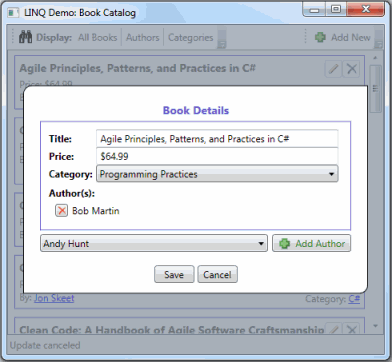
The attached BookCatalog application includes an EditDetails.xaml UserControl to allow editing any of the LINQ data types.
I'm sure I got entirely too clever for my own good here in trying to handle Books, and Authors and Categories using the same set of methods and UserControls - so I'm not suggesting you model your designs after what is here. :-) But I hope it serves its purpose by providing an example of how you can data bind to LINQ to SQL classes and make sure all of the data is synchronized throughout your application.
In EditDetails.xaml.cs, there is a BindDataToEditForm() that sets up the binding from the UserControl to the dataItem to edit (this could be a Book, Author, or Category):
private void BindDataToEditForm( ) {
    Binding binding = new Binding( );
    binding.Source = dataItem;
    binding.Mode = BindingMode.OneWay;
    binding.UpdateSourceTrigger = UpdateSourceTrigger.PropertyChanged;
    EditForm.SetBinding( DataContextProperty, binding );
}
Like the main window, EditDetails.xaml uses DataTemplates to determine how to display the edit form. For example, here's part of the template for Category:
<!-- How to display Category details -->
<DataTemplate DataType="{x:Type LINQDemo:Category}">
  ...
  <Border Name="border" BorderBrush="ForestGreen"
         BorderThickness="1" Padding="10"
         DockPanel.Dock="Right">
    <StackPanel>
      <DockPanel>
        <TextBlock FontWeight="Bold"
            DockPanel.Dock="Left"
            VerticalAlignment="Center">Name:</TextBlock>
        <TextBox Text="{Binding Path=Name}" Margin="5 0"
            VerticalAlignment="Center" DockPanel.Dock="Right"/>
      </DockPanel>
...
This is similar to the main window except it uses TextBoxes instead of TextBlocks to display the data, such as {Binding Path=Name}.
The difference is that since Category now implements INotifyPropertyChanged, when you edit Name in the UI, it automatically updates the underlying Category instance.
The Save button calls SaveDetails(), which calls SubmitChanges() on our DataContext:
private void SaveDetails( object sender, RoutedEventArgs e ) {
    BookCatalog.SubmitChanges();
    CloseDialog();
}
The Cancel button calls CancelUpdate() which:
- Does not submit changes on the
DataContext, so those changes will be discarded as a new DataContext (BookCatalog) instance is created each time you open EditDetails. - Does call the
CancelChanges() method we added to BookCatalog in A LINQ Tutorial (Part 2) to cancel any pending changes to our M:M Join tables.
private void CancelUpdate( object sender, RoutedEventArgs e ){
    BookCatalog.CancelChanges( );
    CloseDialog( false );
}
When the dialog is closed, the main window, BookCatalogBrowser.xaml, gets a fresh DataContext instance to refresh its listing to pick up any changes that you might have saved.
A Known Issue
I discovered the following issue occurs if you choose to use a separate DataContext to delete your M:M Join records:
If you delete and then re-add the same M:M relationship within the same "transaction", you'll get a DuplicateKeyException.
For example, if you edit a Book and first remove an author and then re-add that same author before calling SubmitChanges():
BookCatalog bookCatalog = new BookCatalog( );
Book xpExplained = bookCatalog.Books.Single(
book => book.Title.Contains("Extreme Programming Explained") );
Author kentBeck = bookCatalog.Authors.Single( author => author.Name == "Kent Beck" );
xpExplained.Authors.Remove( kentBeck );
xpExplained.Authors.Add( kentBeck );
bookCatalog.SubmitChanges();
One way to handle this is to prevent that scenario from occurring -- don't allow a removed relationship to be re-added until after you call SubmitChanges() to persist the deletion. Then, you're free to add it back without error.
The Book Catalog application does this. If you open a Book to edit and delete one of its authors - you simply aren't given the choice to re-add that author until you click the Save button. The same is true on the other side when editing an Author to change which Books they have.
Note that this is only the case for M:M Join records that you remove with a separate DataContext, as described in A LINQ Tutorial (Part 2). There are no limitations to, for example, removing and then re-adding the same book to a Category since this is a M:1 (rather than M:M) relationship.
A Note on the Design
I purposefully chose to provide the View with direct access to the entity classes so that it would be as clear as possible of an example for how the bindings and DataContexts work in an application.
Obviously, in a real application, you'll want to put a layer between your view and the model. You can put your business logic there. You can also hide the details of working with the DataContext (e.g., when to refresh, when to call SubmitChanges()) there, so the view doesn't have to understand anything about LINQ to SQL.
The Model-View-ViewModel pattern is a great way to handle this. See Sacha Barber's MVVM Tutorials here on CodeProject.
Thank You!
If you read this far, wow, you should totally get yourself some of that new CodeProject reputation for that. Just sayin'... :-) Thanks for reading.
History
- 12/09/2009: Initial version.



 General
  News
News  Suggestion
  Question
  Bug
Bug  Answer
  Joke
Joke  Praise
  Rant
Rant  Admin
Admin 


 Submit an article or tip


![Rose | [Rose]](https://codeproject.global.ssl.fastly.net/script/Forums/Images/rose.gif)


 I'm really glad you found it helpful!