Introduction
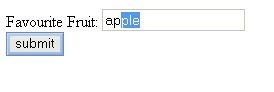
This is a HTML control which integrates autocomplete into the standard textbox. By adding a few lines of code, you can turn any standard textboxes into a user friendly and a rather powerful control.
How it works
Whenever the user types anything in the textbox, the onkeyup event is fired, and the script calls a function. The current text in the textbox is then compared lexically with an array of strings.
Javascript code
<script>
fruits = new Array('apple','pear','orange',
    'mango','durain','grapes','starfruit');
names = new Array('tom','dick','harry','john','petter','foo','bar');
function autocomplete(n,ac_array){
    if (n.value == "") return 0;
    if (event.keyCode == 8 && n.backspace){
        n.value = n.value.substr(0,n.value.length-1);
        n.backspace = false;
    }

    var r = n.createTextRange();
    tmp= n.value;
    if (tmp == "")return 0;
    for (z=0;z<ac_array.length;z++){
        tmp2 = ac_array[z];
        count = 0;
        for (i = 0;i<tmp.length;i++){
            if (tmp2.charAt(i) == tmp.charAt(i)){
                count++
            }
        }
        if (count == tmp.length){
            diff = tmp2.length - tmp.length;
            if (diff <= 0) break;
            kap = "";
            for (i=0;i<tmp2.length;i++){
                if (i >= tmp.length) kap += tmp2.charAt(i);
            }
            n.backspace = true;
            r.text += kap;
            r.findText(kap,diff*-2);
            r.select();
            return 0;
        }
    }
    n.backspace = false;
    return 0;
}
</script>

<input name='fruit' type='text' class='textbox' title="Opening"
    onkeyup="autocomplete(this,fruits)" size="20">
<input name='Name' type='text' class='textbox' title="Opening"
    backspace='false' onkeyup="autocomplete(this,names)" size="20">
How to use the code
- You must define the array of strings which you want to have autocompleted.
fruits = new Array('apple','pear','orange','mango','durain',
    'grapes','starfruit');
- Copy the entire autocomplete function and put it somewhere in your code.
- Add the event
onkeyup='autocomplete(this,fruits)' in the textbox. Note that the 2nd argument should tally with the array name you defined at 1.
- Add the property
backspace='false' in the textbox. The backspace property is applicable when a user press backspace in the textbox. It gets very irritating without the boolean; i.e. when the user press backspace, the highlighted characters get deleted, but it will automatically be replaced by the same characters due to the autocomplete.
Todo
- I've tested the autocomplete control with an array of size 150. The speed was pretty reasonable on my computer (P3 700Mhz). However, I'm sure the autocomplete function's string-matching algorithm can be further improved upon.
- Allow for case insensitive string-matching



 General
  News
News  Suggestion
  Question
  Bug
Bug  Answer
  Joke
Joke  Praise
  Rant
Rant  Admin
Admin 


 Submit an article or tip


