Introduction
This article is on reaching ports, controlling external devices and electronics. Perhaps you are asking "why?" The idea is simple: It is to achieve something that is real, physical and emotional. As a freelancer I have been coding for about 4 years for my own interest. At first I started with C but now for the GUI, I use mostly C# . Therefore a lot of people participating in the codeproject can declare and assign a variable in more than one language:
| C: |
PHP: | VB: //I don't know VB so I looked at MSDN |
int variable = 5; | $variable = 5; | Dim variable As Integer = 5 |
We can do things, however we do same things using different methods. By working in different ways we improve our skills, but everyday something new comes and we need to look for the references. For eg: there are differences in .NET Framework 1.0 and 1.1, MSDN says "we have improved" blah blah blah... Who cares?!... As a result, you need to make some changes in your old program and this is a pain...
Anyway, a friend of mine said: "You have to pass your electronic knowledge with everybody..." This is why I am writing this article.
PART 1 - Some basics of a parallel port
What is a port?
A port contains a set of signal lines that the CPU sends or receives data with other components. We use ports to communicate via modem, printer, keyboard, mouse etc. In signaling, open signals are "1" and close signals are "0" so it is like binary system [See Part 3]. A parallel port sends 8 bits and receives 5 bits at a time. The serial port RS-232 sends only 1 bit at a time but it is multidirectional so it can send 1 bit and receive 1 bit at a time...

Parallel Port - Data Ports:
In my application, I used the data ports which can be seen in the picture from D0 to D7
Parallel Port - Status Ports:
These ports are made for reading signals. The range is like in data ports which are S0-S7. But S0, S1, S2 are invisible in the connector (See my picture in the article). I mentioned these are for reading signals but S0 is different, this bit is for timeout flag in EPP (Enhanced Parallel Port) compatible ports. The address of this status port is 0x379 . this will always be refer to "DATA+1" and it can send 5 numeric data from the 10 - 11 - 12 - 13 - 15 th pins. So how can we reach the data ports? It is simple: every parallel port has an address. In Windows 2000, you can see yours by Settings > Control Panel > System > Hardware > Device Manager > Ports (COM & LPT) > Printer Port(LPT1) > Properties = in Resources > Resource Setting and you can see your address for your parallel port. For Ex: Mine is 0378-037F. This is hexadecimal like in math (mod 16). 0x378 belongs to 888 in decimal form. In this way you can look for your com port or game port addresses. Let's enlighten these bits with a printer example:
- S0: This bit becomes higher (1) if a timeout operation occurs in EPP mode.
- S1: Not used (Maybe for decoration :))
- S2: Mostly not used but sometime this bit shows the cut condition (PIRQ) of the port
- S3: If the printer determines an error it becomes lower (0). Which is called nError or nFault
- S4: It is high (1) when the data inputs are active. Which is called Select
- S5: It is high(1) when there is no paper in printer. Which is called PaperEnd, PaperEmpty or PError
- S6: It sends low impact signaling when the printer gets a one byte data. Which is called nAck or nAcknowledge
- S7: This is the only reversed pin on the connector (see my table in the article) . If the printer is busy and it cannot get any additional data this pin becomes lower. Which is called Busy
Parallel Port - Control Ports:
This port usually used for outputting but these can be used for inputting. The range is like in data ports C0-C7 but C4, C5, C6, C7 are invisible in connector. And the address for this is 0x37A
- C0: This pin is reversed. It sends a command to read D0-D7 on the port. When the computer starts it is high in the connector. Which is called nStrobe
- C1: This pin is reversed. It sends a command to the printer to feed the next line. It is high in the connector after the machine starts. Which is called Auto LF
- C2: This pin is for reset the printer and clear the buffer. Which is called nInit, nInitialize
- C3: This pin is reversed. Sends a high(1) for opening data inputs. It is low after the machine starts. Which is called nSelectIn
- C4: Opens the cut operation for the printer. Not visible in the connector...
- C5: Sets the direction control in multidirectional ports. Not visible in the connector...
- C6: Not used and also Not visible in the connector...
- C7: Mostly not used but it is used as a C5 in some ports. Not visible in the connector...
Parallel Port -Ground Pins:
These are (G0 - G7) the pins from 18 to 25 . These are mostly used for completing the circuit.
After these I used data ports in my application because there are reversed pins in control and status ports. Here is an explanation for reversed pins: While you are not sending any signals to the data port it is in closed position like "00000000" so the 8 pins have no voltage on it (0 Volt) .If you send decimal "255" (binary "11111111") every pin (D0-D7) has a +5 Volt... On the other hand, if I used control ports, there are reversed pins which are C0, C1 and C3 so while we send nothing to the control port its behaviour is "0100" in binary (decimal "11")... If I receive e-mails from you I can make apps using control and status ports...
| Signal | BIT | PIN | Direction |
| -Strobe
| ¬C0
| 1 | Output |
| +Data Bit 0 | D0
| 2 | Output |
| +Data Bit 1 | D1
| 3 | Output |
| +Data Bit 2 | D2
| 4 | Output |
| +Data Bit 3 | D3
| 5 | Output |
| +Data Bit 4 | D4
| 6 | Output |
| +Data Bit 5 | D5
| 7 | Output |
| +Data Bit 6 | D6
| 8 | Output |
| +Data Bit 7 | D7
| 9 | Output |
| -Acknowledge
| S6
| 10 | Input |
| +Busy
| ¬S7
| 11 | Input |
| +Paper End
| S5 | 12 | Input |
| +Select In
| S4 | 13 | Input |
| -Auto Feed
| ¬C1 | 14 | Output |
| -Error
| S3
| 15 | Input |
| -Initialize
| C2
| 16 | Output |
| -Select
| ¬C3
| 17 | Output |
| Ground
| -
| 18-25
| Ground |
PART 2 - Electricity - Lets get some Zzzzzttt zzzzttt...
I made an electrical circuit to show you how our circuit work. It is shown in the picture...
And also I get different angled pictures of my complete circuit. Click for the bigger ones.
Ok then let's find out what we have to supply:
- 1 or 2 meter parallel port cable (3 mt is acceptable but the voltage drops from 5 V to 4.7 V)
- 9 assembling cables (8 go to resistance and 1 go to ground)
- A Breadboard (white one in the picture) or you can solder the cables but with a breadboard you don't have to...
- 8 Leds (2,5 V)
- 8 Resistances (470 ohm) (For not to make the leds garbage because of +5V)
- A Multimeter (Not needed but if something happens you can check the wiring with this...)
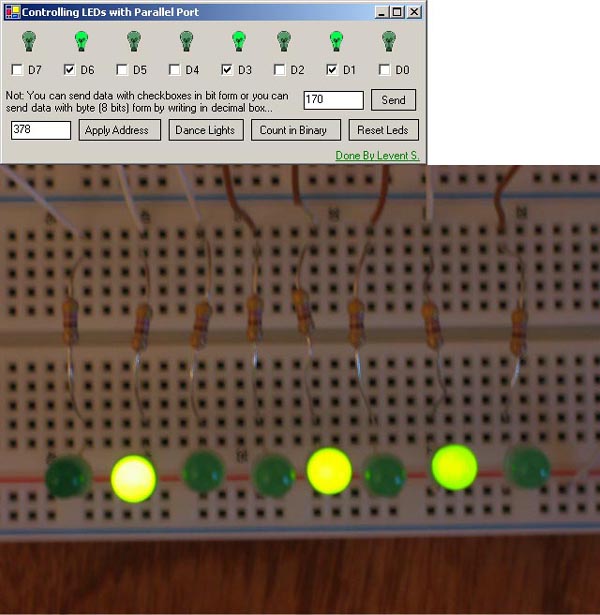
- My Program to make your circuit live :)
Assemble the circuit as in the picture if it is not clear, e-mail me as ls@izdir.com and I will send you the bigger pictures of the circuits...
Part 3 - Hexadecimal / Decimal / Binary
People who have knowledge about the subject can easily pass this part...
Binary = 0, 1 --> 2 digit
Decimal = 0, 1, 2, 3, 4, 5, 6, 7, 8, 9 --> 10 digit
Hexadecimal = 0, 1, 2, 3, 4, 5, 6, 7, 8, 9, A, B, C, D, E, F --> 16 digit
| Ex 1: We have a six digit binary number like "100111" and we want to make it decimal so what we have to do? | |
| Ex 2: We have a two digit decimal number like "11" and we want to convert it to binary??? | |
| Ex 3: We have a three digit hexadecimal number like "21F" and we want it to convert to decimal??? | |
The logic is in these three examples but nobody does the conversion like this. They use Windows operating system's scientific calculator. So if a conversion is needed I use Start > Programs > Accessories > Calculator . or you can make your own conversion program. Also you can check my loop (enumerated checkboxes) func in my app for binary to decimal conversion.
Part 4 - Before coding
Before coding I want to give some info about reaching the ports by using a language and OS. When I was using Windows 98 I could reach the ports with a function which is "outportb". When I upgraded to Windows 2000 this failed because of its kernel. You can not reach the ports directly in NT, 2000 and XP because of their kernel and their printer drivers. Let me prove this: First make the circuit as in the pic and then shutdown your computer, start it, if you have multi boot menu select Windows 98, when it starts there is no light up in the circuit but in Win2000 and XP all the 8 lights are on so we know that the signal is coming and the pins are registered by their kernel with the printerdriver.
Part 5 - Lets make the code to do the rest
I used inpout32.dll in my app for interoping. You can check the workflow below for inpout32.dll and also you can get the source of the dll from here .
Note: I am importing it with the reference of http://www.logix4u.net/ So for further info about the driver check out the site...
In my PortInterop.cs I used the following:
using System;
using System.Runtime.InteropServices;

public class PortAccess
{
    [DllImport("inpout32.dll", EntryPoint="Out32")]
    public static extern void Output(int adress, int value);
}
So you have to import
inpout32.dll to your debug or release directory. By the way, the main thing in my
Form1.cs is
PortAccess.Output. It takes two variables which are address and value. If your data ports are set in "0x378" (see Part 1) you will have to write "888" because "378" Hexadecimal is equal to "888" in decimal. (Default LPT1 is set to "378") If you are using LPT2 which is "0x278" you have to write for the address "632" For ex: for full signaling to pins we have to call the
Output method of
PortAccess like:
PortAccess.Output(888, 255);
And for null data we have to send "0" to the Output method like:
PortAccess.Output(888, 0);
I wrote a func for reseting the LEDs which is:
private void Reset_LEDs()
{
    PortAccess.Output(adress, 0);
}
I didn't use loops for checkboxes and pictureboxes you can also enumerate these for quick coding. First, I do like that but after I changed to several if-else statements because I had to change the GUI. But I left them on the code for performance issues anyone who want speed can use these.
You can also reach your ports with Turbo C++ like:
#include <conio.h>
#include <dos.h>
#define port 0x378 // Port Address
#define data port+0 // Data Port of the parallel cable
void main (void)
{
_out(data, 255);
_out(data, 0);
}
Last Part - Conclusion
I think you will find this to be the most exciting part of this article... So what can you do besides powering small LEDs? You can... Search the net about relays for triggering higher voltages, search some electrical newsgroups and then make circuits and connect them to your parallel port, light up your room lights or turn on your TV etc etc... You can do a thousand things it is up to your imagination... I am planning to write more articles about relays, lcds, oscillators and things like that (of course with PC connection)... Below is a picture of my next article...
Final Note
English is not my first language, so please excuse any mistakes. This is my first article for codeproject, so any suggestions and/or feedback will be appreciated. Thanks for reading till here.
This member has not yet provided a Biography. Assume it's interesting and varied, and probably something to do with programming.



 General
  News
News  Suggestion
  Question
  Bug
Bug  Answer
  Joke
Joke  Praise
  Rant
Rant  Admin
Admin 


 Submit an article or tip


