Click here to Skip to main content

CKCSideBannerWnd: An MFC Banner Control that Can Add a Professional-looking Feel to Most Windows...

By , 6 Nov 2003
 
Prize winner in Competition "MFC/C++ Sep 2003"
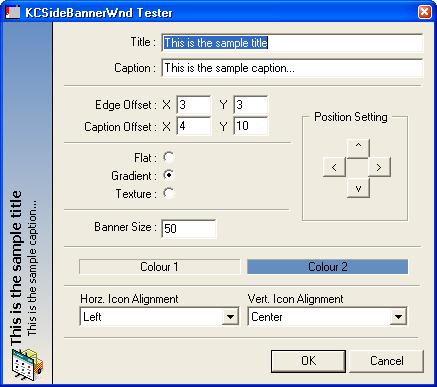
Sample Image

Introduction

Writing software has become an art. I have always felt that programmers who write software that targets a "windowing" environment have one of two choices:

  • Write the software; give it a workable UI and leave it.
  • Write the software; spend time and effort making it look good and satisfy the senses of the customer.

In my experience, I have found that if the software looks good or exciting or just generally appealing to the end user, the process of adoption of the software in the user's life becomes less painful. Developers who take pride in presenting a "beautiful" user interface to their technology that the user never sees can consider themselves artists in their own right.

In an effort to make my software more "beautiful", I've created the CKCSideBannerWnd class. The class brings to life the concept of banners, which can be used to give the user context as to what the purpose is of the current window that they are staring at.

Background

Every time I use software, I always take notes of what I liked about the UI, what I didn't like, what was a good idea, what wasn't and, more importantly, why. One of the concepts that I've always enjoyed is that of a banner (like those found in InstallShield/Wise installation wizards, CPropertyEx derived wizards, etc).

Personally, I feel that those kinds of "well placed" banners give the software UI a more appealing, more professional look. So I took it upon myself to go and whip up a class that can pretty much do what the mentioned banners can do, but a little bit more (like attaching the banner to any edge of a window).

I also felt that the programmer should not have to worry about making allowances for the banner, and that it should be a quick exercise to attach a banner to any window. I have to admit, 2 of my own software packages have already been "upgraded" with the banner control :)

Using the Code

First off, to use the CKCSideBannerWnd class, you will need to include the following files in your project:

  • KCSideBannerWnd.h
  • KCSideBannerWnd.cpp

You will also need to copy the WndUtil.h file into the same directory as the KCSideBannerWnd.* files. Once you have the class at your disposal, using it is simple. To attach a banner to a dialog, add a member to your dialog class like this:

// YourDialog.h file
#include "KCSideBannerWnd.h"

class CYourDialog : public Dialog
{
public:
 CYourDialog();
 // ...
 // other declarations..
protected:
 CKCSideBannerWnd m_banner;
};

Now add the following BOLDED code below to your OnInitDialog() function:

BOOL CYourDialog::OnInitDialog()
{
 CDialog::OnInitDialog();

 // usual MFC wizard code...
 
 // add the banner
 m_banner.Attach(this);
}

If your dialog has the sizing borders, override the OnSize() function and add the BOLDED code below:

void CYourDialog::OnSize(UINT nType, int cx, int cy) 
{
 CDialog::OnSize(nType, cx, cy);
 
 if ( m_banner.m_hWnd )
  m_banner.UpdateSize();
 
}

CKCSideBannerWnd can be attached to any other window, as well. Simply follow the above mentioned steps for attaching the banner to views, etc.

How It Works

The basic working of the control is as follows:

  • When Attach() is called, get hold of the parent window (passed in as first parameter).
  • Make space for the banner by growing the parent window in the appropriate direction.
  • Enumerate all of the parent's child windows (excluding the banner) and offset them accordingly.
  • Create the banner control and attach it.

The beauty of this technique is that the programmer does not specifically have to make space for the banner on any of his/her already defined dialogs or windows. Just a simple attach and the control will make room for itself.

Points of Interest

This article would have been published a lot sooner had it not been for an interesting nuance that I ran into with Windows and its combobox handling. I had been testing this control on a number of different dialogs and everything was working great, until I used it on a dialog box which contained 2 combobox controls.

When the banner was attached, the combobox controls "lost" their ability to display selected text or text that had been entered by the user on the keyboard. In fact, it seemed as if the edit control of the combobox had just stopped working. (The listbox control worked just fine :))

I posted to the forums, but no one seemed to be able to give me an answer as to why this was happening. So off I went on a bug(??) hunt to see what I was doing wrong to cause combobox controls to partially stop working.

What I found eventually was that when EnumChildWindows() is called, and it in turn calls the user supplier handler with each child HWND, one of the children that it found was in fact the edit control of the combobox. The problem came in with me moving the actual edit control, as well as the combobox control.

The solution to this problem was to add a check in the enumeration function which called GetParent() against the so-called child HWND and checked that the parent was in fact that parent as I knew it (the dialog or owning window). The edit control of the combobox control did in fact return the combobox's HWND as its parent and, since I was no longer moving both combobox and its contained edit control, everything worked great.

Class Documentation

  • BOOL Attach(CWnd* pWnd, unsigned int uFlags = 
        KCSB_ATTACH_LEFT, unsigned int uiID = 0xFFF0)

    Call this function to attach the banner to a parent window.

    uFlags can be on of the following (Exclusive Flags):

    KCSB_ATTACH_LEFT: Attaches the banner on the left of the window
    KCSB_ATTACH_TOP: Attaches the banner to the top of the window
    KCSB_ATTACH_RIGHT: Attaches the banner to the right of the window
    KCSB_ATTACH_BOTTOM: Attaches the banner to the bottom of the window

    The uiID is the ID that will be used by the parent to refer to this control. It is defaulted to 0xFFF0.

  • void SetSize(int nSize)

    Adjusts the size of the banner. This is relative in terms of adjusting either the height or the width of the banner and is dependent on where the banner is positioned. In other words, if the banner is on the the left or right, the width will be adjusted. If the banner is on the top or bottom, the height will be adjusted.

  • int GetSize()

    Returns the current size of the banner.

  • void UpdateSize()

    Call this when the size of the parent window has changed.

  • void SetPosFlag(unsigned int uFlags)

    Call this to reposition the banner. The same flags apply as discussed in Attach().

  • unsigned int GetPosFlag()

    Returns the current position flag.

  • void SetFillFlag(unsigned int uFlag)

    Call this to set the fill type of the banner. Possible values are:

    KCSB_FILL_FLAT: Fills the banner with the color set with SetColBkg().
    KCSB_FILL_GRADIENT: Fills the banner with a gradient starting at the color set with SetColBkg() and moving to the color set with SetColBkg2().
    KCSB_FILL_TEXTURE: Fills the background of the banner with a bitmapped texture that can be set with SetTexture().
  • unsigned int GetFillFlag()

    Returns the current fill flag.

  • void SetTitle(const char* lpszTitle)

    Sets the title (main string) of the banner.

  • CString GetTitle()

    Returns the current title of the banner.

  • void SetCaption(const char* lpszTitle)

    Sets the caption (secondary string) of the banner.

  • CString GetCaption()

    Returns the current caption of the banner.

  • void SetColBkg(COLORREF col)

    Sets the primary background color. When a gradient fill is active, this will be the color that the gradient starts at.

  • COLORREF GetColBkg()

    Returns the primary background color.

  • void SetColBkg2(COLORREF col)

    Sets the secondary background color. When a gradient fill is active, this will be the color that the gradient will move towards. In flat fill mode, this color serves no purpose.

  • COLORREF GetColBkg2()

    Returns the secondary background color.

  • void SetColEdge(COLORREF col)

    Sets the color of the edge.

  • COLORREF GetColEdge()

    Returns the color of the edge.

  • COLORREF SetColTxtTitle(COLORREF col)

    Sets the color of the title text.

  • COLORREF GetColTxtTitle()

    Returns the color of the title text.

  • COLORREF SetColTxtCaption(COLORREF col)

    Sets the color of the caption text.

  • COLORREF SetColTxtCaption()

    Returns the color of the caption text.

  • void SetEdgeOffset(CSize szOffset)

    Sets the XY offset of the title text from the edge.

  • CSize GetEdgeOffset()

    Returns the XY offset of the title text from the edge.

  • void SetCaptionOffset(CSize szOffset)

    Sets the XY offset of the caption from the start of the title. In other words, if the edge offset is (5, 5) and the caption offset is also (5, 5), then the caption will be offset 5 pixels away from the title.

  • CSize GetCaptionOffset()

    Returns the XY offset of the caption text relative to the title.

  • void SetTitleFont(CFont* pFont)

    Sets the font used to draw the title text.

  • void GetTitleFont(LOGFONT* pFont)

    Returns the font used to draw the title text in the LOGFONT structure passed into the function.

  • void SetCaptionFont(CFont* pFont)

    Sets the font used to draw the caption text.

  • void GetCaptionFont(LOGFONT* pFont)

    Returns the font used to draw the caption text in the LOGFONT structure passed into the function.

  • bool SetIcon(HICON hIcon, 
      UINT uiIconPos = KCSB_ICON_RIGHT | KCSB_ICON_VCENTER, 
      bool bSelfDelete = true)

    Sets the ICON that will be drawn in the banner. bSelfDelete indicates to the control whether you will be deleting the HICON resource (bSelfDelete = false) or whether the control can delete it when it's no longer needed (bSelfDelete = true).

    uiIconPos can be one or more of the following values:

    KCSB_ICON_LEFT:

    Draws the icon on the left of the banner. If the banner is attached to the left of the window, the icon will be drawn at the bottom. If the banner is attached to the right of the window, the icon will be drawn at the top.

    Note: This flag cannot be combined with the KCSB_ICON_RIGHT flag.

    KCSB_ICON_RIGHT:

    Draws the icon on the right of the banner. If the banner is attached to the left of the window, the icon will be drawn at the top. If the banner is attached to the right of the window, the icon will be drawn at the bottom.

    Note: This flag cannot be combined with the KCSB_ICON_LEFT flag.

    KCSB_ICON_TOP:

    Draws the icon at the top of the banner. If the banner is attached to the left of the window, the icon will be drawn on the left. If the banner is attached to the right of the window, the icon will be drawn on the right.

    Note: This flag cannot be combined with the KCSB_ICON_VCENTER or KCSB_ICON_BOTTOM flags.

    KCSB_ICON_VCENTER:

    Draws the icon vertically centered in the banner.

    Note: This flag cannot be combined with the KCSB_ICON_TOP or KCSB_ICON_BOTTOM flags

    KCSB_ICON_BOTTOM:

    Draws the icon at the bottom of the banner. If the banner is attached to the left of the window, the icon will be drawn on the right. If the banner is attached to the right of the window, the icon will be drawn on the left.

    Note: This flag cannot be combined with the KCSB_ICON_VCENTER or KCSB_ICON_TOP flags

  • void SetIconPos(UINT uiIconPos)

    Set the icon's position in the banner. Use the flags described in SetIcon().

  • UINT GetIconPos()

    Returns the icon positional flags (refer to SetIcon()).

  • void SetTexture(HBITMAP hBitmap, bool bSelfDelete = true)

    Sets the bitmapped texture that will be used to draw the background when the control's fill flag is set to KCSB_FILL_TEXTURE (See SetFillFlag()). The bSelfDelete flag indicates whether you will delete the HBITMAP resource (bSelfDelete = false) or whether the control can delete it when it no longer needs it (bSelfDelete = true).

  • HBITMAP GetTexture()

    Returns the HBITMAP of the texture that is used to draw the textured background.

Things I'd Like to Try When I Have More Time...

Personally, I have never written a control that "makes space" for itself, and the concept has grasped my imagination somewhat. I have been contemplating the idea of developing a background app/service that monitors all HWND creations and attaches a banner to all windows of say, type DIALOG. This would merely be for purposes of fun and educational value... but still a cool idea, I think.

History

  • 2003-10-22
    • First public release.
  • 2003-10-23
    • Added #pragma comment(lib, "MSIMG32.LIB") to the KCSIDEBANNERWND.H file to alleviate the necessity of changing the project settings - Thanks to Warren Stevens.
    • Added a release build of the project to the *.zip file download and removed all unnecessary files (e.g.: *.NCB files) - Thanks again to Warren :).
    • Fixed a bug with Cyrillic (and hopefully other fonts that may have suffered).
  • 2003-10-24
    • Added GetColTxtTitle(), SetColTxtTitle(), GetColTxtCaption() and SetColTxtCaption().
  • 2003-10-27
    • Added ability to provide a bitmap for the background (see SetTexture()) .
    • Added ability to indicate whether the control can clean up the HICON and HBITMAP resources or whether the controlling program will clean up after itself.
  • 2003-10-29
    • Removed the total dependence on MSIMG32.LIB. The control now checks if it can dynamically load MSIMG32.DLL and, if not, it will use its own Gradient function (thanks to John A. Johnson). This idea was given to me by Dominik Reichl and he got the idea from Irek Zielinski's CStaticGradient control.


License

This article, along with any associated source code and files, is licensed under The Code Project Open License (CPOL)

About the Author

Peter Mares
Architect
Ireland Ireland
Member
Peter Mares has no comment on himself. I'll let the objective humanoids do the damage Wink | ;)
He is currently developing a hobby MMO to prove that he can do it Wink | ;)

My Blog

All good things were meant to be improved

Sign Up to vote   Poor Excellent
Add a reason or comment to your vote: x
Votes of 3 or less require a comment

Comments and Discussions

 
You must Sign In to use this message board.
Search this forum  
    Spacing  Noise  Layout  Per page   
GeneralUNICODE FixmemberPeter Mares6 Nov '03 - 19:13 
Hi everyone,
 
I've added the UNICODE fix that was mentioned in the thread below this one. Sorry about that! Atleast its done now. This will probably be the last update unless someone (or I) have a great idea of how to improve this control some more...
 

www.kinkycode.com
[Glossary Manager] [AfterThought Backup Lite]

99 little bugs in the code, 99 little bugs,
Fix 1 bug, recompile....
101 little bugs in the code...
GeneralUhm....memberAnon E. Mouse4 Nov '03 - 7:00 
I really hate to tell you this, especially since you just updated the article.... but.....Smile | :)
 
The call in the CKCSideBannerWnd constructor, to load the msimg32.dll needs to be wrapped in the _T("") macro.
 
// try and load the MSIMG32.LIB
if ( (m_hGradMod = LoadLibrary(_T("MSIMG32.DLL"))) )
m_pGradFill = (PFNGRADFILL) GetProcAddress(m_hGradMod, "GradientFill" );
 

At least *I* had to, to get my unicode build to quit whining.....
 
Artificial intelligence is no match for natural
stupidity.

GeneralRe: Uhm....memberPeter Mares4 Nov '03 - 20:40 
Oops. My bad. Will fix and update as soon as I get a second here Smile | :) Thanks for that. UNICODE is the future... cater for it
 

www.kinkycode.com
[Glossary Manager] [AfterThought Backup Lite]

99 little bugs in the code, 99 little bugs,
Fix 1 bug, recompile....
101 little bugs in the code...
GeneralPrettymemberForogar28 Oct '03 - 13:43 
Pretty useless, but still very pretty. Laugh | :laugh:
 
Excellent piece of work, now I'm looking for an excuse to use it somewhere. Big Grin | :-D
 
Have a 5.


GeneralRe: PrettymemberPeter Mares28 Oct '03 - 16:58 
Does a good programmer need an excuse to use a great control? *playful jab*
 
Hehehehe... take care Wink | ;)
 

www.kinkycode.com
[Glossary Manager] [AfterThought Backup Lite]

99 little bugs in the code, 99 little bugs,
Fix 1 bug, recompile....
101 little bugs in the code...
Generalbug : can't find MSGIM32.dllmemberTut826 Oct '03 - 23:14 
hi,
I tried to compile the demo projet and I have execution error "can't find MSGIM32.dll".
I scanned my disk, I found MSGIM32.lib.
I use VC++ 6.0 and NT 4.0.
I'd like to link statically the MSGIM32.
Can you help me ?

GeneralRe: bug : can't find MSGIM32.dllmemberPeter Mares26 Oct '03 - 23:24 
Hey,
 
Ok, the first problem is that you are running NT 4.0. According to MSDN, they say the dll/lib is available on:
 

Windows NT/2000/XP: Included in Windows 2000 and later.
Windows 95/98/Me: Included in Windows 98 and later.

 
secondly, I know you've probably made a typo, but you made it twice (twece), so its actually MSIMG32. What you can do is get hold of a 98, or 2K machine, find the MSIMG32.DLL file and copy that over to your NT4 machines system(32) directory.
 
That should resolve the issue Smile | :)
 
Regarding the static linking question, I'm not sure of the lib is available as a static link, or if merely acts as a stub. I have a feeling the lib is merely a stub (can't be statically linked)
 

www.kinkycode.com
[Glossary Manager] [AfterThought Backup Lite]

99 little bugs in the code, 99 little bugs,
Fix 1 bug, recompile....
101 little bugs in the code...
GeneralRe: bug : can't find MSGIM32.dllmemberTut826 Oct '03 - 23:34 
thank you for your advice, I'm going to try.
If I found an issue on how using CKCSideBannerWnd with NT 4.0, I will post the solution.

GeneralRe: bug : can't find MSGIM32.dllmemberPeter Mares27 Oct '03 - 0:08 
fantastic Smile | :) Although I think the only issue is with the MSIMG32.DLL file missing in NT4
 

www.kinkycode.com
[Glossary Manager] [AfterThought Backup Lite]

99 little bugs in the code, 99 little bugs,
Fix 1 bug, recompile....
101 little bugs in the code...
GeneralRe: bug : can't find MSGIM32.dllmemberJohn A. Johnson27 Oct '03 - 3:37 
Hi Peter & Tut8,
 
maybe doesent have the performance of the MSDIM32.dll gradient call function, but why don't you try a self made gradient call:
 
(it's only a suggestion)
 
[Message edited twice for mistaken code Roll eyes | :rolleyes: ]
 
void GradientFill(CDC* pDC, COLORREF clr1, COLORREF clr2, CRect rc, bool bHor = true, bool bFlip = false)
{
	if (bFlip)
	{
		// exhange the 2 colors
		COLORREF clr = clr1;
		clr1 = clr2;
		clr2 = clr;
	}
 
	if (pDC->GetDeviceCaps(BITSPIXEL) > 8)	// gradient only for true color displays
	{
		if (bHor)
		{
			// horizontal
			int nWidth = rc.Width();
			for (int x=0; x<nWidth; x++)
			{
				CRect rcl	= rc;
 
				rcl.left	+=  x;
				rcl.right	+= (x + 1);
 
				double l = (double)y / (double)nWidth;
 
				pDC->FillSolidRect(rcl, RGB(
					l * GetRValue(clr1) + (1.0 - l) * GetRValue(clr2),
					l * GetGValue(clr1) + (1.0 - l) * GetGValue(clr2),
					l * GetBValue(clr1) + (1.0 - l) * GetBValue(clr2) ));
			}
		}
		else
		{
			// vertical
			int nHeight = rc.Height();
			for (int y=0; y<nHeight; y++)
			{
				CRect rcl	= rc;
 
				rcl.top		+=  y;
				rcl.bottom	+= (y + 1);
 
				double l = (double)y / (double)nHeight;
 
				pDC->FillSolidRect(rcl, RGB(
					l * GetRValue(clr1) + (1.0 - l) * GetRValue(clr2),
					l * GetGValue(clr1) + (1.0 - l) * GetGValue(clr2),
					l * GetBValue(clr1) + (1.0 - l) * GetBValue(clr2) ));
			}
		}
	}
	else
	{
		pDC->FillSolidRect(rc, clr1);
	}
}

 
Cool | :cool:
GeneralRe: bug : can't find MSGIM32.dllmemberPeter Mares27 Oct '03 - 18:55 
CodeProject should start a "code snippet" gallery. You GradientFill() code would be an ideal candidate for that space...
 
Chris, maybe something worth considering?
 

www.kinkycode.com
[Glossary Manager] [AfterThought Backup Lite]

99 little bugs in the code, 99 little bugs,
Fix 1 bug, recompile....
101 little bugs in the code...
GeneralRe: bug : can't find MSGIM32.dllsussAnonymous27 Oct '03 - 23:04 
hi,
I tried with your function, it works good !
I have just modified one or two parameters, and replace the line :
double l = (double)y / (double)nWidth;
by :
double l = (double)x / (double)nWidth;
 
Thanks a lot.

GeneralUpdatesmemberPeter Mares26 Oct '03 - 18:37 
Hi everyone,
 
I've updated the control to include most of the suggestions and tips that have been so kindly communicated to me. I must admit, my favourite change is the ability to texture the control Smile | :)
 
Take care and hope you enjoy it!
 

www.kinkycode.com
[Glossary Manager] [AfterThought Backup Lite]

99 little bugs in the code, 99 little bugs,
Fix 1 bug, recompile....
101 little bugs in the code...
GeneralUNICODE compilememberAbraxas2324 Oct '03 - 7:06 
Nice job Big Grin | :-D !
 
A few minor changes are necessary to make your control UNICODE compatible:
1) enclose the rest of the string literals with _T("") including the definition of KCSB_CLASSNAME
2) change the paramters to the SetTitle and SetCaption functions from const char* to LPCTSTR
3) change the variable on line 541 of the cpp file from BYTE ch; to TCHAR ch;
GeneralRe: UNICODE compilememberPeter Mares26 Oct '03 - 20:27 
Thanks for those Smile | :) Implemented and article updated Smile | :)
 
Cheers
 

www.kinkycode.com
[Glossary Manager] [AfterThought Backup Lite]

99 little bugs in the code, 99 little bugs,
Fix 1 bug, recompile....
101 little bugs in the code...
GeneralGreat! Thank you very much!memberJohn A. Johnson23 Oct '03 - 23:10 
Thank you very much, I really need it in my projects!
 
Got my 5! Big Grin | :-D
 
Because I was trying different icon sizes, I made 2 small modifications for my use that I'll like to share:
 
1. to load the icon directly from the resource ID I have added the member:
 
bool CKCSideBannerWnd::SetIcon(UINT uIcon, UINT uiIconPos)
{
	HICON hIcon = (HICON)::LoadImage(
		AfxGetInstanceHandle(),	// app instance
		MAKEINTRESOURCE(uIcon),	// resource ID
		IMAGE_ICON,		// type of image
		0,0,			// desired size (0 = current)
		LR_DEFAULTCOLOR);	// load flags
 
	// call the original method
	return SetIcon(hIcon, uiIconPos);
}
 
2. to ensure the correct icon drawn size, I made a small replacement at the end of the DrawIncon call:
 
... DrawIcon(...)
{
	...
 
	}
 
	pDC->DrawState(
		pt,
		CSize(m_bmpInfo.bmWidth, m_bmpInfo.bmHeight), 
		m_hIcon,
		DSS_NORMAL,	//(bDisable ? DSS_DISABLED : DSS_NORMAL),
		(HBRUSH)NULL);
}
 
Cool | :cool:
GeneralRe: Great! Thank you very much!memberPeter Mares24 Oct '03 - 3:20 
Nice Smile | :) Thanks for that... if you want, you can mail me the updated code...
I have added another function that I will be releasing tomorrow... MAybe I can amalgamate your changes into the new release Smile | :)
 
Cheers,
Peter
 

www.kinkycode.com
[Glossary Manager] [AfterThought Backup Lite]

99 little bugs in the code, 99 little bugs,
Fix 1 bug, recompile....
101 little bugs in the code...
QuestionText color?member=[ Abin ]=23 Oct '03 - 18:56 
Nice article there goes my 5.
 
A little issue though, can we change color of title and caption texts (without modifying your source code)? Texts became unreadable when I tried to use a dark backgroud. Also, since we are at it, will you consider bitmap backgroud?
 
And out of curious, why don't you just integrate WndUtil.h into KCSideBannerWnd.h so we only need to maintain 2 files instead of 3? Of course, if you are reusing WndUtil.h in multiple applications then forget about it.
 
Thanks.
AnswerRe: Text color?memberPeter Mares23 Oct '03 - 20:34 
Hi. Thanks for reminding me to add those obvious text colour functions. The files and article have been updated.
I have also started a TO DO list... and you'll notice that I'm going to be adding the ability to supply your own bitmap as the background.
 
Regarding WndUtil.h, yes, I use it in a lot of my control nowadays. This is merely the first control that I've published in which I use it. I'll be publishing a few more controls in the upcoming weeks that make use to the WndUtil.h ... and I'll also be extending the header itself to do some other stuff... Smile | :)
 
Take care and thanks for the comments (and vote Smile | :) )
 

www.kinkycode.com
[Glossary Manager] [AfterThought Backup Lite]

99 little bugs in the code, 99 little bugs,
Fix 1 bug, recompile....
101 little bugs in the code...
GeneralFurtherlymemberemilio_g23 Oct '03 - 0:15 
From your article:
Personally, I have never written a control that "makes space" for itself, and the concept has grasped my imagination somewhat. I have been contemplating the idea of developing a background app/service that monitors all HWND creations and attaches a banner to all windows of say, type DIALOG. This would merely be for purposes of fun and educational value... but still a cool idea I think.

 
Well ... not shure about how and if it can be useful, however, an idea can be to hook the WH_CALLWNDPROC and trap the WM_INITDIALOG message.
This article can give some ideas. It is not necessary to use exactly that code. But the principle could be right.
 
Of course, in that article I was thinking to applications, not to "services" that do the trick to ll the windows every other would have created. But the idea is essentially the same.
Let me know. By now, get my 5 !
 
-E-
GeneralRe: FurtherlymemberPeter Mares23 Oct '03 - 9:52 
Thanks for that. Yes, I was also thinking of hooking ... but was thinking more along the lines of hooking the CBT hook. I think either will work fine. But as I said, attaching the banner to EACH and every window would merely be an exercise of fun and trying to see "if I can do it".
 
Thanks for the help (and the vote).
Peter
 

www.kinkycode.com
[Glossary Manager] [AfterThought Backup Lite]

99 little bugs in the code, 99 little bugs,
Fix 1 bug, recompile....
101 little bugs in the code...
GeneralBug with cyrilicmemberRimas22 Oct '03 - 21:41 
Russian text output in caption in bad order. Then you get char fron string
ch = m_strCaption.GetAt(i);
if char code > 127 it appears as negative number
 
in void CKCSideBannerWnd::DrawTextFields(CDC* pDC, CRect rect)
replace
int ch;
with
BYTE ch;
GeneralRe: Bug with cyrilicmemberPeter Mares22 Oct '03 - 21:54 
Thanks a lot Smile | :) Fixed the bug and updated the files.
 

www.kinkycode.com
[Glossary Manager] [AfterThought Backup Lite]

99 little bugs in the code, 99 little bugs,
Fix 1 bug, recompile....
101 little bugs in the code...
GeneralCComboBox edit controlmemberPJ Arends22 Oct '03 - 16:11 
The edit control is actually a child of the combobox (ID = 1001). The reason it is returned in your ChildEnumProc is that EnumChildWindows will enumerate all the child windows of the given window, and all the children of the child windows, for as many generations as it takes to enumerate them all. The reason it does not find the list portion of the combobox is because the list box is actually a child of the desktop.


Sonork 100.11743 Chicken Little
 
"You're obviously a superstar." - Christian Graus about me - 12 Feb '03
 
Within you lies the power for good - Use it!
GeneralRe: CComboBox edit controlmemberPeter Mares22 Oct '03 - 19:54 
Ahhh ok... I didn't realise the EnumChildWindows() will enumerate down many child hierarchies. Thank you for this Smile | :)
 

www.kinkycode.com
[Glossary Manager] [AfterThought Backup Lite]

99 little bugs in the code, 99 little bugs,
Fix 1 bug, recompile....
101 little bugs in the code...

General General    News News    Suggestion Suggestion    Question Question    Bug Bug    Answer Answer    Joke Joke    Rant Rant    Admin Admin   

Permalink | Advertise | Privacy | Mobile
Web03 | 2.6.130516.1 | Last Updated 7 Nov 2003
Article Copyright 2003 by Peter Mares
Everything else Copyright © CodeProject, 1999-2013
Terms of Use
Layout: fixed | fluid