Introduction
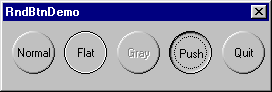
I wanted a button that looked exactly like normal buttons, but instead I wanted them circular. This class can be used like any other owner drawn control - simply include the header file, and declare your button controls as CRoundButton instead of CButton
First of all I make sure the buttons are circles (and not ellipses) and store the centre and radius of the button. Next I simply make the button owner drawn and draw it like every other owner drwn button, but instead of being able to use nice routines like Draw3dRect, I had to roll my own circle drawing routine which would draw each pixel with the correct colour dependant on the point on the circle I was drawing.
I will not include the full source in this page - it is available for download here. The owner draw part is simple and follows along the lines of any other owner drawn button. The circle drawing routine is a standard algorithm, with the only modification in calculating the pixel colour. Given two colours crBright and crDark, and an angle relative to the x-axis, the colour for a pixel can be calculated using the following.
COLORREF GetColour(double dAngle, COLORREF crBright, COLORREF crDark)
{
#define Rad2Deg 180.0/3.1415
#define LIGHT_SOURCE_ANGLE -2.356 // -2.356 radians = -135 degrees,
ASSERT(dAngle > -3.1416 && dAngle < 3.1416);
double dAngleDifference = LIGHT_SOURCE_ANGLE - dAngle;
if (dAngleDifference < -3.1415)
dAngleDifference = 6.293 + dAngleDifference;
else if (dAngleDifference > 3.1415)
dAngleDifference = 6.293 - dAngleDifference;
double Weight = 0.5*(cos(dAngleDifference)+1.0);
BYTE Red = (BYTE) (Weight*GetRValue(crBright) +
(1.0-Weight)*GetRValue(crDark));
BYTE Green = (BYTE) (Weight*GetGValue(crBright) +
(1.0-Weight)*GetGValue(crDark));
BYTE Blue = (BYTE) (Weight*GetBValue(crBright) +
(1.0-Weight)*GetBValue(crDark));
return RGB(Red, Green, Blue);
}
This is a simple linear interpolation between the two colours based on the cosine of the angle between the light source and the point. Angles are measured from the +ve x-axis (i.e. (1,0) = 0 degrees, (0,1) = 90 degrees ), but remember: positive y points down!
Update
Tom Kalmijn kindly added routines that post-process the button image to smooth out the jagged edges. His method uses a nearest-neighbours algorithm to interpolate missing pixels. It's not particularly fast but it does increase smoothing.
Chris Maunder is the co-founder of
CodeProject and
ContentLab.com, and has been a prominent figure in the software development community for nearly 30 years. Hailing from Australia, Chris has a background in Mathematics, Astrophysics, Environmental Engineering and Defence Research. His programming endeavours span everything from FORTRAN on Super Computers, C++/MFC on Windows, through to to high-load .NET web applications and Python AI applications on everything from macOS to a Raspberry Pi. Chris is a full-stack developer who is as comfortable with SQL as he is with CSS.
In the late 1990s, he and his business partner David Cunningham recognized the need for a platform that would facilitate knowledge-sharing among developers, leading to the establishment of CodeProject.com in 1999. Chris's expertise in programming and his passion for fostering a collaborative environment have played a pivotal role in the success of CodeProject.com. Over the years, the website has grown into a vibrant community where programmers worldwide can connect, exchange ideas, and find solutions to coding challenges. Chris is a prolific contributor to the developer community through his articles and tutorials, and his latest passion project,
CodeProject.AI.
In addition to his work with CodeProject.com, Chris co-founded ContentLab and DeveloperMedia, two projects focussed on helping companies make their Software Projects a success. Chris's roles included Product Development, Content Creation, Client Satisfaction and Systems Automation.



 General
  News
News  Suggestion
  Question
  Bug
Bug  Answer
  Joke
Joke  Praise
  Rant
Rant  Admin
Admin 


 Submit an article or tip


