Introduction
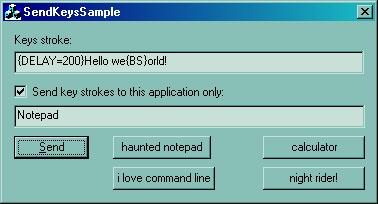
One day I needed to send keys to another application in order to automate a task from my C++ program, but after some research, I found no easy way to do that in C++ and all what was found is reference to VB's or C#'s SendKeys. However, one of the search results returned sndkeys32.pas which is a Delphi code version of the SendKeys() written by Ken Henderson back in 1995.
Since I know Delphi and wanted this same functionality in C++, I decided to port and enhance the code to make it fit my needs. The remainder of the article will explain the concept of sending keys in Win32 and will show you how to use the code in order to send keys in just two lines of code!
Hope you find this article useful.
Key sending concept in Win32
The core functionality of sending keys in CSendKeys revolves around the usage of the keybd_event() Win32 API function.
The keybd_event() produces a keystroke, however the keyboard driver's interrupt handles the calls to this function, which means we can send almost any key combination with less limitations.
In brief, it allows you to send a virtual key, defined in winuser.h as VK_XXX, and a flag which denotes a KeyDown, KeyUp or state to tell if the VKey is an extended key or not.
Normal characters are translated into virtual keys using the VkKeyScan() which takes a CHAR and returns a WORD denoting a VK.
When you send a key, it will be depressed until you send it again with the KEYEVENTF_KEYUP flag.
Here is a small snippet that allows you to send the ALT-TAB sequence:
keybd_event(VK_MENU, 0, 0, 0);
keybd_event(VK_TAB, 0, 0, 0);
::Sleep(1000);
keybd_event(VK_MENU, 0, KEYEVENTF_KEYUP, 0);
keybd_event(VK_TAB, 0, KEYEVENTF_KEYUP, 0);
As you see, in order to send this simple keys combination, 4 lines of coded were needed. Here is where CSendKeys comes to simplify this task.
How to use the code
In short, the code can be used as:
#include "SendKeys.h"
.
.
.
CSendKeys sk;
sk.SendKeys("Hello world!");
.
.
.
.
.
.
sk.SendKeys("{DELAY=50}@rnotepad{ENTER}");
<P>
</P>
CSendKeys is designed in a way to maintain certain compatibility with C#'s SendKeys while also adding more functionality. So if you used C#'s SendKeys.Send() or VB's before then using CSendKeys becomes easier.
Each key is represented by one or more characters. To specify a single keyboard character, use the character itself. For example, to represent the letter 'a', pass in the string "a" to the method. Naturally to represent a string of characters just pass them in order as "hello".
If you want to send modifier keys such as the SHIFT, ALT, CONTROL or WINKEY keys in addition to normal keys, you might want to use any of the characters defined in Table 3.
For example, if you want to send "A" you usually press Shift+A, which is equivalent to sending these key strokes: "+a" , similarly to send the "~" you would press Shift+` which is equivalent to key strokes "+`" or simply "{TILDE}" (Table 1.b).
All characters in Table 3 are reserved and have special meaning in addition to the left/right parenthesis/braces.
The parenthesis are used to associate a given modifier or modifiers with a group of characters, for example to send the "HELLO", you would describe as "+(hello)" which informs CSendKeys to depress the SHIFT key while sending the following keys group. Whereas the braces are used to enclose any of the keys displayed in Table 1 and 2.
The sent keys are sent to no specific application, instead they are just pressed and whatever application has the keyboard input will take the keys.
In order to send the keys to a specific window/application please use either of the methods:
sk.AppActivate(hWnd);
sk.AppActivate("Title");
sk.AppActivate(NULL, "TheClass");
sk.SendKeys("{appactivate Notepad}hello");
The following table is a slightly modified version of the MSDN/SendKeys help:
| Key | Code |
|---|
| BACKSPACE | {BACKSPACE}, {BS}, or {BKSP} |
| BREAK | {BREAK} |
| CAPS LOCK | {CAPSLOCK} |
| DEL or DELETE | {DELETE} or {DEL} |
| DOWN ARROW | {DOWN} |
| END | {END} |
| ENTER | {ENTER} or ~ |
| ESC | {ESC} |
| HELP | {HELP} |
| HOME | {HOME} |
| INS or INSERT | {INS} |
| LEFT ARROW | {LEFT} |
| NUM LOCK | {NUMLOCK} |
| PAGE DOWN | {PGDN} |
| PAGE UP | {PGUP} |
| PRINT SCREEN | {PRTSC} (reserved for future use) |
| RIGHT ARROW | {RIGHT} |
| SCROLL LOCK | {SCROLL} |
| TAB | {TAB} |
| UP ARROW | {UP} |
| F1 | {F1} |
| F2 | {F2} |
| F3 | {F3} |
| F4 | {F4} |
| F5 | {F5} |
| F6 | {F6} |
| F7 | {F7} |
| F8 | {F8} |
| F9 | {F9} |
| F10 | {F10} |
| F11 | {F11} |
| F12 | {F12} |
| F13 | {F13} |
| F14 | {F14} |
| F15 | {F15} |
| F16 | {F16} |
| Keypad add | {ADD} |
| Keypad subtract | {SUBTRACT} |
| Keypad multiply | {MULTIPLY} |
| Keypad divide | {DIVIDE} |
(table 1.a)
The following are my additions:
| Key | Code |
|---|
| + | {PLUS} |
| @ | {AT} |
| APPS | {APPS} |
| ^ | {CARET} |
| ~ | {TILDE} |
| { } | {LEFTBRACE} {RIGHTBRACE} |
| ( ) | {LEFTPAREN} {RIGHTPAREN} |
| Left/Right WINKEY | {LWIN} {RWIN} |
| WINKEY | {WIN} equivalent to {LWIN} |
(table 1.b)
In addition to this, I have added some special keys that act like commands:
| Command Syntax | Action |
|---|
| {VKEY X} | Sends the VKEY of value X.
Very useful if you don't want to recompile CSendKeys and add new Vkey to the hardcoded special keys table.
For example, {VKEY 13} is equivalent to VK_RETURN. |
| {BEEP X Y}} | Beeps with a frequency of X and a duration of Y milliseconds. |
| {DELAY X} | Delays sending the next key of X milliseconds. After the delaying the following key, the subsequent keys will not be further delayed unless there is a default delay value (see DELAY=X).
Example: {DELAY 1000} <-- delays subsequent key stroke for 1 second. |
| {DELAY=X} | Sets the default delay value to X milliseconds. This will cause every key to be delayed X ms.
If a value is already set and you specify {DELAY Y} you will have your following key delay Y ms but the subsequent keys will be delayed X ms.
Example: {DELAY=1000} <-- all subsequent keys will be delayed for 1 second.
|
| {APPACTIVATE WindowTitle} | Activates an application using is WindowTitle.
Very useful if you want to send different keys to different applications. |
(table 2)
| Key | Code |
|---|
| WINKEY | @ |
| SHIFT | + |
| CTRL | ^ |
| ALT | % |
(table 3)
Here are some examples:
| Keystrokes | Description |
|---|
| {DELAY=50}@rnotepad~hello world%ha |
- set delay after each character to 50 ms
- WINKEY+R to invoke the run dialog
- type "notepad" and press ENTER
- Type "hello world"
- Invoke Alt+H then press "A" to invoke the about dialog of notepad
|
| {delay=100}{appactivate Calculator}{ESC}5*7~{beep 1000 500}^c{appactivate Notepad}^a{DEL}Result of 5*7 is: ^v | Given that "Calc.exe" and "Notepad.exe" are running:
- set delay to 100 ms
- activate calculatr
- press ESC to clear previous result
- type in 5*7 then press ENTER
- beep for 500ms with a frequency of 1000
- press CTRL+C to copy result
- activate notepad
- press CTRL+A then DEL in notepad to delete previously written text
- type in a phrase then press CTRL+V to paste the copied result
|
| {DELAY=500}{NUMLOCK}{CAPSLOCK}{SCROLL}{SCROLL}{CAPSLOCK}{NUMLOCK} |
- Press NUM,CAPS,SCROll lock in order
- Turn them off in reverse order
|
| {DELAY=500}% {DOWN 5} |
- press ALT+SPACE
- press DOWN key 5 times
|
For more examples see the accompanying sample code.
- 04/19/2004
- Initial version development
- 04/21/2004
- Added number of times specifier to special keys
- Added {BEEP X Y}
- Added {APPACTIVATE WindowTitle}
- Added
CarryDelay() and now delay works properly with all keys
- Added
SetDelay() method
- Fixed code in AppActivate that allowed to pass both NULL windowTitle/windowClass
- 05/21/2004
- Fixed a bug in
StringToVKey() that caused the search for RIGHTPAREN to be matched as RIGHT
- Adjusted code so it compiles w/ VC6
- 05/24/2004
Reference
Elias (aka lallousx86, @0xeb) has always been interested in the making of things and their inner workings.
His computer interests include system programming, reverse engineering, writing libraries, tutorials and articles.
In his free time, and apart from researching, his favorite reading topics include: dreams, metaphysics, philosophy, psychology and any other human/mystical science.
Former employee of Microsoft and Hex-Rays (the creators of IDA Pro), was responsible about many debugger plugins, IDAPython project ownership and what not.
Elias currently works as an Anticheat engineer in Blizzard Entertainment.
Elias co-authored 2 books and authored one book:
- Practical Reverse Engineering
- The Antivirus Hacker's Handbook
- The Art of Batch Files Programming



 General
  News
News  Suggestion
  Question
  Bug
Bug  Answer
  Joke
Joke  Praise
  Rant
Rant  Admin
Admin 


 Submit an article or tip


