Click here to Skip to main content

NTime - Performance unit testing tool

By , 30 Mar 2006
 

Introduction

This article presents a unique tool to run repeatable performance tests in an application developed by programmers. The NTime tool is very similar to NUnit tool - another unit testing tool, so the users of NUnit will find an almost similar GUI and functionality.

Background

This is the first release of the tool that performs repeatable tasks to help managers, architects, developers and testers test an application against its performance. This version may not be very consistent and it may report errors under different situations. However, the tool was tested under many situations.

Tool usage

This section provides information for the application management team that wishes to use NTime tool to keep applications working at the desired performance level.

Managers

Program managers are welcome to specify application performance boundaries at the beginning of the application development process. They may also note which modules and functions of the application need to work and at which time frames. The performance specifications written by them may be helpful for developers when designing the application performance. Further, the NTime tool tests their performance specifications against real, developed applications. The tests performed by NTime tool may be reproduced at different time periods to see whether the application is giving the expected performance. But the main advantage of using this tool is that it enables managers to create configuration test files for developers and testers to give them a starting point on how to optimize the application.

Developers

Developers use NTime tool to test whether their application works in accordance with the performance specifications designed by managers or by themselves. They need to run the NTime tool when they aren't sure whether their rewritten code still works well. The NTime tool can also be made to remain open on the desktop even when the programmers develop, compile or debug their applications - every application that is built will be reloaded in NTime automatically and shown with the updated tests.

Testers

Testers are actively in the performance test stage. They run repeatable tests after every application's alpha release. Testers will review hundreds or thousands of tests and register them to the bug tracing applications.

Architecture

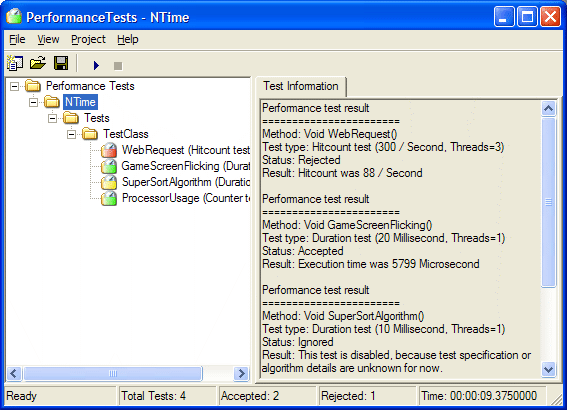
NTime architecture is similar to that of NUnit tool. This section shows the features found in NTime tool.

Simultaneous compile and test time

NTime tool may still be running even when the compilation process of the application that we want to test is going on. After the application has been built, NTime will reflect all the changes, you just need to run the tests and wait for the performance test results whether they are accepted or rejected.

Test timings

Actually, NTime's timings are based on high frequency timers that rely on different onboard chipsets' architecture. This difference generates more or less precision in the performed tests. The disadvantages, while profiling the tests, include system processes and CPU load. Even after closing the heavy loaded applications, there may be other bad things that can occur - like, NTime needs some CPU and threads to perform complex tests and therefore you can indicate about 10 microseconds overhead, so if you want to test high frequency running functions, then you need to write inside of the test code a "for" loop statement i.e. 100 loops, and then test the result for the specified time multiplied by 100.

SDK documentation

NTime tool is supported by two documentation files. The NTime Framework SDK will be your starting point to test your applications against performance tests by adding .NET attributes into your code.

NTime framework SDK

NTime Framework SDK is the often used SDK documentation. This help file shows you the available .NET attributes that you can use in your testing applications. Many attributes are similar to that of NUnit attributes, so if you've used NUnit tool before, then working with NTime will be quite easy.

NTime GUI SDK

After the installation of NTime, you will find the NTime source documentation. This will help you to add some functionality to NTime, but remember every change that you make to this tool is only for your private and non-commercial use. Read License.rtf file for further information about NTime licensing.

Further development

This NTime version is a GUI only application. In future, I plan to develop a console application to provide batch script usability. For further improvements, you may send comments to adamslosarski@tlen.pl with your suggestions to help me make the application work better. Bugs found in this release will be fixed in the next version, so the earlier found errors will be corrected as soon as possible. The source code of NTime will be soon available on the sourceforge.net website, so you can track the latest versions.

Using the code

Below, you can see a sample code which uses all the attributes available with NTime framework. See the NTime framework SDK documentation for more information:

using System;
using NTime.Framework;

namespace NTime.Tests
{
    /// <SUMMARY>
    /// This is a tested class.
    /// </SUMMARY>
    [TimerFixture]
    public class TestClass
    {
        [TimerFixtureSetUp]
        public void GlobalSetUp()
        {
            // initialize one-time initialization data in
            // this testfixture.
        }

        [TimerFixtureTearDown]
        public void GlobalTearDown()
        {
            // release one-time initialized data in
            // this testfixture.
        }

        [TimerSetUp]
        public void LocalSetUp()
        {
            // initialize data for every test found
            // in this testfixture class
        }

        [TimerTearDown]
        public void LocalTearDown()
        {
            // release data for every finished test
            // found in this testfixture class
        }

        [TimerHitCountTest(300, Threads = 3,
          Unit = TimePeriod.Second)]
        public void WebRequest()
        {
            // invoke some code from real application
            // to test its functions against specified
            // performance.
            // in example we will keep our fictional
            // web server's response at 10 milliseconds
            if(System.Threading.Thread.CurrentThread.Name == 
                                                  "NTimeThread_0")
              System.Threading.Thread.Sleep(5);
            else if(System.Threading.Thread.CurrentThread.Name == 
                                                   NTimeThread_1")
              System.Threading.Thread.Sleep(8);
            else
              System.Threading.Thread.Sleep(10);
        }

        [TimerDurationTest(20, Unit = TimePeriod.Millisecond)]
        public void GameScreenFlicking()
        {
            // we want to calc game AI, 3d engine and
            // other stuff to keep it running at 50Hz
            // vertical screen sync.
            System.Threading.Thread.Sleep(5);
        }

        [TimerDurationTest(10, Unit = TimePeriod.Millisecond)]
        [TimerIgnore("This test is disabled.")]
        public void SuperSortAlgorithm()
        {
            // code here will not be profiled until TimerIgnore
            // flag was removed.
        }

        [TimerCounterTest("Process", "% Processor Time", 
          Threads = 1, InstanceName = "NTimeGUI", 
          MinimumValue = 0, MaximumValue = 50)]
        public void ProcessorUsage()
        {
            // we want to see whether our application is
            // optimized to work with minimal CPU usage.
            for(int i = 0; i < 150; i++)
            {
                System.Threading.Thread.Sleep(30);
            }
        }
    }
}

Points of interest

This tool contains some .NET technologies used inside the code, including application domains and .NET remoting - these technologies were introduced to allow simultaneous compile and run test functionality, so that the assemblies may be loaded into separate application domains which run shadowed assemblies, and so the original ones may be overwritten by the compiler. Also, the assemblies can be unloaded from the application domain anytime.

The second thing is the file monitoring which tracks file changes and refreshes the project test tree to reflect changes in the assemblies when a new DLL is deployed.

History

  • 2006-03-28
    • Bug fixes:
      1. Tested methods were launched five times to average time, but the LocalSetup method was launched only once. Now it is launching both during every test method call.
    • Improvements:
      1. Added named threads to detect which thread is executing the test method. Look at the example method 'WebRequest'.
  • 2005-04-05
    • Bug fixes:
      1. Tested assemblies could not read the application configuration settings.
      2. NTimeSetup.exe installer failed when the source files were being selected for installation.
    • Improvements:
      1. New option dialog box allows you to specify the application configuration settings file.
      2. NTime.Framework.dll was promoted to GAC to allow for better shared reference to it.
  • 2004-12-08
    • Updated NTime application with bug fixes and an additional console mode.
  • 2004-05-14
    • Added source code and documentation download separately.
  • 2004-05-11
    • First release of NTime tool.

License

This article has no explicit license attached to it but may contain usage terms in the article text or the download files themselves. If in doubt please contact the author via the discussion board below.

A list of licenses authors might use can be found here

About the Author

AdamSlosarski
Web Developer
Poland Poland
Member
Born in Poland, living there as employeed developer, in free time writing much .net stuff and designing applications.


Sign Up to vote   Poor Excellent
Add a reason or comment to your vote: x
Votes of 3 or less require a comment

Comments and Discussions

 
You must Sign In to use this message board.
Search this forum  
    Spacing  Noise  Layout  Per page   
GeneralGood frameworkmembersaivenkat4 Jun '07 - 2:40 
Its a good framework. As you said, it provides comprehensive result to see how my classes are performing like NUnit rather than extensive graphs like Profilers.
 
Individually its good. But maybe we can integrate it wil an IDE like SharpDevelop to make it a part of TDD. TDD stresses on unit testing but still lacks anything serious on Performance side. Yours will be good addition for this.


Sai
Life is too short for manual testing

GeneralNant support for Ntime [modified]memberivanFrancisDcunha9 May '07 - 2:11 
Does Ntime have Nant support like Nunit?
 
I am trying to integrate selenium RC with NTime I am successful from Ntime GUI to some extent however I was wondering if I can do this via Nant like I do to run my Nunit testcases - Please advice
 
Regards
Ivan.....
 

-- modified at 9:03 Wednesday 9th May, 2007
 
A highly enthusiastic person meant for project leadership

GeneralRe: Nant support for NtimememberAdamSlosarski13 May '07 - 22:15 
I don't know, but you can run NTime in either command-line or gui scenario, i think you should try hook up commandline NTime with Nant

 
Testing your code against performance will keep you running with good scalability and maintenance for years.
NTime.exe - the free tool for real developers of high scalability applications!

GeneralStatus always rejected ? what does this meanmemberivanFrancisDcunha9 May '07 - 0:43 
Performance test result
=======================
Method: Void WebRequest()
Test type: Hitcount test (5 / Second, Threads=1)
Status: Rejected
Result: Hitcount was 0 / Second
 

No matter what I do I always get the status as rejected why ? why rejected ? what am I doing wrong please advice
 
Regards
IvanConfused | :confused:
 
A highly enthusiastic person meant for project leadership

GeneralRe: Status always rejected ? what does this meanmemberAdamSlosarski13 May '07 - 22:16 
Is there any thrown exception in that method? try to use NTime example method and project
 
Testing your code against performance will keep you running with good scalability and maintenance for years.
NTime.exe - the free tool for real developers of high scalability applications!

GeneralRe: Status always rejected ? what does this meanmemberivanFrancisDcunha28 May '07 - 19:18 
Problem is resolved
 
code giving the problem is
[TimerHitCountTest(5, Threads = 1, Unit = TimePeriod.Second)]
public void WebRequest()
{}
 
code working fine now is
[TimerHitCountTest(5, Threads = 1, Unit = TimePeriod.Minute)]
public void WebRequest()
{}
 
Thanks Adam
Regards
Ivan.........

 
A highly enthusiastic person meant for project leadership

GeneralAttempt to divide by zeromemberivanFrancisDcunha8 May '07 - 23:55 
I am getting an exception on screen telling me that I have attempted to divide by zero - I ignored this application and now none of my other files are opening hence I cannot get the unit performance of my Nunit scripts Please let me know how I can handel this divide by zero exception
I tried to change my nunit test code also however it does not help
 
Is there some provision to handle this exception of divide by zero in Ntime
 
Please advice me.
 
Regards
Ivan.....
 
A highly enthusiastic person meant for project leadership

GeneralRe: Attempt to divide by zeromemberivanFrancisDcunha9 May '07 - 0:02 
See the end of this message for details on invoking
just-in-time (JIT) debugging instead of this dialog box.
 
************** Exception Text **************
System.DivideByZeroException: Attempted to divide by zero.
at NTime.RemoteLoader.LoadAssembly(String assembly)
at NTime.NTimeMain.Reload()
at NTime.NTimeMain.Open()
at NTime.GUI.NTimeForm.menuOpen_Click(Object sender, EventArgs e)
at System.Windows.Forms.MenuItem.OnClick(EventArgs e)
at System.Windows.Forms.MenuItem.MenuItemData.Execute()
at System.Windows.Forms.Command.Invoke()
at System.Windows.Forms.Command.DispatchID(Int32 id)
at System.Windows.Forms.Control.WmCommand(Message& m)
at System.Windows.Forms.Control.WndProc(Message& m)
at System.Windows.Forms.ScrollableControl.WndProc(Message& m)
at System.Windows.Forms.ContainerControl.WndProc(Message& m)
at System.Windows.Forms.Form.WndProc(Message& m)
at System.Windows.Forms.Control.ControlNativeWindow.OnMessage(Message& m)
at System.Windows.Forms.Control.ControlNativeWindow.WndProc(Message& m)
at System.Windows.Forms.NativeWindow.Callback(IntPtr hWnd, Int32 msg, IntPtr wparam, IntPtr lparam)
 

************** Loaded Assemblies **************
mscorlib
Assembly Version: 2.0.0.0
Win32 Version: 2.0.50727.42 (RTM.050727-4200)
CodeBase: file:///C:/WINDOWS/Microsoft.NET/Framework/v2.0.50727/mscorlib.dll
----------------------------------------
NTimeGUI
Assembly Version: 1.0.2.0
Win32 Version: 1.0.2.0
CodeBase: file:///C:/Program%20Files/Magic%20Image/NTime/bin/NTimeGUI.exe
----------------------------------------
System.Windows.Forms
Assembly Version: 2.0.0.0
Win32 Version: 2.0.50727.42 (RTM.050727-4200)
CodeBase: file:///C:/WINDOWS/assembly/GAC_MSIL/System.Windows.Forms/2.0.0.0__b77a5c561934e089/System.Windows.Forms.dll
----------------------------------------
System
Assembly Version: 2.0.0.0
Win32 Version: 2.0.50727.42 (RTM.050727-4200)
CodeBase: file:///C:/WINDOWS/assembly/GAC_MSIL/System/2.0.0.0__b77a5c561934e089/System.dll
----------------------------------------
System.Drawing
Assembly Version: 2.0.0.0
Win32 Version: 2.0.50727.42 (RTM.050727-4200)
CodeBase: file:///C:/WINDOWS/assembly/GAC_MSIL/System.Drawing/2.0.0.0__b03f5f7f11d50a3a/System.Drawing.dll
----------------------------------------
System.Configuration
Assembly Version: 2.0.0.0
Win32 Version: 2.0.50727.42 (RTM.050727-4200)
CodeBase: file:///C:/WINDOWS/assembly/GAC_MSIL/System.Configuration/2.0.0.0__b03f5f7f11d50a3a/System.Configuration.dll
----------------------------------------
System.Xml
Assembly Version: 2.0.0.0
Win32 Version: 2.0.50727.42 (RTM.050727-4200)
CodeBase: file:///C:/WINDOWS/assembly/GAC_MSIL/System.Xml/2.0.0.0__b77a5c561934e089/System.Xml.dll
----------------------------------------
NTime.Framework
Assembly Version: 1.0.2.0
Win32 Version: 1.0.2.0
CodeBase: file:///C:/Program%20Files/Magic%20Image/NTime/bin/NTime.Framework.DLL
----------------------------------------
 
************** JIT Debugging **************
To enable just-in-time (JIT) debugging, the .config file for this
application or computer (machine.config) must have the
jitDebugging value set in the system.windows.forms section.
The application must also be compiled with debugging
enabled.
 
For example:


When JIT debugging is enabled, any unhandled exception
will be sent to the JIT debugger registered on the computer
rather than be handled by this dialog box.
 
A highly enthusiastic person meant for project leadership

GeneralRe: Attempt to divide by zeromemberAdamSlosarski13 May '07 - 22:20 
Send me your project (.sln) as simple as you can with this exception generating and i will check this
 
Testing your code against performance will keep you running with good scalability and maintenance for years.
NTime.exe - the free tool for real developers of high scalability applications!

GeneralRe: Attempt to divide by zeromemberivanFrancisDcunha28 May '07 - 19:14 
The problem is resolved
 
Code giving problem was:-
 
[TimerHitCountTest(0, Threads = 1, Unit = TimePeriod.Minute)]
public void WebRequest()
{}
 
Changed code to:-
 
[TimerHitCountTest(5, Threads = 1, Unit = TimePeriod.Minute)]
public void WebRequest()
{}
 
Every thing works fine now
 
Regards
Ivan.......
 
A highly enthusiastic person meant for project leadership

GeneralGetting startedmembervishalmistry23 Aug '06 - 20:57 
I have download the demo and now I want to use that.
I don't know how do get started with this.
 
vishal
GeneralInstallationmembershogi5 Jan '06 - 19:10 
I cannot install the project.
When I select the solution file, it says, that the solution could be under source control
and that's it. I cannot open the solution nor the projects
GeneralRe: InstallationmemberAdamSlosarski6 Jan '06 - 3:14 
I used source control at home to storage my sources of ntime and that's way you cannot open project. Try this:
 
- Skip the warning and you should be able to load project into solution
 
or
 
- Create your own project from beginning and add ntime source files into it (remember to add appriopriate references)

 
Testing your code against performance will keep you running with good scalability and maintenance for years.
NTime.exe - the free tool for real developers of high scalability applications!
QuestionWhat about exceptions?memberjwaga12 Oct '05 - 21:07 
I know it's a performance measuring tool, but it should handle exeptions in some way. A thrown exeption does nothing and the test appears to be still running - which is event worse. You can catch it of course - but then everything seems to be fine and greenSmile | :)
NTime works fine with NUnit, though.
 
Janek
AnswerRe: What about exceptions?memberAdamSlosarski6 Jan '06 - 3:40 
It handles exceptions as well. Look below to see my result of benchmarking GameScreenFlicking() function which throws SystemException inside resulting with status rejected
 
output:
 
Performance test result
=======================
Method: Void GameScreenFlicking()
Test type: Duration test (20 Millisecond, Threads=1)
Status: Rejected
Result: Unhandled exception
Exception: System.SystemException: MyTestException
at NTime.Tests.TestClass.GameScreenFlicking() in ...\NTime\PerformanceTests\Test.cs:line 77
 

PL:
Może w niektórych przypadkach to nie działa? Proponuję wobec tego napisać otoczke try-catch w danej funkcji i przekazywać wyjątek na zewnątrz do NTime-a poprzez forwardowanie (throw)
 
Testing your code against performance will keep you running with good scalability and maintenance for years.
NTime.exe - the free tool for real developers of high scalability applications!
GeneralBuild Manager system for daily buildsmemberAdamSlosarski28 Jun '05 - 1:58 
http://republika.pl/dailybuilds[^]
 
There you can find distributed build system for C++ Builder / Delphi and soon also for .NET compilers
 
Testing your code against performance will keep you running with good scalability and maintenance for years.
NTime.exe - the free tool for real developers of high scalability applications!
Questiona website to hold this great project?memberUnruled Boy19 Jun '05 - 20:16 
well, is there a website to hold this great projectD'Oh! | :doh:
 
Regards,
unruledboy@hotmail.com
AnswerRe: a website to hold this great project?memberAdamSlosarski28 Jun '05 - 1:56 
There is website to hold this project at gotdotnet see http://www.gotdotnet.com/workspaces/workspace.aspx?id=4567739d-b65a-48dc-ab27-812443caaa9f[^]

 
Testing your code against performance will keep you running with good scalability and maintenance for years.
NTime.exe - the free tool for real developers of high scalability applications!
GeneralGreat, but not working!memberajheunis8 Apr '05 - 0:38 
Excactly what I'm looking for, but it doesn't work. Confused | :confused:
 
I don't have time to hack/debug. Please let me know (at www.vectorsoft.net) when you've got a stable/mature version available.
GeneralRe: Great, but not working!memberAdamSlosarski11 Apr '05 - 0:03 
Could you specify exactly what things are not working? Do You add reference to ntime.framework.dll as You should do it in tested projects? It is working with .net 1.1 since You can rebuild entire NTime solution with VS. NET 2005 to use it in .net 2.0

 
Testing your code against performance will keep you running with good scalability and maintenance for years.
NTime.exe - the free tool for real developers of high scalability applications!
GeneralUseless without Config File SupportmemberSean Harris25 Mar '05 - 11:15 
Hi Adam,
 
I'd so love to use your tool. However, it's utterly useless to me without support for config files. I bet you this limitation is stopping MANY other people from using the tool.
 
I believe you're supposed to do set it when you create your AppDomainSetup instance. I tried hacking your code to make it work, but I got a file not found exception. Solve it, and you'll have a proponent in me.
 
~Cheers
 
Sean
GeneralRe: Useless without Config File SupportmemberAdamSlosarski28 Mar '05 - 22:28 
Hi Sean,
 
Thanks for this very important information from You, i will check my code in this week and probably put newer version in this weekend.
 
So summarize - you want your application to get some settings from name.exe.config file right? and NTime prevent to do so because appDomain uses own directory etc.? As i said i'll fix it today and put new version here, thanks again for enjoying this utility Smile | :) .
 
Adam
 
Testing your code against performance will keep you running with good scalability and maintenance for years.
NTime.exe - the free tool for real developers of high scalability applications!
GeneralNice tool, but...memberjconwell8 Dec '04 - 9:25 
Nice tool, but after using it, I still prefer using Nick Weinholt's tool Performance Measurement Framework[^]. It gives a better set of result statistics to base your performance decision on.
 
John C

GeneralRe: Nice tool, but...memberAdamSlosarski8 Dec '04 - 23:03 
>> It gives a better set of result statistics to base your performance decision on.
 
Probably you're right because you talk about profiler which must show result very clearly, but my application is a more unique tool and it's not any next profiler like NumegaDevpartner profiler, AQTime, NPerf or NProf - they are working the same way with more or less additional features.
 
My .NTime tool provides unit testing - i think you don't understand the difference between performance tools and performance unit testing tools. NTime lets you type a boundaries like how fast the method should be in whole product cycle from design to deplyoment and maintenance. Next good thing in .NTime tool is that you can very simple attribute your methods as you work almost the same way as in NUnit, MBUnit, CSUnit etc. Performance Measurement Framework does it using delegates, invocation lists etc it is not comfortable to use - better solution is attributed methods like in NUnit, NTime etc.
 
Example about difference NTime and Performance Measurement Frame..:
 
a)Performance Measurement Framework gives you results how fast is your implemented method and you can decide to improve perfomance
 
b)NTime gives you result (also how fast is your methods but...) but in general result are whether your method test pass or fail, i mean if your method works slower after one month because you forgot about that method but it is invoking certain algorithm method which you changed and resulting in performance degradation then NTime will tell you that the first method has failed test, so you will remember that you changed something in other methods that resulted in perfomance degradation of tested method - you just get info that method pass or fail - and this depends on performance (not work/don't work logic like in nunit)


Testing your code against performance will keep you running with good scalability and maintenance for years.
NTime.exe - the free tool for real developers of high scalability applications!
GeneralRe: Nice tool, but...memberjconwell11 Dec '04 - 17:31 
Its pretty obvious that you did not read anything from the link i posted. this is not a profiler, but a performance unit testing tool. It provides a more accurate time measurement (via the win32 api that it uses) and much more usable result report.
 
Please dont preach to people like they are idiots, especially when you have obviously not done YOUR homework.
 
John Conwell

General General    News News    Suggestion Suggestion    Question Question    Bug Bug    Answer Answer    Joke Joke    Rant Rant    Admin Admin   

Permalink | Advertise | Privacy | Mobile
Web04 | 2.6.130523.1 | Last Updated 31 Mar 2006
Article Copyright 2004 by AdamSlosarski
Everything else Copyright © CodeProject, 1999-2013
Terms of Use
Layout: fixed | fluid