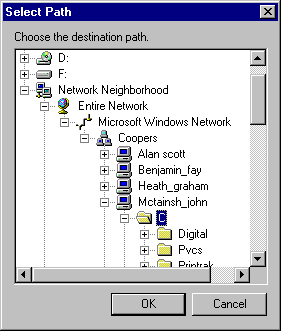
 |

|
Thank you very much . You give me so supports
|
|
|
|

|
Is it possible to add to your Dialog button "New Folder", which will create new folder in selected localization?
|
|
|
|

|
hi,
This is great piece of john,considering that i spent a lot of time searching for such a control on the net.
I would like to know if it is possible to show files of a directory as well. It would be really helpful.
Thanks
Sky Walker
|
|
|
|

|
I could not use SHBrowseForFolder to browse a network folder:
I mean if the initial folder is a network folder, the browse dialog does not search to that folder at the first time.
Please help me
|
|
|
|

|
It is nice control. Can you make hybrid control with combobox
(look like combobox but contains your treecontrol inside)
yooyo
|
|
|
|

|
Hi,
I have just included your dialog in an application, and I must say that I am very happy with it.
- it works very nice!
- it's extremely easy to integrate into an application
- it's very easy to use
Thank's a lot for your work and for sharing it!
I have one tiny remark: above the window, a piece of static text is sitting to display the currently selected directory. If the directory grows taller than the window width, only the first part is shown. I would prefer to show the first part, skip the middle (replaced by ... or something) and show the last part again. However I did not find time to do that.
Another option is to just show the last part, which is extremely easy to do:
replace the static text item by an edit box with the following settings:
General:
ID: IDC_EDIT_NOTE
Visible checked, rest unchecked
Styles:
Align text: left
Auto HScroll and read-only checked, rest unchecked
Extended Styles:
all unchecked
It will now look like the original static text item.
Now you'll have to dig into the code. In the file DlgGetPath.h, in the last lines of member OnSelchangedTree you will find:
//
//TODO add code here to process users selection
//
ASSERT( GetDlgItem( IDC_STATIC_NOTE ) );
SetDlgItemText( IDC_STATIC_NOTE, sPath );
Replace the IDC_STATIC_NOTE in both lines by IDC_EDIT_NOTE and add the following line below the SetDlgItemText:
((CEdit*)GetDlgItem(IDC_EDIT_NOTE))->SetSel(sPath.GetLength(), sPath.GetLength());
This last line will scroll to the end of the path.
|
|
|
|

|
Hi,
It does not allow you to select a network drive.
For instance, it allows the user to choose :
\\11-FileServer\MySubFolder
but not
\\11-FileServer\
The problem seems to be in DoModal()
...
if (::SHGetPathFromIDList(pidl, m_strPath.GetBuffer(MAX_PATH)) == FALSE)
...
This returns FALSE for some reasons, but I can't fix this bug...
Any ideas ?
Thanks.
Yannick.
Yannick Namia
|
|
|
|

|
When the dialog box comes up it displays the top level of drives. Immediately select the 'Cancel' button. A fatal error results and crashes the application.
The problem is in the override for DestroyWindow(). It removes the currently selected item. However, at this point no item has been selected to the pointer that is deleted has value 0. Not nice.
The fix:
BOOL CDlgGetPath::DestroyWindow()
{
HTREEITEM htItem = m_Tree.GetSelectedItem( );
if( htItem == 0 )
return CDialog::DestroyWindow();
//Get the current selection before heading home
m_sPath = GetItemPath( htItem );
Brad Denniston
Viewpoint Engineering
|
|
|
|

|
Well done on a great effort . All I was after was a simple CFileDialog type class that could select directories instead of files. Short of coding something similar myself, this class works a treat. It is so straight forward and the example source compiled the first time, no hassles.
|
|
|
|

|
Just wondering how you managed to get the system icons loaded into a bitmap file? Probably a very simple solution im sure...
Thanks in advance for any help.
|
|
|
|

|
Use SetImageList only can add 16-color image to the treectrl.
How to display a turecolor image or icon in the treectrl?
|
|
|
|

|
Great code with easy to follow documents had it working in no time at all, just a shame you cant view files.
|
|
|
|

|
in the method
bool CDlgGetPath::EnumNetwork( HTREEITEM hParent )
This section of code...
if( dwResult != ERROR_NO_MORE_ITEMS )
{
TRACE( _T("*** ERROR %d - Cannot complete network drive enumeration\n"), dwResult );
break;
}
... which occurs just following the GlobalFree( (HGLOBAL) lpnrDrv );
ensures that the loop will only be executed once. Therefore, large networks will only partially be displayed...or smaller networks where a smaller cbBuffer is used. For the life of me I can not determine what that line of code was trying to accomplish.
Also, some indication to the user that the default path that they were expecting to see on initialization does not exist would be nice.
Otherwise, pretty useful in my case.
|
|
|
|

|
How Can I retrieve a special path name???
Thank to all...
Margaria Ivano
|
|
|
|

|
I used an implementation of John's excellent work and only had one minor problem. FAT volumes are not alphabetically sorted. To get around this you can modify John's 'InsertItem' routine by adding another argument thusly:
HTREEITEM InsertItem(CTreeCtrl *pTree, HTREEITEM hParent, NETRESOURCE *const pNetResource, CString sText, int iImage, int iImageSelected = -1, HTREEITEM hInsertAfter = TVI_LAST);
You also need to change this line:
InsertStruct.hInsertAfter = TVI_LAST;
to:
InsertStruct.hInsertAfter = hInsertAfter;
Then in whatever calls you want (I did it for folder items and network share names) you can set the last argument of 'InsertItem' to TVI_SORT so that those nodes will be sorted.
Voila.
|
|
|
|

|
I build a MFC application for Pocket PC using EVC. I want to add this function in it.
I followed the method you mentioned. But there are lots of errors occur. Such as:
DlgGetPath.h(52) : error C2061: syntax error : identifier 'NETRESOURCE'
DlgGetPath.cpp(168) : error C2065: 'GetDriveType':undeclared identifier
...........
...........
Can you help me to solve these problems. Any help will be appreciated
Thanks!
|
|
|
|

|
Yes it can be customized. And I use it all the time, working just fine. Of course, when you do your own, you have more options to customize it. But why not to make your own Windows so?
But have to say, you have done a good work, and for one who need more customizations and/or have to handle all code, your one is better.
BTW, I'll copy here an example of using SHBrowseForFolder from one of my projects. Usage is simple enough
BROWSEINFO bi;
ZeroMemory(&bi, sizeof(BROWSEINFO));
TCHAR szDiplayName[MAX_PATH];
ZeroMemory(szDiplayName, MAX_PATH);
LPITEMIDLIST lpStartFolder = NULL;
SHGetSpecialFolderLocation(GetSafeHwnd(), CSIDL_DRIVES, &lpStartFolder);
bi.hwndOwner = GetSafeHwnd();
bi.pszDisplayName = szDiplayName;
bi.lpszTitle = _T("Choose a folder");
bi.ulFlags = BIF_USENEWUI;
bi.pidlRoot = lpStartFolder;
LPITEMIDLIST pIDList = SHBrowseForFolder(&bi);
LPMALLOC pMalloc = NULL;
SHGetMalloc(&pMalloc);
if(pIDList != NULL){
SHGetPathFromIDList(pIDList, m_csLocation.GetBuffer(MAX_PATH));
m_csLocation.ReleaseBuffer();
pMalloc->Free(pIDList);
}
pMalloc->Free(lpStartFolder);
pMalloc->Release();
Philip Patrick
"Two beer or not two beer?" (Shakesbeer)
Web-site: www.saintopatrick.com
|
|
|
|

|
Thanks John - I had your browser tree working in my code in less than an hour. Wish more people would just build simple, easy to use, basic functions like yours. This functionality added just what I needed so I could customize for my application.
Thanks again,
Jim
jimsmithfromhighcountrysoftware
|
|
|
|

|
Pretty neat implementation... rather nice. The only thing is that it doesn't display My Documents or any of those folders. This is a shame, and for this reason I am sticking to SHBrowseForFolder() for now.
Hmmmm.... perhaps it wouldn't be that hard to add this? I'll give it a try.
swine
====================================
Check out Aephid Photokeeper, the POWERFUL digital
photo album solution at http://www.aephid.com
|
|
|
|

|
How do i choose a file inside a folder? ( full path including the file i chose )
|
|
|
|

|
Hi
I am stuck with the MFC's CListCtrl,Infact i am using tree control with check boxes the problem i am facing is that i am doing all of the stuff on TVN_SELCHANGED message, there are two problems
1. if an item is already selected this message is never posted
2. if i click on check box rather than on item no message is posted.
Please help me in this scenario, a quick response would be appreciated
if u could mail me personally i will be thankful to u. my mailing address is waqar_a@onebox.com
Thanks
|
|
|
|

|
How can i insert all the contents in your list box in side a combo box such like in the open dialog box. The edit box of the combo box will display the current folder and the list box will show all the contents(such like in the explorer)
Thanks in advance.
Anonymous
|
|
|
|

|
My problem is to detect machines not running Microsoft lan manager ( they may run for example, Novel netware) connected to the lan. The user interface is that similar to a windows explorer type - left pane having a tree view and the right pane having a list view. I wish to display the unix machines ont the left view, along with the machines running the microsoft lan manager. I should be able to browse thru the unix machines as i do thru any machine connect to lan ( of course, username/passwd mvalidation should be there).
I would be very much grateful if u suggest any
1.API
2.Reference
3.website
Thanking you in advance,
Angshuman Chatterjee
|
|
|
|

|
The biggest difference between the two controsl is that yours can't be used "as is" in an ATL COM project. Enough said.....
|
|
|
|

|
Appreciative of your contribution on The CodeProject site.
It's what I want and wait for this solution for a long time.
Thank you very much again "John McTainsh".
Bermusa Thongin
|
|
|
|

|
hi
i read u'r article and it helped for me a lot Thanx for that.
i want to create a windows explorer detailed view control but i am new to this project , so u pl help me if u have any article on this otherwise u pl suggest me some articles.
Thanx
sreeniva
|
|
|
|

|
How can I convert the dialog base project into the SDI CTreeView
|
|
|
|

|
Interesting code, but why not build a wrapper for the SHBrowseForFolder function.
It maybe difficult to use it, but it will browse all the shell namespace for you (returning for instance folders created on the desktop, or those created by some shell extensions)
|
|
|
|

|
I'm new to programming in MFC, is there an easy way to modify this to display the files in a directory also in the same control
|
|
|
|

|
Thanks, this class will help me a lot
|
|
|
|
 |
