Click here to Skip to main content

.NET LCD MatrixControl and GDI+

By , 19 Jun 2004
 

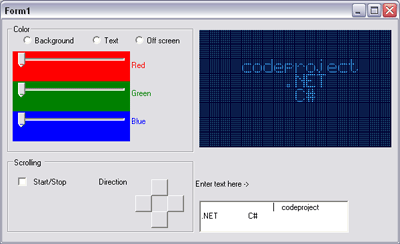
Sample Image - LCDMatrixControl_screen.gif

Introduction

Once, it was required for me, a control similar to LCD, for data presentation. Having looked in the Internet, I found a nice realization from Nic Wilson. But the code was written in C++, and my project was in C#. Therefore, I decided to rewrite Nic's code, and at the same time I wanted to estimate how quick GDI+ works in .NET.

Using the code

In your project, you need to refer to the library with our control, then you should place the control in design time in your project.

After you finish with design time, start initializing our control in the constructor.

public Form1()
{
  InitializeComponent();
  BkColor = Color.FromArgb(R,G,B);
  OnColor = Color.FromArgb(R,G,B);
  OffColor = Color.FromArgb(R,G,B);
  //Set up initial text.
  this.matrixControl1.ScreenText = " Info Text ";
  //In this case pad symbol is empty.
  matrixControl1.SetAutoPadding(true,' ');
  //If you want immeditely start scrolling, 
  //please uncomment next line.
  //matrixControl1.DoScroll(1000, 
  //    MatrixLib.MatrixControl.ScrollDirection.Left);
}

The main "magic" occurs in a method OnPaint.

protected override void OnPaint(PaintEventArgs pea) 
{
  Rectangle m_rect = this.DisplayRectangle;
  //Create buffer image
  Bitmap _buffImage = new Bitmap(m_rect.Width,m_rect.Height);
  Graphics _buff = Graphics.FromImage(_buffImage);
  int x = 0, y = 0;
  int strlen = m_StrText.Length;
  if (strlen == 0)
    return;
  //Create array of color maps
  System.Drawing.Imaging.ColorMap []_ColorMap = 
            new System.Drawing.Imaging.ColorMap[3];
  _ColorMap[0] = new System.Drawing.Imaging.ColorMap();
  _ColorMap[1] = new System.Drawing.Imaging.ColorMap();
  _ColorMap[2] = new System.Drawing.Imaging.ColorMap();
  _ColorMap[0].OldColor = SEGM_COLORS[0];
  _ColorMap[0].NewColor = m_crOnColor;
  _ColorMap[1].OldColor = SEGM_COLORS[1];
  _ColorMap[1].NewColor = m_OffColor;
  _ColorMap[2].OldColor = SEGM_COLORS[2];
  _ColorMap[2].NewColor = m_crBackColor;
  
  //Obtain image attributes
  System.Drawing.Imaging.ImageAttributes bmpAttr = 
          new System.Drawing.Imaging.ImageAttributes();
  try
  {
    bmpAttr.SetRemapTable(_ColorMap);
  }
  catch(System.Exception ex)
  {
    Debug.Fail(ex.Message);
  }
  int charcount = 0;
  int linecount = 1;
  SolidBrush hbBkBrush = new SolidBrush(m_crBackColor);
  //Fill control rectangle 
  _buff.FillRectangle(hbBkBrush,m_rect);
  //Initialize two rectangeles
  Rectangle clipDstn = Rectangle.Empty;
  Rectangle clipSrc = Rectangle.Empty;

  //Now we will start main processing.
  for (int ix = 0; ix < strlen; ix++)
  {
    //This method calculates clip region for current char.
    GetCharBmpOffset((char)m_StrText[ix], ref clipSrc);
    //Initializes target clip.
    clipDstn = new Rectangle(x,y,clipSrc.Width,clipSrc.Height);
    //Draw current symbol in buffer
    _buff.DrawImage(m_ImageMatrix, clipDstn, clipSrc.X, 
              clipSrc.Y, clipSrc.Width, clipSrc.Height, 
              GraphicsUnit.Pixel, bmpAttr);

    x += m_CharWidth + m_XSpacing;
    charcount++;
    if ((charcount == m_MaxXChars) && m_MaxYChars == 1)
    {
      break;
    }
    else if ((charcount == m_MaxXChars) && m_MaxYChars > 1)
    {
      if (linecount == m_MaxYChars)
      {
        break;
      }
      x = charcount = 0;
      y += m_CharHeight + m_YSpacing;
      linecount++;
    }
  }
  //And finally draw our image on control surface.
  pea.Graphics.DrawImage(_buffImage,0,0); 
  //Next lines are necessary...
  hbBkBrush.Dispose();
  hbBkBrush= null;
  bmpAttr.Dispose();
  bmpAttr = null;
  _buff.Dispose();_buff = null;

  _buffImage.Dispose(); _buffImage = null;
}

Conclusion and current issues

The control works perfect, without flickering, but, if you will use the control without scrolling. If you will need scrolling, your application will consume 100% CPU!!!.

Probably, the following line causes the strong consumption of CPU time:

...

//Draw current symbol in buffer 
_buff.DrawImage(m_ImageMatrix, clipDstn, clipSrc.X, 
          clipSrc.Y, clipSrc.Width, clipSrc.Height, 
          GraphicsUnit.Pixel, bmpAttr);
...

It's really so... if you comment out this line, you will get 0% CPU usage.

Conclusion

For heavy operations, it is better to use native methods of API. You may try replacing this line with another one, and try using the API method:

[System.Runtime.InteropServices.DllImportAttribute("gdi32.dll")]
private static extern bool BitBlt(
IntPtr hdcDest, // handle to destination DC
int nXDest, // x-coord of dest upper-left corner
int nYDest, // y-coord of dest upper-left corner
int nWidth, // width of destination rectangle
int nHeight, // height of destination rectangle
IntPtr hdcSrc, // handle to source DC
int nXSrc, // x-coord of source upper-left corner
int nYSrc, // y-coord of source upper-left corner
System.Int32 dwRop // raster operation code
);

License

This article has no explicit license attached to it but may contain usage terms in the article text or the download files themselves. If in doubt please contact the author via the discussion board below.

A list of licenses authors might use can be found here

About the Author

Mikhail Cholokhov
Web Developer
Germany Germany
Member
No Biography provided

Sign Up to vote   Poor Excellent
Add a reason or comment to your vote: x
Votes of 3 or less require a comment

Comments and Discussions

 
You must Sign In to use this message board.
Search this forum  
    Spacing  Noise  Layout  Per page   
Questionpositioningmemberdano215 Nov '12 - 10:30 
Great project !!
Is there possibility to show some text on certain line or column ?
THX
QuestionI need your some help !memberpainterargon30 Aug '12 - 0:29 
Hi Mikhail !
I am not proffi in C# programming,it just hobby.
Can you help me, how can make interfacing LCD Nokia3310+COMport+Atmega8 with GDI ?
My email: lucar_webmaster@rambler.ru
Thank you in advance!!
SuggestionI just triedmembercyprussun24 Aug '12 - 23:28 
Hi Mikhail, it's all there!
Drop a Picture Box, a Timer, a Button, a TextBox on a Form.
Assign the Button and TimerEvent. Set the timer interval to 50, Enabled = false.
Set the PictureBox BackgroundColor, perhaps play with settings in the code.
Enter any text in the Textbox (even at runtime).
Click the Button and enjoy.
(ProcessTime? I could not see much. System Idle 99.5 - 100%,
CPU Usage 0.8% (over all, App running in debug mode & lots in memory)),
on a PC from this century!
Flickering & flashing? Once in a blue moon! It's drawn in the memory
before shoved up to the picturebox.

Q: Is a LCD/LED Panel build up with a dot array, pixels switched on individually to display text or
with text intercepted by same regular occurring lines?
A: (Einstein remembered!)
 
// expand and alter the code as desired, no license need
int yPos = 0; Font fo;
private void button1_Click(object sender, EventArgs e)
{
Bitmap bm; int i, n; Color textColor = new Color(); Point pt1 = new Point();
// Playplay settings besides BackColor of the PictureBox on the Form (RoyalBlue)
// Consider dark lines darken the overall impression considerably
int matrix = 2;
fo = new Font(textBox1.Font.Name, 35, FontStyle.Regular);
using (SolidBrush brush = new SolidBrush(pictureBox1.BackColor))
{
Pen pen;
pen = new Pen(brush);
pen.Color = Color.Black;
textColor = Color.Yellow;// LightBlue;
 
StringFormat textFormat = new StringFormat(StringFormatFlags.NoClip | StringFormatFlags.NoWrap);
bm = new Bitmap(pictureBox1.Bounds.Width, pictureBox1.Bounds.Height);
pt1.X = pictureBox1.Bounds.Width;
pt1.Y = pictureBox1.Bounds.Height;
 
Graphics gr = Graphics.FromImage(bm);
gr.FillRectangle(brush, new Rectangle(0, 0, bm.Width, bm.Height));
textFormat.HotkeyPrefix = System.Drawing.Text.HotkeyPrefix.Show;
textFormat.Alignment = StringAlignment.Center;
textFormat.LineAlignment = StringAlignment.Center;
 
gr.DrawString(textBox1.Text, fo, new SolidBrush(textColor),
new RectangleF(0, yPos, pictureBox1.Bounds.Width, fo.SizeInPoints), textFormat);
 
i = 0; n = 0;
while (i < pictureBox1.Height)
{
gr.DrawLine(pen, new Point(0, n * matrix), new Point(pictureBox1.Width, n * matrix));
i += matrix; n++;
}
i = 0; n = 0;
while (i < pictureBox1.Width)
{
gr.DrawLine(pen, new Point(n * matrix, 0), new Point(n * matrix, pictureBox1.Height));
i += matrix; n++;
}
}
pictureBox1.Image = bm;
if (!timer1.Enabled)
timer1.Start();
}
 
private void timer1_Tick(object sender, EventArgs e)
{
if (fo == null)
return;
if (yPos == 0 - fo.SizeInPoints)
yPos = pictureBox1.Height;
yPos--;
button1_Click(null, null);
} Smile | :)
Questionmatrix.size ?memberdavor_saguaro20 Aug '07 - 0:50 
Hi, this control is good.. works in VS2005.
I have one question.
 
There is any way to set a matrix size in vb.net?
GeneralFull CharSet...memberRazorino29 Nov '04 - 21:57 
Hello,
 
I just changed the Matrix in order to display a full charset, and finally I discovered a bug: you plugged the matrix size (row numbers) in the code.
 
In the Method GetCharBmpOffset()
 
Replace all this code
// if (_left < 32)
// _left *= (m_CharWidth + m_XSpacing);
// else if (_left < 64)
// _left = (_left - 32) * (m_CharWidth + m_XSpacing);
// else
// _left = (_left - 64) * (m_CharWidth + m_XSpacing);
 
by
_left = (_left%32) * (m_CharWidth + m_XSpacing);
 
It will work better with original or modified Matrix
 
Thanks for this usefull control.
 
Razorino
 

GeneralGerman charactermemberwestfale4 Aug '04 - 20:44 
Hi,
 
this is a nice control, but i can't use language specific characters like the german 'Umlaute äüö and s.o.' Confused | :confused: . Who can i make this?
 
Thx
 
Tom
GeneralRe: German charactermemberMikhail Cholokhov7 Aug '04 - 2:39 
Nach den neuen Regeln? Laugh | :laugh: mit ß oder ohne?
It's take some time. All what you need, it only draw new pictures, add it in resourse and depend on localization load german or english resourses.
If it urgently is required, it is possible to communicate with me and I shall look that it is possible to make.
GeneralRe: German charactermemberwestfale18 Aug '04 - 1:31 
Danke Mikhail für deine Unterstützung Rose | [Rose] Smile | :) !!!!
 
Thanks for this perfect controll and your Support.
 
Greeting
 
Thomas
GeneralRe: German charactermemberloizzi19 Jun '05 - 16:18 
What about giving these 'Umlaute' to all? I have tried to create my own set of characters with no luck. The only thing I could solve is the wrong ';' and ':' placement. If I add a new line in the bitmap and extend the the line in code from 127 to 159 nothing really happend. I don't know which charset this library is using. ASCII or ANSI or ASCII with DOS extending or whatever...
 
Bye
 
Frank Loizzi
Germany
GeneralWrong Characters being displayedmembergarythom_usa22 Jun '04 - 0:39 
I don't know if you noticed, but in the images supplied the ; and : characters are mapped backwards. So when you type : in the demo app you get ; and vice-versa. E.g. a time will look like 00;00;00 when it receives the input string 00:00:00.
 
I have updated image files if anyone is interested.
GeneralRe: Wrong Characters being displayedmemberRazorino..15 Oct '04 - 3:36 
Hello,
How did you modify these images?
Is there any visual editor?
Thanx in advance.

GeneralRe: Wrong Characters being displayedmemberGary Thom15 Oct '04 - 4:56 
I used Paint Shop Pro to edit the images.
 
Gary
 
While you're waiting, read the free novel we sent you. It's a Spanish story about a guy named 'Manual.'
- Dilbert
GeneralCPU usagememberRay Hayes21 Jun '04 - 0:42 
The reason you are seeing 100% CPU usage is because you are creating a timer with a delay of 1ms (e.g. calling your scroll routine 1000 time a second!). This is keeping your OnPaint routine in constant catch-up mode.
 
Even a high-specification machine will be hard pushed to run unoptimised graphics code at 1000 frames per second!
 
Consider implementing a frame rate (I would recommend no more than 25 frames per second, but make it a parameter) and calculating where the "text" should be. That is, rather than move each "pixel" left one, calculate where it should be now... so even if there should have been an in-between state, you simply drop that "frame" of animation.
 
Regards,
Ray
GeneralRe: CPU usagememberMikhail Cholokhov21 Jun '04 - 11:28 
Hi Ray,
Thanks for the advise... It is realy so, if I reduce time of updating about one second, loading CPU falls proportionally.
When in demo project instead line
matrixControl1.DoScroll(1/*1 msec*/,MatrixLib.ScrollDirection.Left);
I'll use
matrixControl1.DoScroll(1000/*1 sec*/,MatrixLib.ScrollDirection.Left);
CPU usage falls down up to 10%...
The OnPaint should be optimized Smile | :)
GeneralRe: CPU usagememberch3ckmat315 Aug '04 - 10:37 
hi Ray,
 
i'm having same performance problem in my project where i am generating pictures in picturebox control at 25 frames per second and displaying it on screen half/in full screen mode.
 
i have optimized my picturebox by advice as follows:
 

public class PictureBoxX : System.Windows.Forms.PictureBox
{
public PictureBoxX()
{
}
 
protected override void OnPaint(System.Windows.Forms.PaintEventArgs e)
{
// use SizeMode = PictureBoxSizeMode.StretchImage
e.Graphics.InterpolationMode = System.Drawing.Drawing2D.InterpolationMode.NearestNeighbor;
base.OnPaint(e);
 
}
 
}

 
even with this optimization, i get 100% cpu in half or full screen mode, i have seen C++ apps doing same function with less cpu usage, some told to use BitBlt API call to paint but i dot know how to call it on c#
 
i also have to display upto 4 windows of same picture box control at the same time with same 25 fps. this also gets cpu to 100%.
 
can u help me in resolving this issue?
 
best regards
 
- sci
GeneralSystem.Security.Policy.PolicyExceptionmemberJoel Holdsworth20 Jun '04 - 9:13 
Just got a System.Security.Policy.PolicyException .
That's a bit wierd considering it's only a winforms control
 
Joel Holdsworth
 
Wanna give me a job over the summer?
View my online CV and Job Application[^]

General General    News News    Suggestion Suggestion    Question Question    Bug Bug    Answer Answer    Joke Joke    Rant Rant    Admin Admin   

Permalink | Advertise | Privacy | Mobile
Web02 | 2.6.130523.1 | Last Updated 20 Jun 2004
Article Copyright 2004 by Mikhail Cholokhov
Everything else Copyright © CodeProject, 1999-2013
Terms of Use
Layout: fixed | fluid
