Click here to Skip to main content

Reading and Writing Messages in Outlook Express

By , 27 Mar 2006
 
Prize winner in Competition "MFC/C++ Nov 2004"

Sample Image - Outlook_Express_Messages.jpg

Table of contents

Introduction

The application has the following features:

  1. List local folders.
  2. Create / rename / delete local folder.
  3. List messages of a local folder.
  4. Get message properties.
  5. Get message source.
  6. Create / copy / move / delete messages.
  7. Mark messages as Read or Unread.
  8. List body properties or headers.
  9. Get / set property values.
  10. Navigate body structure.
  11. Get / set body content.
  12. Insert bodies.
  13. List / add / remove attachments.

Using this Code

This code was written to provide an initial example of the IStoreFolder / IStoreNamespace classes. Then, an example of IMimeMessage / IMimeMessageTree / IMimeBody / IMimePropertySet was added to the application. The idea of this article is to document, with a complete example, all these interfaces to show how Outlook Express storage could be accessed.

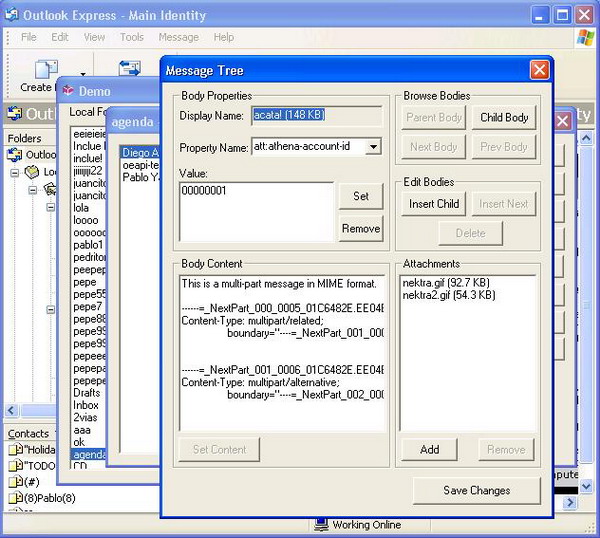
In the initial dialog, all the local folders of the main identity are listed to let the user modify them. In the message dialog, you will see all the messages of the selected folder. Identifying the message source and other operations can be done here. In the 'Bodies' dialog, you will be able to view the message structure and modify it.

Points of Interest

List local folders:

// add all the folders to the list box recursively
void CDemoDlg::AddFolders(STOREFOLDERID dwFolderId)
{
    FOLDERPROPS props;
    HENUMSTORE hEnum;
    int nIndex;

    hEnum = NULL;

    // set the size of the structure
    // or the function return error
    props.cbSize = sizeof(FOLDERPROPS);

    HRESULT hr = 
      m_pStoreNamespace->GetFirstSubFolder(dwFolderId, 
      &props, &hEnum);

    while(SUCCEEDED(hr) && hr != 
               S_FALSE && hEnum != NULL) {
        nIndex = m_listFolder.AddString(props.szName);

        if(nIndex != LB_ERR && nIndex != LB_ERRSPACE) {
            // set the folder id as the data of the item
            m_listFolder.SetItemData(nIndex, props.dwFolderId);

            // add children of this folder too
            AddFolders(props.dwFolderId);
        }

        hr = m_pStoreNamespace->GetNextSubFolder(hEnum, &props);
    }

    // close the enum
    if(hEnum) {
        m_pStoreNamespace->GetSubFolderClose(hEnum);
    }
}

List messages of a folder:

//List messages of folder and add 
//all 'Subject' and 'From' to the list box
MESSAGEPROPS msgProps;
HENUMSTORE hEnumMsg;
CString item;
int nIndex;

hEnumMsg = NULL;

// set the size of the structure
// or the function return error
msgProps.cbSize = sizeof(MESSAGEPROPS);

// as we want the subject and other
// staff we get all the properties.
// you can use MSGPROPS_FAST as first parameter
// to get only a few properties of the message.
HRESULT hr = m_pStoreFolder->GetFirstMessage(0,
                                             0,
                                             MESSAGEID_FIRST,
                                             &msgProps,
                                             &hEnumMsg);

while(SUCCEEDED(hr) && hr != S_FALSE) {
    item = msgProps.pszDisplayFrom;
    item += _T("      ");
    item += msgProps.pszNormalSubject;

    // message subject and from is displayed in the list box.
    // data of each item is the message id.
    nIndex = m_listMsg.AddString(item);

    if(nIndex != LB_ERR && nIndex != LB_ERRSPACE) {
        m_listMsg.SetItemData(nIndex, msgProps.dwMessageId);
    }

    // free the message properties
    // as they are allocated by IStoreFolder.
    m_pStoreFolder->FreeMessageProps(&msgProps);

    hr = m_pStoreFolder->GetNextMessage(hEnumMsg, 
                                   0, &msgProps);
}

// close the enum
if(hEnumMsg) {
    m_pStoreFolder->GetMessageClose(hEnumMsg);
}

Display the source of a message:

// this function displays the source
// of the selected message in the list box
void CMsgDlg::OnView()
{
    ULONG ulReaded = 0;
    int nIndex;
    STOREFOLDERID dwSelMsg;
    HRESULT hr;
    IStream *pTextStream;
    char buffer[4096];

    // Get selected folder id
    nIndex = m_listMsg.GetCurSel();
    if(nIndex == LB_ERR) {
        MessageBox(_T("Select a message first."), 
                   _T("Demo Error"));
        return;
    }

    dwSelMsg = m_listMsg.GetItemData(nIndex);

    // create a IStream from the message
    hr = m_pStoreFolder->OpenMessage(dwSelMsg, 
         IID_IStream, (VOID **) &pTextStream);
    if(FAILED(hr)) {
        MessageBox(_T("Error opening message."), 
                   _T("Demo Error"));
        return;
    }

    CMsgSrcDlg msgSrcDlg;

    // read all the message
    do {
        hr = pTextStream->Read(buffer, 
             sizeof(buffer)-1, &ulReaded);

        if(FAILED(hr)) {
            MessageBox(_T("Error reading message."), 
                       _T("Demo Error"));
        }
        else {
            buffer[ulReaded] = 0;

            msgSrcDlg.AddMessageSource(buffer);
        }
    } while(SUCCEEDED(hr) && ulReaded != 0);

    if(SUCCEEDED(hr)) {
        // display message
        msgSrcDlg.DoModal();
    }

    pTextStream->Release();
}

Create a message in a folder:

IStream *newMail = NULL;
MESSAGEID msgId;
HRESULT hr;
ULONG len;
CString msgSource;

// Set msgSource to contain
// the source of the new message
...

// Create the IStream to write the new message
// this function returns the id of the new message
hr = m_pFolder->CreateStream(0, 0, &newMail, &msgId);
if(FAILED(hr)) {
    MessageBox(_T("Cannot Create Stream."), 
               _T("Demo Error"));
    return;
}

// write message source in the IStream
hr = newMail->Write((const char *) msgSource, 
     msgSource.GetLength(), &len);
if(FAILED(hr)) {
    MessageBox(_T("Cannot Write message."), 
               _T("Demo Error"));
    newMail->Release();
    return;
}

// Commit the IStream in the folder
// and use the returned msgId
hr = m_pFolder->CommitStream(0, 0, 0, 
                  newMail, msgId, NULL);
if(FAILED(hr)) {
    MessageBox(_T("Cannot Commit Stream."), 
               _T("Demo Error"));
    newMail->Release();
    return;
}

// release the IStream
newMail->Release();

List body properties:

// add property names to the combo box
// first get IMimeMessage interface
// using IStoreFolder and the message id.
hr = pFolder->OpenMessage(msgId,
                          IID_IMimeMessage,
                          (LPVOID*) &m_pMimeMsg);
if(FAILED(hr)) {
    OutputDebugString("CMessageTreeDlg::"
             "SetMessage: OpenMessage.\n");
    return;
}

// get root body of the message.
hr = m_pMimeMsg->GetBody(IBL_ROOT, 0, &m_hCurBody);
if(FAILED(hr)) {
    OutputDebugString("OEMessage::SetMessage:"
                      " Cannot get root body.\n");
    return;
}

...

// bind the body to the IMimePropertySet interface.
hr = m_pMimeMsg->BindToObject(m_hCurBody,
     IID_IMimePropertySet, (LPVOID *) &m_pPropertySet);
if(FAILED(hr)) {
    OutputDebugString("OEMessage::UpdateBodyInfo:"
           " BindToObject IID_IMimePropertySet.\n");
    return;
}

...

IMimeEnumProperties *pEnum = NULL;
ENUMPROPERTY eProp = {0};
ULONG cFetched;
HRESULT hr;

m_propNames.ResetContent();

// enum properties of the body.
hr = m_pPropertySet->EnumProps(0, &pEnum);
if(FAILED(hr)) {
    OutputDebugString("OEMessage::"
          "FillCombo: EnumProps.\n");
    return;
}

hr = pEnum->Next(1, &eProp, &cFetched);

while(SUCCEEDED(hr) && hr != S_FALSE) {
    m_propNames.AddString(eProp.pszName);

    hr = m_pAllocator->FreeEnumPropertyArray(1,
                                    &eProp, FALSE);
    if(FAILED(hr)) {
        OutputDebugString("OEMessage::FillCombo:"
                          " FreeEnumPropertyArray.\n");
    }

    hr = pEnum->Next(1, &eProp, &cFetched);
}

if(pEnum) {
    pEnum->Release();
}

List attachments:

ULONG attachCount, i, j;
HBODY *bodyAttachs = NULL;
HRESULT hr;
IMimeBody *pMimeBody;
LPSTR display;
int nItem;

m_attachs.ResetContent();

hr = m_pMimeMsg->GetAttachments(&attachCount,
                                   &bodyAttachs);
if(FAILED(hr)) {
    MessageBox(_T("Cannot get attachments:")
       _T(" GetAttachments."), _T("Demo Error"), MB_OK);
    return;
}

// keep only bodies of type IBT_ATTACHMENT.
for(i=0; i<attachCount;) {
    hr = m_pMimeMsg->IsBodyType(bodyAttachs[i],
                                  IBT_ATTACHMENT);
    if(hr != S_OK) {
        for(j=i+1; j<attachCount; j++) {
            bodyAttachs[j-1] = bodyAttachs[j];
        }

        attachCount--;
    }
    else {
        // for the attachments, get display
        // name of the body to add to the listbox.
        hr = m_pMimeMsg->BindToObject(bodyAttachs[i],
                                      IID_IMimeBody,
                                      (LPVOID *) &pMimeBody);
        if(SUCCEEDED(hr)) {
            hr = pMimeBody->GetDisplayName(&display);
            if(SUCCEEDED(hr)) {
                nItem = m_attachs.AddString(display);
                m_attachs.SetItemData(nItem,
                          (DWORD) bodyAttachs[i]);

                CoTaskMemFree(display);
            }
        }

        i++;
    }
}

if(bodyAttachs) {
    CoTaskMemFree(bodyAttachs);
}

Get body content:

while(1) { // just to save code!
    // bind body handle to a IMimeBody interface.
    hr = m_pMimeMsg->BindToObject(m_hCurBody,
                                  IID_IMimeBody,
                                  (LPVOID *) &pMimeBody);
    if(FAILED(hr)) {
        OutputDebugString("CMessageTreeDlg::"
             "UpdateBodyInfo: BindToObject\n");
        break;
    }

    ...

    encType = IET_BINARY;
    m_isTextBody = FALSE;

    m_cntType = GetContentType(m_hCurBody);

    // if the body is a 'text' treat as a text.
    // Otherwise, read it as a buffer char
    // by char.
    if(m_cntType.Find(_T("text")) == 0) {
        encType = IET_UNICODE;
        m_isTextBody = TRUE;
    }

    ...

    m_bodyContent = _T("");

    // Get body as a stream
    hr = pMimeBody->GetData(IET_UNICODE,
                            &pBodyStream);
    if(FAILED(hr)) {
        OutputDebugString("OEMessage::GetBodyText: GetData\n");
        break;
    }

    // if it is a text when we read it it comes unicode.
    if(encType == IET_UNICODE) {
        // for text bodies
        do {
            // Read the IStream into our buffer
            hr = pBodyStream->Read(lpszwBody,
                                   sizeof(lpszwBody)-sizeof(WCHAR),
                                   &ulRead);
            if(FAILED(hr)) {
                OutputDebugString("OEMessage::GetBodyText: Read\n");
            }
            else if(ulRead != 0) {
                // Null terminate it
                lpszwBody[ulRead/2] = '\0';
                m_bodyContent += (WCHAR *) lpszwBody;
            }
        } while(ulRead != 0);
    }
    else {
        do {
            // Read the IStream into our buffer.
            // It can be binary so it could
            // be displayed truncated.
            hr = pBodyStream->Read(lpszBody,
                                   sizeof(lpszBody)-sizeof(char),
                                   &ulRead);
            if(FAILED(hr)) {
                OutputDebugString("OEMessage::GetBodyText: Read\n");
            }
            else if(ulRead != 0) {
                // Null terminate it
                lpszBody[ulRead] = '\0';
                m_bodyContent += lpszBody;
            }
        } while(ulRead != 0);
    }

    pBodyStream->Release();

    break;
}

if(pMimeBody) {
    pMimeBody->Release();
}

Set body content:

HRESULT hr;
ULONG ulLength, ulWritten;
BSTR bstr = NULL;
IStream *pStream = NULL;
IMimeBody *pMimeBody = NULL;
PROPVARIANT propValue;

UpdateData(TRUE);

while(1) {
    // Create a new stream to write in the new body
    hr = CreateStreamOnHGlobal(NULL,
                               TRUE,
                               &pStream);
    if(FAILED(hr)) {
        MessageBox(_T("Cannot set content:" )
            _T(" CreateStreamOnHGlobal."),
            _T("Demo Error"), MB_OK);
        break;
    }

    // compute the new body length + the
    // zero that terminates the string
    ulLength = m_bodyContent.GetLength() + 1;

    // there are better ways
    // to do it but this is the easiest
    bstr = m_bodyContent.AllocSysString();

    // write in the new body
    hr = pStream->Write((LPWSTR) bstr,
                        ulLength * sizeof(WCHAR),
                        &ulWritten);
    if(FAILED(hr)) {
        MessageBox(_T("Cannot set content: Write."),
                   _T("Demo Error"), MB_OK);
        break;
    }

    // Commit the stream
    hr = pStream->Commit(STGC_DEFAULT);
    if(FAILED(hr)) {
        MessageBox(_T("Cannot set content: Commit."),
                   _T("Demo Error"), MB_OK);
        break;
    }

    // bind body handle to IMimeBody interface
    hr = m_pMimeMsg->BindToObject(m_hCurBody,
                                  IID_IMimeBody,
                                  (LPVOID *) &pMimeBody);
    if(FAILED(hr)) {
        MessageBox(_T("Cannot set content:")
                _T(" Commit."), _T("Demo Error"), MB_OK);
        break;
    }

    CString priCon, secCon;

    propValue.vt = VT_LPSTR;

    // get content-type property to save the body
    hr = m_pMimeMsg->GetBodyProp(m_hCurBody,
         PIDTOSTR(PID_HDR_CNTTYPE), 0, &propValue);
    if(FAILED(hr) || hr == S_FALSE) {
        MessageBox(_T("Cannot set content:")
             _T(" GetBodyProp."), _T("Demo Error"), MB_OK);
        break;
    }

    // this property has the format
    // of 'primaryType/secondaryType'
    char *sep = strchr(propValue.pszVal, '/');

    if(sep == NULL) {
        MessageBox(_T("Cannot set content:")
             _T("Content Type error."),
             _T("Demo Error"), MB_OK);
        PropVariantClear(&propValue);
        break;
    }

    secCon = sep+1;
    *sep = 0;
    priCon = propValue.pszVal;

    PropVariantClear(&propValue);

    // save the data in this new stream
    // into the body using
    // the save conent-type it had before
    hr = pMimeBody->SetData(IET_UNICODE,
                            priCon,
                            secCon,
                            IID_IStream,
                            pStream);
    if(FAILED(hr)) {
        MessageBox(_T("Cannot set content: SetData."),
                   _T("Demo Error"), MB_OK);
        break;
    }

    break;
}

if(bstr) {
    ::SysFreeString(bstr);
}
if(pMimeBody) {
    pMimeBody->Release();
}
if(pStream) {
    pStream->Release();
}

License

You can use this freely, leaving the copyright notice at the top of the files.

History

  • 28-Dec-2004 - First released: IStoreFolder / IStoreNamespace.
  • 25-Mar-2006 - Update: IMimeMessage / IMimeMessageTree / IMimePropertySet / IMimeBody.

License

This article has no explicit license attached to it but may contain usage terms in the article text or the download files themselves. If in doubt please contact the author via the discussion board below.

A list of licenses authors might use can be found here

About the Author

Pablo Yabo
Technical Lead http://www.nektra.com
Argentina Argentina
Member
Pablo Yabo is a Software Developer since he was young, specialized in system internals.
In 2003 years ago founded with Sebastian Wain a Company named Nektra specialized in Outlook Express and Outlook Plugin Development.
Now there is a new Windows Live Mail API 2011 / 2009 that works on all the platforms Windows 7, Vista and XP

Sign Up to vote   Poor Excellent
Add a reason or comment to your vote: x
Votes of 3 or less require a comment

Comments and Discussions

 
You must Sign In to use this message board.
Search this forum  
    Spacing  Noise  Layout  Per page   
Questionhow to set rtf data to a mime messagememberravi malik11 May '10 - 0:12 
hi,
 
this article is very helpful.
 
i want to set rtf data to a mime message
how can i do that?
 
for setting html data to a mime message my code snippet is like this:
 
what change i need to do to set rtf data to the mime message body?
or
first i need to convert rtf data to html data?
 
code snippet:
*********************************************************************
// set html data to a mime message
CoInitialize(NULL);
IMessage* pMsg = NULL;
IBodyPart* pBp = NULL;
IConfiguration* pConfig = NULL;
Fields* pFlds = NULL;
Field* pFld = NULL;
_Stream* pStm = NULL;
 
HRESULT hr = S_OK;
 
hr=CoCreateInstance(
__uuidof(Message),
NULL,
CLSCTX_INPROC_SERVER,
__uuidof(IMessage),
(void**)&pMsg);
 
pMsg->put_To(_bstr_t("\"Some One\" <example@example.com>, \"Another\" <another@example.com>"));
pMsg->put_From(_bstr_t("\"ThirdPerson\" <exampleuser3@example.com>, \"Fourth\" <exampleuser4@example.com>"));
pMsg->put_Sender(_bstr_t("\Finally\" <example@example.com>"));
pMsg->put_Subject(_bstr_t("Files for Monday's meeting."));
 
pMsg->put_MimeFormatted(VARIANT_FALSE);
 
char*pch=NULL;
CFile file;
file.Open("c:\\me.html",CFile::modeRead);
int xx = file.GetLength();
pch = (char*)calloc(1,xx+1);
file.Read(pch,xx);
file.Close();
 
IBodyPart *bodyPart;
pMsg->get_BodyPart(&bodyPart);
bodyPart->put_ContentTransferEncoding(_bstr_t("quoted-printable"));
 
pMsg->put_HTMLBody((unsigned short*)pch);
free(pch);
pch=NULL;
 
pMsg->GetStream(&pStm);
pStm->SaveToFile(L"c:\\me.eml",adSaveCreateOverWrite);
 
pStm->Release();
pMsg->Release();
 
CoUninitialize();
 
*********************************************************************
Questionhow can i find contactsmemberwolf111118 Mar '10 - 4:11 
I want to know how I can find a list of my contacts in Outlook?
it looks a bit like what you did to access local files but how do I find my contacts in Outlook?
thank you Smile | :)
Questionhow to add contact into outlook express group, thanks...memberhsq62813 Sep '09 - 20:20 
Hi, sorry to interrupt you. I am really feazed by the coding on the outlook express.
I am developing my application using C++ with the help of NKT WAB .And i've downloaded the NKT WAB V2.1.0 Source Code.
I appreciated you so much for your great work!!
 
The problem is that i don't know how to add contacts into my OE group in my application,
although i see in the source code that it is appending the EntryId of the existing contact to the DistList.
Now i can get the DistributionListArray by the property of PR_DISTLIST_ENTYRIDS and then create the new "lpProp" of LPSPropValue type.
So how can i set the new "lpProp" as the value of the tag "PR_DISTLIST_ENTRYIDS" of my OE group?
 
In the source code, it is done by "SetField(lpProp)" and i am puzzled by the global varialbe "_changeProps" of "PropMap" type in the function of SetField();
because i can't find any initalization of the varialbe "_changeProps" in the context. Is it releate to COM? but i know little about it....
So the key is that how can i retrieve "_changeProps" ?
if i get it, maybe i can i set the new "lpProp" as the value of the tag "PR_DISTLIST_ENTRYIDS" of my OE group.
Addtional, it failed when i use "lpDistList->SetProps(1, lpProp, NULL)" ;
 
So could you please give me anytips or methods about that?
I’m hopeful you can help my out, and any support is appreciated.
Thanks again and best wishes to you. ^_^
 
The below is my C++ source code of this part:
 
if(lpContactEntryID)
 
{
 
HRESULT hr = E_FAIL;
LPSPropValue lpOldProp;
 
LPSPropValue lpProp;
 
SBinary *lpBin, *lpOldBin;
 
SBinaryArray *lpOldValue;
 
int cValues = 1;
 
ULONG arraySize = 0;


lpOldProp = GetDistributionListArray(lpDistList);
 
lpOldValue = &lpOldProp->Value.MVbin;
 
if(lpOldValue)
 
{
 
cValues = lpOldValue->cValues + 1;
 
lpOldBin = lpOldValue->lpbin;
 
}


hr = m_lpWABObject->AllocateBuffer(sizeof(SPropValue), (LPVOID *) &lpProp);
 
hr = m_lpWABObject->AllocateMore(sizeof(SBinary)*cValues, lpProp, (LPVOID *) &lpBin);


lpProp->dwAlignPad = 0;
 
lpProp->ulPropTag = PR_DISTLIST_ENTRYIDS;


lpProp->Value.MVbin.cValues = cValues;
 
lpProp->Value.MVbin.lpbin = lpBin;


for(int i=0; i<(int)cValues; i++)
 
{
 
if(lpOldValue && i < (int)lpOldValue->cValues)
 
{
 
m_lpWABObject->AllocateMore(lpOldValue->lpbin[i].cb, lpProp, (LPVOID *) &lpBin[i].lpb);
 
lpBin[i].cb = lpOldValue->lpbin[i].cb;
 
memcpy(lpBin[i].lpb, lpOldValue->lpbin[i].lpb, lpOldValue->lpbin[i].cb);
 
}
 
else
 
{
 
m_lpWABObject->AllocateMore(cbContactEntryID, lpProp, (LPVOID *) &lpBin[i].lpb);
 
lpBin[i].cb = cbContactEntryID;
 
memcpy(lpBin[i].lpb, lpContactEntryID, cbContactEntryID);
 
}
 
}
 
if(lpOldProp)
 
{
 
m_lpWABObject->FreeBuffer(lpOldProp);
 
}


hr = lpDistList->SetProps(1, lpProp, NULL);
 

QuestionHow can I manipulate contacts in outlook express 6memberVishalIndia3 Sep '09 - 20:41 
How can I manipulate contacts in outlook express 6
 
If it is out of scope of this article then please give some hint so I can find the way.
AnswerRe: How can I manipulate contacts in outlook express 6memberVishalIndia4 Sep '09 - 1:48 
Well,
 
I got something useful here
http://msdn.microsoft.com/en-us/library/ms629361%28VS.85%29.aspx[^]
 
Now I know outlook express uses "windows Address book". Now can anyone tell me, is there any wrapper/extension through which I can access both mapi clients(Outllok 2007 and later versions) and outlook express (windows address book client)
AnswerRe: How can I manipulate contacts in outlook express 6memberPablo Yabo4 Sep '09 - 3:27 
Hello,
You can use NKT WAB. It is a free open source (LGPL license) library to manipulate contacts in Outlook Express.
 
Hope it helps!
Pablo
QuestionHow to detect Switch Identity Programatically?memberJitendra Shirolkar31 Aug '09 - 22:25 
Hello,
 
I want to detect switch identity event of Outlook express.
whenever any user do switch identity is there is any special message or any other way to trap event.
 
Thanks,
Jitendra
Questiondeleting msg from windows mailmemberMember 31829027 Jul '09 - 21:58 
i was using this code to delete message from outlook express , in windows mail upto finding duplictae (scnning msg from selected folder and deleting =code added by me) was working fine but when it come to delete it gives error ,E_INVALIDARG is return value of deletemessge function.
 
this is realy important to me
 
Please advise .
note: in same type of question it is advise to change flag of message but setflag function do not have value specified in solution
 
Regards
Rupal
AnswerRe: deleting msg from windows mailmemberPablo Yabo8 Jul '09 - 2:37 
Hi,
If you call DeleteMessages with the first parameter 1 (to delete permanent) that doesn't work in Windows Mail. Using 0 in the first parameter works but to use 1 you need an additional interface to pass in the third parameter.
 
Regards,
Pablo
QuestionRe: deleting msg from windows mail [modified]memberMember 31829028 Jul '09 - 20:36 
Thanks
 
here is my code snippet
dwSelMsg = m_listMsg.GetItemData(nIndex);
 
DWORD msgIds[] = {dwSelMsg};
 
msgIdList.cbSize = sizeof(MESSAGEIDLIST);
msgIdList.cMsgs = 1;
msgIdList.prgdwMsgId = msgIds;

hr = m_pStoreFolder->DeleteMessages(&msgIdList, 0, 0);
CString ss;
ss.Format("Return value is %d",hr);
MessageBox(ss);
 
Now as per your solution first parameter value should be 1 ,and i need to use another inter face
will you please assist me with interface name ,function and how to use it
 
Thanks In Advance
Rupal
 
modified on Thursday, July 9, 2009 3:13 AM

General General    News News    Suggestion Suggestion    Question Question    Bug Bug    Answer Answer    Joke Joke    Rant Rant    Admin Admin   

Permalink | Advertise | Privacy | Mobile
Web01 | 2.6.130523.1 | Last Updated 27 Mar 2006
Article Copyright 2004 by Pablo Yabo
Everything else Copyright © CodeProject, 1999-2013
Terms of Use
Layout: fixed | fluid
