You can find the latest version and some other code on my Home Page.
Introduction
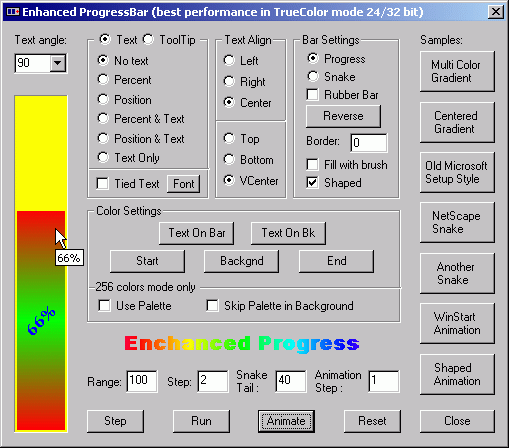
In this article I want to introduce an enhanced ProgressBar control.
I collected some ideas from articles
on CodeGuru
and CodeProject, added some ideas of my
own and developed this
control. I tried to develop it in the most common, flexible and extensible
way. From version 1.3 the control is separated into 3 different classes: CGradient
-> CProgress -> CProgressCtrlX. Class CGradient encapsulates gradient
drawing functionality. CProgress
is a non-window version of the progress control.
It supports nearly all the functionality of the progress bar and can be used
separately. CProgressCtrlX is a MFC progress bar based control that
is also derived from CProgress.
Features:
- Filling with gradient colors
- Multi-color gradient (unlimited number of colors)
- Rubber gradient
- Filling with brush for background and progress indicator (overrides color settings)
- Text on bar
- Dual color for text
- Any angle text rotation (
PBT_ANY_ANGLE) or
0-90-180-270 degree text rotation (w/o PBT_ANY_ANGLE) - Text alignment (right, left, top, bottom, centered, vertical centered)
- Font settings support
- Formatted text (can show percent, position or plain text)
- Text tied to progress indicator
- Support for vertical oriented control
- Reverse mode
- Snake mode
- Borders
- Shaped mode (Use
CRgnX from sample to create rgn from bitmap and text) - ToolTip with text formatting
- Palette support for 256 colors mode (optional)
- Gradient Animation and Stretching
- ...........
Advanced Interface:
Text Alignment (to set text alignment styles use SetTextAlign)
#define PBS_LEFT                 0x0010L
#define PBS_RIGHT                0x0020L
#define PBS_CENTER               0x0030L
#define PBS_TOP                  0x0040L
#define PBS_BOTTOM               0x0080L
#define PBS_VCENTER              0x00C0L
Text Format (to set text format use SetTextFormat and HideText):
#define PBS_SHOW_PERCENT         0x0100
#define PBS_SHOW_POSITION        0x0200
#define PBS_SHOW_TEXTONLY        0x0300
Control Styles (use ModifyBarStyle or appropriated functions):
#define PBS_TIED_TEXT        0x1000
#define PBS_RUBBER_BAR       0x2000
#define PBS_REVERSE          0x4000
#define PBS_SNAKE            0x8000
Advanced functionality:
CGradient:
void SetStretchGradient(float flStretchFactor = 1);
float GetStretchGradient();
void SetGradientColors(COLORREF clrStart, COLORREF clrEnd); void
GetGradientColors(COLORREF& clrStart, COLORREF& clrEnd);
void SetGradientColorsX(int nCount, COLORREF clrFirst, COLORREF clrNext, ...);
const CDWordArray& GetGradientColorsX();
void AddColor(COLORREF clr);
void SetCreatePalette(BOOL fCreate =TRUE);
BOOL GetCreatePalette();
CPalette& GetPalette();
CProgress:

	void SetBarBrush(CBrush* pbrBar);
	CBrush* GetBarBrush();

	void SetBkColor(COLORREF clrBk);
	COLORREF GetBkColor();

	void SetBkBrush(CBrush* pbrBk);
	CBrush* GetBkBrush();

	void SetTextColor(COLORREF clrTextOnBar, COLORREF clrTextOnBk = -1);
	COLORREF GetTextColor();
	COLORREF GetTextColorOnBk();

	void SetShowPercent(BOOL fShowPercent = TRUE);
	BOOL GetShowPercent();

	void SetTextAlign(DWORD dwStyle);
	DWORD GetTextAlign();

	void SetTextFormat(LPCTSTR szFormat, DWORD ffFormat = PBS_SHOW_TEXTONLY);
	void HideText();

	void SetTiedText(BOOL fTiedText = TRUE);
	BOOL GetTiedText();

	void SetRubberBar(BOOL fRubberBar = TRUE);
	BOOL GetRubberBar();

	void SetReverse(BOOL fReverse = TRUE);
	BOOL GetReverse();

	void SetSnake(BOOL fSnake = TRUE);
	BOOL GetSnake();

	void SetSnakeTail(int nTailSize);
	int  GetSnakeTail();

	void SetBorders(const CRect& rcBorders);
	const CRect& GetBorders();

	void SetShape(HBITMAP hBmp, COLORREF clrTransparent = 0);

	void SetRange(int nLower, int nUpper);
	void GetRange(int& nLower, int& nUpper);

	int GetPos() {return m_nPos;}
	int SetPos(int nPos);

	int OffsetPos(int nIncrement);

	int SetStep(int nStep);

	int StepIt();

	void SetFont(CFont* pFont);
	CFont* GetFont();

	void Draw(CDC* pDC, CRect rcDraw, BOOL fSkipDCCache = FALSE);

	virtual DWORD GetBarStyle();
	virtual void ModifyBarStyle(DWORD dwRemove, DWORD dwAdd);

	void Animate(int nStep);
	void ResetAnimation();
CProgressCtrlX:

	void SetTooltipFormat (LPCTSTR lpszToolTipText, DWORD fFormat = PBS_SHOW_TEXTONLY);
	LPCTSTR GetTooltipText();
	void HideTooltip();

	void RunSnake(int nMsPerStep);
	void StopSnake();

	void RunAnimation(int nMsPerStep, int nStep);
	void StopAnimation();
You can use:
SetFont() - to set font and rotation(Escapement) of the textSetStyle(), ModifyStyle(), SetBarStyle(), ModifyBarStyle() - to change styles of control- Any functionality of base class
CProgressCtrl
See Test Project for additional information on usage.
Notes
The best views and performance is got on HighColor(15/16 bit) and
TrueColor(24/32 bit) resolutions.
Control also supports 256 and 16 color modes. However, in 16 colors mode you cannot use gradient,
and in 256 colors mode the control works slower because of
usage of CreateSolidBrush/FillRect
instead of FillSolidRect.
If you want rotate text to any angle - define
PBT_ANY_ANGLE and recompile control.
Control is part of UIBits.dll and independent usage requires additional files:
DrawGdiX.h, MemDC.h
History
January 21, 2001 - version 1.4
- Gradient Animation and stretching added
- Fixed some bugs from previous version
January 10, 2001 - version 1.3
- Code separated to three classes
CGradient, CProgress and CProgressCtrlX - Added tooltips with text formatting
- Added self running snake
- Added palette support for 256 colors mode
- Added shaped style drawing
September 20, 2000 - version 1.2
- Added support for "Any angle text rotation"
(define PBT_ANY_ANGLE and set font with appropriated angle) - Added text alignment
- Added possibility to format text (via virtual function
FormatText())
e.g. you can show percent as
decimal fraction instead of integer - Some code improvements
August 2, 2000 - version 1.1
- Added multi-color gradient
- Added filling with brush for background and bar (overrides color settings)
- Added borders attribute
- Added vertical text support
- Added snake mode
- Added reverse mode
- Added dual color for text
- Added text formatting
- Added tied mode for text and rubber bar mode
- Added support for vertical oriented control
(
PBS_VERTICAL)
June 5, 2000 - version 1.0
You can find the latest version and some other code on my Home Page.
Yury is Software Engineer since 1988.
His programming experience includes C#/VB.NET, WPF, C/C++(MFC/STL), Borland Delphi & C++ (VCL), JavaScript, HTML, CSS, XML, SQL, VB6, DirectX, Flash.
He has worked on PCs (DOS/Win3.1-Vista) and PocketPCs (WinCE).
Yury was born in Ukraine, but currently based in Jerusalem.



 General
  News
News  Suggestion
  Question
  Bug
Bug  Answer
  Joke
Joke  Praise
  Rant
Rant  Admin
Admin 


 Submit an article or tip


