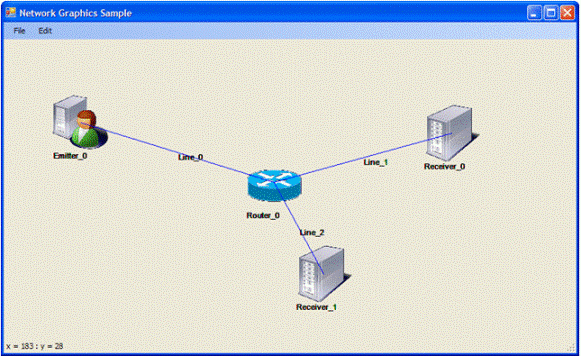
Introduction
A graphic front end to manage network diagrams can be very useful for a lot of purposes like writing simulation software or simply to organize collected data (for example, by a network scanner). In this simple program, we will see a simple way to implement a graphic front end with these basic functions:
- Shape drag and drop
- Mobile connectors (somewhere also defined is a glue link)
- Load and write configuration from/to text file
…without requiring any Office library, so you can use this even if you haven’t installed Visio or PowerPoint.
General Implementation
This software has a main library, i.e., GScenario.cs, that implements the memory representation of all the drawn objects. Formally, this is a class with a pointer to the current object (CurrObjIndx) and an array of objects like this:
public class GObject
public string Name;
public string Type;
public int x1;
public int y1;
public string Lnk1;
public int x2;
public int y2;
public string Lnk2;
The properties are: the (supposedly unique) name of the object (i.e., “Router_0”), its type (for each type, there is a different icon), the limits of the containing window, and the links. These parameters are only significant for a line object, and are useful to implement glue links, and tells what object is connected to each terminal point of the line. The icons of the object types are stored in an ImageList object. The following function of the main form gets the correct image for each type:
private Image FindGObjectTypeImage(string ObjType)
All the GDI functions are managed in the main form class while the corresponding information is assigned, modified, and so on by the GScenario class, or better by its instance Gnetwork. An important fact to note is that after an object modifies the aspect of the form (i.e. Paint event), the diagram must be redrawn using the information in the memory array (GNetwork).
Drag & Drop Function
It is easy to illustrate the drag and drop situation for the two different cases of a shape (rectangular object) and of a line. The first is simple because the second must implement even the “glue link” effect. To manage a drag and drop situation of a shape, we use these event of the main form object:
The MouseDown event can indicate the start of an object dragging if the clicked point is contained in the rectangle related with the object. When entering in drag mode, the cursor gets the shape of a little hand. The MouseUp indicates the release of the mouse button, and we suppose that corresponds to the end of the dragging only if a significant (in this case, we choose 300 milliseconds) time interval has elapsed: this is to avoid mistaking a double click with a drag and drop. When a mouse up occurs, we simply move the center of the previous found object in the mouse up event co-ordinates (i.e., e.X and e.Y, where e is the corresponding MouseEventArgs variable). If the dragged object is a line, the main difference is that, if the mouse up point falls into a rectangular object, the line must be linked to its center. In particular, the terminal point of the line nearest to the mouse down point must be linked to the center of the container object, like shown in the figure below:

Load & Save
There’s not much to explain about this: simply use these methods of GScenario:
public bool LoadFile(string FileFullPath, ref string sErrFileMsg)
public bool SaveFile(string FileFullPath, ref string sErrFileMsg)
The GNetwork object is loaded/translated in a text file like this:
object=Emitter_0;
type=Emitter;
x1=116;
y1=119;
lnk1=;
x2=196;
y2=199;
lnk2=;
end object.
object=Receiver_0;
type=Receiver;
x1=674;
y1=145;
lnk1=;
x2=754;
y2=225;
lnk2=;
end object.
…
We use the basic function of the System.IO namespace, and each line has the form:
[variable_name]=[variable_value];
Further Considerations
An apposite simple function extracts from each “line string”, the (variable, value) couple (for example: x1=116; -> variable=x1; value=116) and saves it to memory or to disk. This example has been developed referring to a TCP network: so the managed objects are clients (TCP flow emitters), servers (receiver), and so on. However, it’s obvious that its validity is general, and can be used for all kinds of hierarchical dependence networks, for example, in logistics, production planning etc… (in this case, the nodes are warehouses). This program doesn’t do anything in terms of calculation on the objects; those contain only the graphics elements, and to be used in a specific contest must be contextualized, for example, adding in the GObject class the information on who is doing the calculations (i.e., bandwidths, capacity, and so on). This program is very simple, so the glue link management is basic: for example, it could be interesting to make the connecting mode more similar to the Visio/PowerPoint one, i.e., implementing the connection to a terminal point of the shape (and not only to the center) or the connections only by perpendicular lines. To conclude, it’s important to say that the program works (calculate center, evaluate if a click is contained or not …) not with the real image object, but with the container rectangle. So, if you choose images like this:
If all goes (almost) good, and if the image area is much smaller than the rectangle area, and not centered … you have to implement a more efficient way to manage the objects, or you have to choose different images.
History
- First release - 1.0 [28/01/2008]



 General
  News
News  Suggestion
  Question
  Bug
Bug  Answer
  Joke
Joke  Praise
  Rant
Rant  Admin
Admin 


 Submit an article or tip


