
Introduction
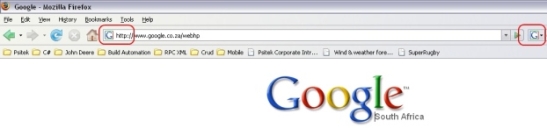
Ever wondered how Internet Explorer and Firefox get those little webpage icons in their address bar or tabs? Well, so did I.
I found a couple of ways to retrieve the icon from a webpage.
But, I am the first to say this surely can't be the best or easiest way of doing this. But hey, it works. Will appreciate if the gurus out there can post some alternative (by alternative, I mean better) methods of extracting the webpage SHORTCUT ICON.
The Code
This code is triggered on the webbrowser's Navigating event.
In this method, there is a double check for the webpage icon. Usually a webpage icon is called favicon.ico. So you can get the icon from a host URL (like www.google.com) by adding /favicon.ico to it. Eg. http://www.codeproject.com/favicon.ico. This should display the icon in a webbrowser.
BUT, sometimes webpages don't call their shortcut icon favicon.ico. So I went to the HTML document to retrieve the icon path. It should be located under the element tag link with attribute rel where rel equals SHORTCUT ICON.
Now I can extract the icon in two different ways. First I get the URL and simply display the icon in an HTML control, in this case a WebBrowser. Secondly, I stream the icon to an image and display it as such in an Image control.
Here's the code:
Firstly set your proxy – if any.
string iconPath = "";

Image img = null;
Stream myStream = null;

WebProxy proxy = new WebProxy("http://proxy:80/", true);
proxy.Credentials = new NetworkCredential("userId", "password", "Domain");
Continuing with the above method, I simply add /favicon.ico to the current URL and send a request.
WebRequest requestImg = WebRequest.Create("http://" + e.Url.Host + "/favicon.ico");

  requestImg.Proxy = proxy;
  requestImg.Timeout = 10000;
Create an instance of the WebResponse. If the response ContentLength is bigger then zero, we simply use the URL we just cooked up.
WebResponse response = requestImg.GetResponse();

if (response.ContentLength > 0)
    myStream = response.GetResponseStream();
ELSE, loop through the HTML document elements and retrieve the attribute rel that equals SHORTCUT ICON. From this, we can retrieve the icon name.
else
{
    HtmlDocument doc = webBrowser1.Document;
    HtmlElementCollection collect = doc.GetElementsByTagName("link");

  foreach (HtmlElement element in collect)
  {
       if (element.GetAttribute("rel") == "SHORTCUT ICON")
       iconPath = element.GetAttribute("href");
     }

  this.Text = doc.Title;

  requestImg = WebRequest.Create("http://" + e.Url.Host + iconPath);

  response = requestImg.GetResponse();

  myStream = response.GetResponseStream();
}
Lastly, I display the "values" in an Image and WebBrowser.
img = Image.FromStream(myStream);
this.pictureBox1.Image = img;

webBrowser2.Url = requestImg.RequestUri;
webBrowser2.Update();
Conclusion
Like I said from the start, this surely can't be the best way, can it? Please post a message if there's any other way of doing this.
This member has not yet provided a Biography. Assume it's interesting and varied, and probably something to do with programming.



 General
  News
News  Suggestion
  Question
  Bug
Bug  Answer
  Joke
Joke  Praise
  Rant
Rant  Admin
Admin 


 Submit an article or tip


 Any ideas?
 That did the trick!--thanks.
 I would like to request a copy of the image when the user launches website request from within my application, but using their default browser (System.Diagnostics.Process.Start(link)), so I could then display the icon next to the link, within my application. Any suggestions?
 trying to figure out how to do in the "standard" MS class?
  Of course, with my limited knowledge of the subject, I could just be talking out my butt.