Introduction
There are quite a number of AJAX libraries/frameworks designed to run on the .NET framework. The typical example would be Microsoft Atlas. As a beginner of AJAX, I'd like to have an in depth understanding of the technologies. Thus, I spent some time to first create something much more simplified which I could also use in my web application projects.
In many web applications, we need to place a lookup textbox or combo box (drop down) to enable users to select one of the records in a master table (product, customer, employee, bin locations, and etc.). Sometimes, the master table comprises of thousands of records, and binding all the records to a combo box is rather inefficient and potentially causes slowness in page loading.
I was inspired by Google Suggest and the Gmail email address field that heavily employ AJAX technologies. I also learned that Google offers an open source project, Google AJAXSLT, which is a set of JavaScript's that are intended for XML transformation to HTML at the client side (web browser) using XSLT and XPATH. This initiative is to promote development of more user friendly fat clients as it reduces the load on the servers substantially.
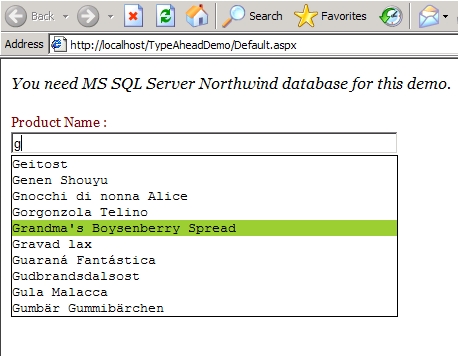
I decided to spend some time to explore the synergy of ASP.NET and AJAXSLT. Hence, I tried to create a type-ahead suggest textbox that'd make asynchronous requests to the server as the user inputs text. The result that closely matches the input string will be returned to the drop down area below the textbox asynchronously.
Background
I created a custom server control which consists of a TextBox and a div object. The "keyUp" event of the Textbox triggers a request to the server, and expects the server to fetch the first 10 records (select the top 10 fields from the table where the field like "keyword%") to the browser in XML form.
At the client-end, which is the web browser, I employ three AJAXSLT functions, "xmlParse()", "xsltProcess()" and "el". "el()" is just a shortcut to "document.getElementById()". However "xmlParse" and "xsltProcess" are designed to parse XML, XSLT, and transform it into HTML.
The HTML output will be injected into the div object which is the drop down area intended for records selection.
The downloadable demo project requires the "Northwind" database of SQL Server to work with, and it uses both the "Products" and the "Customer" tables.
Using the code
The way to use this control is extremely easy.
- Copy all the five JavaScript files from the downloadable source file (typeahead_src.zip) into your web folder. There are the "dom.js", "misc.js", "xpath.js", "xslt.js" (from Google AJAXST), and "ws.js" (with reference to this) files, and make a reference in the header of your web page as follows:
<script src="js/misc.js" type="text/javascript"></script>
<script src="js/dom.js" type="text/javascript"></script>
<script src="js/xpath.js" type="text/javascript"></script>
<script src="js/xslt.js" type="text/javascript"></script>
<script src="js/ws.js" type="text/javascript"></script>
- Add a new server control in the toolbox by selecting "aspnetcs_TypeAhead.dll" in the source file.
- Drag and drop the "
TypeAhead" control into your web page.
- Since I mostly use SQL Server in my web applications, the
TypeAhead textbox works only with SQL Server currently. Hence you need SQL Server to be the backend database. There are three essential properties that need to be set up before you can even test it. They are:
ConnectionString
TableName
DataField
private void Page_Load(object sender, System.EventArgs e)
{
  TypeAhead1.ConnectionString="server=localhost;" +
             "database=Northwind;integrated security=SSPI";
  TypeAhead1.TableName="Products";
  TypeAhead1.DataField="ProductName";
}
- That is it! You do not need to create another aspx page to respond to the request from the web browser.
Areas of Future Improvement
- Support generic data source.
- Allow user to use a keyboard (only with mouse, currently) for record selection.
- Introduce more intelligent logics to reduce frequency of server requests.
- Ability to display more informative results instead of just the selected field in the drop down area.
- Fonts of drop down area should be configurable.



 General
  News
News  Suggestion
  Question
  Bug
Bug  Answer
  Joke
Joke  Praise
  Rant
Rant  Admin
Admin 


 Submit an article or tip


 But not support .mdb, not up,down keyboard
