Background
Over the summer (summer is our low point of the year), we are migrating from SQL Server 2000 to 2005. Because we expect a large increase of traffic in the fall, we are looking to make our system more fault tolerant. This includes redundant database servers for our public web application which gets traffic in the millions of page views a day. We are using transactional replication for data which is updated regularly, and for older 'archive' data we will introduce log shipping this year.
Because log shipping requires the database to be taken offline (SQL 2005 Standard Edition) for the restore process, I needed a way to determine when the restore process was scheduled so I could direct traffic to another server. So I expanded on that and came up with the idea of writing a load balancer. Because we have a growing web farm, I didn't want the web servers to be flooding the database with status pings so I decided the load balancer would run as a service and ping the database for health statistics on a specified interval. The web servers would then ping the service for the database status. Then based on the availability and current load (CPU) of each server, the web servers could use whatever logic was necessary to determine which of the available databases to use.
The goal of this article is to describe the processes which make up the load balancer:
- Data Structure
- Serialization Method
- 'Least Privilege'
PerformanceCounter Permissions - ASP.NET integration
- Using the Results in a Web Application
This article assumes the reader is familiar with the following and as such the topics below are beyond the scope of this article:
- Creating a Windows Service
System.Net.Sockets ASP.Net HttpModulesSystem.Threading- Asynchronous Methods
I've tried to remove code from the article which is not being discussed while still giving the reader a sense of the logic. I've pulled repetitive lines and lists catch blocks which aren't important to the point being discussed. Go ahead and critique my writing as well as the content and enjoy what for me was a fun exercise.
Data Structure
To reduce the 'chattiness' of the communication between servers, I needed a custom data structure to pass between the components which I could also customize in order to add additional data if desired.
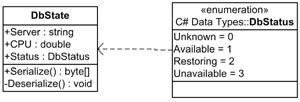
No real discussion is necessary here, other than to note that for simplicity each project has its own copy of this class. In our production application, this class will be part of a larger class library.
Serialization Method
My experience with .NET serialization methods has been that the output is bloated. They simplify the process and make the data self-descriptive and somewhat independent of the application, but I did not want to flood the network with so much data that it affected the performance of the application. So I chose to use System.IO.BinaryWriter and System.IO.BinaryReader to serialize the data across the network. This enabled me to reduce the size of the status data for an instance to less than that of a network ping.
public class DbState
{
public DbState(byte[] serializedData)
{
Deserialize(serializedData, 0);
}
public DbState(byte[] serializedData, long start, out long end)
{
end = Deserialize(serializedData, start);
}
public byte[] Serialize()
{
byte[] data = new byte[256];
MemoryStream stream = new MemoryStream(data);
BinaryWriter writer = new BinaryWriter(stream);
long pos = 0;
try
{
writer.Write((byte)_status);
writer.Write(_cpu);
writer.Write(_server);
pos = writer.BaseStream.Position;
}
finally
{
writer.Close();
stream.Dispose();
}
byte[] output = new byte[pos];
for (int i = 0; i < pos; i++)
output[i] = data[i];
return output;
}
private long Deserialize(byte[] data, long offset)
{
MemoryStream stream = new MemoryStream(data);
BinaryReader reader = new BinaryReader(stream);
if (offset != 0)
reader.BaseStream.Position = offset;
try
{
_status = (DbStatus)reader.ReadByte();
_cpu = reader.ReadDouble();
_server = reader.ReadString();
offset = reader.BaseStream.Position;
}
finally
{
reader.Close();
stream.Dispose();
}
return offset;
}
}
There are two overloaded constructors which allow two methods of deserialization. The first is for simple deserialization of a single object from a stream. The second allows for multiple objects to be serialized into a single stream. The beginning of the stream contains a single byte which indicates the number of objects serialized to the stream (I chose byte since the service is not likely to be monitoring more than 255 database servers).
'Least Privilege' PerformanceCounter Permissions
The most common indicator of server performance is processor time. So I needed to be able to remotely query the Processor - % Processor Time performance counter on each of the database servers. But when I looked around to determine the required permissions, I had difficulty finding any methods other than:
- using a privileged account, or
- using impersonation
Using a privileged account is simply a bad idea and using impersonation wasn't practical from a Windows service. After some digging, I found a blog which pointed to a Microsoft article on performance counter permissions.
In short, I created a domain group which could be added to the local 'Performance Counter Users' group on each database server and added the following permissions to the local group:
- HKLM\System\CurrentControlSet\Services\ControlSecurePipeServers\WinReg
- %SYSTEMROOT%\System32\Perfh.dat
- %SYSTEMROOT%\System32\Perfc.dat
Communication
Because the load balancer is running as a service outside the application boundaries of the web application, it is important to determine how the application will communicate with the service. The choice of serialization was based on my plan to communicate via sockets. The web application initiates the connection and makes a specific request to the service for data. The service then returns the appropriate response to the web server via the open socket.
public enum LBRequestCmd : byte
{
InvalidCommand = 0,
Ping = 1,
DBStatus = 2
}
public void ReadRequest(IAsyncResult result)
{
try
{
AsyncState data = (AsyncState)result.AsyncState;
int len = data.socket.EndReceive(result);
try
{
switch (cmd)
{
case LBRequestCmd.DBStatus:
byte[] status = new byte[(_dbServers.Length * 256)];
MemoryStream dataStream = new MemoryStream(status);
BinaryWriter dataWriter = new BinaryWriter(dataStream);
try
{
byte count = Convert.ToByte(_dbServers.Length);
dataWriter.Write(count);
for (int i = 0; i < _dbServers.Length; i++)
{
byte[] temp = _dbServers[i].Serialize();
if ((temp.Length + dataWriter.BaseStream.Position) >
status.Length)
{
long p = dataWriter.BaseStream.Position;
byte[] temp2 = new byte[status.Length * 2];
status.CopyTo(temp2, 0);
status = temp2;
dataWriter.Close();
dataStream.Dispose();
dataStream = new MemoryStream(status);
dataStream.Position = p;
dataWriter = new BinaryWriter(dataStream);
}
dataWriter.Write(temp);
}
}
finally
{
dataWriter.Close();
dataStream.Dispose();
}
data.socket.Send(status, SocketFlags.None);
break;
}
}
catch
{
}
finally
{
if (_blocking)
{
_blocking = _resumeListening.Set();
}
}
}
catch (ObjectDisposedException)
{
return;
}
}
The LBRequestCmd enum allows the service to respond to different types of requests. For example, if you want to be able to 'ping' the service, or ask the service to refresh the status out of turn, or if you have a specific piece of data you want. It gives you limitless possibilities to expand the scope of the load balancer and customize its output. Albeit, the service as it stands has only been written to respond to a ping request or a request for full status of all monitored databases.
To reduce the impact on resources and the need to manage threads, the asynchronous socket methods are used (BeginAccept, EndAccept, BeginReceive, EndReceive, BeginSend, EndSend) to allow the service to handle as many threads as possible. A good addition to this would be to manage the number sockets available so we don't create too many connections.
ASP.NET Integration
The goal of the load balancer was to have an ASP.NET process which would poll the status of the databases and determine the best connection for any query at a specific point in time. For this, I needed an application variable which stored the status of the servers. Additionally, I did not want to poll the status of the servers for each page so the polling process needed to run independently of the page. I created a custom HttpModule which would poll the load balancer on a specified interval and store the results in application state.
To reduce blocking of threads, the custom HttpModule also uses the asynchronous socket methods defined by System.Net.Sockets (BeginConnect, EndConnect, BeginSend, EndSend, BeginReceive, EndReceive) for the Connect, Send and Receive operations.
Once the status of the servers has been obtained and stored in application state, it is up to the web application to determine how it will use the data to determine the best connection between polling intervals. For example, by comparing the CPU % for each server marked as available, the application would most likely chose the database with the lowest percentage. If the application is unable to retrieve or read the data from the load balancer, the application variable will be destroyed. The downside is that this requires the application to find an available connection on its own. However, I thought it was important to prevent false reporting to the application. An alternative to destroying the application variable would be to change the status to unknown and the CPU to 0 %. Either way, the application should be written to recover from a connection failure with the load balancer.
protected void OnReceive(IAsyncResult result)
{
AsyncState data = (AsyncState)result.AsyncState;
try
{
try
{
data.socket.EndReceive(result);
}
finally
{
data.socket.Shutdown(SocketShutdown.Both);
data.socket.Close();
}
byte count = 0;
long pos = 0;
if (count != 0)
{
DbState[] servers = new DbState[count];
for (byte i = 0; i < count; i++)
{
DbState state = new DbState(data.buffer, pos, out pos);
servers[i] = state;
}
if (_app.Application["Databases"] == null)
_app.Application.Add("Databases", servers);
else
_app.Application["Databases"] = servers;
}
else
{
_log.WriteEntry("There was a problem with the request and"
+ " the load balancer did not recognize the command"
+ " (OnReceive()).", EventLogEntryType.Error);
_app.Application.Remove("Databases");
}
}
catch
{
}
Thread.Sleep(_interval);
data.socket = new Socket(AddressFamily.InterNetwork,
SocketType.Stream, ProtocolType.Tcp);
data.socket.BeginConnect(_endPoint, _connect, data);
}
In order to prevent the need to reload application domain to use load balancing, the web application will continue to poll the load balancer as long as initialization was successful. This way when the load balancer is brought back online or the connection between the two is restored, load balancing will be restored immediately.
protected void OnConnect(IAsyncResult result)
{
AsyncState data = (AsyncState) result.AsyncState;
try
{
data.socket.EndConnect(result);
try
{
byte[] requestStatus = new byte[1];
requestStatus[0] = (byte)LBRequestCmd.DBStatus;
data.socket.Send(requestStatus);
data.buffer = new byte[4096];
data.socket.BeginReceive(data.buffer, 0, data.buffer.Length,
SocketFlags.None, _receive, data);
}
catch
{
}
}
catch (SocketException ex)
{
_log.WriteEntry("A socket exception occurred while trying to"
+ " connect: OnConnect() - (" + ex.SocketErrorCode + ") "
+ ex.Message, EventLogEntryType.Error);
if(_app.Application["Databases"] != null)
_app.Application.Remove("Databases");
data.socket.Close();
Thread.Sleep(_interval);
data.socket = new Socket(AddressFamily.InterNetwork,
SocketType.Stream, ProtocolType.Tcp);
data.socket.BeginConnect(_endPoint, _connect, data);
}
}
Using the Results in a Web Application
Below is a simple example of how you might use the results of the load balancer in an application.
public SqlConnection GetConnection()
{
    string connection = string.empty;
    DbState[] dbs = new DbState[0];
    DbState selected = null;
    if(Application["Databases"] != null)
        dbs = (DbState[])Application["Databases"];

    for(int i = 0; i < dbs.length; i++)
    {
        if(dbs.Status == DbStatus.Available)
        {
            if(selected == null)
                selected = dbs[i];
            else
            {
                if(selected.CPU > dbs[i].Status)
                    selected = dbs[i];
            }
        }
    }

    if(selected != null)
        connection = string.format("Server={0};Database=pubs;Trusted_Connection=Yes;",
		selected.Server);
    else
        connection = "Server=SQL01;Database=pubs;Trusted_Connection=Yes;";

    return new SqlConnection(connection);
}
Conclusion
There are many load balancer products available which provide the ability to balance network connections to a resource. However, the benefits of this method, among others, include:
- consistent state for the entire life cycle of the page
- the ability to determine custom indicators
- application control over the decision process
- low cost
- runs on any hardware configuration
- you may install multiple instances on different servers for fault tolerance (Current
HttpModule doesn't support this yet)
Two important things to note. First, if your application maintains state information in the database, you will be required to either ensure that your state data is either synchronized to each database in the load balancer tree or store the state information independently and use separate connection logic for state data. Second, if you are using connection pooling (ADO.NET default), a separate pool will be created for each unique connection string in your application. Make sure and take this into consideration when you are planning for pool size and how it will affect your application pool settings for memory.
I am interested to hear feedback from others. I am not a network engineer, nor do I have a lot of experience with load balancers other than to say our application uses load balancers for our web servers and I have worked with our network engineer to determine how the load balancers and changes to their configuration would affect our application. Disclaimers aside, I believe that this is a viable solution for a production environment and hope this article helps others to implement similar solutions.
History
- 24th July, 2006: Initial post



 General
  News
News  Suggestion
  Question
  Bug
Bug  Answer
  Joke
Joke  Praise
  Rant
Rant  Admin
Admin 


 Submit an article or tip


 A really great articel, idea and code. Congratulations