Introduction
The ZipEntryHandler enumerates and serves files out of static zip files deployed in your web space. The handler is implemented as a simple ASP.NET IHttpHandler deployed with a code file in the App_Code directory on your website, and configured with a line in the web.config file.
The handler is very useful for several purposes:
- Serving otherwise prohibited files - Code files with extensions that have special meaning to the web application ("cs", "vb", "aspx") can be served statically.
- Storage space - Very compressible content often consumes large amounts of web space. This handler allows content to be stored compressed without special access to the file system on a web server.
- Maintainability - Often, a zip file and the contents of the zip file should both be downloadable and browsable. This pattern allows solely the zip file to be deployed without having to synchronize other downloads.
My company website uses the handler for our Developer Labs area, where samples are available through zip files for users to download, or as single files for users who just browse concepts.
Background
Developers need a basic understanding of ASP.NET to use this component effectively. Knowledge of the IHttpHandler interface may be useful for any modifications to standard behavior.
Using the code
The handler is configured with a single line in the web.config file:
<configuration>
    <system.web>
        <httpHandlers>
            <add path="ZipEntry.axd" verb="GET" type="Elsinore.Website.ZipEntryHandler" />
        </httpHandlers>
    </system.web>
</configuration>
Once configured, zip entries are available as URLs. An example URL:
http://www.mysite.com/ZipEntry.axd?ZipFile=test.zip&ZipEntry=test.cs
This can be broken down as follows:
http://www.mysite.com/<HandlerPath>?ZipFile=<ZipFileVirutalPath>&ZipEntry=<ZipEntryPath>
These URLs can be hardcoded as above, or methods on the ZipEntryHandler class can be used to generate the URLs. The following simple ASPX page demonstrates enumerating zip entries programmatically:
<%@ Page Language="C#" %>

<script runat="server">

    protected override void OnLoad(EventArgs e)
    {
        base.OnLoad(e);

        this.zipFileRepeater.DataSource =
          Elsinore.Website.Utility.GetVirtualFilePaths("~/Content", this.Context);
        this.zipFileRepeater.DataBind();
    }

</script>

<html>
<head>
    <title>Zip Entry Example Page</title>
</head>
<body>
    <asp:Repeater runat="server" ID="zipFileRepeater">
        <ItemTemplate>
            <p>
                <asp:HyperLink runat="server" NavigateUrl="<%# Container.DataItem %>">
                    Download <%# Container.DataItem %>
                </asp:HyperLink>
            </p>
            <p>
                Contents:</p>
            <ul>
                <asp:Repeater runat="server"
                     DataSource="<%# Elsinore.Website.ZipEntryHandler.GetZipEntries(
                                      (string)Container.DataItem, this.Context) %>">
                    <ItemTemplate>
                        <li>
                            <asp:HyperLink runat="server"
                                   NavigateUrl="<%# ((Elsinore.Website.ZipEntryInfo)
                                                      Container.DataItem).Url %>">
                                View <%# ((Elsinore.Website.ZipEntryInfo)
                                           Container.DataItem).Name %>
                            </asp:HyperLink>
                        </li>
                    </ItemTemplate>
                </asp:Repeater>
            </ul>
            <br />
        </ItemTemplate>
    </asp:Repeater>
</body>
</html>
In the code above, the outer Repeater is driven by enumerating the zip files in the Content directory. The inner Repeater uses the ZipEntryHandler.GetZipEntries method to enumerate over the entries in each zip file. The file is rendered like the following:
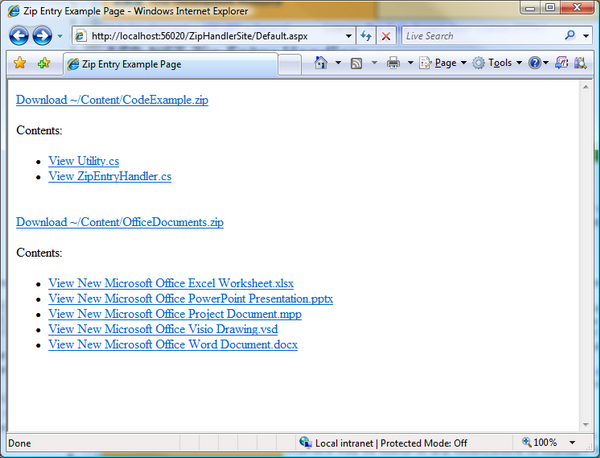
The "View" links provide quick-and-easy access to the contents of the zip file.
Points of interest
I hoped to use classes in the new System.IO.Compression and System.IO.Packaging namespaces to build the handler. Although the System.IO.Compression streams were sufficient for unpacking the compressed streams, the System.IO.Packaging.ZipPackage class is not compatible with standard zip files. The class requires a metadata file as an entry in the zip file that contains extended properties about each of the zip entries. I reverted to classes in the SharpZipLib open-source project.
Jake Morgan
Chief Technology Officer
CTO Jake Morgan brings a diverse background and over 7 years of software development experience to
Elsinore, having created successful software applications in both the public and private sector, and founding a wildly popular online community.
Before joining Elsinore in 2005, Jake led the design and development of the NC FAST Online Verification system, used by the NC Department of Health and Human Services to verify eligibility for billions of dollars in benefits. He also spent time at Nortel Networks and founded the TheWolfWeb.com, a vibrant online community for NC State students, which supported over 15 million page views a month. At Elsinore he oversees the design and development of
IssueNet Issue Management Software.
Jake is an alumnus of NC State University, where he received a BS in Mechanical Engineering.



 General
  News
News  Suggestion
  Question
  Bug
Bug  Answer
  Joke
Joke  Praise
  Rant
Rant  Admin
Admin 


 Submit an article or tip


