Introduction
This article is an extension to Billy McCafferty’s great "Model View Presenter with ASP.NET".
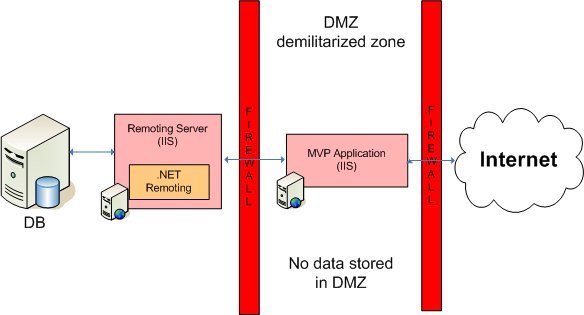
I’ll try to go with a solution provided by Billy a little bit deeper into "enterprise". I’ll discuss the situation where you have to host the site
for internet (as opposite for intranet) and you cannot place the database server inside the DMZ.
Demilitarized Zone is a concept of secure zone that divides the company "safe" inside with the war that is going on outside (in internet). So for security reasons,
you have to place your database somewhere – apart from your website. This solution is something half way between SOA and tight data access and presentation layer integration.
With this solution, you will not have to introduce one more layer to your architecture (no need for a separate service layer) but you will hat a clean physical
separation of layers (see picture).
Please make sure that you have read and understood Billy’s article before you go further with my text.
You have to keep in mind that using this solution, you lose one of the prime NHibernate features: "lazy loading". Working over boundaries, every call to a remote
service means a new NHibernate session, that means no easy way to load things "on demand".
Extending MVP
We will abstract the DAOs (Data Access Objects) further more to make them work over .NET Remoting. First, cut the inline DAOs definition form NHibernateDaoFacotry
and paste it to its own file, say NHibernateDoas. The DAOs definitions from this class will by used with both scenarios remotely and locally.
public class CustomerDaoNHibernate :
       GenericNHibernateDao<Customer, string>, ICustomerDao { }

public class OrderDaoNHibernate :
       GenericNHibernateDao<Order, long>, IOrderDao { }
To make these classes to work outside the normal boundaries, you have to make them inherit from MarshalByRefObject. To make it simple, we will inherit only the base
class for all DAOs: GenericNHibernateDao.
Now you have to write the remote DAO factory class. Let’s name it NHibernateRemoteDaoFactory. It will look like this:
public class NHibernateRemoteDaoFactory : IDaoFactory
{
static NHibernateRemoteDaoFactory()
{
RemotingConfiguration.Configure(
AppDomain.CurrentDomain.SetupInformation.ConfigurationFile,
false);
}
#region IDaoFactory Members
public ICustomerDao GetCustomerDao()
{
NHibernateDaos.CustomerDaoNHibernate dao =
(NHibernateDaos.CustomerDaoNHibernate)
Activator.CreateInstance(typeof(
NHibernateDaos.CustomerDaoNHibernate));
return dao;
}
public IOrderDao GetOrderDao()
{
NHibernateDaos.OrderDaoNHibernate dao =
(NHibernateDaos.OrderDaoNHibernate)
Activator.CreateInstance(typeof(
NHibernateDaos.OrderDaoNHibernate));
return dao;
}
#endregion
}
Configuring .NET Remoting
Believe it or not, but we are done with programming here! Really, from now on, you won’t have to code. The rest will by done by configuring and customizing.
Let's configure the server. I’ll use IIS to make it simple and plain. We will use the binary formatter and HTTP channel. Please create a virtual directory
and place all the MvpSample.Data DLLs in its bin subdirectory. To make IIS understand what you want to serialize, you have to place
the web.config file inside. It will look like this:
<configuration>
  <configSections>
        <section name="nhibernate"
          type="System.Configuration.NameValueSectionHandler, System,
                Version=1.0.1.0, Culture=neutral,
                PublicKeyToken=b77a5c561934e089"/>
    </configSections>

  <appSettings>
        <add key="HBM_ASSEMBLY" value="MvpSample.Core"/>
    </appSettings>

  <nhibernate>
    <add key="hibernate.connection.provider"
       value="NHibernate.Connection.DriverConnectionProvider"/>
    <add key="hibernate.dialect"
       value="NHibernate.Dialect.MsSql2000Dialect"/>
    <add key="hibernate.connection.driver_class"
       value="NHibernate.Driver.SqlClientDriver"/>
    <add key="hibernate.connection.connection_string"
            value="Data Source=mk-r52;Database=testdb;Trusted_Connection=True;" />
    <add key="hibernate.connection.isolation" value="ReadCommitted"/>
  </nhibernate>

  <system.runtime.remoting>
        <application>
            <channels>
                <serverProviders>
                    <formatter ref="binary"/>
                </serverProviders>
                <channel ref="http">
                </channel>
            </channels>
            <service>
                <wellknown mode="SingleCall"
               type="MvpSample.Data.CustomerDaoNHibernate,MvpSample.Data"
               objectUri="CustomerDao.rem"/>
                <wellknown mode="SingleCall"
               type="MvpSample.Data.OrderDaoNHibernate,MvpSample.Data"
               objectUri="OrderDao.rem"/>
            </service>
        </application>
    </system.runtime.remoting>

  <system.web>
        <customErrors mode="Off">
        </customErrors>
        <compilation>
            <assemblies>
                <add assembly="System.Runtime.Remoting, Version=2.0.0.0,
                               Culture=neutral, PublicKeyToken=B77A5C561934E089"/>
      </assemblies>
    </compilation>
  </system.web>
</configuration>
You probably already know the first part that configures NHibernate form Billy's article. The rest configures .NET Remoting. First, you are specifying the channel
and then the services you want to host. We will make the calls to be of SingleCall type (so no state, very much like an ordinary Web Service).
We will be hosting CustomerDaoNHibernate under the name CustomerDao.rem and OrderDaoNHibernate under OrderDao.rem. If your virtual directory
name is MvpSampleRemoteDao, then you can try calling the WSDL for each service like this:
- http://localhost/MvpSampleRemoteDao/OrderDao.rem?wsdl
- http://localhost/MvpSampleRemoteDao/CustomerDao.rem?wsdl
<system.runtime.remoting>
    <application>
      <channels>
        <channel ref="http">
          <clientProviders>
            <formatter ref="binary" />
          </clientProviders>
        </channel>
      </channels>
      <client>
        <wellknown type="MvpSample.Data.CustomerDaoNHibernate,MvpSample.Data"
                    url="http://localhost/MvpSampleRemoteDao/CustomerDao.rem" />
        <wellknown type="MvpSample.Data.OrderDaoNHibernate,MvpSample.Data"
          url="http://localhost/MvpSampleRemoteDao/OrderDao.rem" />
      </client>
    </application>
</system.runtime.remoting>
Congratulations, you are done. From now on, you can switch between remoting / no remoting by editing the Windsor Container configuration file Config\CastleComponents.config.
<configuration>
<components>
<component id="daoFactory"
type="OFS.ORM.Data.NHibernateDaoFactory, OFS.ORM.Data"
service="OFS.ORM.Core.DataInterfaces.IDaoFactory, OFS.ORM.Core" />
</components>
</configuration>
Points of Interest
There are some things you have to keep in mind while working with this architecture:
- All the classes you intend to work over the boundaries have to by serializable.
- After you compile the Data project, you have to transfer somehow the DLL to the IIS virtual directory. You could configure the Data project to output the DLLs
into the bin subdirectory and make the Data project folder by the virtual directory. You can also write an AfterBuild task in your prj file to deploy the DLLs
to a local/remote server; there are a lot of possibilities. For the time being, you have a folder MvpSampleWeb in the zip file provided with this article. You have
to make it a virtual directory in your IIS.
- In his original article, Billy came up with a great idea of an HTTPModule that opens the NHibernate session on every page served. You won't need it while working with remote objects.
So you can turn this part of web.config off:
<httpModules>
  <add name="NHibernateSessionModule"
         type="MvpSample.Web.NHibernateSessionModule"/>
</httpModules>
- There is a question whether you need special tests for your remote DAOs. Surely, yes!
- Oh and yes, I’m deploying the same assembly to the remoting server and client. I’m not working with interfaces as a contract between the client and server.
Well, that approach serves a little bit of work and after all, it is server software, you don’t have to be afraid of someone else peeping into your code, right!
I hope this article will help you set up a great enterprise application with ASP.NET and .NET Remoting!
P.S.: Take a look at Advancing the Model-View-Presenter Pattern - Fixing the Common Problems
by Acuostic - it's another great extension of Billy’s solution.
This member has not yet provided a Biography. Assume it's interesting and varied, and probably something to do with programming.



 General
  News
News  Suggestion
  Question
  Bug
Bug  Answer
  Joke
Joke  Praise
  Rant
Rant  Admin
Admin 


 Submit an article or tip


