Introduction
I had faced a big problem with the TabControl included in Visual Studio 2005. So I applied a "Mnemonic" (hot key) feature to the TabControl, and for this reason I had set the DrawMode property to OwnerDrawFixed. But setting this property removed the XP-look style for the button.
So I tried to implement the DrawItem event for re-drawing the button, but it did not seem to work. I even tried the "Sky Bound component" which is freely available on the net, but it did not match my requirement.
So, finally I decided to build my own control. I browsed the internet for some resources concerning this, but I was not satisfied with what I found.
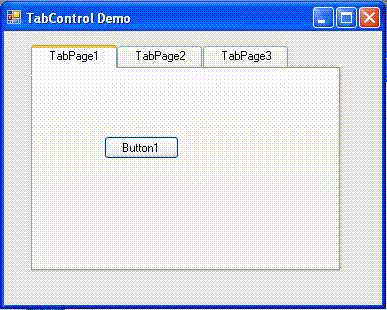
So here is the control, in which I have applied the XP-look style with the hot key feature.
Background
First of all, we need to set the double buffering technique to improve painting and to allow the control to change its appearance:
Me.SetStyle(ControlStyles.UserPaint, True)
Me.SetStyle(ControlStyles.AllPaintingInWmPaint, True)
Me.SetStyle(ControlStyles.DoubleBuffer, True)
Me.SetStyle(ControlStyles.ResizeRedraw, True)
Me.SetStyle(ControlStyles.SupportsTransparentBackColor, True)
Then, you need to override the OnPaint event and draw your own control. The basic steps involved are:
Protected Overrides Function ProcessMnemonic(ByVal charCode As Char) As Boolean
For Each p As TabPage In Me.TabPages
If Control.IsMnemonic(charCode, p.Text) Then
Me.SelectedTab = p
Me.Focus()
Return True
End If
Next p
Return False
End Function
Protected Overrides Sub OnPaint(ByVal e As _
System.Windows.Forms.PaintEventArgs)
MyBase.OnPaint(e)
DrawControl(e.Graphics)
End Sub
Friend Sub DrawControl(ByVal g As Graphics)
If Not Visible Then
Return
End If
Dim render As New VisualStyleRenderer(VisualStyleElement.Tab.Pane.Normal)
Dim TabControlArea As Rectangle = Me.ClientRectangle
Dim TabArea As Rectangle = Me.DisplayRectangle
TabArea.Y = TabArea.Y + 1
TabArea.Width = TabArea.Width + 1
Dim nDelta As Integer = SystemInformation.Border3DSize.Width
TabArea.Inflate(nDelta, nDelta)
render.DrawBackground(g, TabArea)
Dim i As Integer = 0
While i < Me.TabCount
DrawTab(g, Me.TabPages(i), i)
i += 1
End While
End Sub
Friend Sub DrawTab(ByVal g As Graphics, ByVal tabPage _
As TabPage, ByVal nIndex As Integer)
Dim recBounds As Rectangle = Me.GetTabRect(nIndex)
Dim tabTextArea As RectangleF = _
CType(Me.GetTabRect(nIndex), RectangleF)
Dim bSelected As Boolean = (Me.SelectedIndex = nIndex)
Dim render As New VisualStyleRenderer(VisualStyleElement.Tab.Pane.Normal)
render = New VisualStyleRenderer(VisualStyleElement.Tab.TabItem.Pressed)
If bSelected Then
recBounds.Height = recBounds.Height + 10
render = New VisualStyleRenderer(VisualStyleElement.Tab.TabItem.Pressed)
render.DrawBackground(g, recBounds)
render.DrawEdge(g, recBounds, Edges.Diagonal, _
EdgeStyle.Sunken, EdgeEffects.Flat)
Else
recBounds.Y = recBounds.Y + 1
render = New VisualStyleRenderer(VisualStyleElement.Tab.TabItem.Normal)
render.DrawBackground(g, recBounds)
render.DrawEdge(g, recBounds, Edges.Diagonal, _
EdgeStyle.Sunken, EdgeEffects.Flat)
End If
If (tabPage.ImageIndex >= 0) AndAlso _
(Not (ImageList Is Nothing)) _
AndAlso (Not (ImageList.Images(tabPage.ImageIndex) _
Is Nothing)) Then
Dim nLeftMargin As Integer = 8
Dim nRightMargin As Integer = 2
Dim img As Image = ImageList.Images(tabPage.ImageIndex)
Dim rimage As Rectangle = New Rectangle(recBounds.X + _
nLeftMargin, recBounds.Y + 1, img.Width, img.Height)
Dim nAdj As Single = CType((nLeftMargin + _
img.Width + nRightMargin), Single)
rimage.Y += (recBounds.Height - img.Height) / 2
tabTextArea.X += nAdj
tabTextArea.Width -= nAdj
g.DrawImage(img, rimage)
End If
Dim stringFormat As StringFormat = New StringFormat
stringFormat.Alignment = StringAlignment.Center
stringFormat.LineAlignment = StringAlignment.Center
If FlagControl Then
stringFormat.HotkeyPrefix = Drawing.Text.HotkeyPrefix.Show
Else
stringFormat.HotkeyPrefix = Drawing.Text.HotkeyPrefix.Hide
End If
Dim br As Brush
br = New SolidBrush(tabPage.ForeColor)
g.DrawString(tabPage.Text, Font, br, tabTextArea, stringFormat)
End Sub
Using the Code
To use the code, simply add a reference to the TabControl into the new project and drag the TabControl to your form.
Note
Make your comments, corrections, or additions for credits. Your feedback is most welcome.
This member has not yet provided a Biography. Assume it's interesting and varied, and probably something to do with programming.



 General
  News
News  Suggestion
  Question
  Bug
Bug  Answer
  Joke
Joke  Praise
  Rant
Rant  Admin
Admin 


 Submit an article or tip


