
Introduction
This article was inspired by attempting to improve the code of a user control that was posted here on Code Project. The control had a property that took a series of integers. The way the author handled this was, to put it politely, - a messy hack - so I set out to attempt to improve it as I loved the idea of the control itself.
Unfortunately, as it turns out, Microsoft has not made this a very easy process, and I found documentation / online resources in relation to this to be scarce. Viewing some of the .NET source and studying the source of several other articles, I finally managed to get it working fully, so I thought I'd share what I've found.
What is a complex property?
A complex property is one that has multiple values. A good example of this is the System.Drawing.Size struct that is used as a property in most controls, which is basically two integers represented as one property.
Size3D
Size3D is the struct I have created here to demonstrate how to implement a complex property. It is very similar to the .NET Size structure, but it takes obviously width, height, and depth values. This example is only to demonstrate how to create a complex property, and is not intended to be a complete 'ready for production' 3D structure!
The basics (beginner stuff)
The starting point is to make three member variables...
private int m_Width;
private int m_Height;
private int m_Depth;
... and three corresponding properties.
public int Width
{
    get { return m_Width; }
    set { m_Width = ValidateValue(value); }
}
public int Height
{
    get { return m_Height; }
    set { m_Height = ValidateValue(value); }
}
public int Depth
{
    get { return m_Depth; }
    set { m_Depth = ValidateValue(value); }
}
As you can see, each of the setters calls a ValidateValue method, which restricts the values to minimum and maximum values, which I have declared as constants.
public const int FieldMinValue = 1;
public const int FieldMaxValue = 255;
I restricted the FieldMaxValue to a low value as I wished the total volume to be within the range of an Int32 (in the example, this is only applicable in the GetHashCode method).
The next step is to create a simple constructor that takes three ints and assigns them to the member variables...
public Size3D(int width, int height, int depth)
{
m_Width = ValidateValue(width);
m_Height = ValidateValue(height);
m_Depth = ValidateValue(depth);
}
... and a static 'Empty' Size3D:
public static readonly Size3D Empty = new Size3D();
Next steps (slightly more advanced)
Next, we need to allow some basic mathematical calculations and comparison operations on our struct by adding some operator overloads (see my article: An Introduction to Operator Overloading in C#[^] for further explanation) and overriding the Equals, GetHashCode, and ToString methods. I've also added, for convenience, static Add and Subtract methods and a non static readonly IsEmpty property.
That's the struct created. To be able to use this as a property, we need to add a TypeConverter to it by applying the TypeConverter attribute referring our converter class.
[TypeConverter(typeof(Size3DConverter))]
Size3DConverter (more advanced)
This is where the real work gets done in a few overridden methods and our own GetSize3DType method. This class derives from System.ComponentModel.TypeConverter. All we are basically doing is converting to and from the string representation of our struct in the property grid.
I tried many combinations, and it seems to get our struct to work exactly the same as the built-in types we need to override the following methods.
CanConvertFromCanConvertToConvertFromConvertTo
CreateInstanceGetCreateInstanceSupported
GetPropertiesGetPropertiesSupported
Many of the methods call other methods, so it is not easy to explain them in isolation, so I won't attempt that here. If you follow the source code step by step, it should be self explanatory with this working example. The interesting point is we need to use Reflection and the struct's properties to dynamically create new instances when required.
Control3D
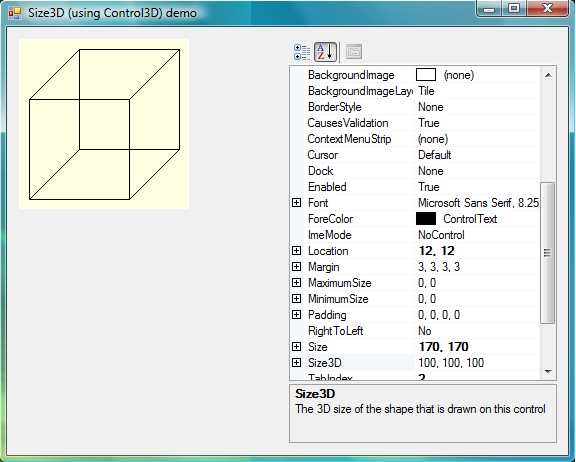
This is a very basic user control (again, not production ready!) that I created to test and demo the Size3D struct.
It has one property - Size3D - a member variable that the property gets and sets, and the overridden OnPaint method to draw the cube/cuboid from the Size3D values.
In use
The demo application uses a property grid that displays the properties of the Control3D instance. The default property is Size3D, and will be automatically selected, and defaults to 100, 100, 100. Notice, the values aren't (until you change them) in bold, or in the Form's designer.cs file, as they are only serialized by the designer when needed. Change any or all of the values, and the control will redraw.
History
- Initial version - 5th September 2008.
This member has not yet provided a Biography. Assume it's interesting and varied, and probably something to do with programming.



 General
  News
News  Suggestion
  Question
  Bug
Bug  Answer
  Joke
Joke  Praise
  Rant
Rant  Admin
Admin 


 Submit an article or tip


