Introduction
In some cases it is necessary to embed resources. This can be because the user should not be allowed to read or update the files. In this short article, I will show you how you can read from an embedded XML-file which is located within a .NET assembly.
To receive the data located within an XML-file we have to use Reflection. You can find a lot of articles about Reflection at The Code Project or via Google. So I won't explain Reflection in this article.
OK, let's start.
We have an exemplary .NET assembly called Example.dll. This DLL includes some XML-files, one of them is the Test.xml. Now we try to receive the content of Test.xml and give it out via the Console.
First of all we have to load the assembly. This will be done using the following code (assuming that the Example.dll is in the working-directory):
Assembly b = Assembly.LoadFrom(@"Example.dll");
With the following lines of code, you can show the different types that are found within the assembly, but you do not want them to receive the content of Test.xml:
Type[] t = b.GetTypes();
foreach (Type t2 in t)
{
    Console.WriteLine(t2.FullName);
}
OK, now we will receive the names of all the resources in our assembly:
string[] names = b.GetManifestResourceNames();
foreach(string name in names)
{
    Console.WriteLine(name);
}
As you know, we need the file Test.xml of our assembly Example.dll. Use the following code to create a stream of data we need:
System.IO.Stream s = b.GetManifestResourceStream("Example.Test.xml");
System.IO.StreamReader sr = new StreamReader(s);
string data = sr.ReadToEnd();
Console.WriteLine(data);
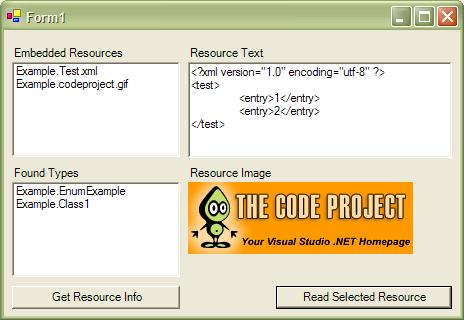
As you can see, the correct data will be shown in the console-window. (The demo application uses list boxes to make the output user-friendly.) Now you are able to load the data into an XmlDocument and manipulate it. Please note that you can't change the resources which are embedded in an assembly (without recompiling) - this means that you can't change resources from your application.
How to load an embedded image
Some of you may ask how to load an embedded image. This isn't more difficult than loading the embedded text:
private void LoadEmbeddedImage()
{
    Assembly b = Assembly.LoadFrom(@"Example.dll");

    System.IO.Stream s =
       b.GetManifestResourceStream("Example.codeproject.gif");

    System.IO.StreamReader sr = new StreamReader(s);

    Image img = Image.FromStream(s);
    this.picLogo.Image = img;
}
The method LoadEmbeddedImage reads the data from the manifest resource stream and writes the data directly into an image. This image will be shown in our GUI.
How to use the code
- Start the Example.sln.
- Compile it first.
- Now you can start the ExampleTest.
History
- 12/27/2004
- 12/28/2004
- Example for loading an embedded image.
- Updated the GUI for showing some information in a user-friendly way.



 General
  News
News  Suggestion
  Question
  Bug
Bug  Answer
  Joke
Joke  Praise
  Rant
Rant  Admin
Admin 


 Submit an article or tip


