Introduction
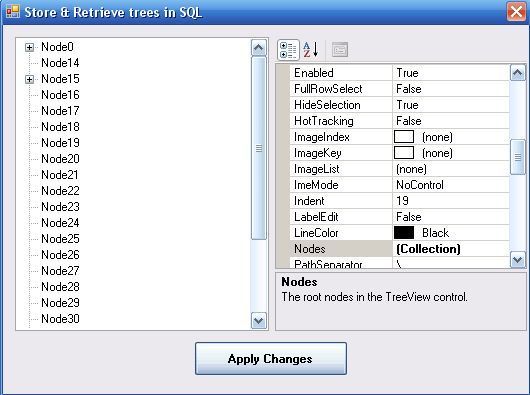
In this article, the ability of Microsoft SQL Server database in storing and retrieving trees will be described. In the sample application, the PropertyGrid component has been used to alter the trees, such as "Add/Remove/Edit/Move up/Move down the root and child".

Prerequisite
You must first install Microsoft SQL Server Express Edition 2005 and create an instance that is named "cm_express", and then run this program. Microsoft SQL Server Express Edition 2005 is freeware and it already exists in the link below to be downloaded:
http://go.microsoft.com/fwlink/?LinkId=65212
Background
In this sample, we have used Microsoft SQL Server 2005 Express Edition to build the tree under the .NET application. This tree has 3 levels, and each level has countless roots and each root has innumerable children and each child in turn has very many children.
Note that if you have three levels, then you should create two tables in your database, or generically if you have n levels then you should create n-1 tables in your database. Each table has two fields, the first field shows parent and the second field shows children in every level.
Notice
You might have two nodes in different levels with a same name, for example second node in level 2 has a name, same as the name of first node in level 3, hence we should mention path with each node named in the database.
Using Demo Application
After Microsoft SQL Server 2005 Express Edition installation, you can run the application. For altering tree, you should click on a button beside (Collection) in Nodes property, then TreeNode Editor appears. In this form, you can add/remove/edit/move up/move down the root and child. For edit node text, you must change Text property. After that, you should click OK button to save and exit from current form, also you must click Apply Changes button in main form to set database information.
Explanation of Source Code
After loading the main form, first we check the SQL connection. If the connection fails, a message will appear that notifies you "to install Microsoft SQL Server Express Edition 2005" as a prerequisite then you try to attach the tree database. If the database already exists, nothing will be run. In order to attach the tree database, I have used the following code:
SqlCommand sqlcm = new SqlCommand();
Sqlcon.Open();
sqlcm.Connection = Sqlcon;
try
{
sqlcm.CommandText = "EXEC sp_attach_db @dbname = N'tree', @filename1 = N'"
+ Application.StartupPath + "\\tree.mdf" + " ', @filename2 = N'"
+ Application.StartupPath + "\\tree_log.ldf" + " ' ";
sqlcm.ExecuteNonQuery();
Sqlcon.Close();
}
catch { }
To create the tree, first we read the roots from t1, and insert them into TreeView; then we read children of these roots from t2, and insert these children into TreeView.
SqlConnection sqlconn = new SqlConnection(cs2);
SqlConnection sqlconn2 = new SqlConnection(cs2);
sqlconn.Open();
sqlconn2.Open();
SqlCommand sqlcmd = new SqlCommand("select * from t1", sqlconn);
SqlDataReader data = sqlcmd.ExecuteReader();
SqlCommand sqlcmd2 = new SqlCommand();
sqlcmd2.Connection = sqlconn2;
SqlDataReader data2;
string lvl1, lvl2, lvl3, lv2, lv3;
int myindex, myindex1, i, j, k;
myindex1 = myindex = i = j = k = 0;
while (data.Read())
{
lvl1 = data["lvl1"].ToString();
treeView1.Nodes.Insert(i, lvl1);
lvl2 = data["lvl2"].ToString();
j = 0;
while (lvl2 != "")
{
myindex = lvl2.IndexOf('|');
lv2 = lvl2.Substring(0, myindex);
treeView1.Nodes[i].Nodes.Insert(j, lv2);
sqlcmd2.CommandText = "select * from t2 where lvl2='" + lvl1+ '|'+ lv2+ "'";
data2 = sqlcmd2.ExecuteReader();
while (data2.Read())
{
lvl3 = data2["lvl3"].ToString();
k = 0;
while (lvl3 != "")
{
myindex1 = lvl3.IndexOf('|');
lv3 = lvl3.Substring(0, myindex1);
treeView1.Nodes[i].Nodes[j].Nodes.Insert(k, lv3);
if (lvl3.Length <= (myindex1 + 1))
lvl3 = "";
else
lvl3 = lvl3.Substring(myindex1 + 1, lvl3.Length - (myindex1 + 1));
k++;
}
}
data2.Close();
if (lvl2.Length <= (myindex + 1))
lvl2 = "";
else
lvl2 = lvl2.Substring(myindex + 1, lvl2.Length - (myindex + 1));
j++;
}
i++;
}
data.Close();
sqlconn.Close();
sqllconn2.Close();
When user clicks the Apply Changes button, the first time all items in t1 and t2 will be deleted, afterwards parents and children will be inserted into tables.
SqlConnection sqlconn = new SqlConnection(cs2);
sqlconn.Open();
SqlCommand sqlcmd = new SqlCommand("Delete from t1", sqlconn);
sqlcmd.ExecuteNonQuery();
sqlcmd.CommandText = "Delete from t2";
sqlcmd.ExecuteNonQuery();

int i1, i2, i3;
i1 = 0;
while (i1 < treeView1.Nodes.Count)
{
 sqlcmd.CommandText = "insert into t1(lvl1)
 values('" + treeView1.Nodes[i1].Text + "')";
 sqlcmd.ExecuteNonQuery();

 i2 = 0;
 while (i2 < treeView1.Nodes[i1].Nodes.Count)
  {
   sqlcmd.CommandText = "insert into t2(lvl2) values('"
 + treeView1.Nodes[i1].Text + '|' + treeView1.Nodes[i1].Nodes[i2].Text + "')";
   sqlcmd.ExecuteNonQuery();

  sqlcmd.CommandText = "update t1 set lvl2 = IsNull(lvl2,'') + '"
  + treeView1.Nodes[i1].Nodes[i2].Text + "'+'|' where lvl1 ='"
  + treeView1.Nodes[i1].Text + "' ";
  sqlcmd.ExecuteNonQuery();

  i3 = 0;
  while (i3 < treeView1.Nodes[i1].Nodes[i2].Nodes.Count)
   {
    sqlcmd.CommandText = "update t2 set lvl3 = IsNull(lvl3,'') + '"
  + treeView1.Nodes[i1].Nodes[i2].Nodes[i3].Text + "'+'|' where lvl2 ='"
 + treeView1.Nodes[i1].Text + '|' + treeView1.Nodes[i1].Nodes[i2].Text + "' ";
    sqlcmd.ExecuteNonQuery();

    i3++;
  }
  i2++;
 }
 i1++;
}
sqlconn.Close();
History
- 17th June, 2007: Initial post
I started programming computers in 2000 at the university and graduated as a computer engineer in 2004.
I have been working with Microsoft and Borland technologies. From 2004 I became an independent computer consultant. My clients have included wide range of corporations, software houses and consulting firms and my assignments have ranged from designing, to implementing, testing, documenting and then enhancing everything from small utilities to large systems.
Clinical Management Software is one of the best projects that implemented during these years. This is versatile software that handles medical tasks.
I enjoying from programming like as ROCK CLIMBING!!!



 General
  News
News  Suggestion
  Question
  Bug
Bug  Answer
  Joke
Joke  Praise
  Rant
Rant  Admin
Admin 


 Submit an article or tip


![Rose | [Rose]](https://codeproject.global.ssl.fastly.net/script/Forums/Images/rose.gif)