Introduction
In spite of the proliferation of object-oriented libraries for Windows, such
as the Microsoft Foundation Classes (MFC), programming with nothing more than
the Win32 SDK still remains a popular choice when performance and size are
issues. However, the terminology used by the SDK is a bit different than that
of MFC, and in some cases can be completely opposite. This article was written
in an attempt to explain some of these differences, and to provide a few
examples.
Under the hood, MFC is really a normal Win32 SDK application, even if it
does not appear to be one. The features that Microsoft has added to MFC over
the years to make programming for Windows simpler, has in some cases obscured
the underlying principles and even renamed these concepts from what SDK
programmers known them as. I myself had this problem recently when reading
several of the articles on CodeProject about subclassing controls.
MFC allows you to create a C++ class, which is derived from a base class -
subclassing in the C++ definition of the word - to change the behavior and the
visual appearance of the control described by the base class. This is very
different from the SDK meaning of "subclassing," which is used only to change
the behavior, but not the appearance.
As an example: If you look at
Chris Maunder's
subclassing article, you will notice that he changes one of the style bits
in his subclassed button to make it owner-drawn, and then overrides the OnDrawItem virtual function in his derived class. In SDK programming, this is
simply implementing an owner drawn control. Hidden by MFC is the fact that the
WM_DRAWITEM message is sent to the parent of the control, and the
parent is responsible for determining which control is to be drawn, its state,
and then drawing it. This is not subclassing; Rather, this is owner-drawing.
On the other hand, if you look at
Daniel
Kopitchinski's message handling article, the behavior of an edit control is
modified by preventing certain keys from getting to the control. Considering
that the control does not send every keystroke to its parent in a
WM_CHAR message, how can the author be overriding this message
handler? This is subclassing in the SDK sense: By changing the function that
handles messages for the edit control, the author was able to filter what the
control actually received.
Samples And Explanations
What follows is code fragments, taken from the Zip file included with this
article that should illustrate both of these concepts from the SDK point of
view.
Subclassing, The SDK Way
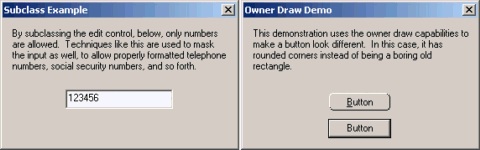
First, we will examine "true" subclassing. The code is adapted directly
from Daniel's, so it should look familiar. When you run the program, you will
find that only numbers are recognized by the edit control. The important thing
to notice in the dialog callback is the code in the WM_INITDIALOG
handler:
g_oldEditProc = (WNDPROC)SetWindowLong(
    GetDlgItem( window, IDC_EDIT ), GWL_WNDPROC, long( EditProc ) );
This is the function responsible for subclassing. The calling format for
SetWindowLong is:
DWORD SetWindowLong( HWND  handleOfWindowToSubclass,
                     int   indexOfPropertyToChange,
                     DWORD newValueOfProperty );
The returned value from this function is the old value of the property. The
GetDlgItem call retrieves the window handle of a control contained
within a dialog box. The constant, GWL_WNDPROC is the index of
the WndProc property for the window. Other constants allow the
developer to change the style of the window, and more. When each of these
building blocks are put together, the result is that the edit control's windows
procedure is replaced with a new one, and the old one is saved in a global
variable called, g_oldEditproc.
The new edit control callback looks like this:
int __stdcall EditProc( HWND window, UINT message, WPARAM wparam, LPARAM lparam )
{
if( message == WM_CHAR )
{
if( IsCharNum( char( wparam ) ) )
{
return( CallWindowProc( g_oldproc, window, message, wparam, lparam ) );
}
else
{
return(0);
}
}
else
{
return( CallWindowProc( g_oldproc, window, message, wparam, lparam ) );
}
}
First, note that Windows does not provide an IsCharNum
function. This is an inline function defined in the source code in the Zip
file for convenience.
Just like Daniel's code, the callback traps all characters sent to the edit
control, and drops everything except for numbers. This could be the basis for
a template that only allows telephone numbers, prices, or social security
numbers, for example.
One of the messages that cannot be properly trapped this way, is
WM_PAINT. You are welcome to try it, by modifying the subclassing
example. An easy test is to paint the background of the control gray. The
code to add to EditProc would look like:
if( message == WM_PAINT )
{
    HDC dc = GetDC( window );
    RECT rect; GetWindowRect( window, &rect );
    FillRect( dc, &rect, HBRUSH( GetStockObject( GRAY_BRUSH ) ) );
    ReleaseDC( window, dc );
    return( 0 );
}
All this will do is cause the control to not be painted at all. Subclassing
is obviously not going to help in customizing the appearance of the control.
That brings this tutorial to its second topic: Allowing a control to be drawn
by its parent.
Owner Drawing
First, notice that in the WM_INITDIALOG handler, the same
SetWindowLong magic is used to add the BS_OWNERDRAW
bit to the control's style. Although it can be set in the resource editor by
checking the "Owner Draw" option, this makes it a little cleaner, and allows
the code to be used on other button controls without modifying the resource
file:
SetWindowLong( GetDlgItem( window, IDC_BUTTON ), GWL_STYLE,
        GetWindowLong( GetDlgItem( window, IDC_BUTTON ), GWL_STYLE ) |
        BS_OWNERDRAW );
When any owner-drawn controls need to be updated, Windows sends a
WM_DRAWITEM message to the parent window of the control. The
parent has the responsibility of determining which child needs to be redrawn,
and then performing some appropriate action to ensure that it happens. If the
control is not drawn, then it will appear to be invisible. For the purpose of
this example, the message handler ensures that only the one button is being
drawn, and then dispatches control to the DrawItem function:
if( ( ( DRAWITEMSTRUCT* ) lparam )->hwndItem == GetDlgItem( window, IDC_BUTTON ) )
{
    DrawItem( ( DRAWITEMSTRUCT* ) lparam );
    return( TRUE );
}
Instead of doing the usual "hot tracking" demonstration, in which the
background color of the button changes when the mouse is over it, the example
program completely changes the appearance of the button to be rounded, instead
of the boring standard rectangle. DrawItem calls the
DrawRoundedButton function with some flags so the button looks
right, given its current state, and then draws the button's text in the center.
If the button is disabled, the text is gray. If the button is pressed
(selected), then the text is offset by one pixel to give it the impression of
depth.
All of the drawing magic is contained in DrawRoundedButton.
This function looks at the flags passed by DrawItem to determine if the button
is pressed or not, and focused or not, and then draws a series of rounded
rectangles nested inside of each other to get the appropriate look. If this
code was used in an actual production piece of software, a compatible device
context should be created where all of the drawing is done, and then copy the
final image to the button's screen device context. This would eliminate the
flicker, and be more efficient. But for the purposes of this example, it is
interested to set a breakpoint at the beginning of the drawing code, and see
how the button is built.
Also of importance in an SDK program, is deleting any GDI objects that are
created. If this is not done, the program would suffer from memory leaks that
would keep building until memory was exhausted:
pen = CreatePen( PS_NULL, 1, 0 );
        ...
DeleteObject( pen );
Conclusion
Hopefully the sample code and the explanations in this tutorial will clear
up some confusion, and help other developers understand the difference between
subclassing and owner drawing. Also, knowing what goes on behind all of the
"MFC magic" can help to understand MFC a little better.



 General
  News
News  Suggestion
  Question
  Bug
Bug  Answer
  Joke
Joke  Praise
  Rant
Rant  Admin
Admin 


 Submit an article or tip


