Note: this would run only under Windows 2000 and the successors.
Introduction
Well - some time ago I wrote a few lines of code which came out to be a hit to some companies. This happened nearly 10 years ago. Those people were used to rent a software - so I finally gave in :)
Nowadays nearly everything is going to get not cheaper - I thought this would be the right time to give my old settled customers the opportunity to pay back my patience. I changed nearly every bit of code I knew working well to some code I expect to do the same ;) I didn't touch a piece of code on which I forgot the usage, so it wasn't much to do!
Multithreading, Inter Process Communication, Kernel Mode Execution, Native API-Support - hmmm, this you can talk to a sales engineer for centuries, he would keep on looking the same cool inter-face which means - he doesn't know what's going on but he has the key to the safe.
Time to posh up my UI ( Unique Identity - also known as User Interface )
My program is used by officials in charge - means: busy, critical on every change that doesn't make them do their job better.
They do need some information temporary but also need to view what they have in front with no change. This sounds like a popup window is needed and indeed this is what I have done there. The general feedback was: Yes we need what you show in your popup, and thanks, really nice but: We also need to see the things underneath the popup so we always don't have to move your information popup window around on the screen. Not so nice.
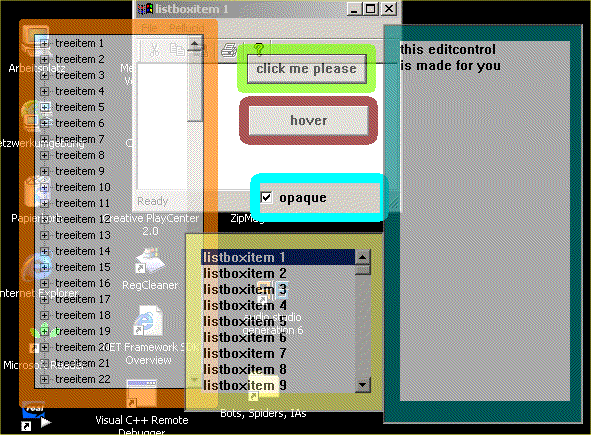
Pellucid was born. A popup-window showing the additional information in a flexible way by letting view the covered section of the original window. Reducing the amount of window-moves while looking cool.
This code does not work on machines with OS-versions lower than W2K because of the usage of window style WS_EX_LAYERED.
The classes
There are 3 classes doing the whole work:
PellucidChild is derived from CWnd and functions as a shell for the original control. It replaces the control's window procedure with its own. The reason for this was the requirement for the control being dragged by mouse as you do this on main windows by dragging the caption bar.
PellucidSelf is derived from CFrameWnd because this gives the opportunity of being placed anywhere on the screen. PellucidSelf becomes the parent of PellucidChild
Pellucid is the shell setting up all required connections between the original control, PellucidSelf and PellucidChild. It also makes the transparency by calling the appropriate functions in Pellucid::CreateSelf().
Usage
- Include the header Pellucid.h where you want the transparent windows to be shown e.g.: MainFrm.h or any
CDialog-derived window or ...
- Add member variables of type
Pellucid
- Add member variables of type of control you want to be shown e.g.
CEdit, CTreeCtrl ...
- Create the control by using the appropriate Create functions
- Create
Pellucid
- If you want to process the notification messages send by the controls then you have to insert message handler for
WM_COMMAND and WM_NOTIFY messages
- If you are done with
Pellucid - the destructor will do the job or just call Pellucid::Destroy()
Sample for 1,2,3
#include "Pellucid.h"
#include "ChildView.h"
class CMainFrame : public CFrameWnd
{
public:
CMainFrame();
protected:
DECLARE_DYNAMIC(CMainFrame)
public:
Pellucid m_pellucid1;
Pellucid m_pellucid2;
Pellucid m_pellucid3;
Pellucid m_pellucid4;
Pellucid m_pellucid5;
Pellucid m_pellucid6;
CListBox m_listbox;
CEdit m_edit;
CTreeCtrl m_tree;
CButton m_button;
CButton m_button2;
CButton m_checkbox;
Sample for 4,5
void CMainFrame::OnShow()
{
int id = 42;
m_listbox.Create (WS_CHILD | WS_VSCROLL | LBS_NOTIFY,
CRect(0,0,0,0),this,id);
int i;
for(i = 0; i < 100; i ++) {
CString s;
s.Format (TEXT("listboxitem %d"),i+1);
m_listbox.AddString (s);
}
CRect rw;
GetWindowRect(rw);
CRect rp;
rp.SetRect (rw.left + 20,rw.top + 70,rw.left + 220,rw.top + 250);
m_pellucid1.Create (
this,
rp,
&m_listbox,
CRect(15,15,rp.Width() - 15,rp.Height () - 15)
);
id ++;
m_edit.Create (WS_CHILD | ES_WANTRETURN | ES_MULTILINE,
CRect(0,0,0,0),this,id);
m_edit.SetWindowText (TEXT("this editcontrol\r\nis made for you"));
rp.OffsetRect (rp.Width () + 10,0);
rp.bottom = rp.top + 400;
m_pellucid2.Create (
this,
rp,
&m_edit,
CRect(15,15,185,375),
CSize(0,0),
RGB(0,128,128),
170,
170,
170,
true,
220);
...
Sample for 6
BOOL CMainFrame::OnCommand(WPARAM wParam, LPARAM lParam)
{
int lw = LOWORD(wParam);
int hw = HIWORD(wParam);
int sel;
TCHAR s[100];
CString s2;
if(lw == 42) {
switch(hw) {
case LBN_SELCHANGE:
sel = ::SendMessage ((HWND) lParam,LB_GETCURSEL,0,0);
::SendMessage((HWND)lParam,
LB_GETTEXT,sel,(LONG)(LPSTR)s);
SetWindowText(s);
break;
case LBN_DBLCLK:
sel = ::SendMessage ((HWND) lParam,LB_GETCURSEL,0,0);
::SendMessage((HWND)lParam,
LB_GETTEXT,sel,(LONG)(LPSTR)s);
s2 = s;
s2 += " double clicked";
SetWindowText(s2);
break;
}
}
...
BOOL CMainFrame::OnNotify(WPARAM wParam, LPARAM lParam, LRESULT* pResult)
{
NMHDR *pnmhdr;
pnmhdr = (NMHDR*)lParam;
CString s;
bool treeee = false;
if(wParam == 44) {
switch(pnmhdr->code) {
case NM_CLICK:
s = " treecntrl click";
treeee = true;
break;
case NM_DBLCLK:
s = " treecntrl dblclk";
treeee = true;
break;
}
if(treeee)
SetWindowText(s);
}
return CFrameWnd::OnNotify(wParam, lParam, pResult);
}
Sample for 7
void CMainFrame::OnPellucidDestroy()
{
   m_pellucid1.Destroy();
   m_pellucid2.Destroy ();
}
This member has not yet provided a Biography. Assume it's interesting and varied, and probably something to do with programming.



 General
  News
News  Suggestion
  Question
  Bug
Bug  Answer
  Joke
Joke  Praise
  Rant
Rant  Admin
Admin 


 Submit an article or tip


![Rose | [Rose]](https://codeproject.freetls.fastly.net/script/Forums/Images/rose.gif)

 )
)


