Abstract
Java 5 has some nice features. In this article, we will discuss these features, and see how you can benefit from these. In Part-I we cover auto-boxing and foreach.
Java 5 Features
A number of interesting features have been added to the Java language in the 1.5 version, or Java 5 as it is referred to. The language level features are auto-boxing, foreach, enums, varargs, annotation, static imports, and generics.
Most of these features can be considered a progress. These improve the productivity of developers in cutting down verbose syntax and making code more intuitive.
The following figure shows my opinion on the usefulness of the features:
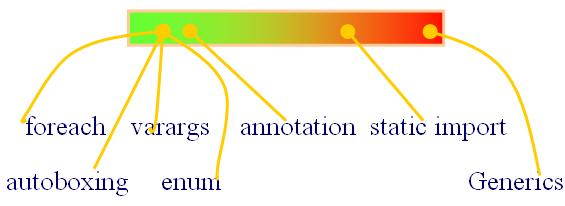
The features on the left (foreach, varargs, auto-boxing, enum) are very good. Annotation is very useful, but we also have to figure out when and where to use it properly. Static import provides only marginal value benefits (and may also lead to poor code), and another feature is pretty bad.
Auto-boxing
Java has two classes of citizens: objects and primitives. You can’t really mix them well in your code. What if you want to write a generalized API that can accept any parameter type. This is done in the Reflection API. Let’s write a poor imitation of Reflection’s invoke() method here:
package com.agiledeveloper;
class A {}
class B {}
public class Test
{
public static void foo1(A obj)
{
System.out.println("foo called with " + obj);
}
public static void foo2(A obj1, B obj2)
{
System.out.println("foo2 called with " + obj1 + " and " + obj2);
}
public static void invoke(String method, Object[] args)
{
if (method.equals("foo1"))
{
foo1((A) args[0]);
}
if (method.equals("foo2"))
{
foo2((A) args[0], (B) args[1]);
}
}
public static void main(String[] args)
{
invoke("foo1", new Object[]{new A()});
invoke("foo2", new Object[]{new A(), new B()});
}
}
In main(), I am calling invoke() with foo1 and then with foo2. In order to send any number of parameters, invoke() accepts an array of objects. There is no problem sending an object of A or object of B to this method. However, let’s add another method:
public static void foo3(int value)
{
    System.out.println("foo3 called witih " + value);
}
How do we call this method using the invoke() method? invoke() expects an array of objects while foo3() expects an int. In earlier versions of Java, you will have to wrap the int into an object and send it to the invoke() method. The standard object to wrap int is Integer. Similarly, we have Double for double, Character for char, etc. While Integer.class represents the Integer class, Integer.TYPE represents the int primitive type that this class serves as a wrapper for.
This approach of manual boxing and manual unboxing has quite a few disadvantages:
- This leads to code clutter
- Requires more work for the developers
- Looks unnatural
- It knocks the socks off novice programmers
Let’s modify the invoke() method and see how we will call it:
public static void invoke(String method, Object[] args)
{
    if (method.equals("foo1"))
    {
        foo1((A) args[0]);
    }
    if (method.equals("foo2"))
    {
        foo2((A) args[0], (B) args[1]);
    }
    if (method.equals("foo3"))
    {
        foo3(((Integer) (args[0])).intValue());
    }
}
And, the call to it will look like:
invoke("foo3", new Object[]{new Integer(3)});
Notice how you place (or box) the value 3 into the Integer object. Similarly, in the call to foo3() within invoke(), you have to unbox the value.
In Java 5, the auto-boxing and auto-unboxing feature is intended to alleviate this clutter. While this is still happening under the hood, at the source code level, we don’t have to do this. Here is the modified code:
invoke("foo3", new Object[] {3});
The above code, when compiled, is translated so that the value of 3 is boxed into an Integer object automatically for you.
Let’s consider another example – we will add a method foo4() as shown here:
public static Integer foo4(Integer v)
{
    System.out.println("foo4 called with " + v.intValue());
    return new Integer(5);
}
Now, here is a way to call this using the Java 5 auto-boxing/unboxing feature:
int someValue = foo4(4);
System.out.println("Result of call to foo4 " + someValue);
As you can see, this code looks more natural and has less clutter.
Pros and Cons:
- Realize that boxing and unboxing still happens under the hood. Take a look at the byte code generated:
   92:  iconst_4
   93:  invokestatic    #31;
//Method java/lang/Integer.valueOf:(I)Ljava/lang/Integer;
   96:  invokestatic    #33;
//Method foo4:(Ljava/lang/Integer;)Ljava/lang/Integer;
   99:  invokevirtual   #23;
//Method java/lang/Integer.intValue:()I
   102: istore_1
This source code presents an appearance that is deceiving. It has performance consequences, especially if you are invoking methods with intense computational needs.
If the Integer object is null, assigning it to int will result in a runtime exception – NullPointerException – being thrown.Understand what == means. For objects, you are comparing identity, for primitive types, you are comparing value. In the case of auto-unboxing, the value based comparison happens.Use it only where performance is not critical.
foreach
Looping is a control structure that has been around ever since we started programming. The good old syntax for looping that you would have used most often is:
for(int i = 0; i < arr.length; i++)
{
    ... = arr[i] ...
}
While this structure is simple, we are forced to use the index i even if we don’t care for it.
What if you want to iterate over a collection, like ArrayList? We will do something like:
for(Iterator iter = lst.iterator(); iter.hasNext(); )
{
    System.out.println(iter.next());
}
Not very elegant, is it? In the for statement, you have nothing past the last ;. You have to call the next() method within the body of the loop so as to advance to the next element and at the same time fetch the element to process.
The foreach introduced in Java 5 simplifies looping further. Let’s take a look at an example of how we will use the old and the new way to loop:
package com.agiledeveloper;

import java.util.ArrayList;
import java.util.Iterator;

public class Test
{
    public static void main(String[] args)
    {
        String[] messages = {"Hello", "Greetings", "Thanks"};

        for (int i = 0; i < messages.length; i++)
        {
            System.out.println(messages[i]);
        }

        for (String msg : messages)
        {
            System.out.println(msg);
        }

        ArrayList lst = new ArrayList();
        lst.add(1);
        lst.add(4.1);
        lst.add("test");

        for (Iterator iter = lst.iterator(); iter.hasNext();)
        {
            System.out.println(iter.next());
        }

        for (Object o : lst)
        {
            System.out.println(o);
        }

        ArrayList<Integer> values = new ArrayList<Integer>();
        values.add(1);
        values.add(2);

        int total = 0;

        for (int val : values)
        {
            total += val;
        }

        System.out.println("Total : " + total);
    }
}
The foreach was introduced tactfully to avoid introduction of any new keywords. You would read:
for (String msg : messages)
as “foreach String msg in messages”. Instead of inventing another keyword “foreach”, the designers decided to use the good old “for”. Also, “in” may be used in existing code for fields, variables, or methods. In order to avoid stepping over your toes, they decided to use the : instead. Within the loop of foreach, msg represents a String element within the array String[].
As you can see, the looping is much simpler, more elegant (ignoring the ugly : for a minute), and easier to write. But, what’s really happening here? Once again, we can turn to byte code to understand.
The code:
for (String msg : messages)
{
    System.out.println(msg);
}
translates to:
   51:  aload_1
   52:  astore_2
   53:  aload_2
   54:  arraylength
   55:  istore_3
   56:  iconst_0
   57:  istore  4
   59:  iload   4
   61:  iload_3
   62:  if_icmpge       85
   65:  aload_2
   66:  iload   4
   68:  aaload
   69:  astore  5
   71:  getstatic       #6;
//Field java/lang/System.out:Ljava/io/PrintStream;
   74:  aload   5
   76:  invokevirtual   #7;
//Method java/io/PrintStream.println:(Ljava/lang/String;)V
   79:  iinc    4, 1
   82:  goto    59
For the array, foreach simply translated to our good old for loop. Let’s take a look at what happens to:
for (Object o : lst)
{
    System.out.println(o);
}
where lst is an ArrayList. The byte code for this is:
   157: aload_2
   158: invokevirtual   #22;
//Method java/util/ArrayList.iterator:()Ljava/util/Iterator;
   161: astore_3
   162: aload_3
   163: invokeinterface #18,  1;
//InterfaceMethod java/util/Iterator.hasNext:()Z
   168: ifeq    190
   171: aload_3
   172: invokeinterface #19,  1;
//InterfaceMethod java/util/Iterator.next:()Ljava/lang/Object;
   177: astore  4
   179: getstatic       #6; //Field java/lang/System.out:Ljava/io/PrintStream;
   182: aload   4
   184: invokevirtual   #20;
//Method java/io/PrintStream.println:(Ljava/lang/Object;)V
   187: goto    162
As you can see, in this case, the foreach translated to the for looping over an Iterator.
So, foreach is simply a syntax sugar that translates to our traditional looping at compile time.
In the above example, I have used foreach on String[] and on ArrayList. What if you want to use foreach on your own class? You can do that, provided your class implements the Iterable interface. It is pretty simple. For foreach to work, you must return an Iterator. Of course, you know that Collection provides the iterator. However, for you to use foreach on your own class, it wouldn’t be fair to expect you to implement the bulkier Collection interface. The Iterable interface has just one method:
public interface Iterable<T> {
Iterator<T> iterator();
}
Let’s give this a try:
package com.agiledeveloper;
public class Wheel
{
}
package com.agiledeveloper;
import java.util.Iterator;
import java.util.ArrayList;
public class Car implements Iterable<Wheel>
{
ArrayList<Wheel> wheels = new ArrayList<Wheel>();
public Car()
{
for(int i = 0; i < 4; i++)
{
wheels.add(new Wheel());
}
}
public Iterator<Wheel> iterator()
{
return wheels.iterator();
}
}
Now, I can use the foreach on a Car object as shown below:
Car aCar = new Car();
for(Wheel aWheel : aCar)
{
}
Pros and Cons:
foreach looks simpler, elegant, and is easier to use.- You can’t use it all the time, however. If you need access to the index in a collection (for setting or changing values) or you want access to the iterator (for removing an element, for instance), then you can’t use the
foreach. - Users of your class will not be able to use
foreach on your object if you don’t implement the Iterable interface.
Conclusion
Java 5 has some nice features. In Part I, we discussed two of these: auto-boxing and foreach. These features eliminate clutter in your code and make the code easier to understand. However, these are simply syntax sugar, and do not improve the performance of your code. We will discuss the remaining features in subsequent parts of this article.
References
- Java Developer Network
- Look in “Presentations” section for “Java 5 Features” examples and slides.
This member has not yet provided a Biography. Assume it's interesting and varied, and probably something to do with programming.



 General
  News
News  Suggestion
  Question
  Bug
Bug  Answer
  Joke
Joke  Praise
  Rant
Rant  Admin
Admin 


 Submit an article or tip

