Introduction
This article is about using progress indicators in WinForms applications. It shows usage of standard progress bars and usage of custom cursors as an alternative UI progress indicator.
Background
The basic idea was to look for differences between progress bars types, how they look while we resize them and so on. In the experiments, I came up with the idea of using the cursor as a progress indicator. It may be useful in the case when we do not have enough space on the form to place a progress bar.
Using the Code
The archive contains a ready to run project. It is created under VS 2005.
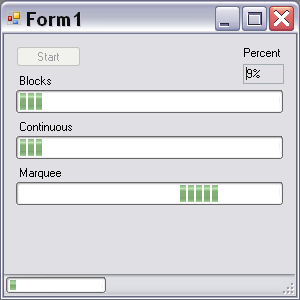
The form shows usage of standard progress bars with different styles. You may notice that Blocks and Continuous looks the same. It's about using of visual styles. MSDN says that it's normal and if visual styles are disabled, then we cannot use Marquee.
Marquee style surprised me. It always works! And one chance to stop it is to set the MarqueeAnimationSpeed property to zero.
The more interesting part of this sample is using custom cursors for progress indication. My first experiment was with loading cursor from resource. Perhaps it is good for cursors like state of art. But it is not a good idea to keep 101 cursor as embedded resource in application. Then each cursor is a simple text like "35%". So I decided to generate cursors in runtime.
This was simply done! We need to use Win32 function CreateIconIndirect that makes a cursor from bitmap for us.
[DllImport("user32.dll", EntryPoint = "CreateIconIndirect")]
private static extern IntPtr CreateIconIndirect(IntPtr iconInfo);
It uses icon info structure, so declare it:
private struct IconInfo
        {
            public bool fIcon;
            public Int32 xHotspot;
            public Int32 yHotspot;
            public IntPtr hbmMask;
            public IntPtr hbmColor;
        }
Then we need to generate bitmap with percentage text.
private Cursor GenerateCursor(int percent)
        {
            Bitmap imgColor = new Bitmap(32, 32,
        System.Drawing.Imaging.PixelFormat.Format24bppRgb);

            SolidBrush brush = new SolidBrush(color);
            SolidBrush brushMask = new SolidBrush(Color.White);
            string s = string.Format("{0}%", percent);
            using (Graphics g = Graphics.FromImage(imgColor))
            {
                SizeF size = g.MeasureString(s, font);
                if (size.Width > 32) size.Width = 32;
                if (size.Height > 32) size.Height = 32;
                g.FillRectangle(brushMask, 0, 0, 32, 32);
                g.DrawString(s, font, brush,
            (32 - size.Width) / 2, (32-size.Height)/2);
                g.Flush();
            }
            imgColor.MakeTransparent(Color.White);
            IconInfo ii = new IconInfo();
            ii.fIcon = false;
            ii.xHotspot = 16;
            ii.yHotspot = 16;
            ii.hbmMask = imgColor.GetHbitmap();
            ii.hbmColor = imgColor.GetHbitmap();
            unsafe
            {
                IntPtr iiPtr = new IntPtr(&ii);
                IntPtr curPtr = CreateIconIndirect(iiPtr);
                return new Cursor(curPtr);
            }
        }
I just create a bitmap with size 32x32 and draw a string on it with Graphics class. Please look at:
imgColor.MakeTransparent(Color.White);
We need it for transparency of background. You can try and delete this line.
All code for working with custom cursors as progress indicator is gathered in the PercentCursor class. You can set color and font for cursor text through Color and Font properties.
The class prepares 101 cursors at the constructor and on any change of color and font. Perhaps you will need a cursor with another text or you will draw it as a picture, then modify GenerateCursor function. Or you can use it alone to prepare a cursor when you need it. Then make it public.
As you can see, making a cursor is simple. You can also create a color cursor while standard Cursor loads only monochrome *.cur files.
More
I want to create an animated cursor, which is also not supported by the Cursor class.
History
- 2007/10/10: First version created
This member has not yet provided a Biography. Assume it's interesting and varied, and probably something to do with programming.



 General
  News
News  Suggestion
  Question
  Bug
Bug  Answer
  Joke
Joke  Praise
  Rant
Rant  Admin
Admin 


 Submit an article or tip

