Introduction
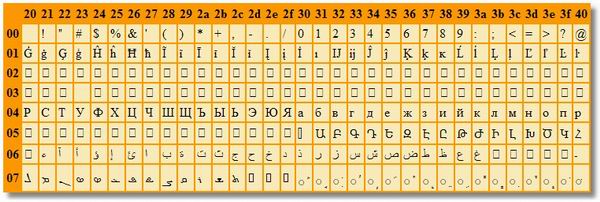
Ever wondered how the Unicode table looks like? Ever needed a special graphical character to simplify your graphical design? Want to know which alphabets are registered with your font?
Then here is a simple control that you may drop on a Web page to find it out!
Using the code
This code has been done with minimum effort. You will find inside neither comments, nor descriptions or designer attributes.
To register it on the Toolbox, download the code and expand in a new folder, create a blank solution, include this project, and build. Then create (or use) a Web application, go to the main form (just to have the Toolbox enabled), open the General tab and right-click inside. From the pop-up menu, click the Add/Remove Items... Then, click the Browse button and navigate to the Codes.dll file (in a folder like .../Bin/Debug). Select that file, accept, and the control should come alive in the Toolbox.
Properties
To simplify the usage of the control, I have considered the long time it needs for rendering the entire page. I have added so, properties to limit the number of columns and rows: ColFrom, ColTo, RowFrom and RowTo with defaults from 0 to 255 (including).
There is also a property for generating hints. When selected, this option produces a link to each char in the table with a tool tip showing the Unicode in the form \u2725. You may want to deactivate it when you desire to print the table on printer. Then, I suggest using also ColFrom and ColTo for limiting the table in the page-width limits.
How it works
Excepting properties and their defaults, the entire code is written in the Render overridden method. Here, I'm just generating a table with a header displaying the lower byte of the Unicode, and the first column - the higher byte.
Worth mentioning that in order to place the table at run time in the same position as at design time, I had to include code to generate the style of the table:
output.Write("<Table style=\"Z-INDEX: 107; POSITION: absolute; "+
  "LEFT: "+Style["LEFT"]+"; TOP: "+Style["TOP"]+
  "\" border=\"0\" cellspacing=\"2\" cellpadding=\"2\" bgcolor" +
  "=\"Lime\" ID="Table1"><TR><TD> </TD>");
And finally, to generate the content of each cell - with or without hints - the code is:
output.Write("<TD bgcolor=\"White\">");
if (DoHints)
  output.Write(string.Format("<A HREF=\"\" TITLE=\"\\u{0:x2}{1:x2}\">{2:c1}" +
                             "</a></td>",i,j,(Char)(256*i+j)));
else
  output.Write(string.Format("{0:c1}</td>",(Char)(256*i+j)));
Enjoy!
Horia Tudosie is Master of Sciences from the Polytechnic University of Bucharest - Computer Sciences.
Horia came in Canada in 1994 and have work in US 4 years since 2003.
He was working with various peculiar languages as Delphi and Forth, but mainly with C++, C#, WPF, and JavaScript. He mainly develops applications and Extensions for GIS.



 General
  News
News  Suggestion
  Question
  Bug
Bug  Answer
  Joke
Joke  Praise
  Rant
Rant  Admin
Admin 


 Submit an article or tip


 What do you mean?