Click here to Skip to main content
Email Password   helpLost your password?


Interactively highlight blocks in any arbitrary web page

This article shows how to take control of the content browsed in web pages while surfing. A few applications are described and provided in the demo app. Though the demo app is written using C#, the audience is much larger as the code involved can be directly translated to C++, VB or other languages. Besides that, HTML hooking is mostly done by Javascript.

HTML hooking ?

After 6 major releases of Internet Explorer, users are still stuck with a rather basic browser. As long as your only need is browse, everything is ok. Internet Explorer allows one to surf easily but what if you want to reuse an interesting part of a web page, subscribe to content updates, automate processing and so on ? In fact none of this is addressed in Internet Explorer 6.0 and those who try to take control of HTML face a giant gap :

HTML hooking technically speaking is a way for developers to subscribe for specific browser events in the goal of providing end-users with browser++ software, applications whose aim is to browse as smartly as possible and make the web a better, more reliable, place to work with.

HTML is in some way already fully hookable, as almost every HTML tag can be attached behaviours associated with clic events. But this doesn't really result in applications because the events work with HTML in the same highly protected web page space, giving very few if any hooking capabilities to the developer, and in turn very few additional features to the end-user.

The Internet Explorer API allows us to host a web browser instance and subscribe for specific events such like being signaled a page has been loaded and is in interactive mode. By taking advantage of this event, a few other tweakings and the fact that the Internet Explorer API provides the Document Object Model (as well), we are going to apply changes to HTML code between the moment a web page is just loaded and the moment the web page is ready and displayed, giving us the ability to control what is actually seen and how it behaves. Let us begin with a first example.

Highlighting blocks in an arbitrary web page

Starting from a standard Form-based C# application, we drop the web browser control onto it, and subscribe for the event fired when the web page is ready, namely OnNavigateComplete:


Subscribing for the page-ready event

When the page is ready, if we want to change the HTML code or apply events, we can take advantage of a method called execScript available at the IHTMLWindow level and provide it with javascript code :
// event called when the web browser updates its view and finishes 

// parsing a new web page

private void OnNavigateComplete(object sender, 
                   AxSHDocVw.DWebBrowserEvents2_NavigateComplete2Event e)
{
    String code = <...some javascript code...>

    // exec Javascript

    //

    IHTMLDocument2 doc = (IHTMLDocument2) this.axWebBrowser1.Document;
    if (doc != null)
    {
        IHTMLWindow2 parentWindow = doc.parentWindow;
        if (parentWindow != null)
            parentWindow.execScript(code, "javascript");
    }
}

That's why we now need the javascript magic. How can we highlight blocks? This raises two questions: what is a block when all we have is a hierarchical tree of HTML tags (the infamous DOM) ? how to do highlighting ?

The first question answer is obvious from the experienced web designer point of view. Needless to say that 90% of web pages use <table> tags to position the content in the web page. Lucky we are, we are able to assume that table blocks are in fact web components, for instance navigation bars, main content, credit bar, and so on. Of course, this is not always true, but this is way true. Just try it, that's demonstration by the example !

HTML reverse engineering will be discussed in another article.

The second answer follows the first. We are going to check HTML elements under the mouse cursor. The processing needs to be fast enough to avoid to uselessly slow down the surfing experience. We simply use the DOM capabilities to traverse element parents from the current element and we seek for a <table> tag. Once we have got it, we just change on-the-fly its border and background color so it highlights. We are of course lucky guys because each change we do is automatically reflected in the web page without full refresh, that's one of the benefits of dynamic HTML. Here we go with the javascript code (boxify.js) :

  document.onmouseover = dohighlight;
  document.onmouseout = dohighlightoff;

  var BGCOLOR = "#444444";
  var BORDERCOLOR = "#FF0000";

  function dohighlight()
  {
    var elem = window.event.srcElement;

    while (elem!=null && elem.tagName!="TABLE")
        elem = elem.parentElement;

    if (elem==null) return;

    if (elem.border==0)
    {
        elem.border = 1;

        // store current values in custom tag attributes

        //

        elem.oldcolor = elem.style.backgroundColor; // store backgroundcolor

        elem.style.backgroundColor = BGCOLOR; // new background color


        elem.oldbordercolor = elem.style.borderColor; // same with bordercolor

        elem.style.borderColor = BORDERCOLOR;

        var rng = document.body.createTextRange();
        rng.moveToElementText(elem);

// following code is in comment but ready to use if required

// -> it can select the highlighted box content

// -> or put automatically the content in the clipboard to ease copy/paste

/*      var bCopyToClipboardMode = 1;
        if (!bCopyToClipboardMode)
            rng.select();
        else
            rng.execCommand("Copy"); */
    }
  }

  function dohighlightoff()
  {
    var elem = window.event.srcElement;

    while (elem!=null && elem.tagName!="TABLE")
        elem = elem.parentElement;

    if (elem==null) return;

    if (elem.border==1)
    {
        elem.border = 0;

        // recover values from custom tag attribute values

        elem.style.backgroundColor = elem.oldcolor;
        elem.style.borderColor = elem.oldbordercolor;
    }
  }
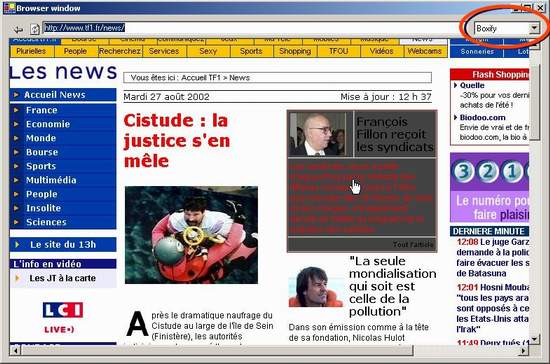
To play with interactive highlighting, we have a combobox in the right hand-corner on the application. Here is how the combobox has been developed : we have dropped this component from the Toolbox Window onto the Form, then inserted the selectable options in the Items Collection from the Properties Window, and chose "DropDownList" as combo-box style to disable edition. One thing we could'nt do from the Properties Window was to select the initial index, and had to manually add code for it : this.comboBox1.SelectedIndex = 0;. Resulting in that combo-box of me :


Adding an unusual combo-box to a web browser app

As the combo-box inherently means, in this article we are here with a few other hookings to play with. Let me first introduce how state switching is managed :

protected enum NavState
{
    None,
    NoPopup,
    Boxify
};


// event called when selection changes in the combobox

private void OnNavigationModeChanged(object sender, 
                                     System.EventArgs e)
{
    if ( comboBox1.Text=="NoPopup" )
    {
        NavigationState = NavState.NoPopup;
    }
    else if ( comboBox1.Text=="Boxify" )
    {
        NavigationState = NavState.Boxify;
    }
    else
    {
        NavigationState = NavState.None;
    }

    // synchronize UI

    SyncUI("");
}


// event called when the web browser updates its view and finishes 

// parsing a new web page

private void OnNavigateComplete(object sender, 
               AxSHDocVw.DWebBrowserEvents2_NavigateComplete2Event e)
{
    String sURL = (string) e.uRL;
    if (sURL=="about:blank")
        return;

    SyncUI( sURL );

}


// applogic

//


protected void SyncUI(String sURL)
{
    if (sURL.Length>0)
        textBox1.Text = sURL; // update UI


    String code;

    if ( NavigationState == NavState.NoPopup )
    {
        // squeeze down onload events (when web page loads)

        String code1 =	"document.onload=null;" +
                        "window.onload=null;" +
                        "for (i=0; i<window.frames.length; i++) { " +
                        " window.frames[i].document.onload=null;" + 
                        "window.frames[i].onload=null; };";

        // squeeze down onunload events (when web page is closed)

        String code2 =	"document.onunload=null;" +
                        "window.onunload=null;" +
                        "for (i=0; i<window.frames.length; i++) { " +
                        " window.frames[i].document.onunload=null;" + 
                        "window.frames[i].onunload=null; };";

        code = code1 + code2;

     }
     else if ( NavigationState == NavState.Boxify )
     {
         // read boxify.js

         FileStream fin = new FileStream("boxify.js", FileMode.Open, 
                                    FileAccess.Read, FileShare.ReadWrite) ;
         StreamReader tr = new StreamReader(fin) ;
         code = tr.ReadToEnd();
         tr.Close();
         fin.Close();

         if (code.Length==0) Console.WriteLine("Cannot find boxify.js file");
     }
     else
     {
         // stop boxify.js

         //

         code = "document.onmouseover = null; document.onmouseout = null;"  ;
     }

     // exec Javascript

     //

     IHTMLDocument2 doc = (IHTMLDocument2) this.axWebBrowser1.Document;
     if (doc != null)
     {
          IHTMLWindow2 parentWindow = doc.parentWindow;
          if (parentWindow != null)
               parentWindow.execScript(code, "javascript");
     }

}

Banning popups

Another nice HTML hooking technique is the one for preventing popups from opening. Web designers are used to the technique of executing javascript when quitting the current web page, and a lot of them use it on the purpose of opening popup pages (especially p0rn). What we do is, once the page is ready, overwrite these "callbacks" and force them to null.

Because the DOM is a rather richer object model, it is not enough to force null at the document level (the object representing the web page), we need to do this at the window level, and at any subwindow levels, known as frames.

See code above.

Saving HTML for reuse

Even if saving HTML for reuse deserves an article for itself, let me just initiate the few lines of code needed to do just that. In fact if we used C++ we would have casted the IHTMLDocument interface to IPersistFile and applied the Save() method on it, but in C# the replacement for IPersistFile is known as UCOMIPersistFile, in the System.Runtime.InteropServices namespace. What follows is what is needed to store the HTML code on your hard drive using C# :
IHTMLDocument2 doc = (IHTMLDocument2) this.axWebBrowser1.Document;
UCOMIPersistFile pf = (UCOMIPersistFile) doc;
pf.Save(@"c:\myhtmlpage.html",true);
It's that easy.
You must Sign In to use this message board.
 
 
Per page   
 FirstPrevNext
Question(VERY URGENT) how to collect selected table all TD values in an array or dataset [modified]
k3072002
20:49 4 Jan '10  
can any one help me out for collecting all td values from a selected table and save it in a dataset.

awaiting for yor quick reply

Thanks in advance.

modified on Tuesday, January 5, 2010 2:23 AM

Questionhow i can save url to Mhtml file?
Mohammad Hammad
6:27 18 Jun '07  
is it possible to re use this code for saving mhtm file
IHTMLDocument2 doc = (IHTMLDocument2) this.axWebBrowser1.Document;
IPersistFile pf = (IPersistFile) doc;
pf.Save(@"c:\myhtmlpage.mht",true);

Note
UCOMIPersistFile becomes obsolete and changed to IPersistFile

please help me

Hammad

GeneralAny idea about MSIE 7.0?
Akash Kava
14:10 2 Nov '06  
MSIE 7.0 installed machines return parentWindow as an exception that Can not cast to IHTMLWindow2

Programming is fun.
-Akash Kava

QuestionHow to get the return value from parentWindow.execScript function [modified]
Mukkesh K
10:21 6 Jun '06  
Hi All,

parentWindow.execScript(GetSaveScript(entryName), "JavaScript");

the GetSaveScript return some string value. How to get that value in .Net

i tried

object valueasStr = parentWindow.execScript(GetSaveScript(entryName), "JavaScript");

if(valueasStr != null)
{
string myValue = valueasStr as string
}

But valueasStr is always null...

Please help me...

Thanks

Mukkesh


-- modified at 15:32 Tuesday 6th June, 2006
AnswerRe: How to get the return value from parentWindow.execScript function
amedeo
3:13 31 Jul '07  
You can add un new textbox element es.

mshtml.IHTMLElement el = doc.createElement("input");
el.id = "myValue";
doc.appendChild((mshtml.IHTMLDOMNode)el);

then you ca execute

parentWindow.execScript(document.all['myValue'].value = GetSaveScript(entryName), "JavaScript");

then you care get value using...
mshtml.IHTMLElement el = doc.getElementById("myValue");
object val = el.getAttribute("value",0);

Hi.

Generalhow 2 work with combo box using axWebBrowser1 ?
vedmack
23:37 3 Jan '06  
for example in this site :
http://www.google.com/advanced_search?hl=en

how i can choose an option in any of the multiline combo boxes?
like Language, File Format.....
i mean for example in Language i wanna select some language
and in file format i wanna select pdf

thx in advance....


GeneralValue of a JavaScript variable inside the webBrowser control?
rwelte
1:34 27 Apr '05  
Hi,

does anyone know if it's possible to read the value of a JavaScript variable and pass it to the C# Code? (The JavaScript is embedded in a HTML Page and executed in the webBrowser Module)

Thanks in advance, RandySmile
GeneralRe: Value of a JavaScript variable inside the webBrowser control?
Priyank Bolia
4:29 29 Apr '05  
I hope this will help you... It will take a javascript, function name and parmaters in comma separated format and execute the javascript...
using System;
using System.Drawing;
using System.Collections;
using System.ComponentModel;
using System.Windows.Forms;
using System.Data;
using System.CodeDom.Compiler;
using System.Reflection;
using Microsoft.JScript;

namespace JsInterpreter
{
///
/// Summary description for Form1.
///

public class JsInterpreter : System.Windows.Forms.Form
{
private System.Windows.Forms.Button buttonOK;
private System.Windows.Forms.TextBox textBoxFunction;
private System.Windows.Forms.TextBox textBoxEntry;
private System.Windows.Forms.GroupBox groupBox;
private System.Windows.Forms.TextBox textBoxParameter;

private static object _jscriptInterpreter = null;
private static Type _jscriptType = null;
private static string _jscriptSource = "";

///
/// Required designer variable.
///

private System.ComponentModel.Container components = null;

public JsInterpreter()
{
//
// Required for Windows Form Designer support
//
InitializeComponent();

//
// TODO: Add any constructor code after InitializeComponent call
//
}

///
/// Clean up any resources being used.
///

protected override void Dispose( bool disposing )
{
if( disposing )
{
if (components != null)
{
components.Dispose();
}
}
base.Dispose( disposing );
}

#region Windows Form Designer generated code
///
/// Required method for Designer support - do not modify
/// the contents of this method with the code editor.
///

private void InitializeComponent()
{
this.buttonOK = new System.Windows.Forms.Button();
this.textBoxFunction = new System.Windows.Forms.TextBox();
this.textBoxEntry = new System.Windows.Forms.TextBox();
this.groupBox = new System.Windows.Forms.GroupBox();
this.textBoxParameter = new System.Windows.Forms.TextBox();
this.groupBox.SuspendLayout();
this.SuspendLayout();
//
// buttonOK
//
this.buttonOK.Location = new System.Drawing.Point(104, 238);
this.buttonOK.Name = "buttonOK";
this.buttonOK.Size = new System.Drawing.Size(70, 24);
this.buttonOK.TabIndex = 4;
this.buttonOK.Text = "Execute";
this.buttonOK.Click += new System.EventHandler(this.buttonOK_Click);
//
// textBoxFunction
//
this.textBoxFunction.Location = new System.Drawing.Point(10, 24);
this.textBoxFunction.Multiline = true;
this.textBoxFunction.Name = "textBoxFunction";
this.textBoxFunction.ScrollBars = System.Windows.Forms.ScrollBars.Both;
this.textBoxFunction.Size = new System.Drawing.Size(260, 142);
this.textBoxFunction.TabIndex = 1;
this.textBoxFunction.Text = "";
//
// textBoxEntry
//
this.textBoxEntry.Location = new System.Drawing.Point(10, 176);
this.textBoxEntry.Name = "textBoxEntry";
this.textBoxEntry.Size = new System.Drawing.Size(260, 20);
this.textBoxEntry.TabIndex = 2;
this.textBoxEntry.Text = "";
//
// groupBox
//
this.groupBox.Controls.AddRange(new System.Windows.Forms.Control[] {
this.textBoxParameter,
this.textBoxFunction,
this.textBoxEntry,
this.buttonOK});
this.groupBox.Location = new System.Drawing.Point(6, 8);
this.groupBox.Name = "groupBox";
this.groupBox.Size = new System.Drawing.Size(280, 272);
this.groupBox.TabIndex = 0;
this.groupBox.TabStop = false;
this.groupBox.Text = "JavaScript Interpreter:";
//
// textBoxParameter
//
this.textBoxParameter.Location = new System.Drawing.Point(10, 208);
this.textBoxParameter.Name = "textBoxParameter";
this.textBoxParameter.Size = new System.Drawing.Size(260, 20);
this.textBoxParameter.TabIndex = 3;
this.textBoxParameter.Text = "";
//
// JsInterpreter
//
this.AcceptButton = this.buttonOK;
this.AutoScaleBaseSize = new System.Drawing.Size(5, 13);
this.ClientSize = new System.Drawing.Size(294, 290);
this.Controls.AddRange(new System.Windows.Forms.Control[] {
this.groupBox});
this.FormBorderStyle = System.Windows.Forms.FormBorderStyle.FixedDialog;
this.MaximizeBox = false;
this.MinimizeBox = false;
this.Name = "JsInterpreter";
this.SizeGripStyle = System.Windows.Forms.SizeGripStyle.Hide;
this.StartPosition = System.Windows.Forms.FormStartPosition.CenterScreen;
this.Text = "ComScore";
this.groupBox.ResumeLayout(false);
this.ResumeLayout(false);

}
#endregion

///
/// The main entry point for the application.
///

[STAThread]
static void Main()
{
Application.Run(new JsInterpreter());
}

private void buttonOK_Click(object sender, System.EventArgs e)
{
ICodeCompiler compiler;
compiler = new JScriptCodeProvider().CreateCompiler();

CompilerParameters parameters;
parameters = new CompilerParameters();
parameters.GenerateInMemory = false;

_jscriptSource = "package JscriptInterpreter\n{\nclass JscriptInterpreter\n{\n";
_jscriptSource += textBoxFunction.Text;
_jscriptSource += "\n}\n}";

CompilerResults results;
results = compiler.CompileAssemblyFromSource(parameters, _jscriptSource);

Assembly assembly = results.CompiledAssembly;
_jscriptType = assembly.GetType("JscriptInterpreter.JscriptInterpreter");

_jscriptInterpreter = Activator.CreateInstance(_jscriptType);

Object objResult;
if(textBoxParameter.Text != null && textBoxParameter.Text.Length > 0)
{
Object[] objArr = textBoxParameter.Text.Split(',');
objResult = _jscriptType.InvokeMember(textBoxEntry.Text, BindingFlags.InvokeMethod, null, _jscriptInterpreter, objArr);
}
else
{
objResult = _jscriptType.InvokeMember(textBoxEntry.Text, BindingFlags.InvokeMethod, null, _jscriptInterpreter, null);
}
MessageBox.Show(objResult.ToString());
}

}
}


http://www.priyank.in/
GeneralIs there any way of notification that Javascript has changes the HTML DOM ?
nabil_shams
23:52 19 Dec '04  
hi ,
I have made a simple page which has one form . the form has one button, which is not a submit , it is a normal .. as I clicks that button a javascript function executes on the page and change the HTML DOM , ie , It add one more button in the same page .. so now I have two buttons , If I check the DOM it is updated now and not it contains 2 buttons , I just want to know that ,does the HTML document fires any event to let its user know that the javascript or some other script has changes the HTML Document , so I can update my file too .
thanx

GeneralCapture all alert messages and close them
nabil_shams
4:00 9 Dec '04  
Hi , I have seen this project , nice work , I am almost doing the same thing but I want to hook all the Alert message , ShowModalDialog messages , Prompt message and then want to call an Event handler and in that event handler I want to destry the message and want to to some work , is it possible for JAvascript Objects .. thanx
GeneralRe: Capture all alert messages and close them
Stephane Rodriguez.
10:43 14 Dec '04  

Not with javascript I am afraid. With C++ though, using IDocHostUIHandler (if I remember well), it should be possible to disable javascript errors (alert messages), and have a hold on pop up boxes. Being low-level enough, you could altenratively use a BHO and hook up all child windows.


GeneralRe: Capture all alert messages and close them
mstbcn
3:09 23 Aug '06  
you can disable most scripting errors from being raised by setting the Silent property of the browser to true

GeneralTrapping image display?
Narendra Chandel
23:30 1 Apr '04  
Is there any way using your technique, so that I can catch events when a particular image is about to be displayed or after displayed can I change content of the image.
For example I want to keep my images encrypted at server, but when I am displaying under custom browser I will decrypt them?


__NarendraC
GeneralRe: Trapping image display?
Stephane Rodriguez.
9:33 2 Apr '04  
Yes, you can do that by subscribing for the DispHTMLImgEvents event interface, especially the onload() method, declared in mshtml.dll

How to achieve that? This interface is an event interface and, as such, is subscribed by adding a connection point. This article (http://www.codeproject.com/buglist/iefix.asp) shows how to subscribe another event interface, DWebBrowserEvents (implemented in shdocvw.dll) and shows a code pattern you could rely on.

Good luck.

GeneralHow to save image in webpage?
w14243
23:48 24 Mar '04  
Rod,

In your article, 'Saving HTML for reuse' is very useful for me. I have a question on how to save image in WebBrowser control. This is my code:

oDocument = (mshtml.IHTMLDocument2)this.TheWebBrowser.Document;
int i = 0;
string sname;

UCOMIPersistFile f;

foreach( mshtml.HTMLImgClass img in oDocument.images )
{
f = (UCOMIPersistFile)img; // fail
sname = "j:\\z\\" + i.ToString() + ".jpg";
f.Save( sname, true );
i++;
}

But it failed.

How to use similar method to save an image, just like 'Save image as...' in IE image context menu? The 'Save as' dialog should not be displayed.

Would you please give me some advice?

My email is w14243@email.mot.com

Regards,

GeneralRe: How to save image in webpage?
Stephane Rodriguez.
2:02 25 Mar '04  
Unfortunately, the IHTMLImgElement interface does not inherit the IPersistXXX interface and as a result cannot be bound to save the image locally.

There is alternative solution though. Once you know the actual url of each image (make sure not to process the same image multiple times), you can download it from the web as a stream, and then do whatever you want with it, including saving it to a local file. The nice thing about downloading the image from the web is that, by default, it reuses the cache of Internet Explorer and thanks to that won't really download images twice.

A general code for downloading a resource like an image from the web is as follows :

HttpWebRequest h = (HttpWebRequest) WebRequest.Create("http://weblogs.asp.net/heatherleigh/contact.aspx");
StreamReader sr = new StreamReader( h.GetResponse().GetResponseStream() );
// sr.ReadToEnd(); for instance
// or create a filewriter and store the stream there


GeneralRe: How to save image in webpage?
w14243
3:08 25 Mar '04  
Thank you. I found the way.

GeneralRe: How to save image in webpage?
rrrado
22:06 18 Apr '04  
I also need this, but unfortunately image I need to download is not cached because of HTTP cache control, and is dynamically created, so it is different every time it is downloaded. So I can't use this solution. I've found that it is stored in temporary internet files anyways, but I couldn't find it using standard URL cache control APIFrown


rrrado
GeneralRe: How to save image in webpage?
iamduyu
9:08 14 May '07  
if the response says:no-cache,it'll not be saved to cache folder by winInet(IE).it exists only in memory.

----------------------

attitude is everything

GeneralRe: How to save image in webpage?
rrrado
3:34 15 May '07  
I know :/ original image is not saved.


rrrado

GeneralRe: How to save image in webpage?
Berdon Magnus
19:54 24 May '07  
If you're trying to load a dynamic image that has private content dependent upon a certain session on the webpage or something, then I have a solution. Don't load the image in the web browser, load the url though, then:

HttpWebRequest h = (HttpWebRequest)WebRequest.Create(URL);
h.CookieContainer = new CookieContainer();

foreach (string Cooky in webBrowser.Document.Cookie.Split(';'))
{
h.CookieContainer.Add(new Cookie(Cooky.Split('=')[0].Replace(" ", ""), Cooky.Split('=')[1].Replace(" ", ""), DOMAIN, URL));
}
HttpWebResponse response = (HttpWebResponse)h.GetResponse();
Stream simg = response.GetResponseStream();
Image bimg = new Bitmap(simg);

GeneralTD AND TR
wblairIV
12:21 26 Aug '03  
I want to be able to suck out the text in a particular td within the table. How can I make that work? Any ideas?
GeneralRe: TD AND TR
Stephane Rodriguez.
21:22 26 Aug '03  
This article[^] shows how. It's in French but you get the idea.


-- modified at 4:07 Tuesday 18th October, 2005
GeneralRe: TD AND TR
claudio aparecido
21:03 10 Oct '04  
Its too simple:Big Grin
tableId.children(0).children.tags("TR")(indexTr).children.tags("TD")(indexTd).innerText
where :
tableId =>It is the table's id
indexTr =>It's the row number(sequence)
indexTd =>It's the cell number in the row(sequence)

SmileI hope it's usefullSmile

huahuahuahuahuah hauh uahua huha uha uhu ahuah uah uha u

GeneralVersion in VC++ 6.0
tsz
15:24 20 Jan '03  
Do you have the version of VC++ 6.0?
Thanks!


Last Updated 4 Sep 2002 | Advertise | Privacy | Terms of Use | Copyright © CodeProject, 1999-2010
