Introduction
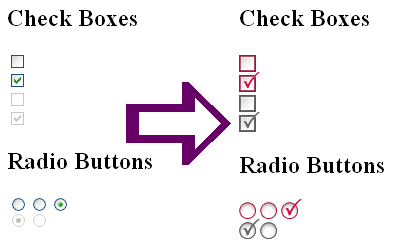
The age old problem of styling HTML inputs has plagued developers for years, as the current CSS rules (<2.0) provide limited scope for styling. This method offers a solution to this problem by replacing all page inputs (of type radio or checkbox) with appropriate image representations.
Background
The original code was written by BrainError. All credits are to him for his methodology. I have simply extended the functionality of his code by adding support for radio buttons and disabled inputs. Please visit his site for the original implementation.
Using the code
The code is completely self contained. You simply need to add the JS file to any of your pages where you want the replacement to occur and it will do the biz for you. Simply add the following to the HEAD section of your HTML pages or copy and paste all the code into your JS source:
<script language="JavaScript" src="wdx_inputreplacer.js">
</script>
Open the JS file and update the following lines with appropriate locations to your images for replacement:
var imgCheckboxFalse = 'images/checkbox_unchecked.gif';
var imgCheckboxTrue = 'images/checkbox_checked.gif';
var imgCheckboxFalseDisabled =
              'images/checkbox_unchecked_disabled.gif';
var imgCheckboxTrueDisabled =
               'images/checkbox_checked_disabled.gif';
var imgRadioFalse = 'images/radio_unchecked.gif';
var imgRadioTrue = 'images/radio_checked.gif';
var imgRadioFalseDisabled =
               'images/radio_unchecked_disabled.gif';
var imgRadioTrueDisabled =
               'images/radio_checked_disabled.gif';
You could remove the line:
window.onload = init;
from the bottom of the JS source file and call the init() function from your page's BODY or manually if you like.
The code is highly cross-browser compatible as the method is very basic. It will also continue to provide the functionality (without the visual improvements) if JavaScript is disabled.
Notes before use
All inputs must be given unique IDs (which is fine if you are a .NETter) otherwise the script will not be able to identify which input has been checked/unchecked.
Future changes
The current implementation is not accessible as the images swapped in do not strictly exist in the DOM therefore cannot be tabbed to. If I find the need I will update this article with a method to do so. However, it would require pre-adding the visual images into the page source and therefore would not be as "plug and play" as this version, however it may provide a method for the replacement of specific inputs rather than all.
References



 General
  News
News  Suggestion
  Question
  Bug
Bug  Answer
  Joke
Joke  Praise
  Rant
Rant  Admin
Admin 


 Submit an article or tip


 . Just wondering... how would it be possible to be able to navigate the inputs with the tab button?