Introduction
Did you know that your job can be much easier? Now you can create fully editable web sites without extensive coding. Kentico CMS (http://www.kentico.com/) gives you all you need for a price that will suit every budget.
Quick Overview
Kentico CMS is a full-featured content management system for dynamic web sites. It’s completely web-based and provides you with many useful features:
- Fully customizable ASP.NET page templates
- Tree hierarchy of pages, documents and files
- Editable regions and structured document templates with custom fields
- Workflow and approval
- Versioning and archiving
- Content scheduling and expiration
- Document-level permissions
- Multilingual support
- Full-text search
- 27 built-in smart controls, such as menu, grid, master-detail view, etc.
- ... and much more.
Kentico CMS is:
- Open - It’s fully documented and delivered with the administration interface’s source code open for re-branding and customization.
- Flexible - Whatever you can do in ASP.NET, can be done with Kentico CMS. You have full control over your web site structure, design, page layout and HTML code.
- Extendible – You can easily define your own page templates, document types with custom fields and create custom modules.
Architecture and System Requirements
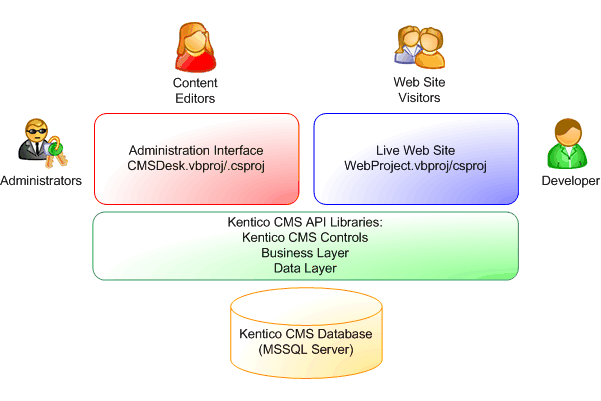
Kentico CMS is a three-tiered application. It uses the standard architecture of ASP.NET 1.1 and Microsoft SQL Server 2000 which means you can easily deploy it using FTP on a shared hosting server without any changes in server configuration.
Your new web site is a standard Visual Studio.NET project written in Visual Basic .NET or C# (you can use other development tools as well). Page templates are standard ASPX files that receive a URL parameter and display specified content. If it’s necessary, you can add your .NET code to page templates as you do it now.
Figure 1 – Kentico CMS uses a three-tiered architecture with standard ASP.NET web projects.
If you’re familiar with ASP.NET, HTML and CSS, you will be able to learn Kentico CMS very quickly.
The supported client browsers for the administration interface are Internet Explorer 6.0, Netscape 7.1, Mozilla 1.7 and FireFox 1.0. The browser compatibility of your site depends on your code and on the controls you use. All Kentico CMS controls render valid XHTML code and their design can be customized using CSS styles.
Administration Interface
You can edit your web site using Kentico CMS Desk, which is the administration interface. Once you’ve signed in, you’ll be offered six core modules:
- My Desk module, with an overview of your documents and workflow status.
- Content module, for management of documents and files.
- Tools module, with built-in and custom modules.
- Administration module, which allows you to manage users, roles and global permissions.
- Development module, which contains all system settings, such as document types, page templates, transformations, queries, etc.
The
Content module allows you to browse and modify the
tree structure of pages and documents. It provides you with all the tools you need – site view, editing, versioning, workflow and document permissions.
Figure 2 – The Content module organizes all documents in the structure that reflects the site map.

Content Editing
Kentico CMS offers two ways of storing and editing content: Editable Regions and Document Templates.
Editable regions allow you to easily convert a static page into dynamic. You only add a few special tags that specify which parts of the page should editable. This way is useful for unstructured content, such as Home page, About Us page, etc.
Figure 3 – Editable regions allow you to easily modify unstructured page content, such as Contact Us page.
Document templates allow you to define new document types with custom fields, such as “PC”, “notebook”, “car”, “mobile phone”, etc. This way is recommended for structured content and it allows you to completely separate content from design. You will typically use it for product catalogs and various listings.
Figure 4 – Every document template has its own editing form with custom fields.
Document Templates and Custom Fields
How many hours do you usually spend developing editing forms for articles, news or product details? With Kentico CMS, you can use a powerful wizard to define your own document types in a few moments. The wizard automatically generates:
- Database table
- Queries
- Editing form with custom fields of different types and validation
For example, if you’re creating a real-estate site, you can use the wizard to define a document template named “House” with the fields: Price, Location, Description, Available from, Photo, Bedrooms, etc.
Figure 5 – The Document Template Designer automatically creates an underlying database table for your content, generates queries and an editing form.
For every custom field, you can choose from 6 SQL data types:
- Text
- Longtext
- Integer
- Decimal
- Bit
- Date/time
You can also choose the type of every field:
- Textbox
- Textarea
- WYSIWYG Editor (FCKEditor, FreeTextBox or any third-party editor)
- Drop-down list
- Checkbox
- Calendar
- Your own user control (ASCX)
Can you imagine how much time that saves?
No coding, no manually written SQL, no testing – the editing form is immediately ready-to-use and your users can start entering structured content straight away!
Since Kentico CMS stores custom document types in standard database tables, you can easily:
- Separate content and style.
- Create custom reports from entered data.
- Search and sort data by the value of a chosen field.
- Integrate a Kentico CMS database with your existing systems.
Page Templates
Now that you know how to edit content in Kentico CMS, you might want to know how you can publish it on your web site.
When you define a new page in the site structure, you need to specify a page template. The page template is a common ASPX page that receives a Request.Querystring("aliaspath") parameter. This parameter determines which document should be displayed – it’s the path of the document in the tree structure. The page templates must be prepared by developer and registered in Kentico CMS Page Template Catalog.
When a user requests a page, Kentico CMS reads the current URL in the format www.myweb.com/products/product1.aspx and displays content using a predefined page template. It actually rewrites the request to www.myweb.com/products.aspx?aliaspath=/products/product1. The products.aspx page is your page template.
Figure 6 – Kentico CMS parses the current URL, looks up an appropriate page template and calls it.
You can easily create a new page template in Visual Studio.NET or some other development tool. You simply create a new web form, place controls on it, set their parameters and, if necessary, add some VB.NET or C# code.
Figure 7 – You can easily create page templates in Visual Studio.NET 2003 as standard ASP.NET pages in VB.NET or C#.
Here's an example of a simple ASP.NET page with one editable region:
<%@ Page Language="vb" AutoEventWireup="false" Codebehind="Contact.aspx.vb"
Inherits="CorporateSite.Contact"%>
<%@ Register TagPrefix="uc1" TagName="Header" Src="Header.ascx" %>
<%@ Register TagPrefix="cc1" Namespace="Kentico.CMS.CMSControls"
Assembly="Kentico.CMS.CMSControls" %>
<html>
<head>
<%=CorporateSite.Functions.GetPageTags("/contact")%>
</head>
<body>
<form id="Form1" method="post" runat="server">
<cc1:CMSPageManager id="CMSPageManager1" runat="server">
</cc1:CMSPageManager>
<uc1:Header id="Header1" runat="server"></uc1:Header><BR>
<cc1:CMSEditableRegion id="CMSEditableRegion1" runat="server"
RegionTitle="Main Text" RegionType="HtmlEditor"
DialogHeight="400" DialogWidth="700"></cc1:CMSEditableRegion>
</form>
</body>
</html>
Kentico CMS Controls and Kentico CMS API
Have you ever written code for a DHTML dropdown menu or created your own site map? You don’t need to do that any more! Kentico CMS is delivered with 27 controls that you can simply drag and drop on your page template in Visual Studio.NET. The controls include:
- drop-down DHTML menu, tab control, tree menu, list menu
- document viewer with XSLT and ASCX support
- grid, repeater, datalist, master-detail view
- bread crumbs
- site map
- search dialog
- event calendar
- product comparison
- and others.
See the
Control Gallery on-line.
The controls read the data from the database using automatically generated queries or using your custom SQL queries. You don’t have to write any ADO.NET and data-binding code, which greatly reduces your development time.
Since Kentico CMS is a standard ASP.NET application, you can also use any third-party controls. You can use Kentico CMS API to retrieve content as a DataSet or XML and bind it to any control.
Kentico CMS Controls and API are fully documented and delivered with many examples so that you can easily learn how to use them.
Security
Have you ever dreamt about document-level permissions for your web content? Your dreams have come true! The philosophy of document permissions in Kentico CMS is very similar to Windows NTFS file system, but everything is stored in the database. You can even specify permissions for particular sections by inheriting permissions from the parent document which makes security administration much easier.
Figure 8 – The philosophy of document permissions is very similar to the Windows NTFS file system, including permissions inheritance.
Besides, you can specify global permissions that override local permissions. Global permissions can be assigned to customizable roles in the permission matrix.
Restricted Areas for Registered Users
Kentico CMS allows you to create password-protected areas, such as intranets or extranets for partners. Once users sign in they can only see content they are allowed to read. This means that you don’t have to write any additional code for security and personalization – everything is ensured by Kentico CMS.
Multilingual Support
Kentico CMS allows you to create multilingual web sites in any number of languages. You can easily switch between languages on your web site as well as in the editing interface. The user’s preferred language can be recognized using a number of mechanisms – by domain name, by the client’s browser settings, or it can be chosen manually by the user. When the document is not available in the chosen language, the default language version can be displayed instead.
Also the administration interface supports multiple languages and you can easily create your own translation. We provide the following languages at the moment: English, German, Italian, Dutch and Czech.
Workflow and Approval
Do you need to enforce business processes for every piece of content published on the web site? With Kentico CMS, you can define different workflows for articles, news, product details, etc. You can organize the whole publishing process into a linear, fully customizable workflow.
When a user submits a document for approval, the people responsible for the next step can be automatically notified by e-mail and can also find all the documents waiting for their approval in the My Desk module.
Figure 9 – Kentico CMS provides a fully customizable workflow process for every document type.
Versioning and Archiving
What happens if you delete an article by accident or need to return to the previous version? Kentico CMS allows you to store all document versions. The system works similarly to Visual Source Safe:
- You check out the document, which means that you are the only user who can edit it.
- After you finish your modifications, you check it in and set a new version number.
You can
roll back to any previous version. The versioning system also allows you to remove the document from the web site while still keeping it in the
archive. Then, you can
restore the document at any time.
Full-Text Search
Kentico CMS allows you to incorporate full-text search in one minute using built-in controls. The search engine searches all document types (news, articles, products, etc.) as well as uploaded files (PDF, TXT, DOC, XLS, HTML) and displays results in one listing.
Source Code
The Kentico CMS administration interface is delivered with VB.NET and C# source code in all editions. You can also purchase the full source code of all libraries.
Regardless of the license you buy, you are free to make modifications to the application code, use your logo and design and even distribute the modified application as a part of your services to your clients after purchasing an appropriate license for them.
Editions and Licensing
As you can see, Kentico CMS is a powerful content management solution. Still, its price is even more interesting – starting from $349 per web site! For this price you get the content management system that can be run on your own or hosted server. If you consider how many hours you would spend creating a similar solution, the “build versus buy” decision is easy.
Use Kentico CMS and become more productive today! You can purchase the product at http://www.kentico.com/EN/Buy. Your purchase is risk-free since we provide a 30 day money back guarantee!
| Feature | Express Edition | Professional Edition |
| Content Creation |
| Tree structure of documents | Yes | Yes |
| Editable regions | Yes | Yes |
| Custom document types | No, only the built-in types | Yes |
| Versioning and archiving | Yes | Yes |
| Customizable workflow | No | Yes |
| Scheduling and expiration | Yes | Yes |
| Multilingual web sites | Yes | Yes |
| Multilingual administration | Yes | Yes |
| Content and style separation | Yes | Yes |
| WYSIWYG editor | Yes | Yes |
| CSS support | Yes | Yes |
| File management | Yes | Yes |
| Security |
| Global permissions | Yes | Yes |
| Customizable roles | Yes | Yes |
| Restricted areas | Yes | Yes |
| Document-level permissions | No | Yes |
| Development |
| Visual Studio.NET support | Yes | Yes |
| Source code of the administration interface (VB.NET and C#) | Yes | Yes |
| Detailed documentation of API, database and controls | Yes | Yes |
| 27 ASP.NET controls | Yes | Yes |
| Content Delivery |
| Customizable ASP.NET page templates | Yes | Yes |
| Full-text search | Yes | Yes |
| Friendly URLs | Yes | Yes |
| Extending Modules |
| Possibility to add custom modules | Yes | Yes |
| Newsletter module | No | Yes |
| Staging module | No | Available in September |
| BizForms module (easily create contact forms, surveys, capture data on the web) | No | Available in September |
| Prices |
| 1 web site | $349
$262 for partners | $499
$375 for partners |
| 1 server (unlimited web sites) | $999
$750 for partners | $1499
$1125 for partners |
| 1 server with full source code | N/A | $2499
$1875 for partners |
Become a Kentico Solutions Partner and Get 25% Discount
If you create web sites for your clients, register as a Kentico Solutions Partner and get 25% discount off the list price, which means that you can get Kentico CMS for only $262! The registration is free and without obligation! Register at http://www.kentico.com/EN/Partners.
Try it now!
Do you think Kentico CMS can help you? Try it now!
If you need more details or help:



 General
  News
News  Suggestion
  Question
  Bug
Bug  Answer
  Joke
Joke  Praise
  Rant
Rant  Admin
Admin 


 Submit an article or tip


