Introduction
There are several samples available to save and restore application or user preferences, but most are limited to primatives (numbers, dates, booleans, strings, etc.), or have code to handle specific types of objects. I found this approach too limiting, and frankly, too complex for what is a fairly simple operation - convert _X_ to a string and back again.
The answer lies mainly in two built-in interfaces:
IConvertable is implemented by all "primatives" and enumerations, and identifies something that can be converted directly to a string and back.
ISerializable is implemented by a variety of objects, including Font, Image, Icon, and DataSet. It provides methods for converting an object to a stream (serialize) and back again (deserialize). Additionally, any structure with the <Serializable()> attribute can also be serialized, such as Color or Point.
Background
This sample is built around actual production code that I use, to save user preferences to a SQL Server database. The code in the demo was modified to simply use text files.
Using the code
Sample Code
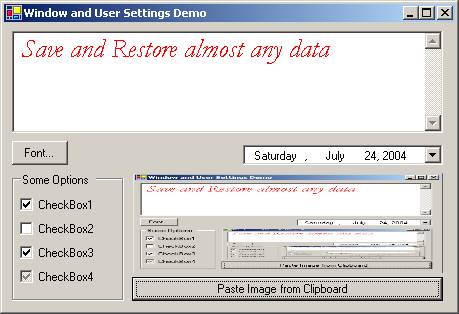
The following excerpts from the demo code show, how easy it is to save and restore various user preferences: a Color, a Font, and a String. The demo will also demonstrate an Enum (CheckState), a DateTime, an Image, and a user-defined Structure (via frmWindowSettings). Move the form, resize it -- it will appear the same the next time you run the application.
Protected Overrides Sub OnLoadSettings()
MyBase.OnLoadSettings()
tbFreeForm.ForeColor = CType(UserPreferences.GetPreference
("FREEFORM.COLOR", tbFreeForm.ForeColor), Color)
tbFreeForm.Font = CType(UserPreferences.GetPreference
("FREEFORM.FONT", tbFreeForm.Font), Font)
tbFreeForm.Text = CType(UserPreferences.GetPreference
("FREEFORM.TEXT", tbFreeForm.Text), String)
End Sub
Protected Overrides Sub OnSaveSettings()
MyBase.OnSaveSettings()
UserPreferences.SavePreference("FREEFORM.COLOR",
tbFreeForm.ForeColor, True)
UserPreferences.SavePreference("FREEFORM.FONT", tbFreeForm.Font, True)
UserPreferences.SavePreference("FREEFORM.TEXT", tbFreeForm.Text, True)
UserPreferences.SavePreferences()
End Sub
UserPreferences
The UserPreferences class has several static (Shared) methods:
Public Shared Function GetPreference(ByVal Key As String,
ByVal DefaultValue As Object) As Object
Key is the unique identifier for the preference
DefaultValue is the value to return if no saved preference can be found.
Returns a saved preference (if found), or the provided DefaultValue. The Type of the DefaultValue must match the type of the saved preference -- it is used to determine how to restore the saved value.
Public Shared Sub SavePreference(ByVal Key As String, ByVal Value As Object,
ByVal Persist As Boolean)
Key is the unique identifier for the preference
Value is the value to be saved
Persist determines if the value is saved between sessions (True), or only stored in memory while the application is running (False).
Saves the specified value to the local cache; will optionally flag persistence to a file.
Public Shared Property AutoSave() As Boolean
Sets the save mode for the UserPreferences: Use AutoSave = True to enable atomic (key/value) saves, each time SavePreference is called. Use AutoSave = False to use the bulk save method. The demo only supports AutoSave = False.
Public Shared Function DefaultFileName() As String
Returns the default filename used to save/load user preferences. It will be in the format:
x:\Documents and Settings\<username>\Application Data\
<exename>\Preferences.datPublic Shared Sub FetchPreferences(Optional ByVal FileName As String = "")
FileName is the filename to use (or DefaultFileName, if not provided).
Loads in all user preferences saved in the specified file.
Public Shared Sub SavePreferences(Optional ByVal FileName As String = "")
FileName is the Filename to use (or DefaultFileName, if not provided).
Saves all user preferences to the specified file.
frmWindowSettings
Also included is an ancestor form, that automatically saves and restores its last size, position, and state. I use this form as an inheritance base, whenever creating a new window. It provides custom "events" to easily add load/save code, as well as a new property:
Protected Overridable Sub OnLoadSettings()
Called when the form and controls have been created and initialized.
Protected Overridable Sub OnSaveSettings()
Called when the form is closing.
Protected Overridable Sub OnRendered()
Called when the form is first made visible.
Public Property SaveSettings() As Boolean
Set True to enable window size/position restore (default); set False to disable. SaveSettings = False will not disable OnSaveSettings or OnLoadSettings, just the ancestor behavior.
Points of interest
When developing the routines, I found that DateTime is not 100% "convertible." When a DateTime is converted to a String, only seconds are kept, and any fractions are discarded. To prevent data loss, DateTime values are stored as ticks (1/10,000 sec.) in SavePreference().
History
- 1 Nov 2003 - udpated sourcecode
- 16 Jan 2004 - updated sourcecode
| You must Sign In to use this message board. |
|
|
 |
|
 |
use
Dim tc As System.ComponentModel.TypeConverter = System.ComponentModel.TypeDescriptor.GetConverter(GetType(Font)) Dim newFont As Font = DirectCast(tc.ConvertFromString("Your fontSTRING here"), Font)
Label1.Font = newFont
 
|
| Sign In·View Thread·PermaLink | 5.00/5 |
|
|
|
 |
|
 |
I was implementing a custom preference library (like every other programmer probably has done at least once) when I decided to see how other people approached this. I ran across your post and decided to take a look. It is interesting, but there is an issue that occurs when you strong name your project, and then try to restore preferences that were saved from a different version. For instance, try strong naming your project, and then save a custom enum. Change the version number. When you start up your class again, you'll receive an exception because the version number, among other thigns, was stored along with the custom enum. I realize your library was not built to handle versioning, but I would suggest looking into methods of saving preference objects that make it difficult for programmers to add preferences that cannot be deserialized when the version changes.
|
| Sign In·View Thread·PermaLink | |
|
|
|
 |
|
 |
David, I haven't have any problems using this with versioning, but I don't use strong naming. It is a known fact that changing the version of a strong named assembly will "break" binary serialization (amongst other things), but I have a few suggestions that might help. When I have the time I'll update the project to incorporate one or two of them.
1) Put the UserPreferences class into it's own assembly and don't change the version. Strong naming and versioning is like a COM interface -- don't change it unless there's a valid reason, because it everything that uses it will have to be recompiled.
2) One suggestion says to use BinaryFormatter.FilterLevel = TypeFilterLevel.Low. This property is only available in Framework 1.1, and this project is currently 1.0. The docs are somewhat vague about exactly what this does, but you can try it.
3) Switch to using XMLSerialization (at least on the PersistData structure). This will avoid the version problem (I think). I've been wanting to add support for it anyway.
4) If all else fails, switch to custom serialization by directly implementing ISerialize on the classes you want to preserve. Then you're in complete control.
Hope this helps,
|
| Sign In·View Thread·PermaLink | |
|
|
|
 |
|
 |
An excellent class that works well. I'm a newbie to VB.Net on the learning curve so I had a go at I modifing your class to save application prefrences into an XML file, for instance app.site.config, strings and integers are no problem but anything else gives me grief. Any pointers
Many thanks oldie_the_geordie
|
| Sign In·View Thread·PermaLink | |
|
|
|
 |
|
 |
My guess is it's because the class is essentially storing "binary" data, and XML can't handle that.
You could play around with the encoding and switch the UTF-7, but you would likely still have to use CDATA for the data portion to deal with illegal characters.
The other alternative would be to hex-encode the data before putting it in the XML. You just take each byte's ascii value and convert to a 2-byte hex code (like HTML colors are encoded). For example, "Hello" hexed would be "48656C6C6F", which is XML-safe.
Hope this helps
|
| Sign In·View Thread·PermaLink | |
|
|
|
 |
|
 |
I made something similar in C# for my own needs so I was curious to see how you did it. There is a couple of interesting ideas in your implementation, but by quickly scanning your code, I made 3 observations :
Also, I don't see the point of using Windows1252 encoding for serialization. All strings in .NET are Unicode. At the very least, if you really want to go into that kind of trouble, you should make use of the System.Globalization namespace. The way your class is coded, it's useless for people say in China or any other country not in the 1252 codepage.
These are by no means superfluous details that only have to do with programming style. These are the kind of things that prevent your class from being used in bullet-proof applications (or at least trying to be).
Sébastien
Intelligence shared is intelligence squared.
Homepage : http://www.slorion.webhop.org
|
| Sign In·View Thread·PermaLink | 5.00/5 |
|
|
|
 |
|
 |
Sébastien, You make some good points, some of which I must disagree with.
For your first point of not rethrowing exceptions, I have three defenses -- 1) in Java, you must catch an exception when thrown, even if you just rethrow it. 2) It is the standard practice at my company to catch and rethrow exceptions. It's in our guidelines (mainly as a standardization, since we also use Java). 3) The caller does not need to parse the message, but simply look at the InnerException. All the original information is there. (Except in one place. My bad.)
For point 2, I am using ArgumentException in several places, but I could probably do a better job. Please remember this was ported from our [company] programming standards, which includes custom exceptions -- not all mapped cleanly.
You're correct about ignoring the catch at stream.close. The try/catch should not even be there. Logically, I doubt the code could get to that point and fail anyway....
Finally, Code page 1252 is used not used to format display text, but only to handle serialized data as a string. Specifically, all values (to 255) should be preserved. PREDICATABLY. Some code pages don't do this, and if I leave it up to System.Globalization it may use one of them. I haven't tested, but according to Google, code page 1252 is avaliable on all Win32 platforms, including Chinese. Without "telling" .NET which code page to use, it tries to "interpret" from the data, and in this case it was often guessing wrong.
The point of CodeProject is not to simply share code, but also knowledge and experiences to promote better coding. And I thank you for yours.
|
| Sign In·View Thread·PermaLink | |
|
|
|
 |
|
 |
Obviously, I didn't know about your company coding standards, so that explains many things But still, I have some remarks/suggestions :
You don't need an Exit Sub statement when throwing an exception (at least, it's how it works in C#).
I didn't see that you provided an inner exception so at least, that's better than having to parse the message ... But still, that imposes on the user of your class a deviation from the standard practice. I understand the point about Java, but Java and .NET are two similar but different platforms : coding and design standards don't necessarily port to the other one. Also, in Java, you need to declare which exception(s) you might throw so the caller knows what to catch, which is not the case on .NET.
About the 1252 codepage, I didn't say it was unavailable on certain versions of Windows, I said it doesn't support all languages. I can't say I know much about the ins and outs of serialization, but can't you simply save data as Unicode instead of ANSI ?
GWSyZyGy wrote: The point of CodeProject is not to simply share code, but also knowledge and experiences to promote better coding.
I totally agree with you and one never stop learning
Sébastien
Intelligence shared is intelligence squared.
Homepage : http://sebastienlorion.com
|
| Sign In·View Thread·PermaLink | |
|
|
|
 |
|
 |
Nice work!!!
But there is a small problem when there is no text in the textbox of the demo project.
Greetings, Filip
|
| Sign In·View Thread·PermaLink | |
|
|
|
 |
|
 |
Thanks!
I had a workaround before XMas, but it wasn't behaving the way I wanted it to. But I finally found the real problem.
In UserPreferences.vb, SettingData Class, Sub New()'s, change the line:
Me.Value = Data.Value to:
m_Value = Data.Value
I think that's the crux of the change. I'll be updating the source, but it will be a few days before it gets posted.
|
| Sign In·View Thread·PermaLink | |
|
|
|
 |
|
 |
I'm interested in how you made it with SQL server instead of writing settings to a file.
Can you support us with your original SQL related code?
Thanks, Zsidi
Zsidi
|
| Sign In·View Thread·PermaLink | |
|
|
|
 |
|
 |
Sorry, but the code relies heavily on our data layer, which I can't post. But I can at least give you the table structure:
CREATE TABLE [dbo].[UserSetting] ( [SettingID] [int] IDENTITY (1, 1) NOT NULL , [GroupName] [nvarchar] (50) COLLATE SQL_Latin1_General_CP1_CI_AS NOT NULL , [KeyName] [nvarchar] (100) COLLATE SQL_Latin1_General_CP1_CI_AS NOT NULL , [KeyValue] [nvarchar] (4000) COLLATE SQL_Latin1_General_CP1_CI_AS NULL ) ON [PRIMARY] GO
ALTER TABLE [dbo].[UserSetting] WITH NOCHECK ADD CONSTRAINT [PK_UserSetting] PRIMARY KEY CLUSTERED ( [SettingID] ) ON [PRIMARY] GO
ALTER TABLE [dbo].[UserSetting] ADD CONSTRAINT [UK_UserSetting] UNIQUE NONCLUSTERED ( [GroupName], [KeyName] ) ON [PRIMARY] GO
Most fields should be obvious; "GroupName" is the username, or whatever you use, plus "special" sets of values (I have value sets for "SYSTEM", "ETL", "ADMINLOCKS", etc.).
Hope this helps
|
| Sign In·View Thread·PermaLink | 1.00/5 |
|
|
|
 |
|
 |
Your code saves only IConvertible, ISerializable, System.ValueType and Array. How about other Serializable types like ArrayList?
|
| Sign In·View Thread·PermaLink | 1.00/5 |
|
|
|
 |
|
 |
Sorry for not responding, but for some reason CodeProject didn't send it to me.... 
The "problem" is that ArrayList doesn't implement ISerializable, but it does have the <Serializable()> attribute. They aren't quite the same thing, but for this it doesn't really matter. Just add the following tests:
SavePreference: ElseIf TypeOf Value Is ISerializable OrElse _ TypeOf Value Is System.ValueType OrElse IsArray(Value) _ OrElse Value.GetType.IsSerializable Then
GetPreference: ElseIf TypeOf DefaultValue Is ISerializable OrElse _ TypeOf DefaultValue Is System.ValueType OrElse _ IsArray(DefaultValue) OrElse DefaultValue Is Nothing _ OrElse DefaultValue.GetType.IsSerializable Then
I'll be updating the source soon(ish).
|
| Sign In·View Thread·PermaLink | |
|
|
|
 |
|
|
 |
|
 |
Thanks, Nick. In some ways, our articles do overlap, but I think the main focus of the articles are very different. Your article (correct me if I'm wrong) extends the behavior of the System.Configuration classes (XML-based storage); my article is less concerned with how or where the data is stored (the original code used SQL Server), and more concerned with what is stored (objects, structures, etc.).
As an aside ... your article was posted only 3 days before mine, but has waaaay more views . Maybe I should start posting in C# instead of VB.....
GWSyZyGy
|
| Sign In·View Thread·PermaLink | |
|
|
|
 |
|
 |
I can't understand why people care whether an article is in C# or VB. Your code could be translated to C# by putting semi-colons at the end of the lines and making a few minor tweaks. Heck, you even use "CType(, String)" instead of "CStr()". What C# developer wouldn't love your code?
Post any way you like.... it's still a good article. Maybe I'll view it a few more times to make you feel luv'd. 
-Kevin Buchan
|
| Sign In·View Thread·PermaLink | |
|
|
|
 |
|
 |
More VB.
Actually I like it when authors take the time to post both ways, but I for one would like to see more VB on this site. If there were more VB articles, perhaps there would be more VB programmers reviewing this site (chicken vs. egg problem).
Thanks for the article.
|
| Sign In·View Thread·PermaLink | |
|
|
|
 |
|
 |
...which beings up a question I've often pondered -- Why are there no VB<->C# code converters? As Kevin pointed out, the code wouldn't take much effort to convert, as is true for any .NET code out there that uses framework (managed) objects and methods. Even the code with API calls is fairly straightforward to convert. Even if only 80-90% of the code (in a given project) could be converted it would be a tremendous help!
Say, does CodeProject have a "wish list" section...?
Thanks for your input, GWSyZyGy
|
| Sign In·View Thread·PermaLink | |
|
|
|
 |
|
|
 |
|
|
 |
|
|
