Introduction
Quite often, you want to customize the colors shown in your dialogs. Maybe a
unique, original look is required (and you don't want to go all the way into
skinning); perhaps a red background seems suitable for critical error messages;
if you've developed a complex dialog, parts of which serve as drop targets, you
might want to emphasize those: or, in a form with required fields, you might
want a different color for them.
The easy way to do this, is handle the WM_CTLCOLOR family of
messages: the easy way to handle messages in WTL, is to use a mixin class
which does most of the grunt work.
Background
In winuser.h, you can find the definitions of
WM_CTLCOLORMSGBOX, WM_CTLCOLOREDIT,
WM_CTLCOLORLISTBOX, WM_CTLCOLORBTN,
WM_CTLCOLORDLG, WM_CTLCOLORSCROLLBAR, and
WM_CTLCOLORSTATIC.
By checking MSDN, you find out that all their handlers have a lot in common:
- They all receive a handle to the device context (
HDC) for the
relevant control in their wParam.
- They all receive a handle to the relevant control (
HWND) in
their lParam.
- They all return a handle to a brush (
HBRUSH), which will be
used to erase the control's background (unless, of course, you handle
WM_ERASEBKGND yourself).
What's left to do? Implement a mixin with a message map which calls the same
handler for all of them, with one overrideable function and a few data members
for customization, and you're done! Well, that mixin is already written. I hope
you'll find it as useful as I found so many CodeProject samples.
By the way, "Deleted
Windows Programming Elements" in MSDN mentions
WM_CTLCOLORMSGBOX as gone, never again to return. It was part of
16-bit Windows.
Using the code
Five lines of code, that's all it takes:
- Include the relevant header (CCtlColor.h).
- Add the mixin (
CCtlColored<>) to your inheritance list,
with whatever flags you consider relevant.
- Chain to the mixin's message map.
- Optionally, initialize the text and background colors, if
COLOR_WINDOW and COLOR_WINDOWTEXT are not suitable for
your purpose.
Here is a sample, which repaints a wizard-generated 'about box'.
#include <CCtlColor.h> // (One)
class CAboutDlg : public CDialogImpl<CAboutDlg>
, public CCtlColored<CAboutDlg>
{
public:
enum { IDD = IDD_ABOUTBOX };
BEGIN_MSG_MAP(CAboutDlg)
MESSAGE_HANDLER(WM_INITDIALOG, OnInitDialog)
COMMAND_ID_HANDLER(IDOK, OnCloseCmd)
COMMAND_ID_HANDLER(IDCANCEL, OnCloseCmd)
CHAIN_MSG_MAP(CColoredThis)
END_MSG_MAP()
LRESULT CAboutDlg::OnInitDialog(UINT uMsg,
WPARAM wParam, LPARAM lParam, BOOL& bHandled)
{
SetTextBackGround(0xFfbF9F); SetTextColor(RGB(0X60, 0, 0)); SetTextColor(::GetSysColor(COLOR_INFOTEXT)); (Four)
SetBkBrush(COLOR_INFOBK);
CenterWindow(GetParent());
return TRUE;
}
LRESULT CAboutDlg::OnCloseCmd(WORD wNotifyCode,
WORD wID, HWND hWndCtl, BOOL& bHandled)
{
EndDialog(wID);
return 0;
}
};
What else can be done (if you really, really want to)
The exposed functions
You can change the dialog's appearance at run time, using the exposed
functions:
COLORREF SetTextColor(COLORREF newColor);
COLORREF SetTextBackGround(COLORREF newColor);
HBRUSH SetBkBrush(int nIndex);
HBRUSH SetBkBrush(HBRUSH NewBrush,
bool bManaged = false,
COLORREF clrBackGround = CLR_INVALID);
Little can be added. The first two are the ones I personally used most often,
the third is an easy shortcut when you want to use system colors; the last one
is the heaviest tool, both powerful and hard to use.
Flags
A set of flags, defined in an enum at the beginning of the
header, enables managing the messages the class will handle. For each of the
WM_CTLCOLOR* messages there's a FLG_HANDLE_* flag,
that, if it's set (either at creation time or at run time), will enable managing
the corresponding message. The flags are passed as a parameter to the
template (as usual, with a "reasonable default"), and can be modified through
the protected member m_Flags.
As mentioned above, "Deleted
Windows Programming Elements" in MSDN mentions
WM_CTLCOLORMSGBOX is obsolete (part of 16-bit Windows only), so it
is commented out in the source, and so is the corresponding flag. Who knows,
some day they might be back.
The overrideable function
In the best tradition of WTL, one of the functions in the class is overrideable:
LRESULT DoHandleCtlColor(
UINT uMsg, HDC hdc, HWND hw)
The default handler sets the text color and background of the passed
HDC using the relevant member variables, and then returns the
member brush handle, which will be used by Windows' DefWindowProc()
when handling WM_ERASEBKGND.
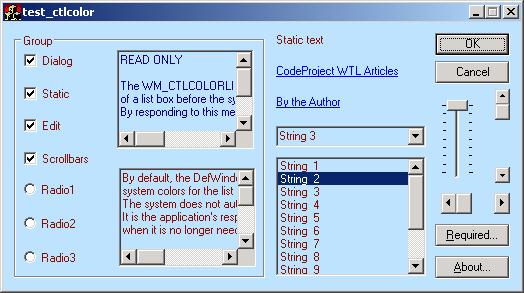
In the sample app, there are a couple of overrides: one in
class
CMainDlg
, which shows read-only edit boxes in a color scheme different
from that used for writeable edit boxes (and everything else), the other in
class CRequiredDlg, which paints the background of "required
fields" in a different color (light green).
Basically, you can do whatever you like in an override (if you decide to use
one), but always return a valid brush.
The protected (accessible) members
All data members are protected, which means they are accessible
by your class. Still, only one is meant to be directly modified:
m_Flags. All others are accessible just to enable using them if you
override DoHandleCtlColor(), putting accessors for them seemed a
bit of an overkill. Object-oriented purists might complain, but then, they all
write in Eiffel, don't they?
Changing the looks of common dialogs (such as File Open)
Sorry, it's not that easy! You have to create a common dialog, and subclass
it before its shown. That, at least, is the theory: I must confess that I
didn't, yet. I hope I'll be able to add that feature in the near future.
Points of Interest
Track Bars
A TrackBar control does not repaint itself until it gets the focus. So, if
you enable run time changes of appearance, and you have one, you'll have to set
and reset the focus in order to show it properly.
Scroll Bars
Scroll bars respond to the WM_CTLCOLORSCROLLBAR message only if
they are direct children of your dialog: according to MSDN,
The WM_CTLCOLORSCROLLBAR message is used only by child
scrollbar controls. Scrollbars attached to a window (WS_SCROLL and
WS_VSCROLL) do not generate this message. To customize the
appearance of scrollbars attached to a window, use the flat scroll bar
functions.
And, in the flat scroll bar API documentation...
Note: Flat scroll bar APIs are implemented in Comctl32.dll versions 4.71 through 5.82.
Comctl32.dll versions 6.00 and higher
do not support flat scroll bars.
So, your edit and list boxes will not
have repainted scrollbars unless you use FlatSB_SetScrollProp(),
which requires calling InitializeFlatSB() on control
initialization, and even then, there will be no result after calling these
functions, if your OS is running Windows XP (first one with Comctl32.dll version
6), or later. I considered adding a couple of flags, one to use or not flat
scroll bars, other to see if scroll bars have been initialized, but that meant
making the flag variable private and providing an accesor and a couple of
setters (at least OR and REPLACE), it looked like too much work for too
ephemeras a reward. What's your opinion? If anyone there knows of a way to
customize the background of a scrollbar created using a window style
(WS_SCROLL, WS_VSCROLL), I'll be glad to learn.
Buttons
Buttons do not respond to whatever settings you used while handling
WM_CTLCOLORBTN, unless they're owner-drawn.
On owner-drawn buttons, quote MSDN:
"An owner-drawn button is painted by the application, not by the system,
and has no predefined appearance or usage. Its purpose is to provide a button
whose appearance and behavior are defined by the application alone. The
parent window of an owner-drawn button typically responds to at least three
messages for the button:
-
WM_INITDIALOG
WM_COMMAND
WM_DRAWITEM
When you must paint an owner-drawn button, the system sends the
parent window a WM_DRAWITEM message whose lParam parameter is a pointer to a
DRAWITEMSTRUCT structure. Use this structure with all owner-drawn controls to
provide the application with the information it requires to paint the control.
The itemAction and itemState members of the
DRAWITEMSTRUCT structure define how
to paint an owner-drawn button."
In other words, quite a lot of work just to paint a button, and then themes
might make your life even harder... Personally, I don't consider it's worth
the effort.
The Sample App
The sample application is a dialog-based WTL application, which has a few
checkboxes to alter its appearance, and two interesting buttons: About... opens an 'About box', which has a static variable
that controls its appearance: there are four color sets, shown below. Each time
you click the button, you'll get a different one.

Required..., shown below, is more interesting. The dialog
paints the background of all 'required' fields in light green: if one of those
is missing, you cannot close the dialog by clicking OK, only by clicking CANCEL.
In order to enable what you see, the class CRequired holds a
brush member (in addition to the one inherited from CCtlColored),
and overrides DoHandleCtlColor() so that it checks if the control
is one of the 'required' edit boxes, and if so, it paints its background,
otherwise letting the default implementation of DoHandleCtlColor()
handle things.
References
- ATL
Upside/Down Inheritance, by Jim Beveridge, explains very nicely the concept
of mix-in classes. If the link ever breaks, Google for it, there are quite a few
copies around.
- The Eiffel programming language is a
beautiful programming language, as object-oriented as you can get. Even though I
myself prefer C++, I won't deny there's a lot of charm and elegance in Eiffel.
- "Deleted
Windows Programming Elements" holds a list of symbols defined in Windows
headers just to keep backwards compatibility, and their replacements, wherever
relevant.
- Contrasting
Colors, in CodeProject, by alucardx,
provides the idea for one of the bonus color-manipulation functions found at the
bottom of the header.
History
Pablo writes code for a living, in C++, C#, and SQL.
To make all that work easier, he uses some C++ libraries: STL, ATL & WTL (to write Windows applications), and code generation.
Pablo was born in 1963, got married in 1998, and is the proud father of two wonderful girls.
Favorite quotes:
"Accident: An inevitable occurrence due to the action of immutable natural laws." (Ambrose Bierce, "The Devil's Dictionary", published in several newspapers between 1881 and 1906).
"You are to act in the light of experience as guided by intelligence" (Rex Stout, "In the Best Families", 1950).



 General
  News
News  Suggestion
  Question
  Bug
Bug  Answer
  Joke
Joke  Praise
  Rant
Rant  Admin
Admin 


 Submit an article or tip


