Client-Side and Server-Side JavaScript
This article presents a trick to reuse the same source code (JavaScript) in client-side (inside a browser) and server-side (inside IIS/ASP).
JavaScript is an amazing language which can be executed in two very different environments; it can run within a browser (client-side) as well as within a Microsoft IIS web server (server-side). Running on client-side, JavaScript is a good workaround for HTML limitations and helps building user-friendly web applications (it's also called Dynamic HTML). Running on server-side, JavaScript enables building dynamic Web pages (for example reading data from a database and presenting it in a Web browser).
Client-Side JavaScript
In order to use JavaScript in client-side context (within a browser like Internet Explorer or Netscape), you have to use the source of the client_script.js.
alert("This is a client-side message");
Server-Side Javascript
To use JavaScript in a server-side context (within Microsoft IIS's ASP engine), you have to use the <%@ %> and <% %> tags:
<%@ language="javascript" %>
<%
  Response.Write("This is a server-side message");
%>
Alternatively, you can use the script tag, with the attribute runat set to "server":
<%@ language="javascript" %>
<script language="javascript" runat="server">
  Response.Write("This is a server-side message");
</script>
And as for a client-side script, you can add the src attribute:
<%@ language="javascript" %>
<script language="javascript" runat="server" src="server_script.js">
</script>
File server_script.js:
Response.Write("This is a server-side message");
Shared-Sides JavaScript
In order to share the same source code between client-side and server-side context, you have to use an external source file (via the src attribute):
FICHIER "client_server_script.asp":
<%@ language="javascript" %>
<!-- This will load the JAVASCRIPT code into
     SERVER-SIDE context (no output in browser) -->
< script language ="javascript"
  src ="client_server_script.js" runat ="server"></ script >

<!-- This will call the JAVASCRIPT code
                      from SERVER-SIDE context -->
<p>
Server:
<%
Response.Write(client_server_function("TEST FROM SERVER"));
%>
</p>

<!-- This will include the JAVASCRIPT code
                   into CLIENT-SIDE context -->
<script language="javascript" src="client_server_script.js">
</script>

<!-- This will call the JAVASCRIPT code from CLIENT-SIDE
   context when you click on the button -->
<p>
Client:
<input type="submit" onclick="alert(client_server_function('TEST FROM CLIENT'));">
</p>
FICHIER "client_server_script.js"
function client_server_function(strText)
{
return("client_server_function: "+strText);
}
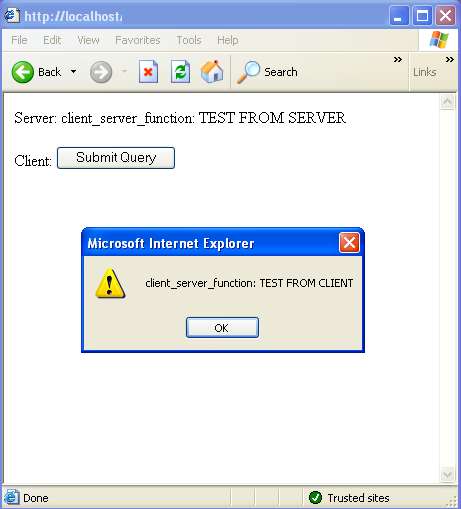
When run, this page will output the following:
WARNINGS: Restrictions on a Shared-Sides JavaScript file
You can use only basic JavaScript objects, types, functions and methods in a shared JavaScript file, i.e.:
- You must not put any prefix/declaration tags in the shared source file: no
script, <%@ %> or <% %> tags
- You can't use any object, function or method specific to the client-side context (the browser's object model):
Do not call document, body, frame, alert...
- You can't use any object, function or method specific to the server-side context (the ASP object model):
Do not call Request, Response, Server...
References
History
Date posted: June 5th, 2003
Fell into computer software at the age of 11, founder of 3 startups, and now manager of an independent software vendor (ISV) labelled proSDK (www.prosdk.com)... And still a freeware writer and technical article author!



 General
  News
News  Suggestion
  Question
  Bug
Bug  Answer
  Joke
Joke  Praise
  Rant
Rant  Admin
Admin 


 Submit an article or tip


